
These guides walk through the things people do most with Piglets. Every command and output here was run against the published PiG 0.5.1. Paths are shortened to ~.
Build your first Piglet
Start from the reviewer on the Piglets page: a YAML file with a name, a description, a systemPrompt and a tools ceiling. Register it so you can run it by name from anywhere.
pig piglet add ./agents/reviewer.yaml
pig --piglet reviewer
Added reviewer (0 extensions, 0 skills) → ~/.pig/piglets/reviewer.yamlpig piglet add copies the file into ~/.pig/piglets/, so later edits to your working copy don't change the registered one until you add it again. pig piglet list shows what is registered.
NAME      SCOPE  SOURCE                           BINARY  IMAGE  DESCRIPTION
reviewer  user   ~/.pig/piglets/reviewer.yaml     -       -      Reviews a change and lists risks.
Two things catch people the first time. The tools list is a ceiling, not a list to turn on, so the active tools still start from PiG's defaults and the Piglet cuts away everything outside its list. And a systemPrompt replaces PiG's prompt rather than adding to it. Leave it out to keep PiG's. The worked example shows exactly what the model receives in each case.
Add extensions and skills
A Piglet selects extensions and skills by origin. PiG tries the origins in order and records the first one that resolves.
name: researcher
tools: [read]
extensions:
  - name: search
    origins: [local:./extensions/search]
    tools: [web_search]
skills:
  - name: source-review
    origins: [local:./skills/source-review]
discovery:
  extensions: []
  skills: [workspace]
extensions[].tools limits which of an extension's tools the model sees, so this researcher gets exactly read and web_search. discovery controls what PiG may pick up from your workspace and user folders on top of that. In an active Piglet an empty list means nothing ambient loads, which keeps a shared Piglet behaving the same on every machine.
Strip PiG down
The strip block removes built-ins. Deny mode names what goes. Keep mode names what stays and strips everything else, including built-ins that a later PiG adds, so a lean Piglet stays lean.
name: my-core
description: "PiG with only the four core tools."
strip:
  keep:
    tools: [read, bash, edit, write]
    extensions: []
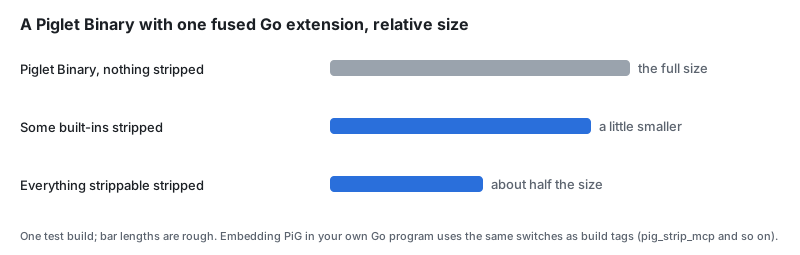
At run time the stripped tools, commands and extensions are gone. In a Piglet binary most of them are not compiled in at all, which is where the size drop comes from.
A Piglet can't strip every tool and /quit together, since that would leave no way to do anything or leave. pig piglet validate refuses it and says why.
Build on another Piglet
extends makes one Piglet the base of another. Strip lists and slots inherit down the chain, and a child can only narrow what it inherits unless it says otherwise.
name: core-reviewer
description: "The reviewer on the lean core."
extends:
  source: local:./pig-core.yaml
systemPrompt:
  text: "You review changes. List the risks first, then the questions."
tools: [read, bash]
pig piglet lineage shows the chain root first, with what each link adds, removes or changes and the digest of each file.
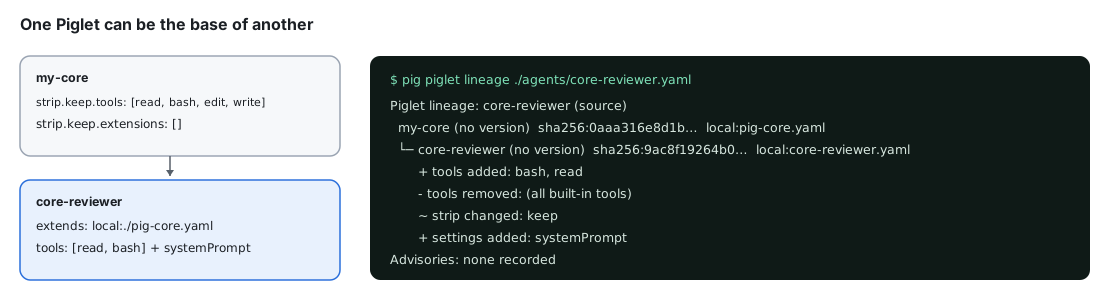
To bring back something a base stripped, name it under extends.remove.strip and set extends.allowWiden: true. Without allowWiden, PiG refuses the widening and tells you which entry did it. A Piglet with an extends chain runs from its source path. pig piglet add refuses to copy the chain, so keep the files together.
Build a launcher script or a binary
A script is a two-line launcher that runs the registered Piglet with whatever you pass it.
pig piglet build reviewer --format script --out ./run-reviewer#!/bin/sh
exec pig --piglet '/home/you/.pig/piglets/reviewer.yaml' "$@"A Piglet binary is a complete PiG with the Piglet built in. It needs no --piglet, and with a signing key it carries a signed manifest of exactly what it was built from.
pig piglet keygen ./keys/reviewer.key
pig piglet build reviewer --format binary --sign-key ./keys/reviewer.key --out ./pig-reviewer
Piglet signing key ed25519:a92cfd5c97757c32484719b02a819ebf
private: ./keys/reviewer.key (keep it secret; sign with pig piglet build <name> --format binary --sign-key ./keys/reviewer.key)
public: ./keys/reviewer.key.pub (publish it; users trust it with pig piglet trust add)Fetching PiG source (0s) — github.com/MichaelKinsy/PiG@v0.5.1
fetching PiG v0.5.1 source (cached after first build)
Compiling and linking Go binary (37s) — reviewer → ./pig-reviewer
Signing binary (1m43s) — ./pig-reviewer
Built ./pig-reviewer (67530353 bytes) in 1m46s./pig-reviewer --version0.5.1+1.3.0.1402973aThe builder compiles PiG from source. A release pig fetches the source of exactly its own version through the Go module proxy the first time and caches it, so you need Go but no PiG checkout. Without Go, --builder container runs the same build in Podman or Docker. Piglet Binaries covers targets, fused and isolated extensions, and the frontend slot.
Publish a Piglet
Give the Piglet a version first. Publishing refuses a Piglet without one.
release:
  version: 0.1.0
Source goes to npm with the pig-piglet keyword, which is how it shows up on the Piglet catalog and how others add it. PiG writes the package, checks that the version is new, and runs your npm. npm handles your login, and PiG never sees a token.
pig piglet publish reviewer --to npm
pig piglet publish reviewer --to npm --yes --access public
Signed binaries go to a GitHub release, one per target, with SHA256SUMS and a signed index.
pig piglet publish reviewer --to github --repo you/reviewer --sign-key ./keys/reviewer.key
pig piglet publish reviewer --to github --repo you/reviewer --sign-key ./keys/reviewer.key --yes
Both are dry runs until you add --yes, and both refuse a version that already exists. Published versions are immutable, so raise release.version and publish again. When the same machine published the binaries, the npm package records them, so the catalog can show pig piglet pull next to pig piglet add. Publish a Package or Piglet covers trusted publishing from CI.
Add, pull and update someone else's Piglet
From npm you get the source, which runs on the pig you already have.
pig piglet add npm:@pi-in-go/pigpen-piglet-pig-music
pig --piglet pig-music
Added pig-music (1 extensions, 0 skills) → ~/.pig/piglets/pig-music.yamlFrom GitHub you get a signed binary built for your machine.
pig piglet pull 'github:MichaelKinsy/pigpen/pig-warden@0.1.0'Pulled pig-warden 0.1.0 for darwin/arm64, signed by ed25519:fc4fbe0a1ba0f640a360bfd5a1c98874
binary: ~/.pig/artifacts/piglets/pig-warden/0.1.0/darwin/arm64/pig-pig-warden
receipt: ~/.pig/receipts/piglets/pig-warden/0.1.0/darwin/arm64.pullRun the file on the binary: line. It is a whole PiG, and its --version prints the PiG it was built with, which can be older than your own pig. pig piglet update pig-warden moves it to the newest release in the same signed namespace, and says so when you are already current.
Before you run a binary you didn't build, check it.
pig piglet verify ~/.pig/artifacts/piglets/pig-warden/0.1.0/darwin/arm64/pig-pig-wardenSignature: signed by ed25519:fc4fbe0a1ba0f640a360bfd5a1c98874 (not in your Piglet trust store: this proves it is unchanged since that key signed it, not who holds the key)
Signed manifest:
Piglet: pig-warden 0.1.0
target: darwin/arm64
Pig: 0.4.1
component extension/warden fused binary sha256:1d7c28b7862b…The signature proves the file hasn't changed since the key signed it. To also trust who holds the key, add the publisher's public key with pig piglet trust add. pig piglet lineage on a binary prints the same recorded identity: the Piglet name and version, its digests and the signer.
Common problems
- "field … not found in type piglet.Piglet". The Piglet format is closed, so a typo in a field name is an error with its line number.
pig piglet schemaprints every field. - The model only sees
read.toolsis a ceiling. Pass--tools, setdefaultTools, or bake the option into a launcher script. - "Piglet add cannot copy an extends dependency closure". Run a Piglet that extends another from its source path.
- "needs release.version to be published". Add a
releaseblock with a version. - "is already on npm". Versions are immutable. Raise the version.
- A pulled binary prints an older PiG version. That is the PiG it was built with. Pull a newer release of the Piglet, or ask its author to rebuild.