
Zed
A code editor that runs coding agents over the Agent Client Protocol (ACP). pig-acp adapts PiG to ACP.

What works and what you need
Needs: PiG ACP adapter. pig-acp, PiG’s ACP adapter, which is in every PiG 0.8.0 release as its own archive (pig-acp-0.8.0-<system>). On 2026-11-25, Zed 1.30.2 on macOS ran a PiG 0.8.0 agent thread through pig-acp 0.2.3 with a real model: a shell call, a file read, then the answer. With pig-acp 0.2.3 the thread heading shows the Pi version PiG follows (pig v1.6.0); pig-acp 0.2.4 shows PiG’s own.
Uses pig-acp. Complete the one-time pig-acp setup first, then add the configuration below.
Setup
Connection: ACP, through pig-acp.
Configuration: Zed settings.json (docs: ~/.config/zed/settings.json on macOS and on Linux without a custom XDG_CONFIG_HOME); or Agent Settings > External Agents > Add Agent > Add Custom Agent, which opens settings.json with an agent_servers entry
Format: JSON, key agent_servers.<name> with type, command, args, env
{
  "agent_servers": {
    "PiG": {
      "type": "custom",
      "command": "pig-acp",
      "args": ["--pig", "/path/to/pig"],
      "env": {}
    }
  }
}- Complete the one-time pig-acp setup on the Integrations page so pig and pig-acp are on your PATH.
- Add PiG as a custom agent in Zed’s settings.json using the snippet above.
- Open the agent panel, open the new thread menu, and choose PiG under External Agents.
Test record
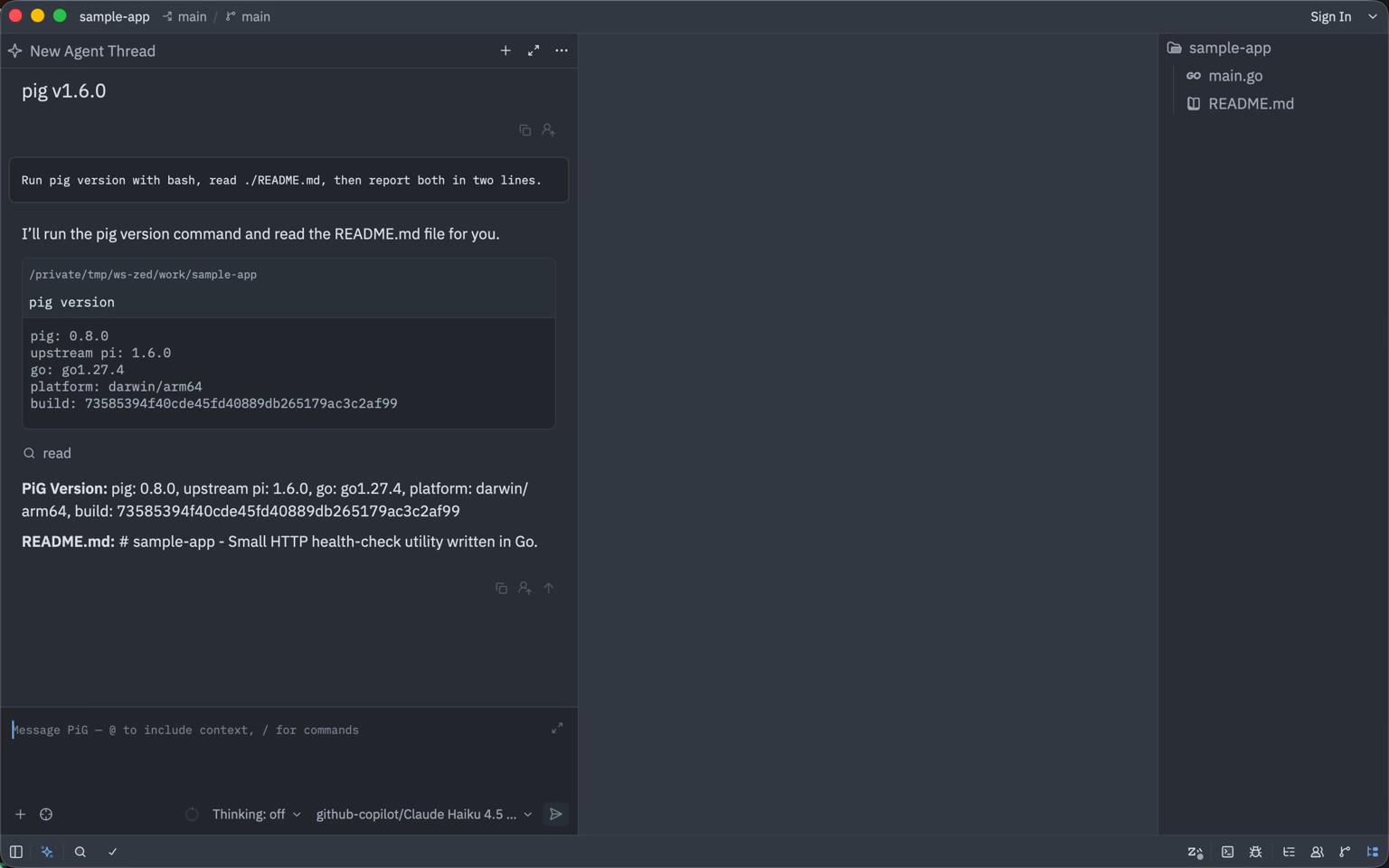
PiG 0.8.0 (macOS, real model)
Ran (2026-11-25). Zed 1.30.2 on macOS with pig-acp 0.2.3 and pig 0.8.0, set up as a custom agent in Zed's settings: a shell call, a file read, then the answer.
Notes. Ran a PiG 0.8.0 agent thread through pig-acp 0.2.3 as a custom agent in Zed's settings: a shell call, a file read, then the answer.
How to verify.
- Add the PiG custom agent entry to Zed's settings.json
- Open the agent panel, open the new thread menu, and choose PiG under External Agents
- Send a prompt that reads a file in the project
Expected: Zed shows the tool call and PiG's answer in the agent thread.
Sources and project
- zed.dev/docs/ai/external-agents
- raw.githubusercontent.com/zed-industries/zed/main/docs/src/ai/external-agents.md
The name and logo belong to Zed’s owners. PiG is independent of Zed; no endorsement is implied.