
CodeCompanion (Neovim)
Connects to PiG over ACP through pig-acp. Ran on PiG 0.7.0 with a scripted model.
What works and what you need
Needs: PiG ACP adapter. pig-acp, PiG’s ACP adapter, which ships as its own archive in every PiG 0.8.0 release. CodeCompanion (Neovim) ran on PiG 0.7.0 with pig-acp 0.2.1 and a local scripted model, and has not been rerun on 0.8.0.
Uses pig-acp. Complete the one-time pig-acp setup first, then add the configuration below.
Setup
Connection: ACP, through pig-acp.
Configuration: Neovim Lua config: require('codecompanion').setup({ adapters = { acp = { <name> = function() ... end } } })
Format: Lua; custom ACP adapter with commands.default = { executable, args... }
require("codecompanion").setup({
  adapters = { acp = {
    pig = function()
      local helpers = require("codecompanion.adapters.acp.helpers")
      return {
        name = "pig", formatted_name = "PiG", type = "acp",
        roles = { llm = "assistant", user = "user" },
        commands = { default = { "pig-acp", "--pig", "/path/to/pig" } },
        defaults = { mcpServers = {}, timeout = 20000 },
        parameters = {
          protocolVersion = 1,
          clientCapabilities = { fs = { readTextFile = true, writeTextFile = true } },
          clientInfo = { name = "CodeCompanion.nvim", version = "1.0.0" },
        },
        handlers = {
          lifecycle = { setup = function(self) return true end, auth = function(self) return true end },
          request = { build_messages = helpers.build_messages },
        },
      }
    end,
  } },
  interactions = { chat = { adapter = "pig" } },
})
Test record
PiG 0.7.0 run
Ran (2026-11-07). Neovim 0.12.6 + codecompanion.nvim 9cc3c13 + plenary.nvim; pig-acp 0.2.1 and pig 0.7.0 (pig --version prints 0.7.0+1.5.0), Linux amd64 in a container, with a local scripted model (no real model, no key).
Not run. Real model; the chat UI was driven with keystrokes in a terminal.
Notes. require('codecompanion').chat({user_prompt=..., auto_submit=true}) in `nvim --headless -u NONE`; chat buffer text read back.
How to verify.
- Open Neovim with the config above
- Run :CodeCompanionChat, go to the end of the buffer, type a prompt, leave insert mode and press Enter in normal mode
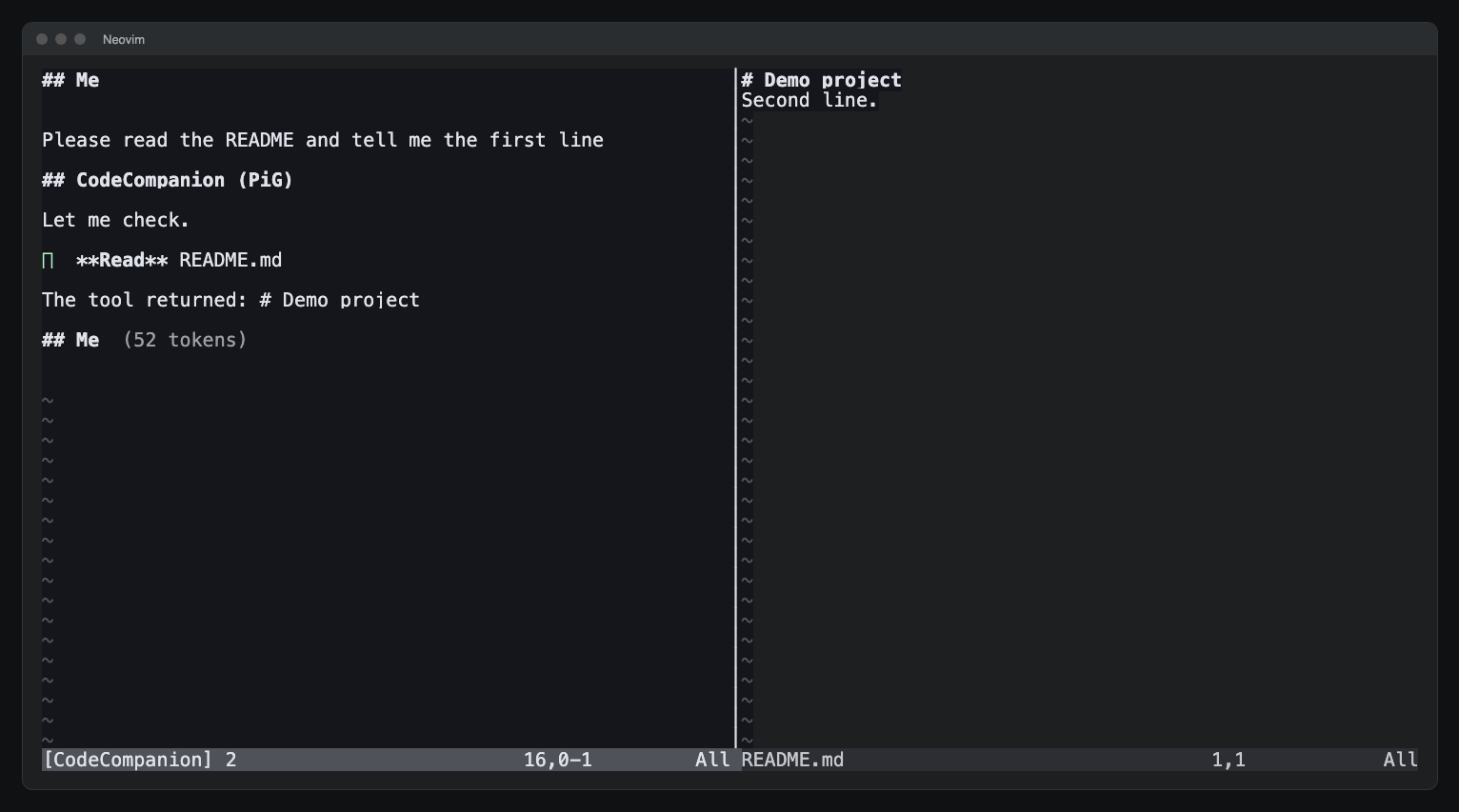
Expected: The chat buffer shows the PiG reply and the read tool output.
Sources and project
CodeCompanion (Neovim) documentation
- codecompanion.olimorris.dev/configuration/adapters-acp
- raw.githubusercontent.com/olimorris/codecompanion.nvim/main/doc/configuration/adapters-acp.md
The name and logo belong to CodeCompanion (Neovim)’s owners. PiG is independent of CodeCompanion (Neovim); no endorsement is implied.