RPC mode runs PiG as a headless process that speaks JSON Lines on standard input and output. Use it from another language, an editor, or a separate process. It is how several of the integrations drive PiG.
Prerequisites: pig 0.7.0 or later and a configured model.
Step 1: start it
pig --mode rpc --no-sessionCommon options: --model <provider/model>, --name <name>, --session-dir <path>, --piglet <name-or-path>. Standard output carries only protocol data; diagnostics go to standard error.
Step 2: send commands, read events
Each command is one JSON object on one line. A command with an id gets a response with the same id; after a prompt, events stream until agent_settled.
{"id":"1","type":"get_state"}
{"id":"2","type":"prompt","message":"Read README.md and tell me what it says"}
A minimal client in Python:
import json, subprocess
p = subprocess.Popen(["pig", "--mode", "rpc", "--no-session"], stdin=subprocess.PIPE, stdout=subprocess.PIPE, text=True)
def send(obj):
    p.stdin.write(json.dumps(obj, separators=(",", ":")) + "\n"); p.stdin.flush()
send({"id": "1", "type": "get_state"})
print(p.stdout.readline())
send({"id": "2", "type": "prompt", "message": "Read README.md and tell me what it says"})
for line in p.stdout:
    event = json.loads(line)
    print(event.get("type"))
    if event.get("type") == "agent_settled":
        break
p.stdin.close()
Verify
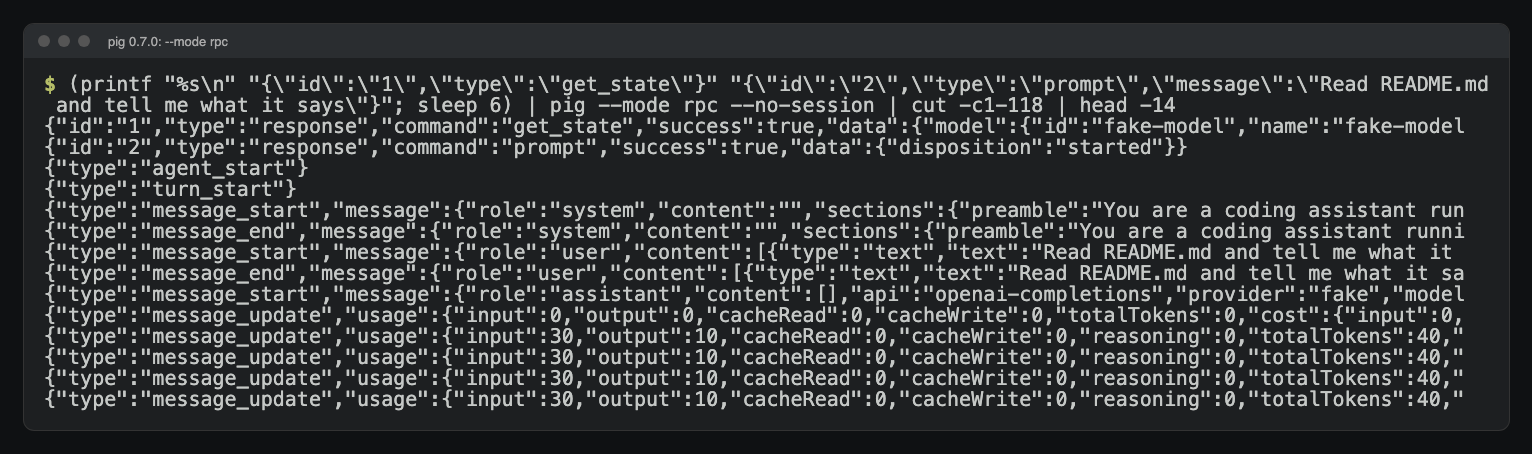
The first line back is the get_state response ("success":true), then the prompt response with "disposition":"started", then events: agent_start, turn_start, message_start, message_update, tool events when a tool runs, and agent_settled at the end. The screenshot below is the start of that stream from pig 0.7.0 with a scripted model (2026-11-07). The earlier recording of a complete run is the RPC demo.
Reference: RPC mode, RPC commands, extension UI over RPC.