JSON mode runs one prompt and prints every event as a JSON line, then exits. Use it in scripts and CI where you want the result without a terminal UI.
Prerequisites: pig 0.7.0 or later and a configured model.
Step 1: print mode, plain text
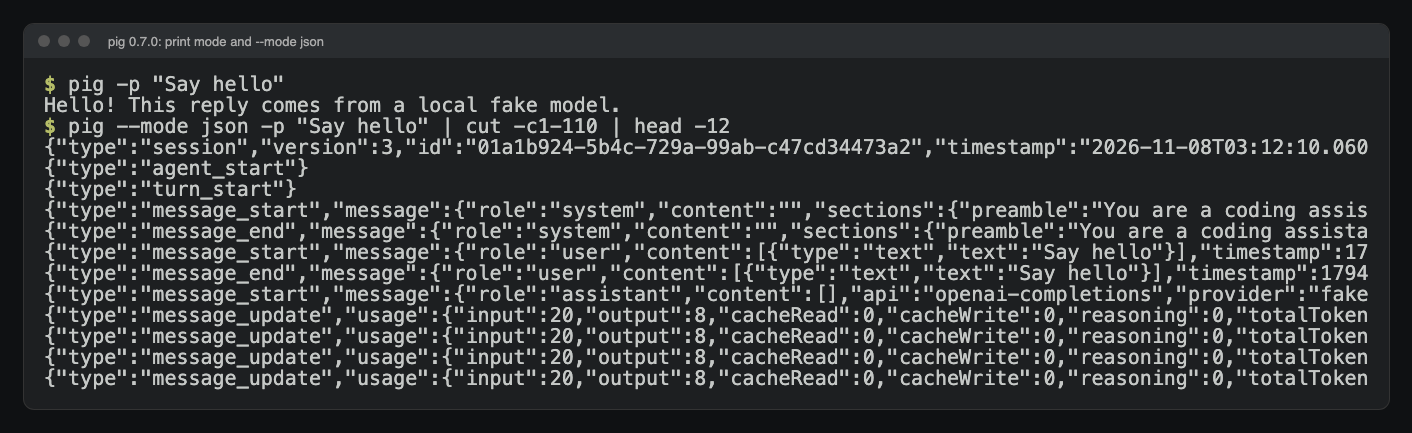
pig -p "Say hello"-p runs the prompt once and prints the final reply.
Step 2: JSON mode, events
pig --mode json -p "Say hello"The first line is the session header with the session id and working directory. Then each event is one line: agent_start, turn_start, message_start and message_end for the system, user and assistant messages, message_update while the reply streams, tool events when a tool runs, and the end of the turn.
Verify
Both commands exit with status 0. The first prints the reply. The second prints one JSON object per line, starting with {"type":"session",...}. The screenshot below is that run with pig 0.7.0 and a scripted model (2026-11-07). The event types and shapes are documented in JSON event stream mode.