
Install
Install with PiG
pig install npm:timestamp-piInstall with Pi
pi install npm:timestamp-piPackages run code with your permissions and influence agent behavior. Catalog inclusion is not a security audit. Review the source before installing a third-party package.
Pi manifest JSON
The pi field of package.json.
{
  "image": "https://raw.githubusercontent.com/luongnv89/pi-extensions/main/assets/timestamp-pi-timestamps.png",
  "extensions": [
    "./src/index.ts"
  ]
}
README
Written by the package's publisher, shown as published in version 0.3.0 (README.md). PiG does not review it.
timestamp-pi
Show a timestamp under every message in Pi's chat, plus a prompt-cache countdown in the footer.
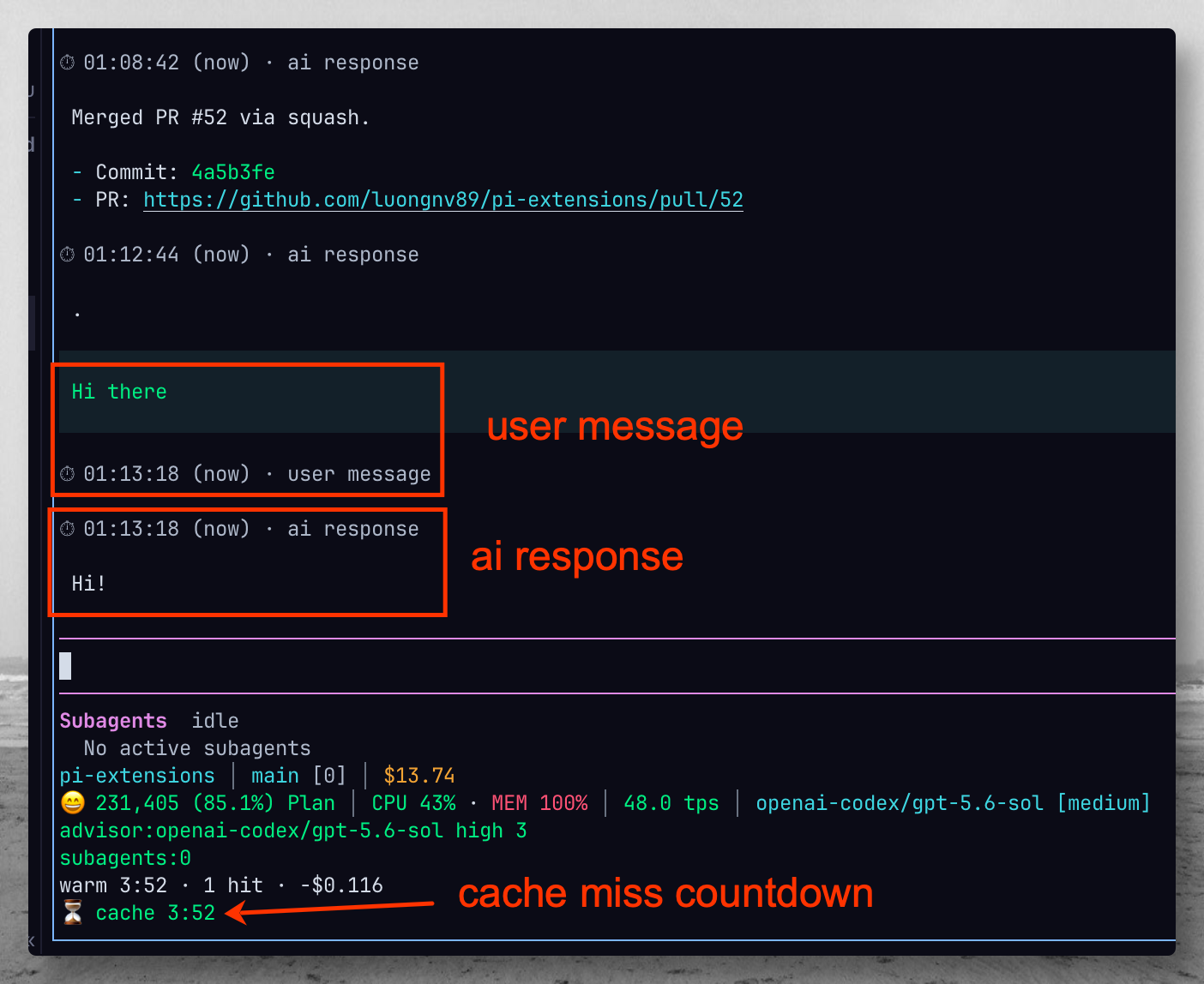
What it does
- Per-message timestamps with context — a dim line like
⏱ HH:MM:SS (2m ago) · user messageappears directly under each message, labeled asuser message,ai response, ortool call - Cache miss countdown — a footer status element shows
⏳ cache 4:32, counting down the 5-minute prompt-cache TTL after each response; turns green while warm, yellow under 1 minute, red (cache expired) once the next request will be a cache miss
Timestamps are stored as custom session entries: they persist across reloads and are rendered TUI-only — they are never sent to the LLM. For paid keep-alive turns that refresh the prompt cache, use cache-warm instead; timestamp-pi does not send warming traffic.
Features
- Zero context pollution — timestamps never reach the model
- Session-persistent — historical timestamps re-render when you resume a session
- Live countdown — countdown refreshes every second while the cache is warm
- Coexists with other footers — adds its own status element instead of replacing Pi's footer (same approach as subagents-pi)
- Toggle on/off — use
/timestamp-pifor the TUI menu (or the original toggle behavior outside the TUI);on,off, andtoggleare explicit non-menu forms
Usage
After installation, timestamps appear automatically. In the TUI, a bare command opens a compact enable/disable menu; Escape or Close leaves the current state unchanged. Outside the TUI, the bare command keeps its toggle behavior.
/timestamp-pi          # menu in the TUI, toggle elsewhere
/timestamp-pi toggle   # toggle without opening a menu
/timestamp-pi on       # explicitly enable
/timestamp-pi off      # explicitly disable
Compatibility
The menu is shown only when Pi supplies an extension context with mode === "tui" and hasUI. Older host runtimes that omit ctx.mode use the non-TUI fallback instead of opening UI/RPC dialogs: the bare /timestamp-pi command toggles the feature.
Settings persistence
The deliberate /timestamp-pi toggle is stored in the private, validated
~/.pi/agent/timestamp-pi.json file (the path follows Pi's getAgentDir()).
The default remains enabled when no preference is present. Message timestamps,
prompt-cache timing, and footer timers remain session-only and are never saved
as preferences.
Installation
# From npm
pi install npm:timestamp-pi

# From repo (local)
pi -e ./extensions/timestamp-pi
Reload Pi (/reload) after installing.
Requirements
Requires @earendil-works/pi-coding-agent >= 0.84 (uses registerEntryRenderer).
Commands
| Command | Description |
|---|---|
/timestamp-pi | Open the TUI enable/disable menu, or toggle outside the TUI |
/timestamp-pi toggle|on|off | Toggle or explicitly set the feature without opening a menu |
Example
Chat:
You
Fix the failing test in auth.spec.ts
⏱ 14:32:05 (2m ago) · user message

Assistant
Fixed — running the tests now.
⏱ 14:32:08 (now) · ai response

Assistant
⏱ 14:32:10 (now) · tool call
Status element (in the footer):
⏳ cache 4:12
License
MIT