
Install
Install with PiG
pig install npm:session-orchestratorInstall with Pi
pi install npm:session-orchestratorPackages run code with your permissions and influence agent behavior. Catalog inclusion is not a security audit. Review the source before installing a third-party package.
Pi manifest JSON
The pi field of package.json.
{
  "skills": [
    "./skills"
  ],
  "prompts": [
    "./pi/prompts/*.md"
  ],
  "extensions": [
    "./pi/extensions/session-orchestrator.ts"
  ]
}
README
Written by the package's publisher, shown as published in version 5.22.0 (README.md). PiG does not review it.

Session Orchestrator
Your coding agents get an agreed plan, a check after each round of changes and a handover to the next session.



Who it is for
- People who run Claude Code, Codex CLI, Cursor IDE or Pi on a git repository and want an agreed plan before the agents start.
- People who want a check after each round of changes and a written handover to the next session.
- People who want it free (MIT) and local: it writes plain text into your repository, with no account and no server of its own. By default it makes two background connections, an update check against npm and a security check (Node release index, CISA KEV feed, and the names and versions of your lockfile packages sent to OSV; for GitHub remotes also
gh); you can switch both off (see SECURITY.md). Usage telemetry stays off until you consent.
What you need
- Node.js 24 or later.
- macOS or Linux (checked before every release). Windows is best effort: it runs and has a native smoke test in CI, but there is no native acceptance before each release; reported bugs get fixed (details in docs/install.md).
- A git repository.
- One of Claude Code, Codex CLI (0.160 or later), Cursor IDE or Pi. Claude Code has no declared minimum version.
- Optional:
glabfor GitLab orghfor GitHub, only if you want issues and merge requests filed there. - Nothing else to install or sign up for.
Install
In Claude Code:
/plugin marketplace add Kanevry/session-orchestrator
/plugin install session-orchestrator@kanevry
Not installed yet? Let your agent read the docs first: add the read-only docs server (MCP) with one URL, nothing to install.
Codex CLI, Cursor IDE, Pi, upgrade and uninstall: docs/install.md. The guide also covers installing the Lead add-on.
The npm release check installs the tagged version in a clean Node.js 24 environment and exercises the shipped Bash guard. Public check runs
For releases published by the trusted workflow, the version's npm page links to the source commit and build workflow under Provenance. npm package
Website (Deutsch) · Commands · User guide · Changelog
Beta: 15 free seats in the agenticbuilders Pass for Session Orchestrator users. You learn to get real work done with Claude Code and agents. In return you tell me for 14 days what helped. Want a seat? agenticbuilders.at/so
How it works
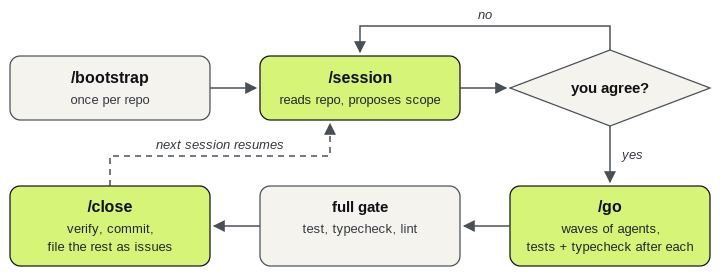
/sessionreads your repository, your open issues and the last session, proposes what to work on, and waits for your correction. Nothing changes in your code until you agree./goruns the agreed work in waves: rounds of parallel agents, each with its own list of files. Your tests and typecheck run after each wave; failures become fix tasks for the next one./closeruns the full check (test, typecheck and lint), checks every planned item against what happened, commits, and files the rest as GitLab or GitHub issues.
| Without it | With it |
|---|---|
| You paste your working rules into every session | /session reads git, issues and the last session first |
| Two agents edit the same file | Each agent gets a declared file list; overlaps are rejected |
| "Done" before the tests ran | Tests and typecheck run after each wave |
| A crash loses the plan | Progress is written down after each wave; the next /session offers to resume |
First session
- Run
/bootstrap --fast --no-interviewonce in your project. It adds a short Session Config block to your instruction file (CLAUDE.mdorAGENTS.md). - Set the three check commands in that block to what your project uses, for example
test-command: npm test,typecheck-command: npm run typecheck,lint-command: npm run lint. Every other key is optional (reference). - Run
/session featureand describe the task. Correct the proposed scope, then run/goand, when the work is done,/close.
On Codex and in headless Claude Code (claude -p) some command names differ: Codex · headless.
What do you want to do?
| Situation | Type | You get |
|---|---|---|
| A new project idea | /plan new | Research, decisions, a PRD and issues (works out of the box; uses your baseline when configured) |
| A feature that is not clear yet | /plan feature | A bounded plan with acceptance criteria |
| A feature that is clear | /session feature, then /go, then /close | The agreed change, checked, committed, leftovers as issues |
| A big or unclear change | /session deep | It looks first, then builds |
| Tidy up | /session housekeeping | A short maintenance pass |
| Issues an agent could not start from | /backlog | A check of your GitLab issues (labels, readiness, size, dependencies) and fixes you approve |
| Look back on a phase | /plan retro | What worked, what to change |
| The same mistakes keep coming back | /evolve, then /reconcile | Lessons you approve become rules |
The destructive-command guard has 18 rules. When its hook is active, 14 rules block a command and 4 issue a warning.
It learns, with your yes
/evolve suggests lessons from your own session records; /reconcile turns the ones you approve into rule files that later sessions load. It never trains a model and never changes itself without your approval (how it works).
Next step
- Plan your first session with the free starter course for Session Orchestrator users.
- Run several sessions with lead-session-orchestrator. This separate npm package puts the sessions in order and collects their questions in one queue for you.
User guide · Install · Components · Telemetry (off unless you turn it on) · Contributing · Security · Issues · MIT · Privacy · npm · All docs
Provided as-is: a community project with best-effort maintenance and no SLA. Independent, and not affiliated with or endorsed by Anthropic, OpenAI or Cursor. The method is taught at agenticbuilders.at; the plugin is free and does not need the courses.