
Install
Install with PiG
pig install npm:rinco-pi-hudInstall with Pi
pi install npm:rinco-pi-hudPackages run code with your permissions and influence agent behavior. Catalog inclusion is not a security audit. Review the source before installing a third-party package.
Pi manifest JSON
The pi field of package.json.
{
  "extensions": [
    "./extensions/hud/index.ts"
  ]
}
README
Written by the package's publisher, shown as published in version 1.6.1 (README.md). PiG does not review it.
Rinco Pi HUD
A live status footer for Pi. Project, git, session, tool and cost state in four groups, updated while you work.




Install · Commands · What it shows · Layout · Development
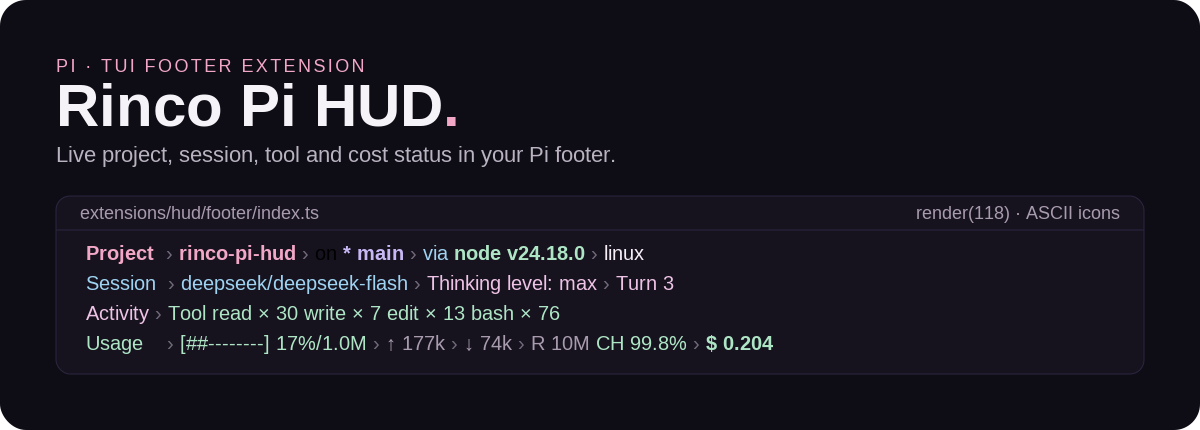
Rinco Pi HUD takes over Pi's footer with four groups of live state and lets you switch off anything you do not want. Pi loads the TypeScript extension directly, so there is no build step: tsconfig.json sets noEmit: true and exists only for npm run typecheck.
Install
Requires Pi 1.3.0 or newer within the 1.x release line. Development and CI dependencies are pinned to 1.3.0.
pi install npm:rinco-pi-hud
Restart Pi afterwards, or run /reload. The footer is enabled by default and /hud opens the settings UI.
From GitHub, or from a local checkout:
pi install git:github.com/Rinisnotarobot/rinco-pi-hud
git clone https://github.com/Rinisnotarobot/rinco-pi-hud.git
cd rinco-pi-hud
pi install "$PWD"
[!IMPORTANT] Pi extensions run with your user permissions. Review the source before installing any third-party extension.
[!NOTE] Truecolor and 256-color terminals are supported; explicit RGB colors use Pi's terminal-capability-aware encoder. The screenshot above renders with ASCII icon mode;
/hudswitches between theauto,nerd, andasciiglyph sets.
Commands
| Command | Effect |
|---|---|
/hud | Settings UI: rows, segments, separator, icons, colors, templates |
/hud statusline enable|disable|toggle | Show or hide the whole footer |
/hud row project|session|activity|usage <enable|disable|toggle> | Turn one row on or off |
/hud format "<template>" | Replace the four rows with a single-line template |
/hud compact-format "<template>" | Opt into a wrapped template below 80 columns; clear removes it |
/hud footer hud|hidden|native | Four-group/template HUD, statuses only, or Pi’s native footer |
/hud layout|segments|extensions | Open a settings section directly |
/codex-status | Print Codex subscription usage and rate-limit windows |
/usage-refresh | Refresh the model usage or balance shown in the footer |
What it shows
| Row | Segments, each with its own switch under Built-in segments in /hud |
|---|---|
| Project | directory, git branch, commit and tag, working-tree status, operation state (MERGING, REBASING, …), diff metrics, runtime, package version, OS, user |
| Session | session name, provider and model, thinking level, turn count, duration, clock |
| Activity | running tools, completed tool counts, skills, MCP servers |
| Usage | context window with a gauge, input and output tokens, cache read/write volume and hit rate, cost, model quota |
Rows are toggled with /hud row usage disable; the segments inside them have individual switches in the same UI. Existing configs that used the former aggregate tokens or toolActivity switches are migrated automatically.
Model quota
The Usage row follows the active model's provider:
- openai-codex — ChatGPT subscription rate limits and reset credits, queried through Pi auth with a
codex app-serverfallback. Reads ascodex 60% 5h (14:30) 75% wk; the reset stamp becomes14:30 12 Febwhen the window rolls into another day. - token-switch — billing balance from the
TOKEN_SWITCH_API_KEYenvironment variable, astoken-switch $750.00. - deepseek — account balance from the DeepSeek API using the credential Pi holds for the provider, either from
/loginorDEEPSEEK_API_KEY. Reads asdeepseek ¥110.00, preferring CNY when the account reports several currencies.
These queries use a 15-second timeout and a 5-minute cache, and /usage-refresh refreshes the active one on demand.
Layout
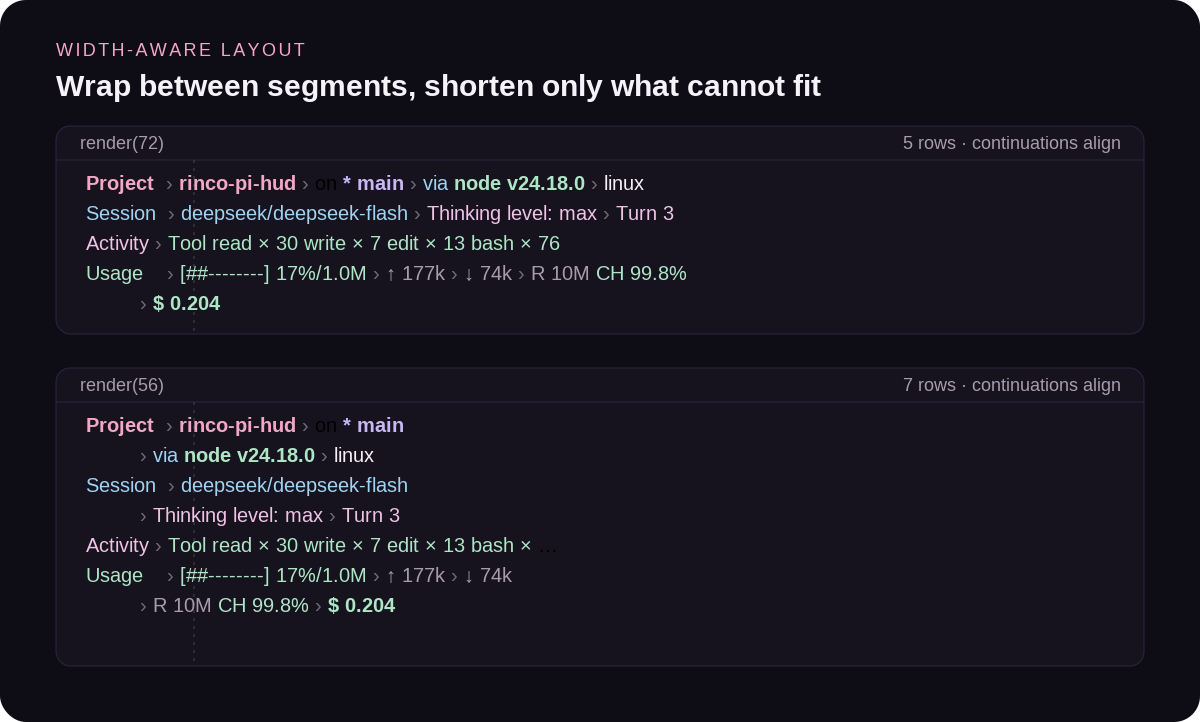
Groups wrap only at segment boundaries. A continuation line realigns under the separator column, and a segment that no longer fits is shortened with … instead of pushing the segments after it off the row.
Set a template for a single-line footer instead of the four groups:
/hud format "$cwd( $git_branch)$fill($context)( $tokens)( $cost)"
Variables accept $name or ${name}. The footer reference lists all of them, along with the aliases ($directory, $status, $codex, …). Run /hud format with no argument, or /hud format clear, to go back to the four groups.
Configuration
The HUD uses /hud; /zentui is reserved for the original Zentui package. There is no legacy command alias. See Using with Zentui for component separation.
/hud writes to ~/.pi/agent/rinco-pi-hud.json and applies changes immediately. It covers the separator style, icon mode (nerd, ascii, or auto), footer colors (Pi theme tokens or terminal palette styles), context rendering (text, gauge, or both), the project refresh interval, and third-party extension statuses with their own placement and color mode.
Footer colors follow the active Pi theme by default, including theme switches and automatic light/dark changes. In /hud, Footer colors → theme enables this behavior; terminal keeps the original Sakura RGB palette. Explicit custom colors (hex, indexed, or fg:/bg: styles) remain fixed in either mode. Remove those entries from colors to restore automatic theme colors.
Footer features are adapted from Zentui 0.32.0, without installing its editor, messages, working line, tool display, or OMP adapter. New opt-in features include repository-relative paths, $join_sep, compact templates, extension-published values, safe status hyperlinks, PR/CI metadata, and average token rate. Defaults and existing configurations remain unchanged. See docs/upstream-zentui.md for the exact snapshot and integration boundaries, and docs/footer.md for configuration and examples.
Project contents
| Path | Purpose |
|---|---|
extensions/hud/index.ts | Composition root for controllers, shared state, and UI installation |
extensions/hud/config/ | Configuration model, normalization, migration, and persistence |
extensions/hud/footer/ | Footer rendering, semantic grouping, responsive layout, and template parsing |
extensions/hud/segments/ | State collectors: Git, runtime, MCP, skills, projects, etc. |
extensions/hud/telemetry/ | Usage formatting, provider balance probes, and the Codex subscription client |
extensions/hud/session/ | Pi event registration, session lifecycle, and live context overlay |
extensions/hud/state/ | Aggregated state, telemetry reducer, and project refresh controller |
extensions/hud/commands/ | /hud settings UI and configuration controller |
extensions/hud/ui/ | Icons and terminal style utilities |
docs/footer.md | Complete footer configuration reference |
docs/CONTRIBUTING.md | Local development, testing guidance, and pull request checklist |
tests/ | Vitest suite: footer layout, telemetry, provider balances, MCP runtime tool counts |
Development
Node.js 22.19 or later, and Pi itself.
npm install
npm test          # Vitest suite
npm run typecheck # tsc --noEmit
npm run verify    # format, types, lint, tests
Every script is defined in package.json; docs/CONTRIBUTING.md lists them all, including lint, format, and test:watch.
README images
The two boards above are generated from a real footer render rather than drawn by hand. assets/readme/source/capture-footer.mts drives the extension's own installFooter path over this repository's state and a real Pi session transcript, then build-assets.mts turns the ANSI rows into SVG:
npx tsx assets/readme/source/capture-footer.mts . ~/.pi/agent/sessions/<session>.jsonl 118 72 56 > /tmp/footer.json
npx tsx assets/readme/source/build-assets.mts /tmp/footer.json
Troubleshooting
The footer does not appear
Confirm Pi is running in TUI mode rather than headless, JSON, or print mode. Then run /reload, and pi list to confirm the package is installed.
The layout looks wrong in a narrow terminal
The footer measures the terminal and wraps at segment boundaries, so narrow windows show fewer segments per line. Set a footerFormat template, or disable low-priority segments in /hud.
Colors look incorrect
The default palette follows the active Pi theme. If the footer still uses fixed colors, select Footer colors → theme in /hud and remove explicit color overrides from ~/.pi/agent/rinco-pi-hud.json. Third-party statuses set to original retain their own colors. Truecolor and 256-color output follow Pi's detected terminal capabilities.
Icons are missing or misaligned
Unicode and Nerd Font glyphs vary between terminals and fonts. Install a Nerd Font, or switch to ASCII icons in /hud.
License
MIT. See LICENSE.
Third-party licenses
This package incorporates work from the following open-source projects:
- pi-zentui by Luka — MIT licensed. The Footer portion was adapted for this package.
Source: https://github.com/lmilojevicc/pi-zentui - pi-shannon-statusline by RealAlexandreAI — MIT licensed. Session, model, activity, MCP, configuration-count, and Codex subscription capabilities were adapted.
Source: https://github.com/RealAlexandreAI/pi-shannon-statusline - pi-codex-usage by narumiruna — MIT licensed. The Codex usage client under
extensions/hud/telemetry/codex-usage/derives from this project.
Source: https://github.com/narumiruna/pi-codex-usage
See NOTICE for details.