
Install
Install with PiG
pig install npm:projectopsInstall with Pi
pi install npm:projectopsPackages run code with your permissions and influence agent behavior. Catalog inclusion is not a security audit. Review the source before installing a third-party package.
Pi manifest JSON
The pi field of package.json.
{
  "skills": [
    "./skills"
  ]
}
README
Written by the package's publisher, shown as published in version 4.120.2 (README.md). PiG does not review it.
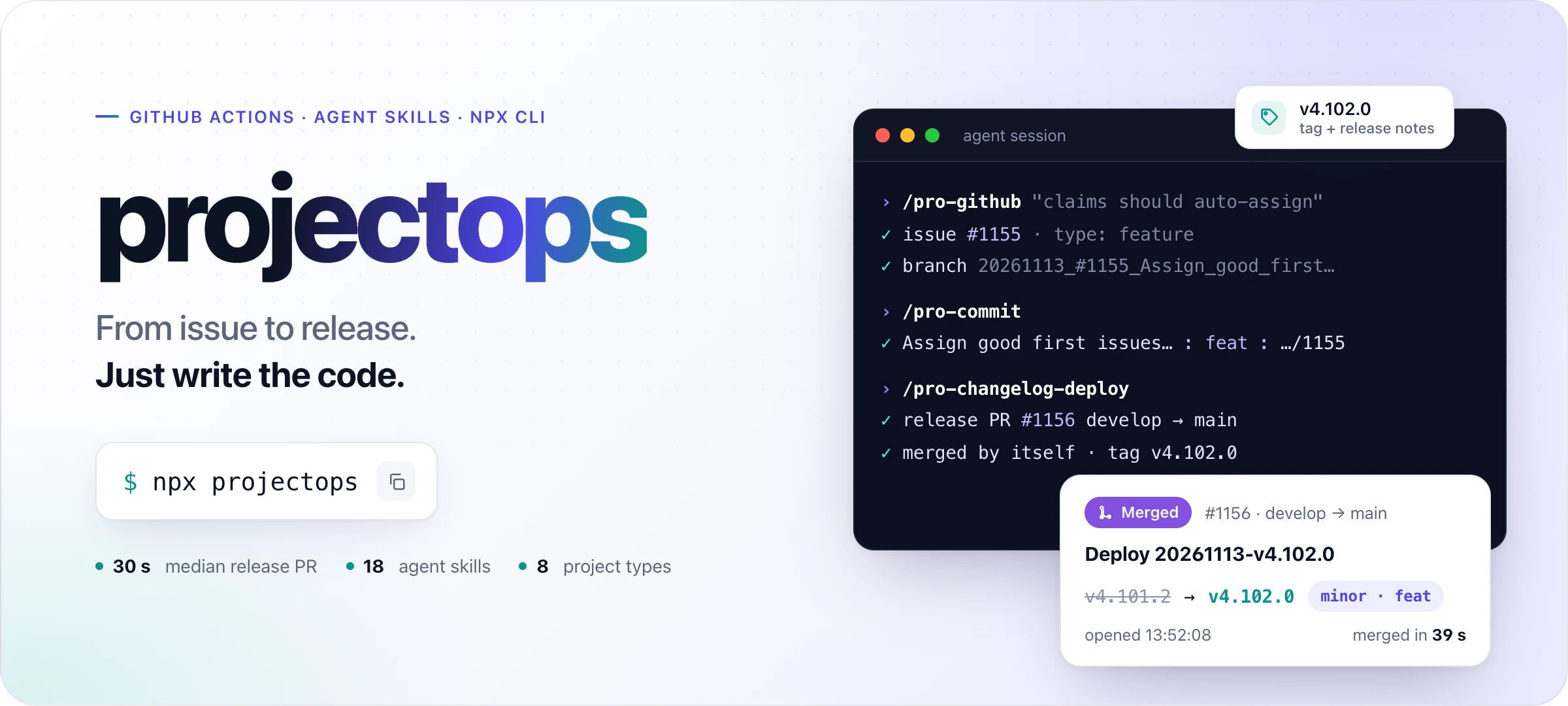
One install: issue → branch → release PR → deploy, with agent skills that drive each step.




Get started
npx projectops
| I want to... | Run this |
|---|---|
| Add it to an existing project | npx projectops (interactive wizard, nothing to install first) |
| Start a new project | Click Use this template on GitHub (set up in about a minute) |
| Install Agent Skills only | npx projectops --mode skills |
| Check the install state (read-only) | npx projectops --mode doctor |
Needs Node.js 20.12+ and Git (Agent Skills also need Python 3). npm latest is exactly what is on main. Every flag: CLI reference.
Watch the wizard run (real recording on a sample Spring project)

How one change ships
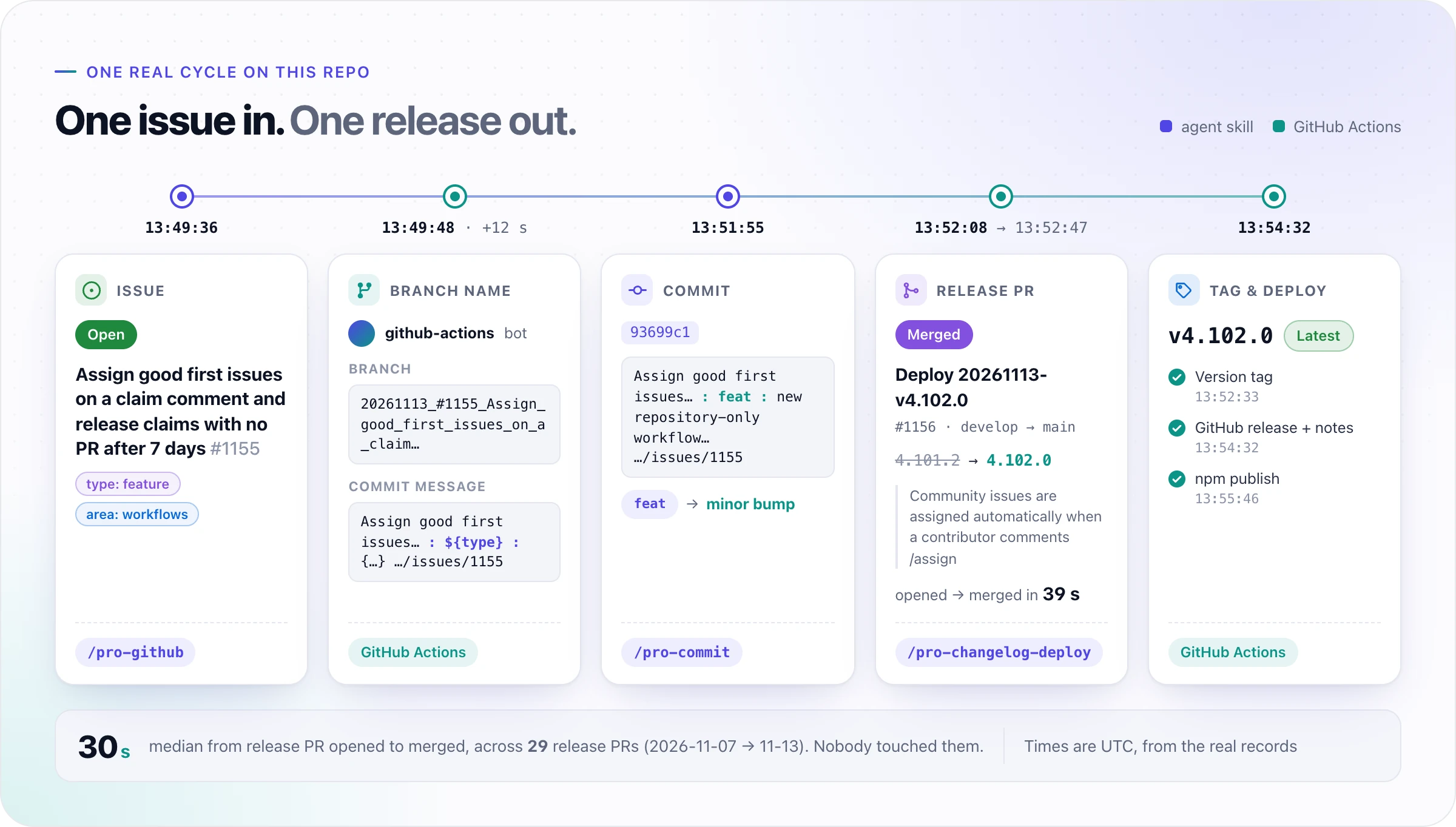
Every card above is a real record from this repository. You open an issue (or /pro-github files it); a bot comments the branch name and commit template; /pro-commit writes the commit; /pro-changelog-deploy opens the release PR, which picks the version from commit titles (feat → minor), writes the notes, merges itself and tags the release.
Measured on this repository. The 29 release PRs opened from develop to main between 2026-11-07 and 2026-11-13 each went from opened to merged, with the version decided, CHANGELOG and README updated and the tag created, in a median of 30 seconds (fastest 25, slowest 50). Nobody touched them after opening. Check it yourself: compare created_at and merged_at of the merged release PRs (GET /repos/Cassiiopeia/projectops/pulls?state=closed&base=main).
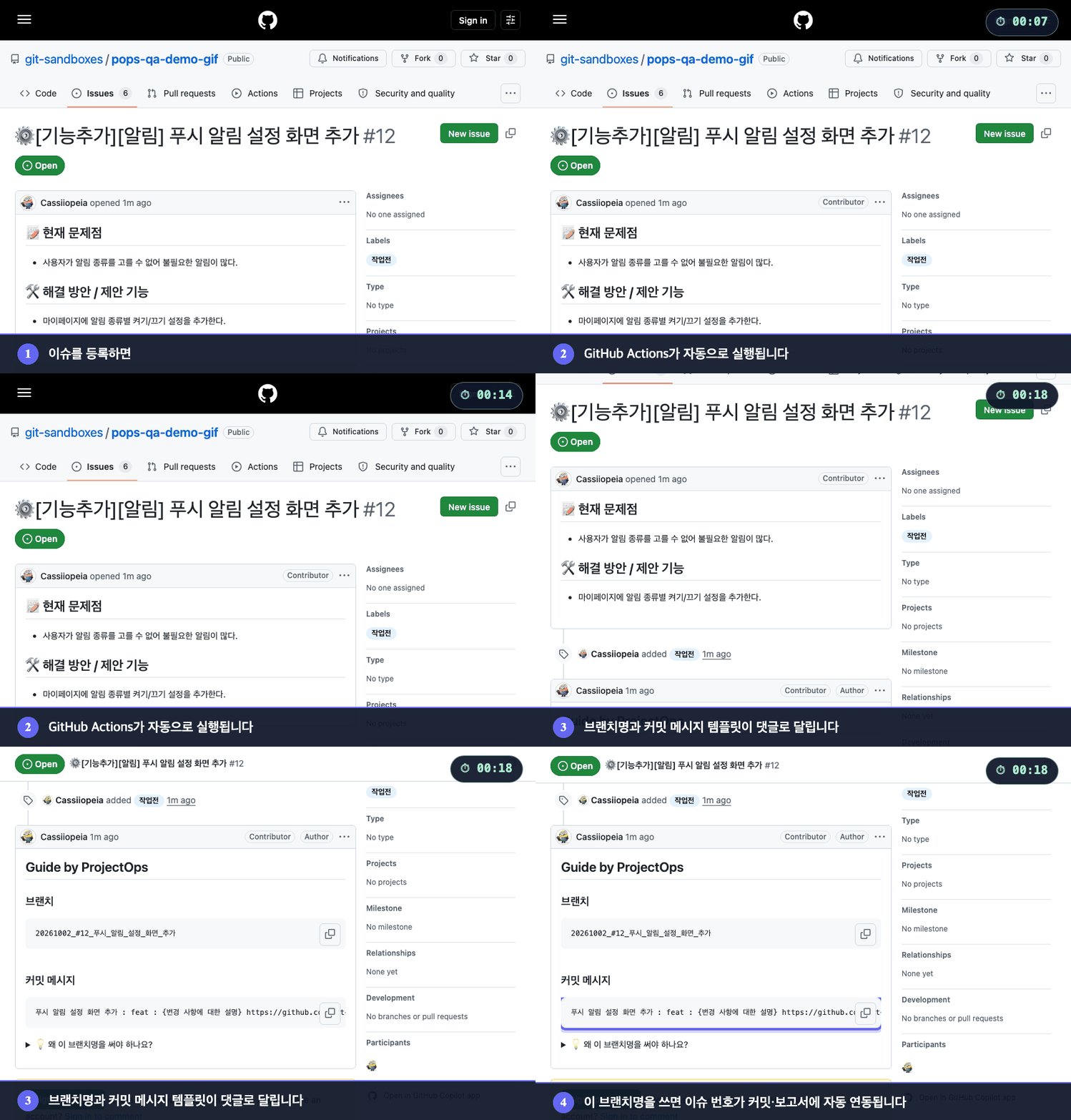
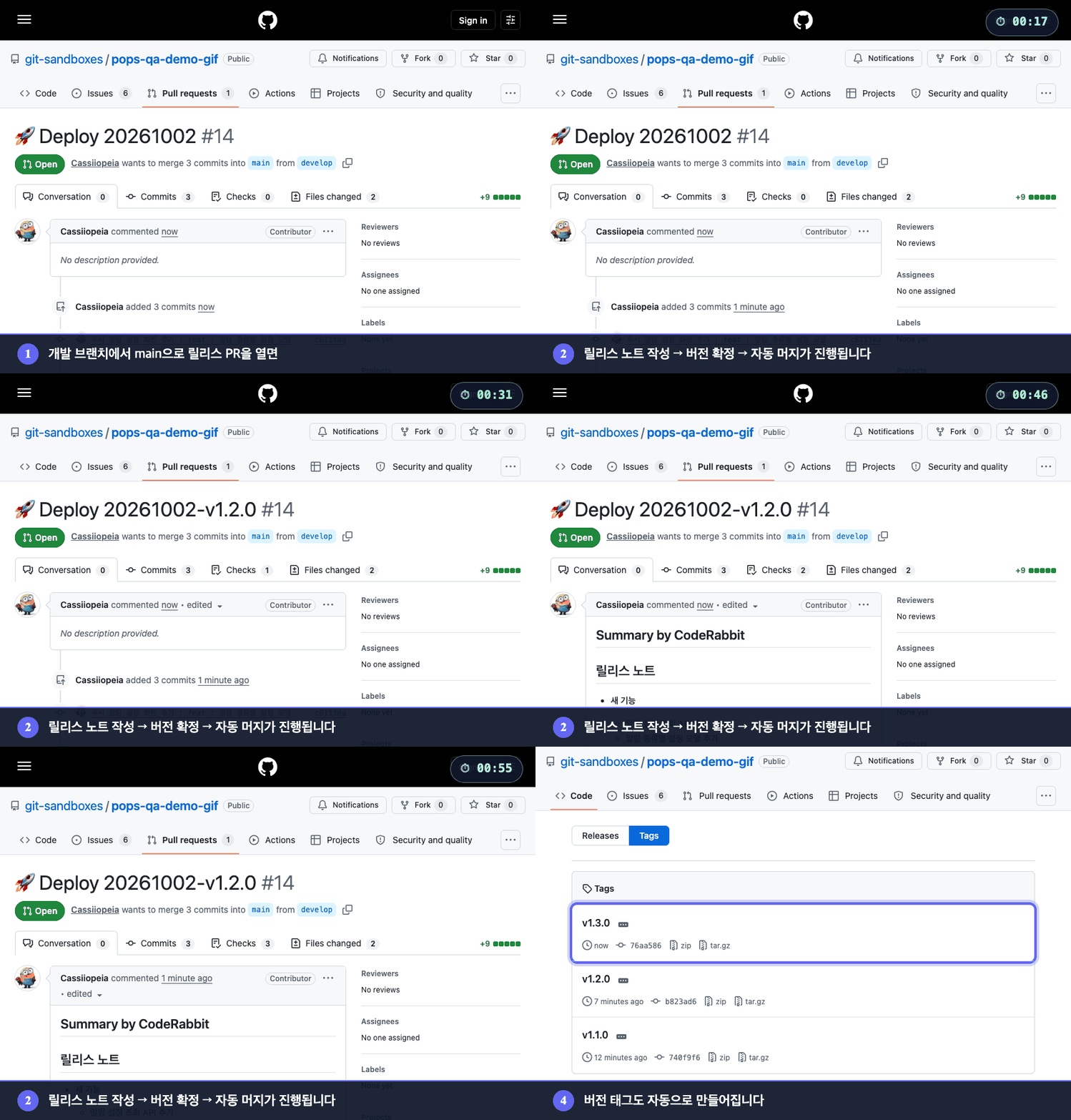
See it run: issue, PR summary and release, recorded in a sample repo (real time in the corner)
Open an issue and a comment with the branch name and commit template arrives.
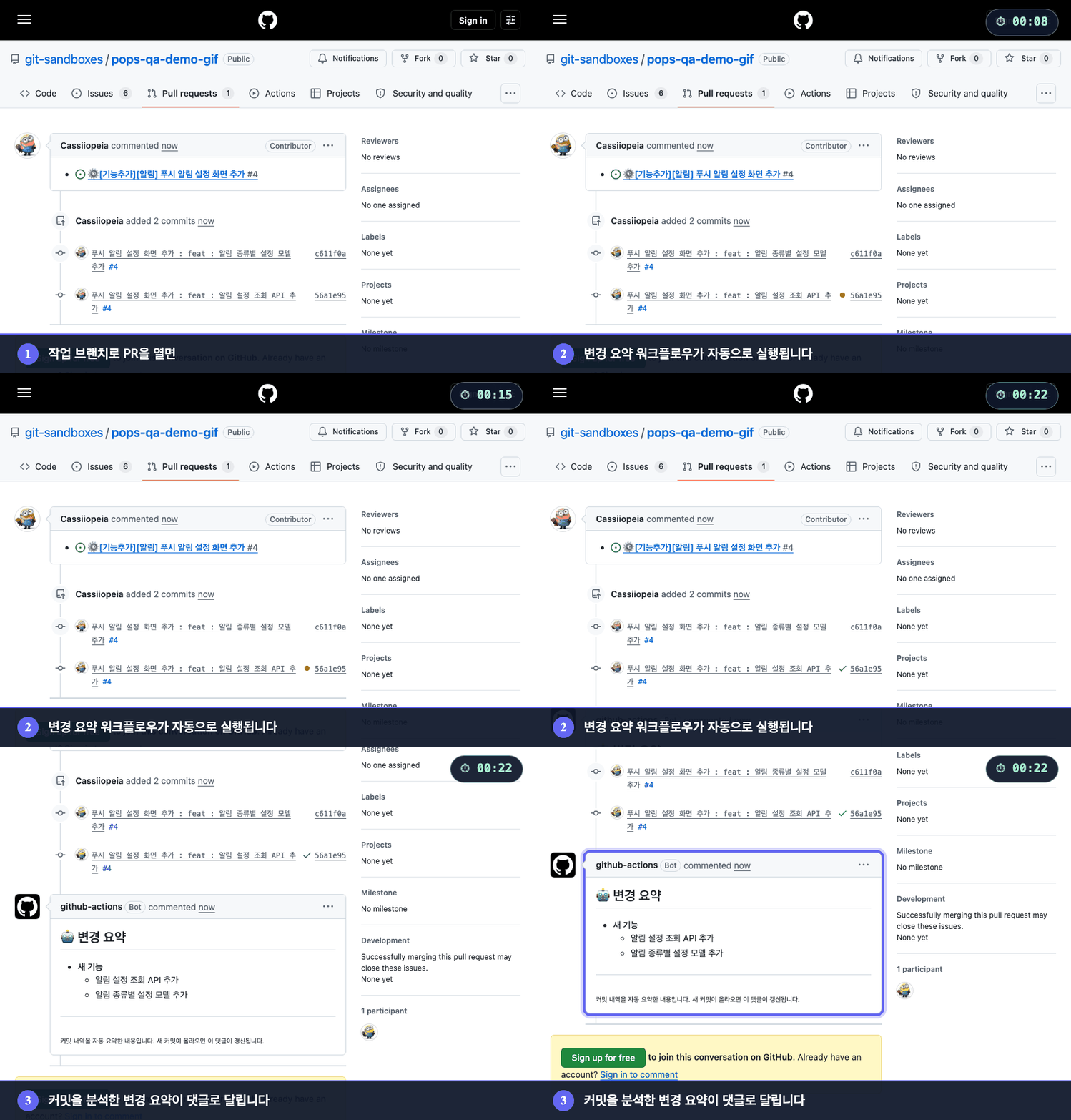
Open a PR and a change summary built from the commits is posted, then updated on every push.
Open a release PR and it writes the notes, decides the version, merges and creates the tag.
What you get
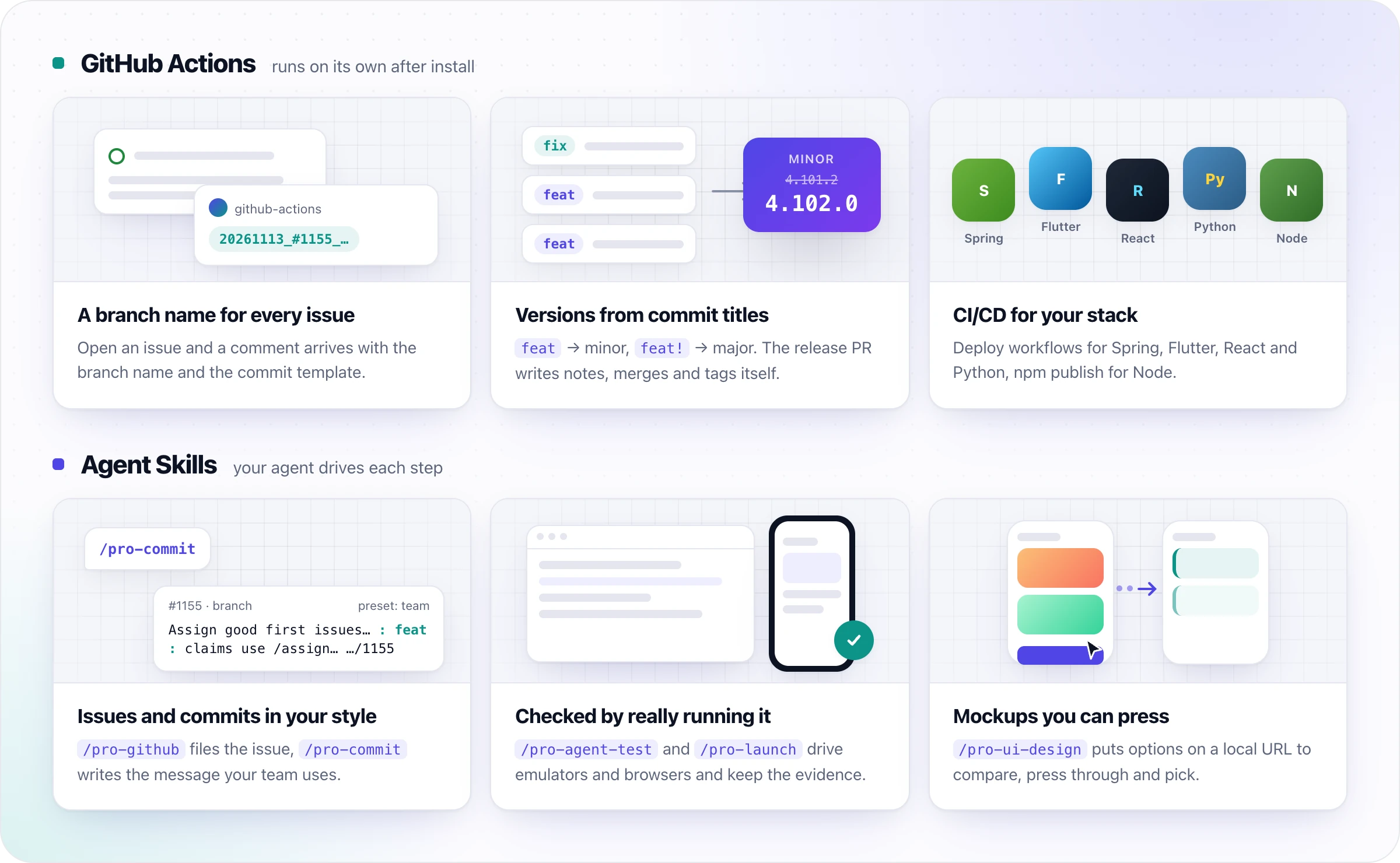
| The usual way | With projectops |
|---|---|
| Bump versions, tag and write the changelog by hand | The release PR decides the version from commit titles, writes the notes and tags |
| Set up CI/CD from scratch | Workflows for Spring, Flutter, React, Python and Node, ready on install |
| Format every issue and commit message by hand | /pro-github and /pro-commit write them in your team's format |
| Re-type prompts for every review or analysis | 18 skills give consistent results without re-typing |
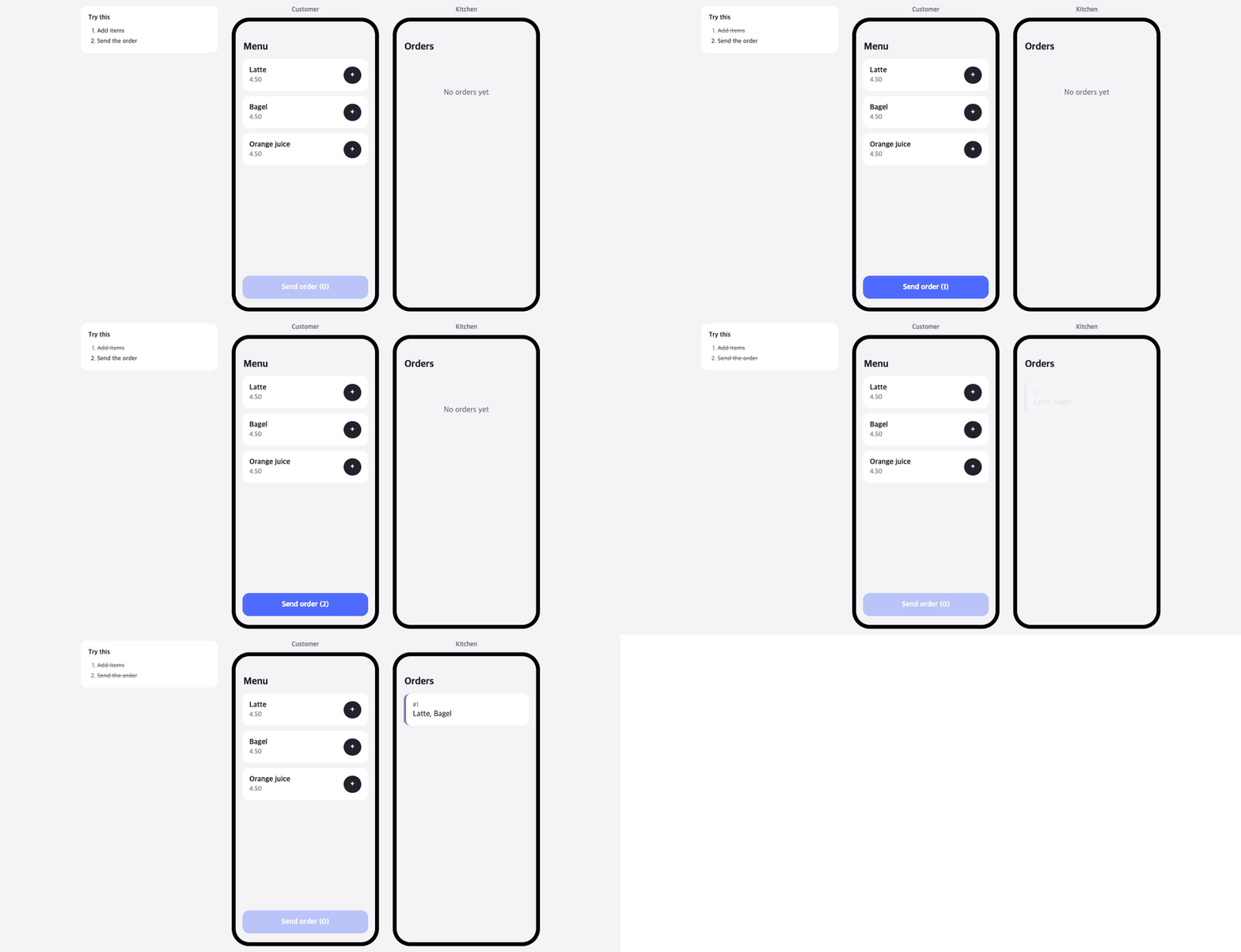
Mockups you can press. /pro-ui-design puts options on a local URL in your repo's tokens and fonts. Here two screens share one state: the order placed on the left lands in the kitchen on the right. The same run can post this GIF to the issue.
Agent Skills
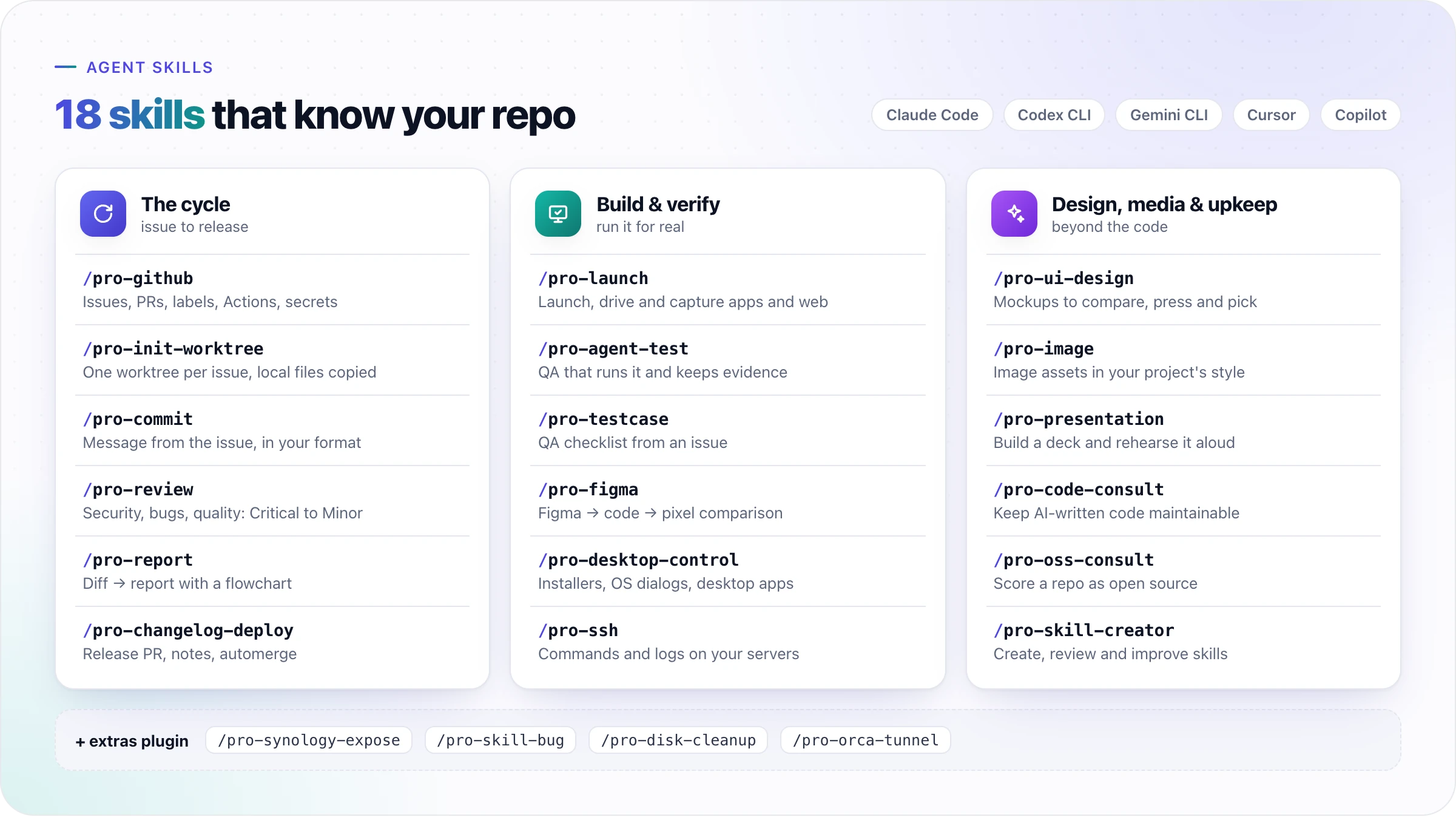
Agent Skills (18) run in Claude Code, Codex CLI, Gemini CLI, Cursor and GitHub Copilot, and write in your style (~/.projectops/config/config.json, see the Skills guide). Design, planning and implementation are left to superpowers (brainstorming → writing-plans → executing-plans).
See all 18 Agent Skills and how to install them
| Group | Skill | Purpose |
|---|---|---|
| Cycle | /pro-github | Issues (one line → template), PRs, labels, comments, repo exploration, Actions and Secrets |
| Cycle | /pro-init-worktree | Create a Git worktree and copy the local files it needs |
| Cycle | /pro-commit | Commit message from the issue context, in your format (preset or template) |
| Cycle | /pro-review | Review from 6 angles, classified Critical / Major / Minor |
| Cycle | /pro-report | git diff → implementation report with a flowchart, posted as a comment |
| Cycle | /pro-changelog-deploy | Push develop → release PR to main + release notes + automerge |
| Build & verify | /pro-launch | Launch, drive and capture apps, web and servers; mock empty and error states |
| Build & verify | /pro-agent-test | QA that really runs the app and reports steps, evidence and severity |
| Build & verify | /pro-testcase | Issue → QA checklist |
| Build & verify | /pro-figma | Figma design → code, then a pixel comparison |
| Build & verify | /pro-desktop-control | Installer wizards, OS dialogs and desktop apps; asks before installs |
| Build & verify | /pro-ssh | Run commands on servers over SSH (EC2, Synology NAS, Linux) |
| Design & upkeep | /pro-ui-design | Mockups on a local URL to compare, press and pick, or a designer request |
| Design & upkeep | /pro-image | Image assets in your project's own style, with real transparency |
| Design & upkeep | /pro-presentation | Build an HTML deck, rehearse aloud with coaching, export PDF and PPT |
| Design & upkeep | /pro-code-consult | Keep AI-written code maintainable by your conventions |
| Design & upkeep | /pro-oss-consult | Score a repo as an open-source project and fix what you approve |
| Design & upkeep | /pro-skill-creator | Create, review and improve a skill |
Extras (optional plugin): /pro-synology-expose, /pro-skill-bug (report a suspected skill bug from any session), /pro-disk-cleanup (reclaim disk space safely), /pro-remote-link (a link to open Orca or Paseo from outside), /pro-project-blueprint (start a new repo with your usual layout, branches, public-repo secrets and deploy), /pro-brain (knowledge notes per issue, change set or merge, written where you choose: the repo, your local gbrain, remote or team gbrains; doctor checks each one), /pro-gbrain (attach a repo to GBrain in one command: one question, then repo, server brain, sync, registry and an end-to-end check; status, repair, share, remove). Install: claude plugin install projectops-extras@projectops-marketplace --scope user
# Claude Code
claude plugin marketplace add Cassiiopeia/projectops
claude plugin install projectops@projectops-marketplace --scope user
# Gemini CLI
gemini extensions install https://github.com/Cassiiopeia/projectops
# Codex CLI (macOS / Linux)
codex plugin marketplace add Cassiiopeia/projectops
# Cursor, GitHub Copilot and the full menu
npx projectops --mode skills
Compared with other tools
If you only need one piece of this, a smaller tool may suit you better (full comparison).
| (blank) | projectops | release-please | semantic-release | changesets |
|---|---|---|---|---|
| Version decided from | Commit titles | Conventional Commits | Conventional Commits | Changeset files |
| Release step | Release PR, merged automatically | Release PR you merge | Releases on push | "Version Packages" PR |
| CI/CD for your project type | Yes | No | No | No |
| Agent skills for the whole cycle | Yes | No | No | No |
| Adds to your repo | About 60 files | A workflow + config | A config + CI step | .changeset/ + CI step |
When it is not a fit
- GitHub only. It relies on GitHub Actions, issues and PRs.
- Two branches. Releases go from a development branch to the default branch (names are set in
version.yml). - About 60 files land in your repo (workflows, helper scripts, templates).
- Frequent releases.
latestfollowsmain;npx projectops@<version>pins the installer only, not the workflow templates. - Server deploys assume a Docker host reachable over SSH. A personal access token is optional (setup).
Supported types: flutter, spring, python, react, react-native, react-native-expo, node, basic (react includes Next.js). Comment commands such as @projectops server build and @projectops build app: PR Preview, Flutter builds, Issue automation.
Community
- First contribution? Pick a
good first issueand comment/assignon its own line; a bot assigns it to you for 7 days. - CONTRIBUTING.md · ARCHITECTURE.md · CODE_OF_CONDUCT.md · SECURITY.md (report vulnerabilities privately)
- Issues for bugs and requests, Discussions for questions. Finished issues get
status: doneand close when a release merges.
Documentation
Everything is on the docs site, in English and Korean: Getting started · CLI · Agent Skills · Versioning · Changelog · SSH + Docker deploy · Flutter CI/CD · Troubleshooting
Latest version : v4.120.2 (2026-11-26)
MIT License · README images are rendered from docs/recording/readme_assets/