
Install
Install with PiG
pig install npm:pi-updaterInstall with Pi
pi install npm:pi-updaterPackages run code with your permissions and influence agent behavior. Catalog inclusion is not a security audit. Review the source before installing a third-party package.
Pi manifest JSON
The pi field of package.json.
{
  "image": "https://github.com/user-attachments/assets/b34ca10f-1baf-4f4c-9f14-414a5b814112",
  "extensions": [
    "./index.ts"
  ]
}
README
Written by the package's publisher, shown as published in version 0.8.0 (README.md). PiG does not review it.
pi-updater
pi-updater checks for pi and extension updates and lets you install them from your current session.
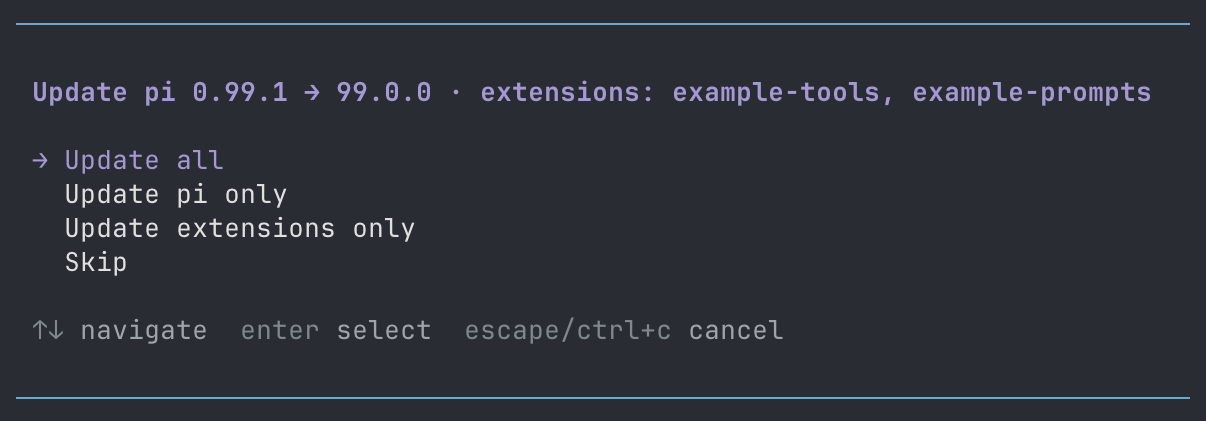
Simulated updates.
Pi already detects updates. This extension adds the prompt, installation,
and return to your session. Installation uses Pi's native pi update command;
pi-updater does not manage packages itself.
Installation
pi install npm:pi-updater
Requires pi 1.0.0 or later. For older versions, pin pi-updater@0.5.1.
Usage
Pi checks in the background when a session starts. If updates are available,
a notification lists them without taking input. Run /update to check manually
and choose what to install.
If only pi is outdated:
- Update now — run
pi update --self, then restart pi on the current session - Skip — close the prompt
- Ignore <version> — silence automatic notices for this pi version
If both pi and extensions are outdated, a combined prompt appears:
- Update all — run
pi update --all, then restart - Update pi only — run
pi update --self, then restart - Update extensions only — run
pi update --extensions, then reload - Skip — close the prompt
If only extensions are outdated, you're offered pi update --extensions.
Extension-only updates reload in place.
"Ignore" is only offered in the Pi-only prompt and suppresses automatic
notifications for that version. Manual /update checks still offer it.
Skipping an extension update does not suppress future notifications. Pinned (@version / #ref) and local packages are excluded,
matching pi's own update check.
In non-interactive modes, or if the restart fails, pi-updater falls back to
a message telling you how to restart yourself. Ephemeral --no-session runs
stay ephemeral across the restart.
If pi was updated next to the running version instead of in place, as the pi.dev installer and custom update commands do, pi-updater asks you to restart pi yourself.
The restart keeps the flags you started pi with. It leaves out the first
prompt and attached files and the flags that select a session. When pi
continues a saved session that already has messages, the restart also leaves
out --provider, --model and --thinking, because pi restores these from
the session. Once the session is saved to disk, it also leaves out --name,
so a name set with /name is kept. If pi was started with --api-key, or if
pi-updater cannot rebuild the arguments safely, it asks you to restart pi
yourself.
How version checks work
The Pi version check uses Pi's update service. Extension checks use Pi's package manager. The notification waits for both checks without blocking startup. If the automatic version check fails, it can use a cached result.
After an update restarts Pi, the startup check is skipped once. /update
requests fresh results. Cache and dismissed-version state live in Pi's agent
directory and respect PI_CODING_AGENT_DIR.
Demo
Run /update --test in an interactive terminal to preview a combined Pi and
extension update prompt. All updates shown are fixtures;
choosing an update action only simulates progress. The command makes no network
requests or cache changes and never installs, reloads, or restarts Pi. It also
works offline.
Disabling checks
pi's standard environment variables are respected:
export PI_SKIP_VERSION_CHECK=1   # disable automatic checks
export PI_OFFLINE=1              # offline mode, also disables checks
While pi-updater is active it suppresses pi's built-in update notice so you don't get notified twice for the same release. pi's "Package Updates Available" banner cannot be suppressed the same way, so it may still appear alongside pi-updater's notification.
Limitations
RPC clients can receive the automatic notice, but RPC mode does not support
/update’s progress view. Run /update in an interactive Pi terminal to
install updates or ignore a Pi version.
Pi's native updater determines which installations can update automatically. Standalone binary installs receive download instructions. Windows self-update supports npm and pnpm installs only.
Updating pi-updater itself
pi update npm:pi-updater
License
MIT