
Install
Install with PiG
pig install npm:pi-status-widgetInstall with Pi
pi install npm:pi-status-widgetPackages run code with your permissions and influence agent behavior. Catalog inclusion is not a security audit. Review the source before installing a third-party package.
Pi manifest JSON
The pi field of package.json.
{
  "extensions": [
    "./src/index.ts"
  ]
}
README
Written by the package's publisher, shown as published in version 0.2.1 (README.md). PiG does not review it.
pi-status-widget
A footer for pi with four presets, emoji or nerd font icons, twelve color schemes, and a thinking level segment that changes color with the level.
Derived from pi-footer by wobondar, MIT licensed. This package keeps 14 widgets, four presets, no config UI, and no runtime dependencies. If you want powerline segments, an in terminal config editor, or 56 widgets, pi-footer is the better fit.


Install
pi install npm:pi-status-widget
Restart your pi session. For a one off try without installing:
pi -e npm:pi-status-widget
Requirements
- Node 22 or newer
- pi 0.80 or newer
- A Nerd Font only if you choose
icons nerd.emojiis the default and needs no patched font. - Truecolor terminal to see a color scheme as designed. Below truecolor every scheme falls back to the nearest of the basic 16 colors.
What it shows
Four presets, switched with one command. Only 2-lines uses two lines; for any other layout over more than one line, edit the config file.
| Preset | Separator | Widgets |
|---|---|---|
default | dot | provider and model, thinking level, context length, git branch, git diff compact, session cost, elapsed time |
compact | space | model, thinking level, git branch, context percent and window limit, cost |
2-lines | dot | directory name and branch on the first line, then model, thinking level, context percent and window limit, cost |
git-heavy | dot | provider and model, directory name, branch, short SHA, working tree counts, diff compact, ahead and behind |
Examples from a real terminal:
default:anthropic/claude-sonnet-4 high 42k main (+12,-3) $0.42 12mcompact:claude-sonnet-4 high main 25% (200k) $0.422-lines:my-app mainoverclaude-sonnet-4 high 25% (200k) $0.42git-heavy:anthropic/claude-sonnet-4 my-app main a1b2c3d +2 ±1 ?0 (+12,-3) ↑1 ↓0
The text above is before icons and colors. With emoji you see 🤖, 🧠, 🌿, and so on. With nerd you see the same spots with Nerd Font glyphs.
Icon modes
/statusbar icons emoji
/statusbar icons nerd
emojiis the default. It works in any terminal.nerdneeds a Nerd Font. Without it the glyphs will show as missing boxes.
An explicit icon choice sticks. Switching presets does not overwrite it, because the font is a property of the terminal, not the layout.
Thinking level color
The thinking segment colors itself from the level, using the same colors pi uses for its own thinking indicator.
| Level | Theme color | Fallback |
|---|---|---|
off | thinkingOff | brightBlack |
minimal | thinkingMinimal | blue |
low | thinkingLow | cyan |
medium | thinkingMedium | yellow |
high | thinkingHigh | magenta |
xhigh | thinkingXhigh | red |
max | thinkingMax | brightRed |
How it resolves:
- If a color scheme is active, the scheme provides the color for that level and the theme is not asked. This keeps the whole footer in one palette.
- Otherwise pi theme color for that level, if the loaded theme defines it.
- Otherwise the fallback in the table above.
- If no level is reported by the model, the widget uses its configured
fg.
The color follows the active pi theme. Change the theme in /settings and the thinking color changes with it.
Turn it off per widget with thinkingLevelColors: false in the config file.
Color schemes
A scheme recolors this footer and nothing else. It does not change pi's theme, which lives in /settings. Choosing github-light here leaves your editor and prompt as they were.
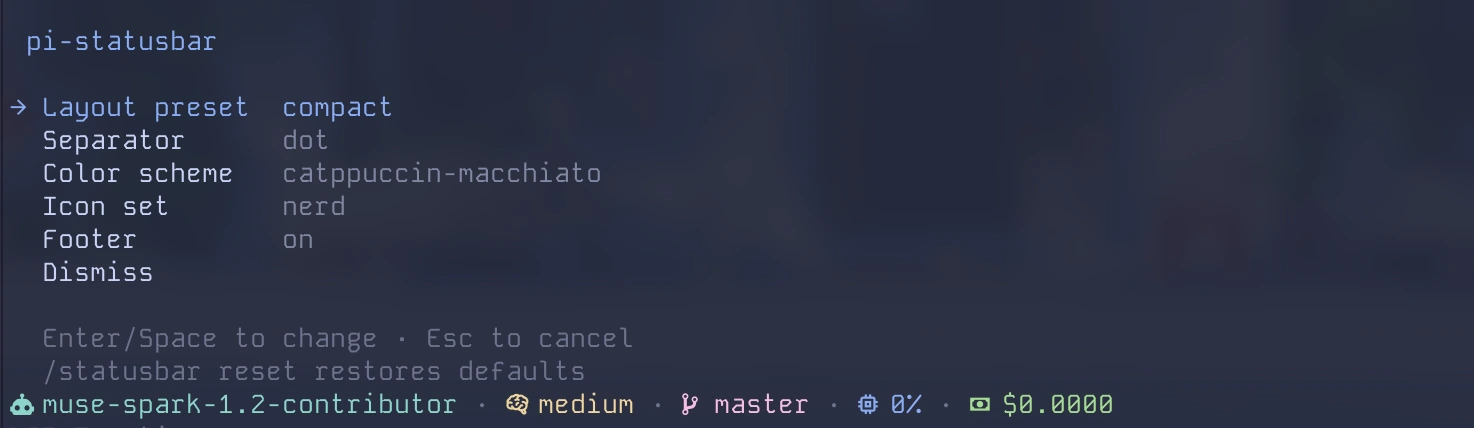
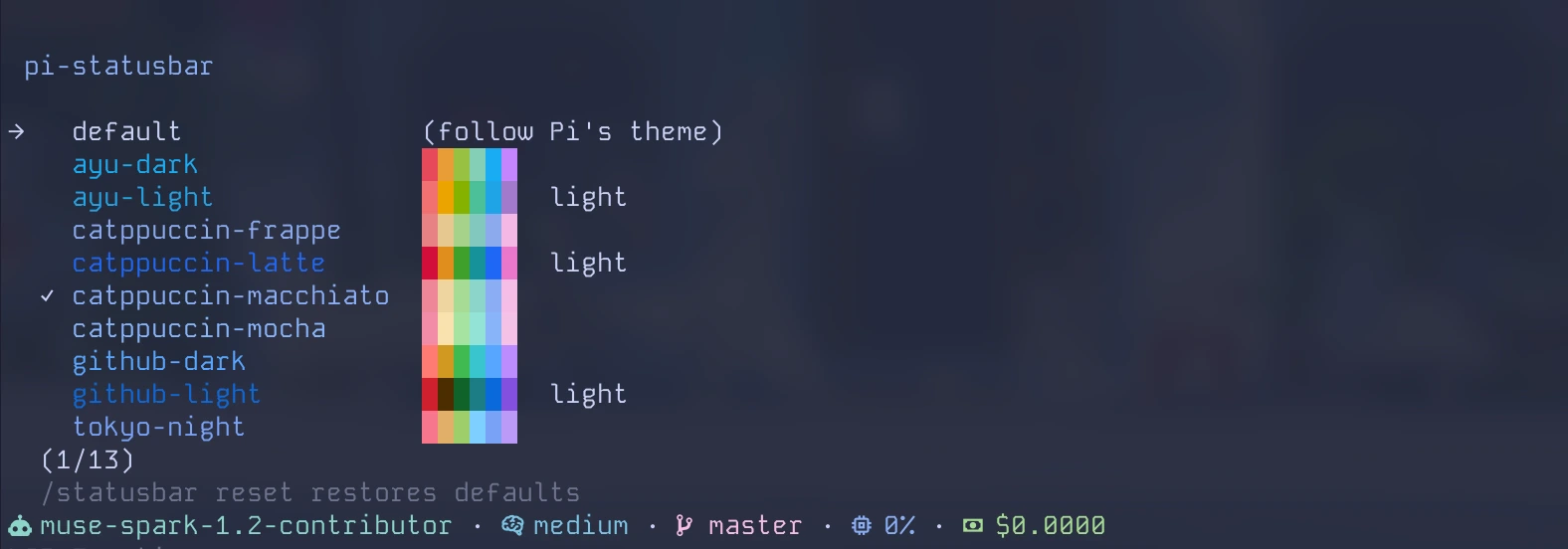
Pick one from the Color scheme row in /statusbar or name it directly:
/statusbar colors tokyo-night
/statusbar colors default
default is the shipped value and means inherit. Every color stays whatever pi theme decides. It is also the way back out of a scheme.
Schemes marked light expect a light terminal background. Nothing stops you using one on a dark terminal, but it was not drawn for it.
- ayu:
ayu-dark,ayu-light(light) - catppuccin:
catppuccin-frappe,catppuccin-latte(light),catppuccin-macchiato,catppuccin-mocha - github:
github-dark,github-light(light) - tokyo night:
tokyo-night,tokyo-night-day(light),tokyo-night-moon,tokyo-night-storm
Only foregrounds. A scheme never fills a background, so the footer keeps sitting on your terminal background and a light scheme cannot paint a bright band across a dark screen.
A scheme needs truecolor
Every scheme is 24 bit color, so a scheme looks like itself only where your terminal can show 24 bit color. Below truecolor each color falls back to the nearest of the basic 16, which your terminal then paints from its own palette. The footer still works and still picks up the shape of the scheme, but the result sits close to what you saw with no scheme at all. If you chose a scheme and almost nothing changed, this is why.
pi decides this once, and this footer follows that decision rather than guessing. kitty, ghostty, WezTerm, Warp, iTerm2 and Windows Terminal are recognised. Under tmux or screen it depends on COLORTERM being truecolor or 24bit. Setting terminal.trueColor in pi settings overrides the lot.
Reaching a color no scheme offers
A widget fg in the config file names a slot, and the active scheme decides what that slot looks like. fg: "brightCyan" is the terminal brightCyan under default and the scheme brightCyan under a scheme, and the widget never knows which. Naming a slot and then choosing a scheme is how you reach a color no single setting offers.
The slots are the sixteen ANSI names, black through brightWhite, plus default to inherit, and pi:<name> for one of pi own theme colors. A hex is not accepted. No scheme could restyle it, and one way for color to reach the footer is worth more than two.
Command reference
Bare command opens the settings panel or prints state when no UI is present. Every mutation saves to disk and repaints immediately. A failed write notifies rather than throwing.
Tab completes the subcommands, then that subcommand's values. It is the one place every scheme name is typeable without opening the panel first.
/statusbar                                    open the settings panel
/statusbar preset <default|compact|2-lines|git-heavy>
/statusbar separator <none|dot|pipe|space|powerline|dash|comma>
/statusbar icons <emoji|nerd>                 switch icon set
/statusbar colors <scheme>                    the panel lists every scheme
/statusbar on | off                           show or hide the footer
/statusbar reset                              restore defaults
Bare /statusbar prints:
pi-statusbar on · preset default · separator dot · icons emoji
colors default
~/.pi/agent/extensions/pi-statusbar.json

Usage:
  ...
Settings panel rows:
| Row | What it changes | Values |
|---|---|---|
| Layout preset | Preset plus its separator | default, compact, 2-lines, git-heavy |
| Separator | Global separator between widgets | none, dot, pipe, space, powerline, dash, comma |
| Color scheme | Footer palette | default plus twelve names, each shown in its own colors with a swatch |
| Icon set | Glyph set | emoji, nerd |
| Footer | Enabled | on, off |
Color scheme row opens a picker. Move the cursor to preview each scheme on the real footer. Press Enter to commit, Escape to go back to the scheme you opened with. The preview writes nothing until you commit.
Separator row cycles with left and right arrows. Color scheme row does not cycle in place because thirteen entries is too many to step through one at a time.
Config file
File path is ~/.pi/agent/extensions/pi-statusbar.json. Override it with PI_STATUSBAR_CONFIG.
If the file is missing you get defaults. If the file is not valid JSON you get defaults and a warning. An unknown preset, separator, icon mode, or scheme name falls back to default rather than failing to load. An unknown widget type in a hand edited file is dropped.
Shape
{
  "version": 1,
  "enabled": true,
  "preset": "default",
  "separator": "dot",
  "separatorFg": "default",
  "separatorBg": "default",
  "iconMode": "emoji",
  "colorScheme": "default",
  "lines": [
    [
      { "id": "model-provider-demo", "type": "model-provider", "enabled": true, "options": {} },
      { "id": "thinking-level-demo", "type": "thinking-level", "enabled": true, "options": { "thinkingLevelColors": true } }
    ]
  ]
}
| Field | Type | Default | Notes |
|---|---|---|---|
version | 1 | 1 | Fixed |
enabled | boolean | true | false hides the footer |
preset | string | default | default, compact, 2-lines, git-heavy |
separator | string | per preset | none, dot, pipe, space, powerline, dash, comma |
separatorFg | ColorName | default | Named color, see below |
separatorBg | ColorName | default | Named color, see below |
iconMode | string | emoji | emoji, nerd |
colorScheme | string | default | default or one of twelve |
lines | WidgetEntry[][] | per preset | Array of lines, each a list of widget entries |
ColorName is default to inherit, one of sixteen ANSI names black through brightWhite, or pi:<themeColor> for a pi theme color. Hex is rejected.
Widgets
Fourteen types exist. Each entry has type, enabled, and options. Common options on every widget are fg, bg, bold, plus per widget raw, icon, hideWhenEmpty, hideWhenZero, text where listed.
| Type | Shows | Base options | Extra properties |
|---|---|---|---|
model | Active model id | raw, icon | showProvider boolean, default false |
model-provider | Provider and model as provider/model | raw, icon | none |
thinking-level | Reasoning level for models that report it | raw, hideWhenEmpty, icon, text | thinkingLevelColors boolean, default true |
cwd-basename | Name of current directory | raw, hideWhenEmpty, icon, text | none |
context | Context usage percent and window limit, such as 10% (200k) | raw, icon | warningThreshold number, dangerThreshold number, warningFg, dangerFg |
context-length | Context size as token count | raw, hideWhenZero, icon | tokenFormatStyle choice default compact, plus same warning and danger thresholds and colors as context |
cost | Session cost | raw, icon | costFormatStyle choice default compact, showSubscription boolean |
total-time | Wall clock since first session entry | raw, icon | none |
git-branch | Branch name, hidden outside a repo | raw, hideWhenEmpty, icon, text | gitBranchDisplayStyle choice default round-brackets custom, surroundLeft text, surroundRight text |
git-sha | Short HEAD SHA | raw, hideWhenEmpty, icon, text | none |
git-status | Staged, unstaged, untracked counts | raw, hideWhenEmpty, icon, text | none |
git-diff | Insertions and deletions | raw, hideWhenEmpty, icon, text | gitDiffMode choice plain compact |
git-ahead-behind | Ahead and behind vs upstream | raw, hideWhenEmpty, icon, text | none |
flex-separator | Pushes following widgets to the right | none | none |
Decorations like fg: "cyan" or bold: true sit inside options next to the properties above.
How it differs from pi-footer
pi-footer is the larger package and the right choice if you want powerline segments, an in terminal config editor, or any of its 56 widgets. This one keeps 14 widgets, four presets, no config UI, and no runtime dependencies. Both read the same pi extension APIs, so footer data like getGitBranch comes from the same source.
Notes on terminals and colors
- The extension honors
NO_COLOR. Any non empty value disables colors. pi:<themeColor>delegates totheme.fgand only affects foregrounds. Pi exposes no arbitrary background there.- Below truecolor, schemes degrade to the basic 16. That is intentional while keeping scope small. It means every scheme still loads, it just looks close to
default.
License
MIT. See LICENSE for both copyright holders, wobondar first, then derangga.