
Install
Install with PiG
pig install npm:pi-startup-headerInstall with Pi
pi install npm:pi-startup-headerPackages run code with your permissions and influence agent behavior. Catalog inclusion is not a security audit. Review the source before installing a third-party package.
Pi manifest JSON
The pi field of package.json.
{
  "image": "https://fastly.jsdelivr.net/gh/EnderLiquid/pi-startup-header@main/assets/cover.png",
  "extensions": [
    "./extensions/pi-startup-header.ts"
  ]
}
README
Written by the package's publisher, shown as published in version 0.3.1 (README.md). PiG does not review it.
Pi Startup Header
English | 简体中文
Every time you open the Pi TUI, you are greeted by the same plain, pale block of startup text:
pi v0.xx.x
escape interrupt · ctrl+c/ctrl+d clear/exit · / commands · ! bash · ctrl+o more
Press ctrl+o to show full startup help and loaded resources.

Pi can explain its own features and look up its docs. Ask it how to use or extend Pi.
It fits Pi's signature restraint perfectly, but after a while, it can start to feel a little dull. And one day, you finally get tired of it.
Summary
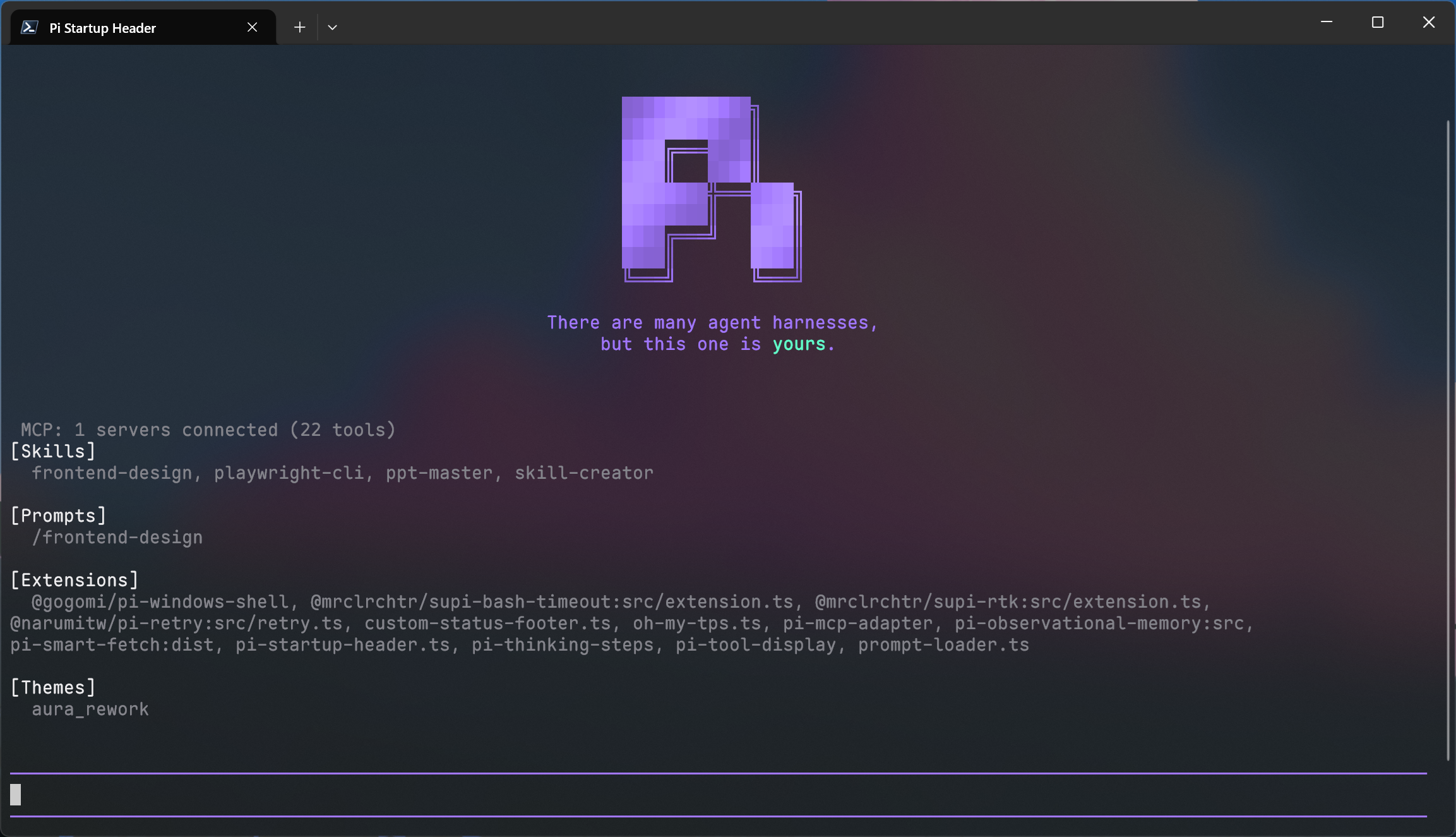
pi-startup-header replaces Pi's default startup header with a theme-aware gradient ASCII header.
Install
npm package
pi install npm:pi-startup-header
Git repository
pi install git:github.com/EnderLiquid/pi-startup-header
What it does
A great AI coding terminal deserves a better startup header — that is exactly what pi-startup-header is for.
Pi's official website already leaves a strong visual impression. Why not bring some of that feeling into the terminal?
pi-startup-header does one thing: it replaces the default top header at session start with a Pi-style gradient ASCII logo and tagline.
By default, the logo and tagline colors come entirely from your current Pi theme, so the result stays visually consistent without any extra configuration.
From the moment Pi starts, the interface feels just a little different.
Configuration
To globally override the header's default colors, create:
~/.pi/agent/pi-startup-header.json
If you use a custom Pi agent directory, the configuration file is located in that directory.
Configuration file format:
{
  "general": {
    "logoGradientBase": "accent",
    "textBase": "accent",
    "textHighlight": "mdLink"
  },
  "themeOverrides": [
    {
      "theme": "my-dark-theme",
      "logoGradientBase": "#7aa2f7",
      "textHighlight": "success"
    }
  ]
}
Each color can use one of the following value types:
- A Pi foreground
ThemeColor, such as"accent","mdLink", or"success". - A six-digit RGB hex value, such as
"#7aa2f7". - An xterm 256-color palette index from
0to255, such as117.
Each color field is resolved independently according to the following precedence:
- An override whose
themeexactly matches the current theme name, including case, takes precedence overgeneral; omitted fields inherit fromgeneral. - When no override matches, values from
generalare used; omittedgeneralfields inherit the built-in defaults. - The built-in defaults use
accentfor the Logo gradient and normal tagline text, andmdLinkfor highlighted text.
Run /reload after editing the configuration file to apply the change. If the JSON or configuration values are invalid, the plugin shows a warning at startup and falls back to the default configuration. Because color names are validated against the Pi version you are running, colors added in newer Pi versions work without upgrading the plugin, and the warning names the offending field if one is not recognized.
Preview
A picture is worth a thousand words:
License
MIT License