
Install
Install with PiG
pig install npm:pi-scoped-models-extra-infoInstall with Pi
pi install npm:pi-scoped-models-extra-infoPackages run code with your permissions and influence agent behavior. Catalog inclusion is not a security audit. Review the source before installing a third-party package.
Pi manifest JSON
The pi field of package.json.
{
  "image": "https://raw.githubusercontent.com/kdejaeger/pi-scoped-models-extra-info/main/screenshot.png",
  "extensions": [
    "index.ts"
  ]
}
README
Written by the package's publisher, shown as published in version 1.3.0 (README.md). PiG does not review it.
pi-scoped-models-extra-info
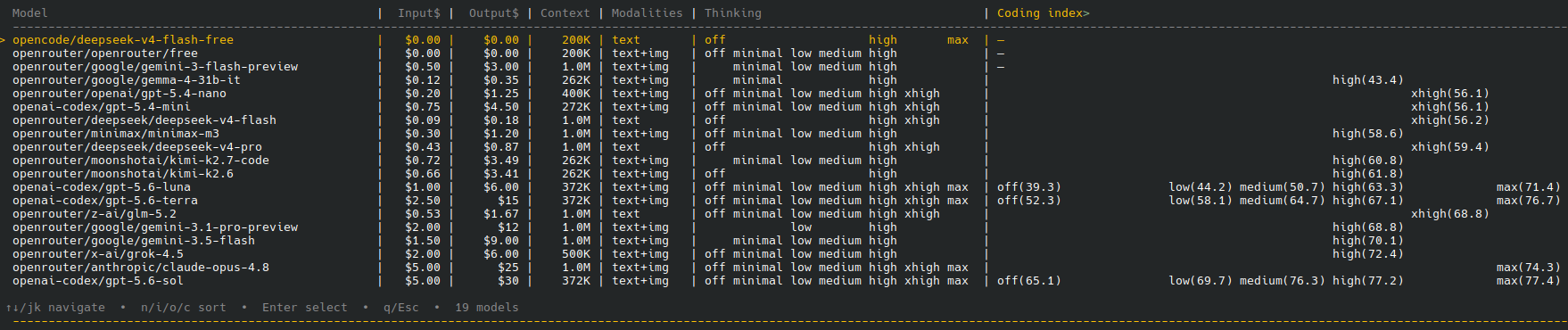
Interactive table of your pi coding agent's scoped models — pricing, context window, thinking levels, modalities, and the optional Artificial Analysis Intelligence Index.
Features
- Rich model table — shows all your enabled (scoped) models in one view
- Columns: model slug, input price, output price, context window, input modalities, thinking levels, and the AA Intelligence Index
- Sortable — press
m(model),i(input price),o(output price),a(AA index) - Model switching — press Enter on any row to switch to that model
- Keyboard navigation —
↑↓/jkto move,Home/Endto jump,q/Escto close - Optional AA index — per-thinking-level Artificial Analysis Intelligence Index (if
AA_API_KEYis set)
Installation
Via git (pi package manager)
pi install git:github.com/kdejaeger/pi-scoped-models-extra-info
Then reload pi (/reload) or restart.
Via local clone
Clone the repo and add to ~/.pi/agent/settings.json:
{
  "extensions": [
    "~/pi-scoped-models-extra-info/index.ts"
  ]
}
Usage
Run the command:
/scoped-models-extra-info
Or use the keyboard shortcut: Alt+E
Navigation
| Key | Action |
|---|---|
↑ / k | Move selection up |
↓ / j | Move selection down |
Home | Jump to first model |
End | Jump to last model |
PageUp | Page up through the model list |
PageDown | Page down through the model list |
Enter / Space | Switch to selected model |
m | Sort by model |
i | Sort by input price |
o | Sort by output price |
a | Sort by AA Intelligence Index |
f | Toggle free-models-only filter |
q / Esc | Close table |
Configuration
AA Intelligence Index (optional)
The extension can show Artificial Analysis Intelligence Index scores per thinking level. To enable this:
- Get an API key from artificialanalysis.ai
- Set the environment variable before starting pi:
export AA_API_KEY="aa_your_key_here"
pi
Or add to your ~/.bashrc / ~/.zshrc:
export AA_API_KEY="aa_your_key_here"
Without this variable, the extension works perfectly — it just omits the AA index column.
Data credit: index values are sourced from Artificial Analysis and shown under their API terms. Free-tier keys only cover the /language/models/free endpoint, which publishes the Intelligence Index and the six capability indices — the old Coding Index was retired by AA.
What it shows
The table displays only the models you have enabled/scoped in your pi settings.json (enabledModels). If you haven't scoped any models, it shows all available models.
Pricing comes from pi's built-in model registry — it's accurate for all providers pi supports (OpenAI, Anthropic, Google, OpenRouter, Groq, etc.).
Thinking levels are resolved from each model's capabilities, with smart fallback for OpenRouter-proxied models.
Package structure
pi-scoped-models-extra-info/
├── index.ts              # Extension source
├── package.json          # Pi package manifest
├── screenshot.png        # Table screenshot
└── README.md             # This file