
Install
Install with PiG
pig install npm:pi-sakura-cyberdeckInstall with Pi
pi install npm:pi-sakura-cyberdeckPackages run code with your permissions and influence agent behavior. Catalog inclusion is not a security audit. Review the source before installing a third-party package.
Pi manifest JSON
The pi field of package.json.
{
  "image": "https://raw.githubusercontent.com/beautifulrem/pi-sakura-cyberdeck/main/docs/screenshots/session.png",
  "themes": [
    "./themes/sakura-macaron.json"
  ],
  "extensions": [
    "./extensions/header/index.ts",
    "./extensions/matrix/index.ts",
    "./extensions/zentui/index.ts",
    "./extensions/claude-shimmer/index.ts",
    "./extensions/changelog/index.ts"
  ]
}
README
Written by the package's publisher, shown as published in version 1.5.2 (README.md). PiG does not review it.
pi-sakura-cyberdeck
Lightweight Sakura Macaron visual pack for Pi: a pastel theme, cyberdeck header, framed tool cards, a Starship-style footer and a Claude-style working line, with no runtime dependencies.
Quick start
pi install git:github.com/beautifulrem/pi-sakura-cyberdeck
Then pick the theme in /settings → sakura-macaron and restart Pi once. Details: Install.
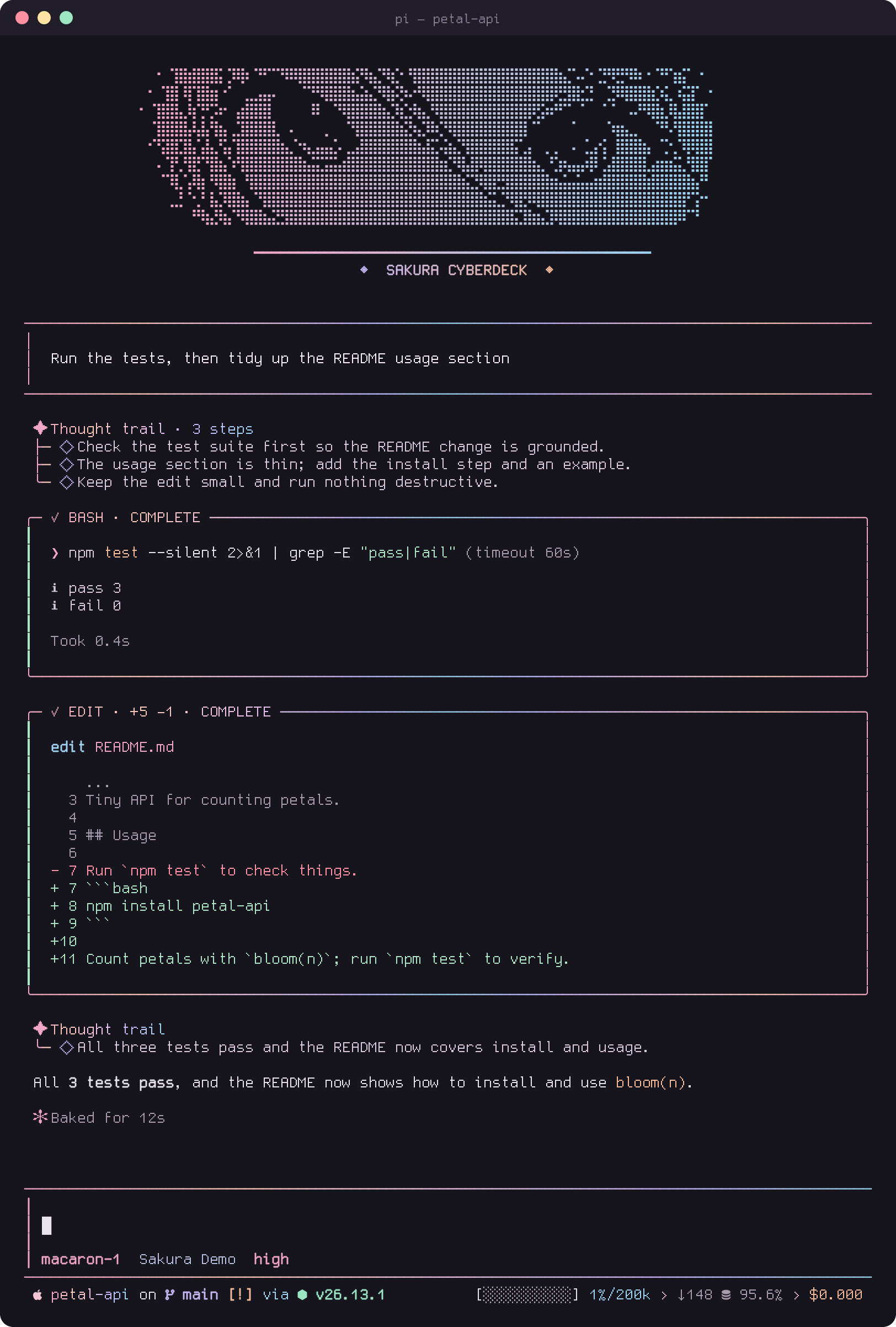
Real Pi 1.5.2 session rendered by this pack (scripted demo model; GohuFont uni14 Nerd Font Mono).
v1.5.2 — frames every tool card (image results included), brings back Pi's bash-mode and scroll cues in the Sakura editor frame, and hardens the footer, settings, changelog viewer, matrix rain and shimmer. See what changed.
What’s inside
| Piece | Role |
|---|---|
Theme sakura-macaron | Dark macaron palette (sakura / peach / petal / lavender / sky / mint / coral), incl. fullscreen scrollbar and search colors |
| Header | Sakura→sky cyberdeck startup art |
| Zentui | Editor rails, Starship-style footer, sakura tool/message frames |
| Claude shimmer | Working line with macaron sweep, effort + token HUD |
| Matrix | Pastel digital-rain widget while working — off by default, /sakura-matrix on |
| Changelog | /sakura-changelog viewer (Pi >= 1.5.0 shows updates in its own “Extension Updates” notice) |
No runtime dependencies; everything uses Pi’s public extension API except three small, guarded render patches (user messages, tool card frames, selector borders).
Other editor extensions (e.g. pi-fff) keep their input and autocomplete inside Zentui’s frame, even when loaded after this pack.
Look
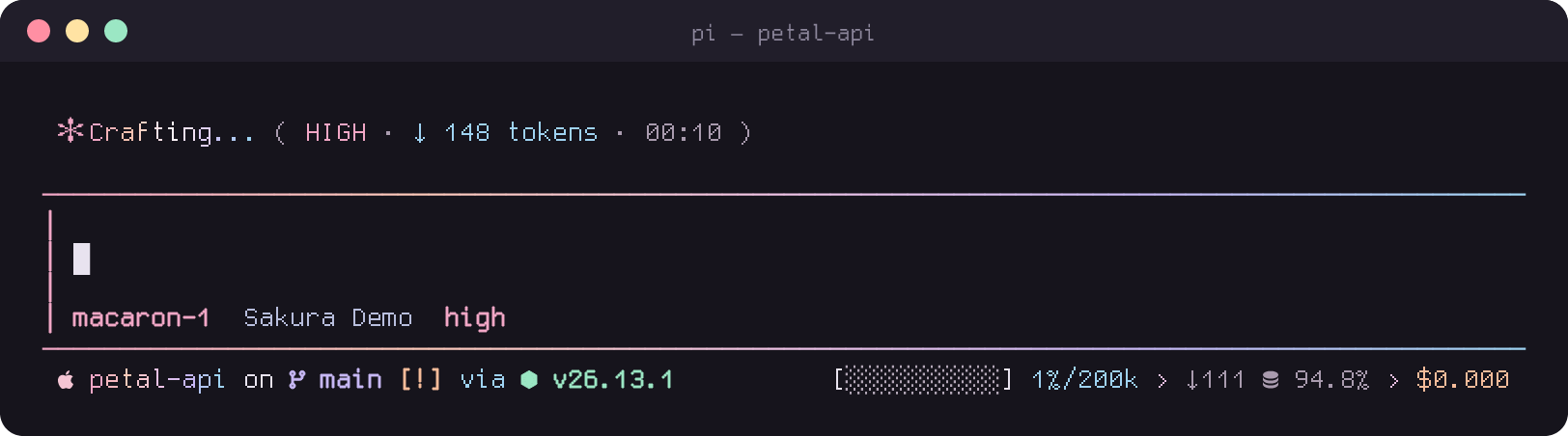
Footer
◆ project on ⎇ main [███░░░░░░░] 4%/128k › ↑12k ↓1.4k › $0.06
In the terminal,
◆and⎇are Nerd Font icons (OS logo and git branch). Without a Nerd Font, seticons.mode: "ascii".
- Context gauge: macaron gauge; context label sky, cost peach
- Separators / cwd / os: sakura gradient accents
- Totals match Pi’s own footer (incl. compaction and subagent/tool usage)
- Static by default;
/zentui pulse onanimates it while the agent works
Working line
✻ Whisking... ( HIGH · ↓ ~1.2k tokens · 00:12 )
- Effort MINIMAL→MAX, tier-colored; one verb per run
- Tokens:
~marks the live estimate; the provider’s final count replaces it and accumulates across tool turns - Fades toward coral when the stream stalls; pulses mint while a tool runs
✻ Whisked for 12safter a successful run (whole-run time)
History
╭─ ✓ READ · COMPLETE ──────────────╮
┃  read src/app.ts                 │
┃  …Pi’s own output, unchanged…    │
╰──────────────────────────────────╯
- Sent prompts keep Sakura gradient borders in both color-source modes;
colorSources.userMessagescontrols the rail, not the gradient frame - Tool cards: one continuous Sakura gradient across the whole title (rules, status symbol/text and diff counts); semantic status rail (
toolTitlerunning /successdone /errorfailed); result output stays Pi’s own render, byte-for-byte - Status label always carries the state:
◆ READ · RUNNING,✓ READ · COMPLETE,× READ · FAILED - Diff results (
edit) add their+N −Mline counts from Pi's own result diff (details.diff); other tools never show a count - Bash headers use
❯, not$:❯ cd pi-sakura-cyberdeck && npm run typecheck && npm test (timeout 120s) - Shell headers use Pi's native syntax grammar and active
syntax*theme colors (keywords/builtins, strings, variables, comments). Long commands wrap with a hanging indent; collapsed cards show five command rows with the configured expand-key hint. Expand for the full command, including multiline scripts. PowerShell keeps itsPS>prompt and grammar. Requires the publicregisterToolRendererAPI; older hosts keep native headers. - Warning/error notices, including output-truncation warnings, retain Pi's semantic theme colors. A log containing the word
Errordoes not turn a successful tool intoFAILED; only Pi's result status does. Arbitrary output/ANSI colors are not guessed or recolored. editdiffs and image results (readof a PNG on a vision model, browser screenshots) are framed like any other tool card; terminal image rows only gain the left rail so nothing is drawn over the picture.!cmdoutput stays stock Pi- Hidden thinking shows a sakura
✦ Thoughtlabel; visible thinking is compressed into a✦ Thought traildigest (/zentui thinking-trail offshows Pi's stock rendering)
Thought trail
✦ Thought trail · 3 steps
 ├─ ◇ First step here.
 ├─ ◇ Second step that is quite long
 │    and should wrap nicely.
 ╰─ ◇ Third final step.
- One step per thinking paragraph, first line only; rails/
◇in the sakura gradient, body in the thinking tint - Wrapped rows keep their
│rail, including long inline code, URLs, backticks and math; each digest row is literal text rather than reparsed Markdown. Long trails cap at 16 rows, then╰─ … +N more. Very narrow widths fall back to Pi's normal thinking render. - Display-only via Pi's public markdown transformer; the session and model context keep the full thinking text
Requirements
- Pi >= 0.87.1 (tested on 0.87.1, 0.99.1 and 1.5.2)
- Dark terminal background (the theme does not paint a background)
- Truecolor recommended; 256-color terminals get the nearest palette colors,
NO_COLORdisables the pack’s own colors - Nerd Font for the default icons (
icons.mode: "ascii"works without)
Recommended terminal font: GohuFont uni14 Nerd Font Mono as the primary font, with Zpix and Unifont as fallbacks. This pixel stack is what the screenshots use: Zpix covers CJK and symbols such as ✦ ◇ ✻, and Unifont catches whatever is left. Set the fallbacks in your terminal's font settings.
Install
pi install git:github.com/beautifulrem/pi-sakura-cyberdeck
Local:
pi install /path/to/pi-sakura-cyberdeck
Then /settings → theme sakura-macaron (Pi 0.99 defaults to its system theme). Restart Pi once.
Prefer this package’s shimmer over stock
npm:pi-claude-shimmer.
Updating
For an unpinned Git installation:
pi update git:github.com/beautifulrem/pi-sakura-cyberdeck
Restart Pi after updating. Pi >= 1.5.0 shows what changed under Extension Updates on the next fresh launch (its own package-changelog notice, condensed when collapseChangelog is set). On older Pi versions, use /sakura-changelog; the command always opens the full changelog inside Pi. See also CHANGELOG.md.
Pi does not push package updates automatically. Users who pinned a tag or commit must explicitly select the new version:
pi install git:github.com/beautifulrem/pi-sakura-cyberdeck@v1.2.0
Notes for 1.2.0:
- Existing theme and Zentui settings are preserved.
- The fixed-editor compositor was removed. Old
fixedEditorsettings are removed from your config automatically (with a one-time notice if it was enabled); use Pi’s fullscreen mode below instead. - If an earlier
/zentui fixed-editor disableturned your editor off (a 1.1.x bug), run/zentui editor ononce. - Sakura Matrix is now off by default. If you had explicitly saved it on, it stays on; otherwise run
/sakura-matrix on. - The footer pulse animation is now opt-in (
/zentui pulse on).
Sticky editor (Pi fullscreen mode)
For a sticky editor and scrollable transcript use Pi’s native fullscreen TUI:
// ~/.pi/agent/settings.json
{
  "tuiMode": "fullscreen"
}
Or start with pi --tui-mode fullscreen. Pack styling (editor chrome, footer, shimmer, theme scrollbar/search colors) still applies.
Load only some pieces
Pi can filter a package's resources. Replace the plain source string in ~/.pi/agent/settings.json with an object:
{
  "packages": [
    {
      "source": "git:github.com/beautifulrem/pi-sakura-cyberdeck",
      // everything except the startup header and matrix rain
      "extensions": ["extensions/*/index.ts", "!extensions/header/index.ts", "!extensions/matrix/index.ts"]
    }
  ]
}
Use "extensions": [] to keep just the sakura-macaron theme. pi config toggles the same resources interactively.
Configuration
Zentui config file: ~/.pi/agent/sakura-cyberdeck-zentui.json (edit with /zentui). If the file contains invalid JSON, the pack warns you at startup and does not overwrite it.
// ~/.pi/agent/sakura-cyberdeck-zentui.json (excerpt)
{
  "colors": {
    "contextNormal": "syntaxFunction",
    "cost": "mdCode",
    "editorBorder": "sakura-macaron-gradient"
  },
  "features": {
    "messageStyle": true,     // sakura frames for messages and tool cards
    "thinkingTrail": true     // compress visible thinking into a "✦ Thought trail" digest
  },
  "animations": {
    "footerPulse": false      // animate footer gradients while the agent works
  }
}
Matrix settings live in ~/.pi/agent/sakura-cyberdeck-matrix.json (edit with /sakura-matrix).
Commands
/zentui                                   settings UI (editor, footer, messages, icons, colors…)
/zentui editor|statusline|messages|copy-friendly|thinking-trail|pulse on|off|toggle
/zentui format "<template>"               custom footer format ("" = segment layout)

/sakura-matrix [status]                   current rain settings
/sakura-matrix on|off                     enable / disable the rain widget
/sakura-matrix preview                    show the rain for 5 seconds
/sakura-matrix fps N | density N | height N
/sakura-matrix help

/sakura-changelog [version]               scrollable changelog (q / Esc to close)
Conflicts
Avoid stacking with pi-zentui, pi-powerline-footer, stock pi-claude-shimmer, or a second copy of this pack. They share the footer / working line / editor surfaces.
Changelog
Full history: CHANGELOG.md (also available in Pi via /sakura-changelog).
1.5.2
- Tool cards with image results (
readof a PNG on a vision model, browser screenshots) are framed like every other card; terminal image rows only gain the left rail. - The framed editor shows Pi's bash-mode colour while the prompt starts with
!, and keeps the↑/↓ N morescroll labels. Sent prompts keep Pi's OSC 133 prompt markers at line start. - Footer: right side (context, tokens, cost) survives narrow terminals; virtual models show context;
literal
|separators keep neighbouring colours; another extension's footer is never removed; fewer git/runtime probes. - Settings,
/sakura-changelog, matrix rain and shimmer fixes. See CHANGELOG.md.
Earlier versions
See CHANGELOG.md for 1.0.0 – 1.5.1.
Development
npm run dev:setup     # installs Pi + TypeScript into .dev/ (not shipped, no package deps)
npm run verify        # package check + strict typecheck + unit tests
PI_HOST_ROOT=/path/to/node_modules/@earendil-works/pi-coding-agent npm test   # test against another Pi
Node >= 22.18 is required (the suite runs on native type stripping). When debugging the TUI, Pi's PI_TUI_WRITE_LOG captures the raw ANSI stream.
License
MIT. Claude shimmer is a sakura-themed fork of pi-claude-shimmer (MIT). Zentui is a modified copy of pi-zentui (MIT, see NOTICE).