
Install
Install with PiG
pig install npm:pi-runwayInstall with Pi
pi install npm:pi-runwayPackages run code with your permissions and influence agent behavior. Catalog inclusion is not a security audit. Review the source before installing a third-party package.
Pi manifest JSON
The pi field of package.json.
{
  "image": "https://raw.githubusercontent.com/purboo/pi-runway/main/design/preview.png",
  "extensions": [
    "./index.ts"
  ]
}
README
Written by the package's publisher, shown as published in version 0.2.6 (README.md). PiG does not review it.
pi-runway
The editor's frame tells you everything — and nothing you don't need.
An editor frame for pi. The top edge shows where you are and which model you're talking to. The bottom edge is your context: it fills up like a runway. The frame's color and motion tell you whose turn it is. It replaces pi's footer, so you get those rows back for the conversation.
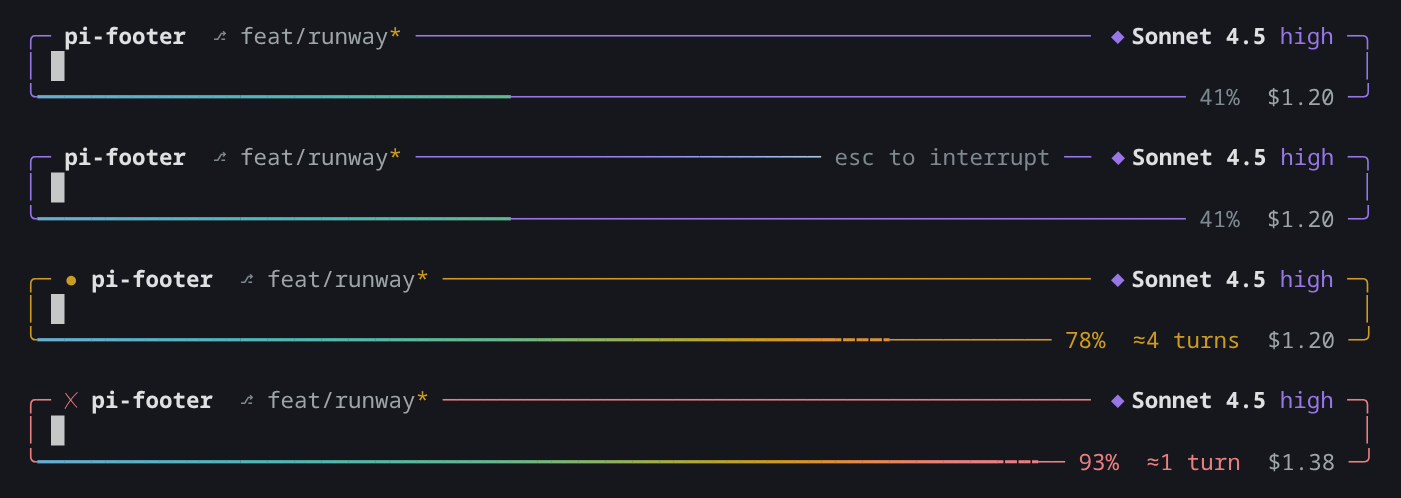
Install
pi install npm:pi-runway
There is nothing to configure.
To get pi's own footer (token counts, cost) and editor back for a while, run /runway (or /runway off, /runway on). The choice lasts until pi exits.
Reading it
╭─ pi-footer  ⎇ feat/x* ─────────────────────── esc to interrupt ── ◆ Sonnet 4.5 high ─╮
│ make it pop█                                                                          │
╰━━━━━━━━━━━━━━━━━━━━━━━━━━━━━━━━━━━━━━━━━━━━━━━━━╍╍╍╍───────────────── 78%  ≈4 turns ─╯
Top edge
| (blank) | (blank) |
|---|---|
pi-footer | Repo name, plus the subdirectory if you're in one (pi-footer/src). Outside git: the folder name. |
⎇ feat/x | Git branch. Its presence also tells you the folder is a repo. |
* | Uncommitted changes. |
mcp 3 | Status text from other extensions (ctx.ui.setStatus()). |
esc to interrupt | Only while the agent works: the one thing you can do then. |
◆ Sonnet 4.5 high | The model, followed by the thinking level, both in the level's color (the same color pi gives the editor border). Models that can't think show no level. A provider prefix appears only when the same model is available from more than one provider. A routed virtual model shows as auto → model. |
Bottom edge
| (blank) | (blank) |
|---|---|
━━━━━━ | Context used. Cool colors while there's room, warmer as it fills. |
╍╍╍╍ | From 70%: how much the next prompt will probably use. |
78% | Context used. Dim below 70%, yellow from 70%, red from 90%. |
~18% | An estimate, right after a compaction or a context edit, until the next response measures the context again. |
≈4 turns | From 70%: prompts left before the window is full, from how much your last three prompts grew it. |
The frame itself
| (blank) | (blank) |
|---|---|
| Thinking-level color, still | Idle. Your turn. |
| A light running along the top | The agent is working — however long it takes. |
Yellow, with ● | An extension is waiting for your answer. |
Red, with ✗ | The last run failed. Stays until your next prompt. |
pi's own retry and compaction messages show as usual.
Design rules
- Color only for signals. Everything is quiet until something needs you.
- Your theme's colors. Every color comes from the active pi theme.
- No Nerd Font needed. Only standard Unicode symbols.
- Works with every provider. Nothing that only some providers report.
- Graceful when narrow. Things step aside one at a time; the context reading and the run-state mark always stay.
- Fast. Nothing is computed while you type. The frame is built from cached strings; session data is read on events (end of a message, end of a run, compaction, model change), and git only after a tool may have touched files.
Development
bun install
bun run link-pi      # symlink the host-provided pi packages for type checking
bun run check        # tsc + bun test
pi -ne -e ./index.ts # try it in isolation