
Install
Install with PiG
pig install npm:pi-response-durationInstall with Pi
pi install npm:pi-response-durationPackages run code with your permissions and influence agent behavior. Catalog inclusion is not a security audit. Review the source before installing a third-party package.
Pi manifest JSON
The pi field of package.json.
{
  "image": "https://raw.githubusercontent.com/tech-msc/pi-response-duration/main/assets/worked-underline.png",
  "extensions": [
    "./index.ts"
  ]
}
README
Written by the package's publisher, shown as published in version 1.0.3 (README.md). PiG does not review it.
Pi Response Duration
A small Pi extension that appends the elapsed time to the transcript after a long, completed user response.
Example
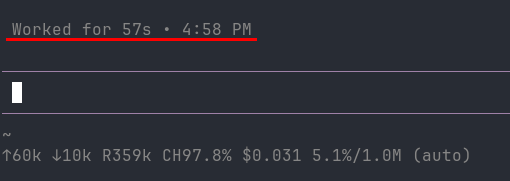
Behavior
- Measures the main agent's observable response from
before_agent_start(for auserrun) toagent_settled, not from the exact moment the user sends the message. This includes the agent's turns and tool work, including time spent waiting for foreground subagents, rather than only model-generation time. - Measures elapsed wall-clock time once, without summing subagent durations. Background jobs may continue after the main agent settles; the annotation does not measure their global completion.
- Adds an entry only for completed responses that took more than 30 seconds.
- Does not add entries for aborted or failed runs, or outside the interactive TUI.
- Rounds up to whole seconds (
31s,2m 4s) and shows the local time using the system locale. - The annotation is a custom transcript entry and is not sent back to the model as conversation context.
Install
Install the published npm package with:
pi install npm:pi-response-duration
For a manual personal install, copy this directory to ~/.pi/agent/extensions/response-duration/. Pi discovers the package manifest and loads index.ts automatically on startup. Restart Pi after installing or moving it.
Alternatively, from a checkout containing this package, install the local path with:
pi install ./response-duration
Development
Run the tests with Node's built-in test runner:
npm test
Preview the npm archive without publishing:
npm pack --dry-run
Package metadata
The published npm package is pi-response-duration. It uses the MIT license. Pi provides @earendil-works/pi-coding-agent and @earendil-works/pi-tui at runtime; they are intentionally declared as peer dependencies rather than bundled runtime dependencies.