
Install
Install with PiG
pig install npm:pi-plugin-managerInstall with Pi
pi install npm:pi-plugin-managerPackages run code with your permissions and influence agent behavior. Catalog inclusion is not a security audit. Review the source before installing a third-party package.
Pi manifest JSON
The pi field of package.json.
{
  "image": "https://github.com/wyattferguson/pi-plugin-manager/raw/main/assets/search-screenshot.png",
  "skills": [
    "./skills"
  ],
  "extensions": [
    "./extensions"
  ]
}
README
Written by the package's publisher, shown as published in version 0.2.3 (README.md). PiG does not review it.
pi-plugin-manager
Browse, install, and remove Pi plugins — without leaving the terminal.


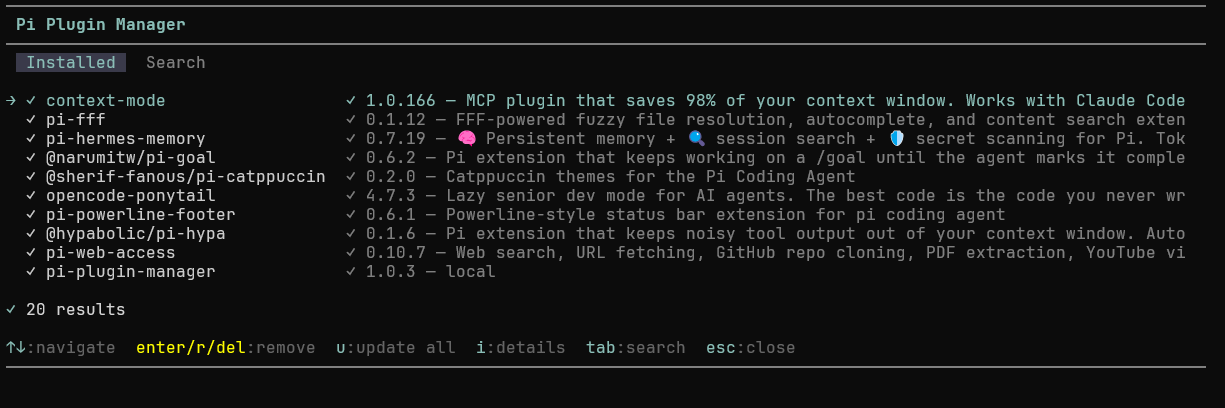
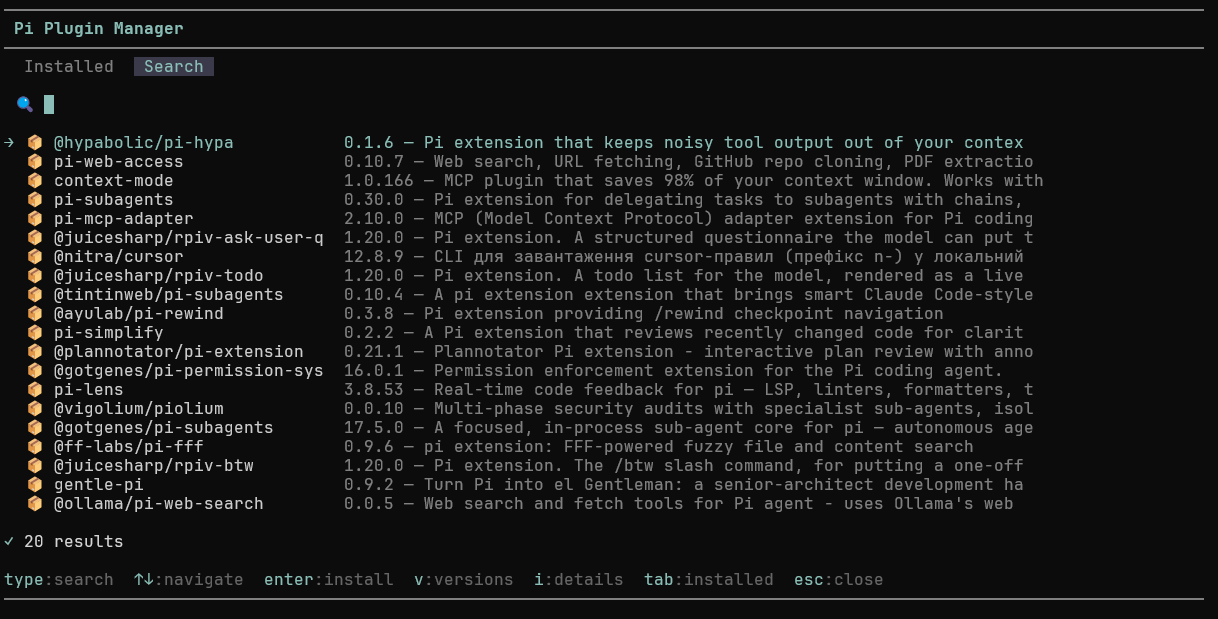
A TUI for managing Pi plugins — see what's installed, search the catalog, install and remove packages, and bulk-update everything that's out of date. All from one screen, all with keyboard shortcuts.
Install
pi install npm:pi-plugin-manager
That's it. No config files, no API keys.
Why this exists
Pi has a growing ecosystem of extensions, skills, and themes — everything from web search and subagent delegation to custom providers and status bars. But managing them has meant juggling pi install, pi remove, pi list, and pi check-updates commands across separate terminal sessions.
This puts it all in one place. A single TUI that shows your installed plugins, checks for updates, lets you search the catalog, and handles installs and removals — all with keyboard shortcuts, no context-switching.
What you can do
| Want | How |
|---|---|
| See every plugin you've installed | Open the Installed tab — name, version, description, and type (📦 npm, 🔀 git, 📁 local) at a glance |
| Check for updates | Installed tab shows 🔄 on outdated packages and the version bump (1.2.3 → 2.0.0) |
| Update everything outdated | One key — u — updates all outdated npm packages in sequence |
| Search the package catalog | Switch to Search tab, type to find plugins on npm tagged with pi-package |
| Install something | Search results show name, version, and description. Hit Enter to see details, then Enter again to install |
| Remove a plugin | Arrow to it, press r, confirm with y. Done |
| See what a package is about | i on any installed package opens a details panel with description, author, license, downloads, and publish date |
| Pin a specific version | Pick an exact version before installing instead of grabbing latest |
Usage
Open the manager with:
/plugins
Keyboard reference
| Key | Action |
|---|---|
↑ ↓ | Navigate the list |
Tab | Switch between Installed and Search tabs |
Enter | Open details / confirm install (search) / confirm remove (installed) |
r / Delete | Remove the selected package |
u | Update all outdated packages |
i | Show package details |
v | Pick a specific version (before install) |
PageUp PageDown | Jump 20 items at a time |
Escape | Go back / close the manager |
y n | Confirm or cancel an action |
What about updates after install?
The Installed tab checks npm for newer versions when it opens. Packages with updates show a 🔄 icon and the version bump. Press u to update everything — it installs npm:name@latest for each outdated package individually (which means pinned versions stay pinned).
License
Contact + Support
Created by Wyatt Ferguson
For any questions or comments heres how you can reach me:
:octopus: Follow me on Github @wyattferguson
:mailbox_with_mail: Email me at wyattxdev@duck.com
:tropical_drink: Follow on BlueSky @wyattf
If you find this useful and want to tip me a little coffee money:
:coffee: Buy Me A Coffee