
Install
Install with PiG
pig install npm:pi-permission-bash-cmd-checkerInstall with Pi
pi install npm:pi-permission-bash-cmd-checkerPackages run code with your permissions and influence agent behavior. Catalog inclusion is not a security audit. Review the source before installing a third-party package.
Pi manifest JSON
The pi field of package.json.
{
  "image": "https://raw.githubusercontent.com/gszj2018/pi-permission-bash-cmd-checker/refs/heads/media/media/screenshot_en.png",
  "extensions": [
    "./extension/index.ts"
  ]
}
README
Written by the package's publisher, shown as published in version 0.3.0 (README.md). PiG does not review it.
pi-permission-bash-cmd-checker
English | 简体中文
A Pi Coding Agent extension package that enhances
@gotgenes/pi-permission-system
with bash command explanations and classifier-based risk assessment in the terminal UI.
Inspired by GitHub Copilot in Visual Studio Code.
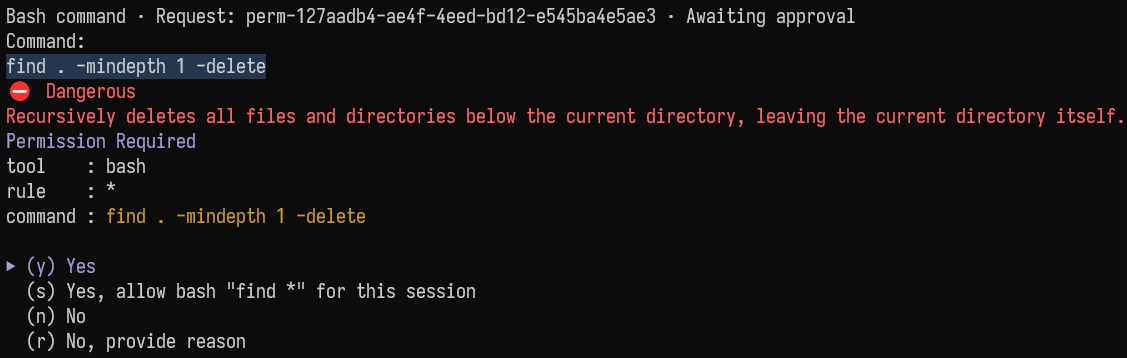
Features
1. Command Explanations
See a short explanation of what a bash command does, in English or Simplified Chinese.
2. Risk Assessment and Optional Blocking
A classifier (default: typesafe/jev-latest) assesses command risk:
| Result | Display | Meaning |
|---|---|---|
safe-ro | ✅ Likely Safe (RO) | Read-only operations that are likely safe. |
safe-rw | ℹ Likely Safe (RW) | Operations that modify data but are likely safe. |
unsafe | ⛔ Dangerous | Operations that may be dangerous. |
unknown | ⚠ Unknown | The risk could not be determined with confidence. |
Set autoBlockUnsafe to true to block commands assessed as dangerous automatically.
This option is disabled by default.
3. Command Preview and External Viewer
Commands, risk labels, and explanations appear in a live preview above the editor, where long commands are shown truncated. Press Alt+C to view the complete command in the configured external viewer.
Installation
Requirements:
- A Pi version with Classifier/Jev support.
@gotgenes/pi-permission-system
This extension works only in the interactive TUI.
Install as a Pi package:
# From npm
pi install npm:pi-permission-bash-cmd-checker

# From this GitHub repository
pi install git:github.com/gszj2018/pi-permission-bash-cmd-checker
Usage
Enable Command Analysis
Add bash-cmd-checker to authorizerChain in your permission-system configuration, normally at
~/.pi/agent/extensions/pi-permission-system/config.json:
{
  "authorizerChain": ["bash-cmd-checker"]
}
Keep your existing permission rules and other chain links; placing the checker near the start of the
chain is recommended. Analysis covers bash requests that require approval (ask).
Run /reload after changing the configuration.
If you use project-level permission settings, make sure the chain in effect also includes the checker.
Opening the Full Command
| Key | Action |
|---|---|
| Alt+C, or your configured shortcut | Open the complete command in the configured external viewer. |
Configuration
Create ~/.pi/agent/bash-cmd-checker.json to customize the extension, then run /reload to apply
your changes. If PI_CODING_AGENT_DIR is set, place the file in that directory instead.
All fields are optional. If no configuration file exists, the following defaults apply:
{
  "llm": {
    "model": null,
    "language": "en",
    "timeoutMs": 30000
  },
  "classifier": {
    "model": { "provider": "typesafe", "id": "jev-latest" },
    "timeoutMs": 10000,
    "thresholds": { "safe": 0.5, "unsafe": 0.3, "confidence": 0.8 }
  },
  "widget": { "commandViewerShortcut": "alt+c" },
  "externalViewer": {
    "command": "code",
    "args": [],
    "mode": "detach",
    "filePath": null
  },
  "autoBlockUnsafe": false
}
See schemas/bash-cmd-checker.schema.json for the full
JSON Schema. An optional $schema field enables schema validation in your editor.
Configuration Fields
| Field | Default | Description |
|---|---|---|
llm.model | null | Model used for explanations, in { "provider": "…", "id": "…" } form.null uses the current session's default model. |
llm.language | "en" | Language for explanations: en for English, zh for Simplified Chinese. |
llm.timeoutMs | 30000 | Timeout for explanations, in milliseconds. |
classifier.model | typesafe/jev-latest | Model used for risk classification, in { "provider": "…", "id": "…" } form.null disables risk assessment only. |
classifier.timeoutMs | 10000 | Timeout for risk assessment, in milliseconds. |
classifier.thresholds.safe | 0.5 | Minimum probability required for a safe category. |
classifier.thresholds.unsafe | 0.3 | Minimum probability required for the unsafe category. |
classifier.thresholds.confidence | 0.8 | Minimum confidence required to accept an assessment. |
widget.commandViewerShortcut | "alt+c" | Shortcut for opening the complete command in the external viewer. |
externalViewer.command | "code" | Viewer executable name or path.null leaves the viewer unconfigured. |
externalViewer.args | [] | Literal arguments passed to the viewer before the command file path. |
externalViewer.mode | "detach" | detach starts the viewer in the background; wait suspends the TUI until the viewer exits. |
externalViewer.filePath | null | Directory for session command files.null uses a fixed subdirectory of the system temporary directory. |
autoBlockUnsafe | false | Automatically block commands assessed as dangerous. |
External Viewer
- The complete command is saved to a session
.shfile that is overwritten on the next open and is never deleted automatically. It may contain secrets; pass your viewer's read-only arguments (for example["-R"]for nvim) if you want it read-only. detachkeeps the Pi TUI usable and the viewer runs separately, so configure a GUI editor or a launcher that opens its own pane.waitsuspends Pi until the viewer exits.- On Windows, configure the actual
Code.exepath:codeusually resolves tocode.cmd, which is not supported, and there is no shell fallback. Configure only an editor or a trusted launcher.
Notes and Limitations
- Risk labels and thresholds are not safety guarantees. This extension never approves commands automatically and does not replace permission rules or a sandbox. When analysis fails or is unavailable, the permission system still decides whether to approve.
- Only native
bashrequests that require approval are covered. Aliased shell tools, other tools, policy decisions, session approvals, yolo approvals, and requests decided by an earlier chain link are not analyzed. - The extension runs only in the interactive TUI. A forwarded bash request from a non-TUI subagent can be analyzed by the parent TUI session.
- Complete commands are sent to the selected model providers without redaction and may contain secrets. Commands and explanations are also visible in the terminal. Review the provider's privacy policy before use.
- Background analysis may incur costs that are not automatically included in Pi's session cost display.
Development
npm install
npm test
npm run typecheck
To load the extension locally from the repository root:
pi -e ./extension/index.ts
The project uses TypeScript and Node.js's built-in test runner.
Project Structure
pi-permission-bash-cmd-checker/
├── extension/
│   ├── index.ts                # Extension entry point (dependency assembly)
│   ├── lifecycle.ts            # TUI detection, initialization, and session lifecycle
│   ├── config.ts               # Configuration loading and strict validation
│   ├── types.ts                # Shared types and implementation-independent contracts
│   ├── utils.ts                # Shared predicates
│   ├── command.ts              # Full bash command extraction
│   ├── utils-pi.ts             # Prefixed notifications with failure fallback
│   ├── permissions.ts          # Service binding, event parsing, and arbitration
│   ├── analysis.ts             # Parallel analysis tasks, deadlines, and cancellation
│   ├── llm.ts                  # Explanation model adapter
│   ├── classifier.ts           # Classifier model adapter
│   ├── risk.ts                 # Risk threshold decisions
│   ├── state.ts                # Session state, generations, and records
│   ├── widget.ts               # Preview widget and viewer controller
│   ├── external-viewer.ts      # Session command files and viewer launch
│   ├── external-viewer-node.ts # Node filesystem and process adapters
│   ├── shortcut.ts             # Viewer shortcut parsing
│   └── terminal-text.ts        # Colors, safe escaping, and wrapping
├── schemas/
│   └── bash-cmd-checker.schema.json
└── tests/                      # Unit and integration tests