
Install
Install with PiG
pig install npm:pi-opiumInstall with Pi
pi install npm:pi-opiumPackages run code with your permissions and influence agent behavior. Catalog inclusion is not a security audit. Review the source before installing a third-party package.
Pi manifest JSON
The pi field of package.json.
{
  "image": "https://raw.githubusercontent.com/akholod/pi-opium/main/assets/hero.webp",
  "skills": [
    "./skills"
  ],
  "extensions": [
    "./extensions"
  ]
}
README
Written by the package's publisher, shown as published in version 0.6.2 (README.md). PiG does not review it.

Opium


Turn your Pi session into a small team.
The problem
One agent doing everything in one chat gets slow and blurry. It searches the codebase, reads docs, writes code and reviews it, all in the same context, while you wait. The context fills up with grep output, and a big decision rests on a single model's opinion.
What Opium does
Your Pi session becomes the lead. It hands work to specialists that run in the background while you keep talking, and their results come back to your session on their own. When a decision matters, it asks a council of different models and shows you where they agree.
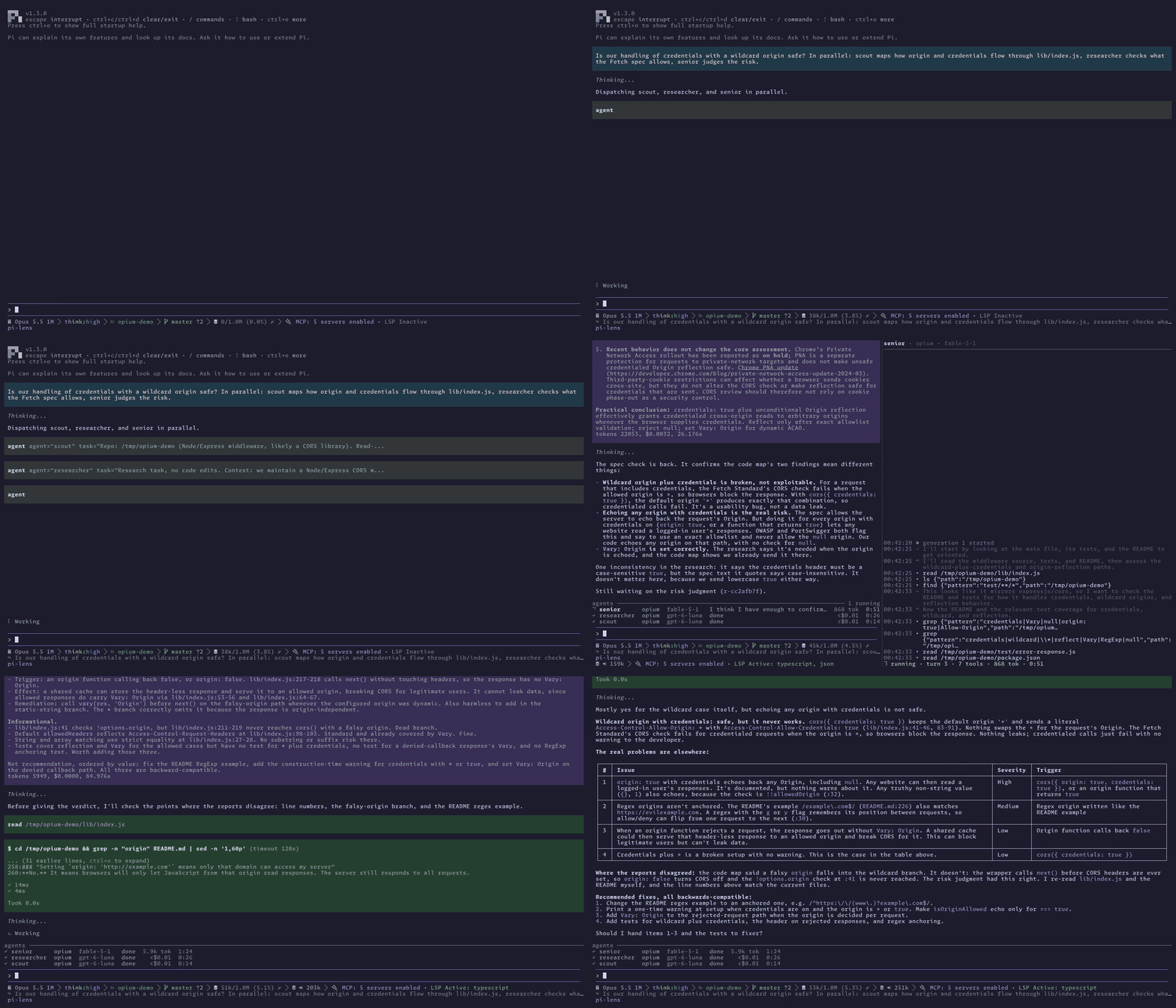
One request, three agents at once, each in its own live pane (tmux here). The lead merges their reports and checks where they disagree.
Install
Paste this into your coding agent (Pi, Claude Code, Codex, ...):
Install and configure Opium for Pi by following https://raw.githubusercontent.com/akholod/pi-opium/main/docs/install.md
It asks which subscriptions you have and whether you want the full setup with the recommended extras, gives every agent a model that fits, and checks the result.
Or by hand:
pi install npm:pi-opium
Start Pi (or /reload a running session) and keep working as usual. Every agent starts on your
session's model, so it works with whatever provider you have.
Your session's model is the lead: it decides what to hand off and to whom.
Pick a strong one (/model). For web research, also install
pi-web-access.
How it looks in practice
Just ask:
- "Find where auth tokens are refreshed" → scout searches, you keep going.
- "Fix the failing tests in
api/" → fixer works in the background and reports back. - "Review this change before I merge it" → reviewer checks the code and whether its tests would catch a bug.
- "Get a second opinion on this migration plan" → the council answers.
While agents run, a list above the editor shows what each one is doing. Inside herdr or tmux, each one also gets a read-only pane that closes when it's done.
The team
| Agent | Does |
|---|---|
| scout | finds files and code, fast |
| researcher | reads docs and the web, answers with sources |
| senior | architecture, design, stuck bugs, simplification |
| designer | UI and UX, built and polished |
| fixer | writes the code for a clear, bounded task |
| reviewer | fast review of a finished change: code and its tests |
| tester | writes tests that would catch a bug |
| fast-generic | git, commits, tests, builds |
| vision | images for models that can't see them |
| council | three models answer, one sums up where they land |
tester and reviewer come with two bundled skills, write-tests and
review-tests.
Handy commands
/council <question>: ask the council directly./opium-preset [name|off]: switch the models the team uses./opium-doctor: check your setup;--livealso pings every model./reflect: review how the session went and suggest improvements./deepwork <task>: a stricter workflow for big, risky changes./orchestrator off: back to a plain Pi session.
Works better with
- pi-web-access: lets researcher search the web and read pages.
npm i -g ctx7(the Context7 CLI; ornpx ctx7@latest, optionalctx7 loginfor higher limits): up-to-date library docs for researcher.pi mcp add gh_grep --url https://mcp.grep.app: GitHub code search for researcher.- Any other MCP server added with
pi mcp add: give it to an agent inopium.json, for example"scout": { "mcpServers": ["my-index"] }.
Config
One file: ~/.pi/agent/opium.json, created on first run. Out of the box
every agent uses your session's model. Give an agent its own model, a
backup model or a time limit:
{
  "agents": {
    "senior": { "model": "anthropic/claude-fable-5-1", "thinking": "high" },
    "fixer": {
      "model": "openai-codex/gpt-6-luna",
      "fallbackModels": ["anthropic/claude-sonnet-5-5"]
    }
  }
}
Codemode. researcher and senior can use Pi's codemode tool:
one short script that runs several reads, searches or fetches in parallel
and filters big output before the model sees it. The scripts share a few
workers across your whole Pi process, so Opium sets
PI_CODEMODE_MAX_WORKERS=6 when it loads, unless you set it yourself (your
value always wins; /opium-doctor warns below 4). To turn codemode off for
an agent, copy its file from the package's agents/ folder to
~/.pi/agent/agents/ and remove codemode from the tools: line; your
copy replaces the packaged one. Codemode itself is a Pi setting
(codemode.mode); Opium does not change it.
Your own agents. Put a new .md file in ~/.pi/agent/agents/ with
advertise: true in its frontmatter, and the lead sees it in its team
list with its description and can hand it work. See
docs/agents.md.
The council needs different models. Three seats on the same model is
one opinion said three times. Give councillor-alpha, councillor-beta
and councillor-gamma different models; Opium warns you until you do.
Ready-made presets for Claude, ChatGPT, Copilot, OpenCode Go, Gemini and a mix of them: docs/models.md.
Docs
- Install: step by step, written for an agent but fine by hand.
- Models: which model for which role, presets per subscription.
- Agents: who does what, what each may do, time limits.
- Configuration: every option in
opium.json. - Troubleshooting: what the doctor's warnings mean.
Under the hood
Agents run inside your Pi process through pi-agent-runner. They follow your permission rules, ask you in the usual dialog, and wrap up with a report when their time runs out.
Credits
Inspired by oh-my-opencode-slim.
MIT