
Install
Install with PiG
pig install npm:pi-matrix-integrationInstall with Pi
pi install npm:pi-matrix-integrationPackages run code with your permissions and influence agent behavior. Catalog inclusion is not a security audit. Review the source before installing a third-party package.
Pi manifest JSON
The pi field of package.json.
{
  "extensions": [
    "./index.ts"
  ]
}
README
Written by the package's publisher, shown as published in version 0.9.0 (README.md). PiG does not review it.
pi-matrix-integration


Control your Pi terminal from anywhere, anytime
This is pi-matrix-integration, an extension that connects a Pi coding agent session to a Matrix chat room.
Pi normally runs in a terminal, which is nice. But not when you are away from that machine and don't have access. This extension fixes that.
Pi posts what it is doing into the matrix messaging room - milestones, questions, final answers - and you can reply. Just like the terminal. But now from your phone, tablet or PC.
And you can seamlessly switch back and forth between the terminal and app.
Use Cases
1. Remote Control of your Pi agents
Matrix provides messaging access from desktop, tablet and mobile devices to the Pi session in your terminal. For matrix messaging you will need a matrix app, like Element. But because it's Matrix you can also bridge it with Whatsapp, Discord, Slack, Telegram etc. You decide.
2. Desktop Companion App
Although not the original reason why I created this extension, I find that running Element on the desktop next to the Pi terminal session is really usefull as a high level overview of my Pi sessions (see example 2)
3. Team access to Pi terminal agent without SSH
Provide access to Pi sessions for team members without having to open up SSH and all its security hardening.
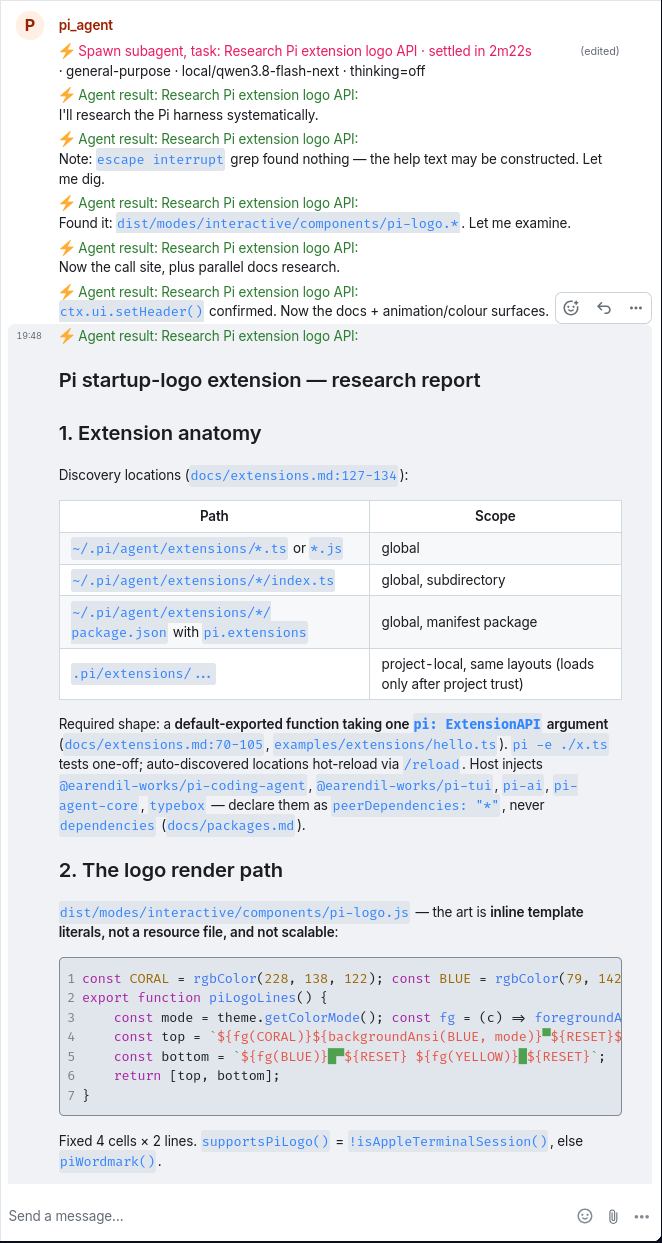
Desktop Element - Sub-agents spawning and checking back in, milestones and rich formatting in an Element room
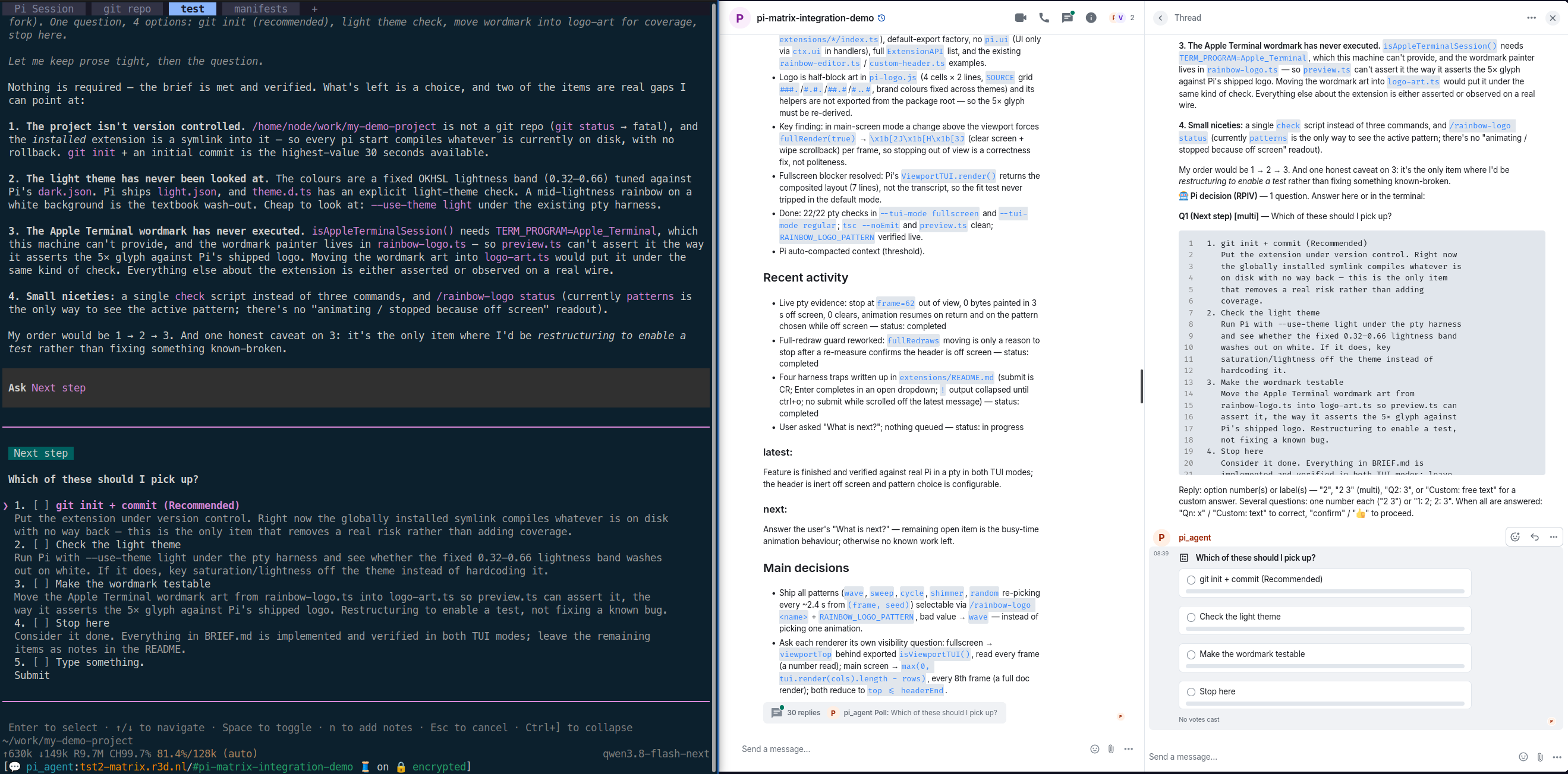
Using Element as a desktop companion app next to the terminal to keep a higher level overview of your Pi agent: the threads provide easy condensed access to all Pi sessions, the active thread summary keeps a summary-at-glance for your terminal session, and the thread conversation is a condensed overview of the terminal session, with only milestone and end-of-turn messages (no thinking)
Getting Started
Pre-requisites
- You need a personal Matrix account on your matrix homeserver, and a client messaging app (I use Element X and Desktop).
- A Matrix account for the Pi agent on that same (or federated[^1]) matrix homeserver — its own account, not your personal one — on any server with password login.
- The easy setup below requires the agent account to be able to create rooms, set the room alias, and invite users. If your homeserver forbids that, use Manual Room Setup instead.
[^1]: A federated setup (agent and personal accounts on different homeservers) works in principle — room resolution, join and invite are all federated Matrix operations — but it is untested; same homeserver is the walked path. End-to-end encryption across servers is the least reliable part.
Install
pi install git:github.com/r3dnl/pi-matrix-integration
echo 'Restart / reload your Pi session.'
(Once the npm publish lands: pi install npm:pi-matrix-integration.)
See quickstart for details and integration with other extensions (decision dialogue, subagents) and tools (voice msg transcription).
Features
| Feature | What you get |
|---|---|
| Full autonomy | Your own Pi harness, your own messaging server — fully integrated, no SaaS in between. |
| Steer from your phone | Full 2-way communication between Pi and Matrix. Reply in the room and Pi picks it up. Typing terminal input echoes to the room as 🧑 User: …, room input shows in the terminal as [Matrix] …, so you always know where an input came from. → Example |
| Milestones | The room gets highlighted 🎯 milestones, TODO progress, session/compact/model events and each turn's final answer (💬 Pi: …), so you know what the agent is doing from anywhere. → Example |
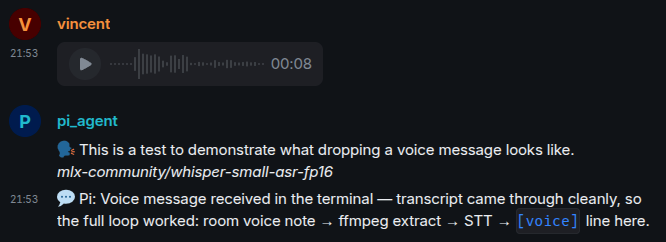
| Drop a voice message | Record on your phone and press send: the transcript lands in the Pi terminal, plus an echo in the room naming the engine that produced it (remote STT model or local Whisper). → Example |
| Attach a file to the Pi session | @ picks a workspace file for the agent out of the room. → Example |
| Upload a file to the room | Type @@<fragment> in the room: the artifact picker uploads the file as a real attachment, captioned with the commit it was read at. Markdown ↔ HTML formatting is translated both ways. → Example |
| Answer a decision from anywhere | The ask_user_question questionnaire is mirrored into the room; answer on either side — first answer wins (pairing). → Example |
| One session = one thread | Each session opens a 🧵 <topic> thread, surviving /compact and restarts, readable by a phone-only user. → Example |
| Watch the session get summarized | That thread's root message is rewritten in place with topic, milestones and decisions as the session progresses. Fast and configurable (incl custom LLM) → Example |
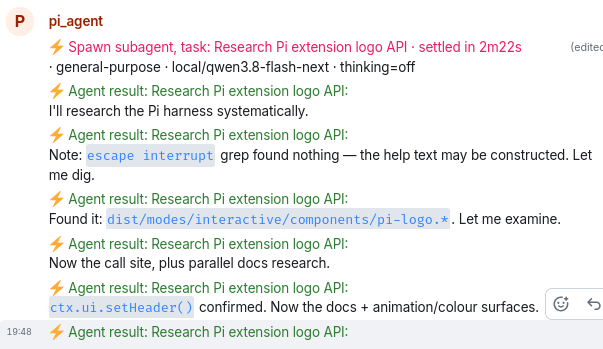
| See subagents spawn and check back in | Background spawns and their results post to the room and fold into their spawn lines. → Example |
| Commands from the room | /matrix-*, other extensions' commands and /skill: calls run when typed in the room — the full surface, membership-gated. (Pi built-ins like /new stay terminal-only.) → Commands |
| Security by default | End-to-end encrypted rooms support, secure terminal login, agent-owned account, access token based credentials, in a 0600 file outside project dir, zero 3rd party traffic / telemetry. |
| Compliance ready | Pi and matrix allow for tailoring the setup to your compliance needs. |
Examples
Steer from your phone:
room  › ship the fix, run the tests first
terminal  [Matrix] ship the fix, run the tests first
room  🎯 Milestone: TODO progress: 2 of 3 done
room  💬 Pi: Tests green — pushing branch fix/auth-ttl.
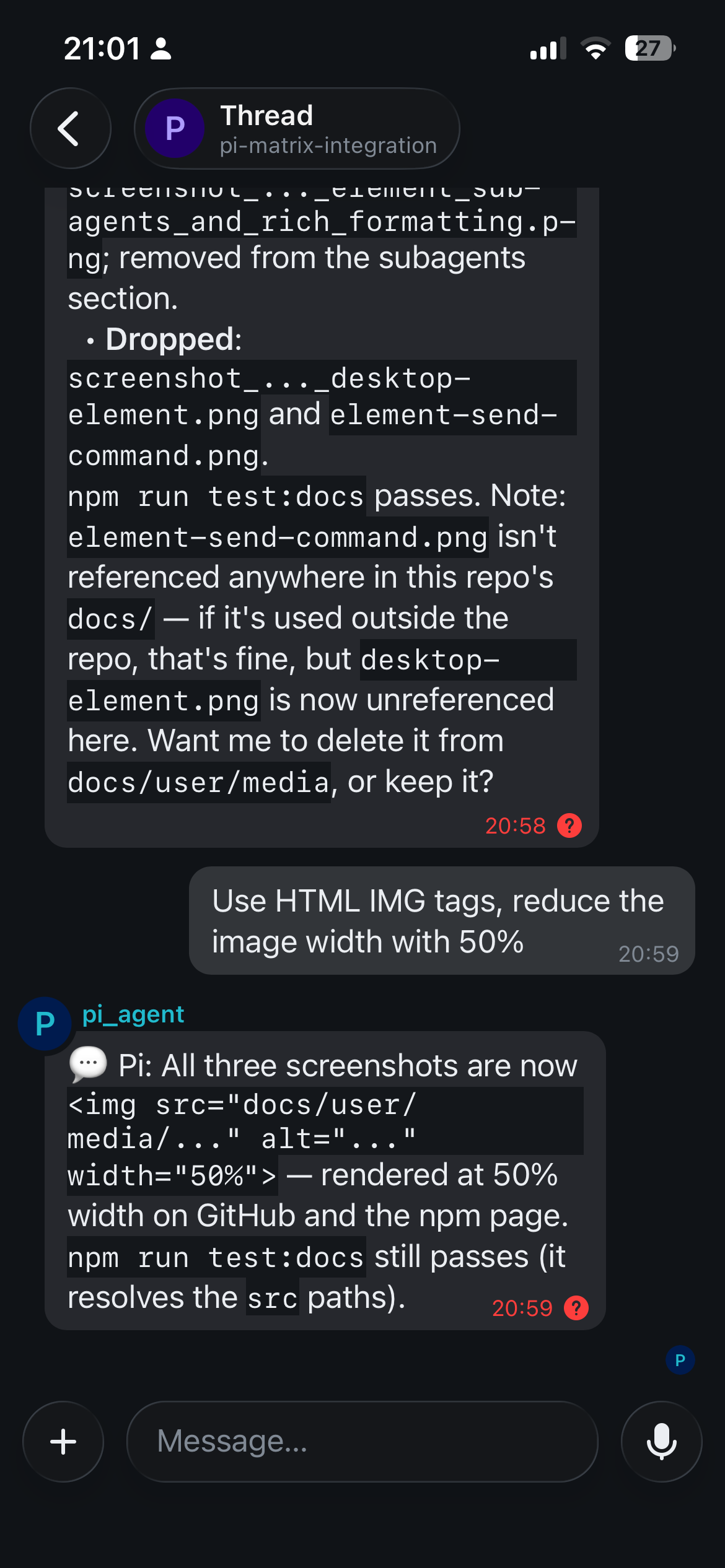
Milestones
Important milestone events get highlighted in the matrix room.

Drop a voice message
Just record on your phone, and press send. The transcription will appear in the room. Run a transcription model next to Pi, or remote. Needs either ffmpeg on the Pi host (local engine) or a remote STT endpoint (PI_MATRIX_STT_BASE_URL); a message that cannot be transcribed gets a warning back in the room.
Attach a file to Pi terminal session:
Since we don't have direct access to the file picker in the TUI, the matrix room shows files to choose pick from.
room  › what does @docs/spec.md say about retries?
terminal  [Matrix] what does docs/spec.md say about retries? (content attached)
Upload a file to the matrix room:
Want to see the contents of a project file? Upload it to the room - again with fuzzy file picker:
room  › @@CHANGELOG
room  Artifact matches for @@CHANGELOG:
      1. CHANGELOG.md
      Reply with the exact path (or its number) to attach.
room  › 1
room  📎 CHANGELOG.md — CHANGELOG.md · a1b2c3d          [file attachment]
The picker answers in the room only — the terminal stays quiet. A fragment that is already an exact path (@@CHANGELOG.md) uploads immediately. @@ takes .md, .feature and media files (image / audio / video) up to the attach cap; the caption carries the commit the file was read at, or uncommitted.
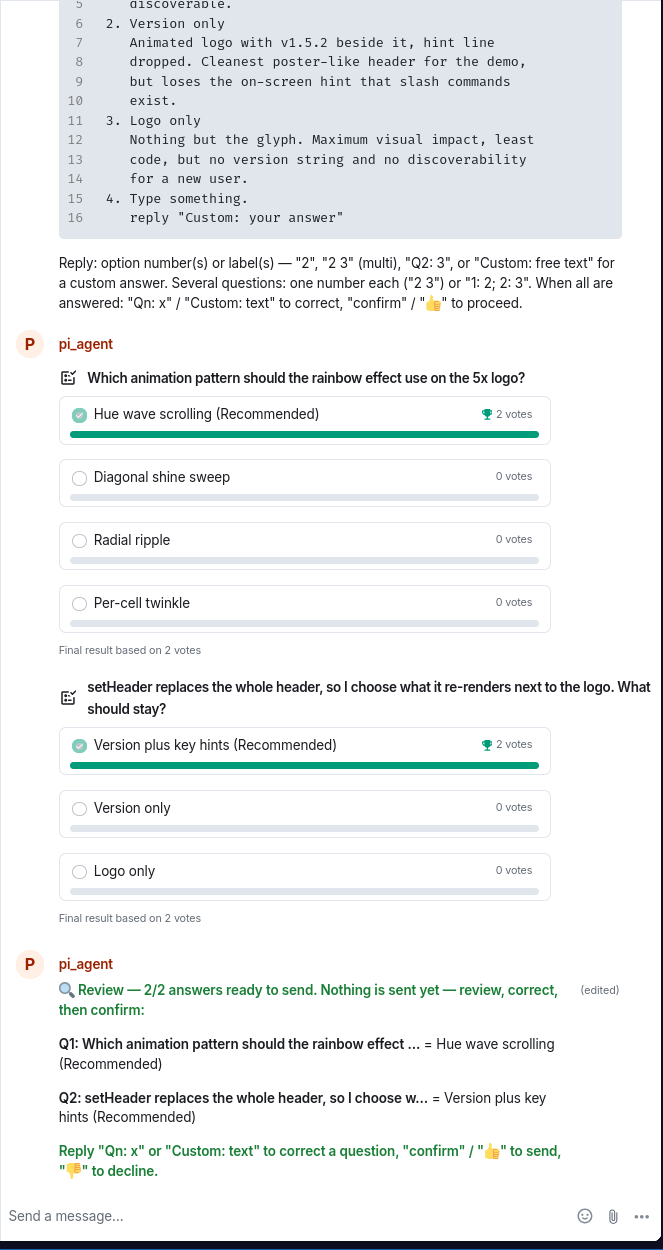
Answer a decision from the couch:
Mirrors RPIV's ask_user_question extension with:
- context of the decision to be made
- a poll for picking answer (incl multiple answers)
- allows a
custom: ....message for a different answer - final confirmation approval
- fully synchronous between terminal and matrix client
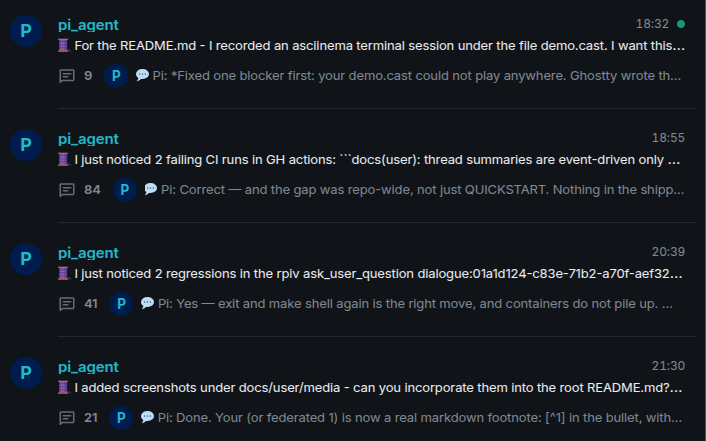
Organize Pi sessions as Matrix threads
Keep things organized by running a Pi terminal session as a threaded conversation.
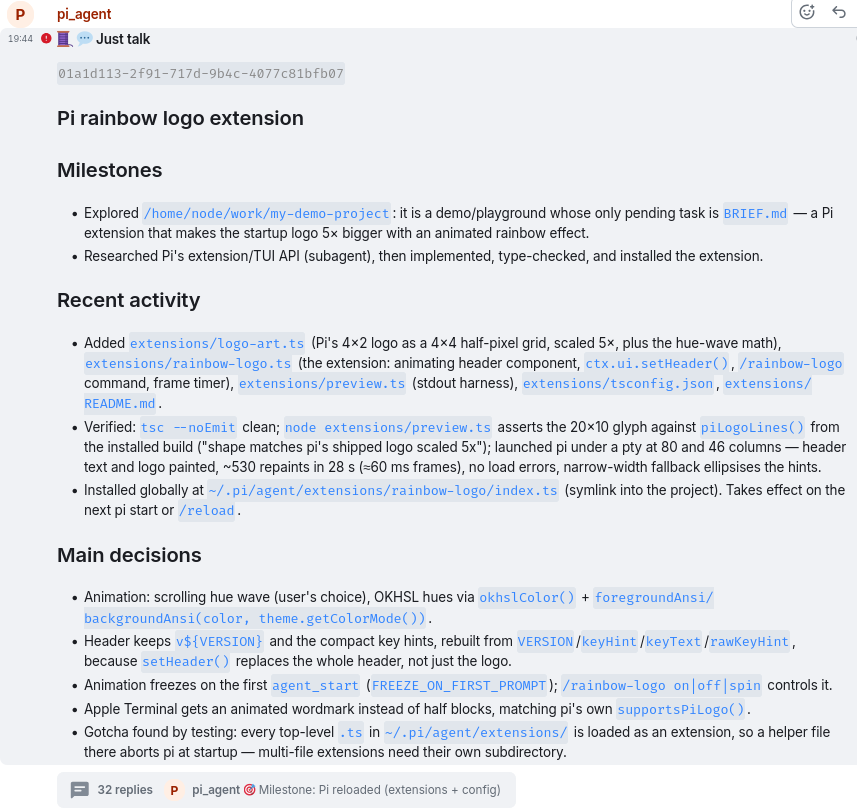
Watch your session get summarized
The root message of a Matrix threaded conversation gets updated with a summary as the Pi session progresses.
See subagents spawn and check back in
Configuration
Precedence: environment variables > config file > defaults.
Config lives at <project>/.pi/matrix/matrix-config.json(.jsonc) (for projects without one, ~/.config/pi-matrix-integration/config.json); every key has a PI_MATRIX_<UPPER_SNAKE> override. The config is one JSON object of grouped keys — the breakdown:
| Group | Covers |
|---|---|
piMatrixIdentity, piMatrixConnection | homeserver, agent account, credentials, profiles |
piMatrixRoom | room selection, end-to-end encryption |
sendMilestones, sendUserMessages, sendFinalMessages | what Pi posts into the room |
piMatrixMessageFormatting | Markdown ↔ HTML translation |
matrixToPi*, piToMatrixMirrorAskUserQuestions | room→Pi features: slash commands, file picker, voice transcription; question mirror |
piMatrixThreading | threads, summary cadence and model |
piMatrixSubagents | sub-agent spawn/result visibility |
piMatrixLogging, piTerminalUi, piTerminalMatrixLoginCommand | log level and files, footer/TUI display, login-command mapping |
- Every key, default and effect: configuration reference.
- A commented example with every key, enum value and default: docs/user/matrix-config.example.jsonc.
- One trap worth knowing early: a profile-suffixed config file (
matrix-config.<profile>.jsonc) is never read at startup — it goes live only when you activate it at runtime with/matrix-switch <profile>(or/matrix-connect <profile>, same thing). The barematrix-config.jsonis the live config, and it is live again after every restart.
Reference
- Commands — the full surface the extension registers, table below.
- Configuration reference — every key, default, effect and environment override.
- Per-project setup — one project : one room, the recommended layout, the
~/.piFAQ. - Ask-user pairing — the question mirror's terminal patch.
- Troubleshooting — cannot connect, connected-but-silent, missing threads, decryption, stale summaries.
- Roadmap — what's coming in 1.0.0 and beyond.
- Security posture — what the room can do, what it cannot, how to report a vulnerability.
- Developing · Coding standards · Architecture — for contributors and coding agents.
Commands
| Command | Description |
|---|---|
/matrix-login | Log in to Matrix (new account or re-auth) and reconnect |
/matrix-connect [profile] | Connect to the Matrix room (optionally switching profile first) |
/matrix-disconnect | Disconnect from the Matrix room |
/matrix-toggle | Toggle Matrix integration on/off |
/matrix-status | Show Matrix connection status |
/matrix-switch [profile] | Switch server/room/user profile at runtime (no arg → menu) |
/matrix-send <message> | Send a message to the Matrix room |
/matrix-messages [limit] | Show recent messages from the Matrix room |
/matrix-thread-toggle | Toggle threading (footer thread icon: bright = on, faded = off) |
/matrix-thread-summarize | Run a thread-summary pass now |
/matrix-subagents | List sub-agent spawns (running + settled) — advanced |
/matrix-introduction-tour | Walk the room through an introduction tour |
/matrix-help | Send a concise end-user guide to the room |
Aliases: /pi-help (= /matrix-help), /matrix-summarize-thread (= /matrix-thread-summarize).
Notes:
- Every extension command is reachable from the room: any room member can type it and it runs against your session, and the room relays slash commands from every installed extension (
/skill:*included). - Security and permission control is "as-is" in the agentic harness. There is no (matrix) per-user allowlist — Matrix room membership is the access control.
- Pi's own built-in commands (
/new,/reload) stay terminal-only. - The three model-facing tools (
matrix_send_milestone,matrix_get_messages,matrix_update_thread_summary) let Pi use the room on its own.
Related
@juicesharp/rpiv-ask-user-question— the decision dialogues; this extension prompts for the one pairing patch it needs.@tintinweb/pi-subagents— recommended sub-agent package: room-mode thread summaries and sub-agent visibility ride on a sub-agent extension being installed.- Element — threads are a Labs feature in Element X (iOS); Element Desktop shows threads in a panel.
License
MIT — see LICENSE. That grant covers this package's own code; the vendored QR sign-in files stay Apache-2.0 (licence text shipped at LICENSES/Apache-2.0.txt), as do the npm dependencies named there.