
Install
Install with PiG
pig install npm:pi-llama-reasoningInstall with Pi
pi install npm:pi-llama-reasoningPackages run code with your permissions and influence agent behavior. Catalog inclusion is not a security audit. Review the source before installing a third-party package.
Video
Declared by the package manifest. Open the file ↗
Pi manifest JSON
The pi field of package.json.
{
  "image": "https://raw.githubusercontent.com/Ryu-CZ/pi-llama-reasoning/main/media/pi-preview.gif",
  "video": "https://raw.githubusercontent.com/Ryu-CZ/pi-llama-reasoning/main/media/preview-animation.mp4",
  "extensions": [
    "./extensions/index.ts"
  ]
}
README
Written by the package's publisher, shown as published in version 0.2.3 (README.md). PiG does not review it.
pi-llama-reasoning




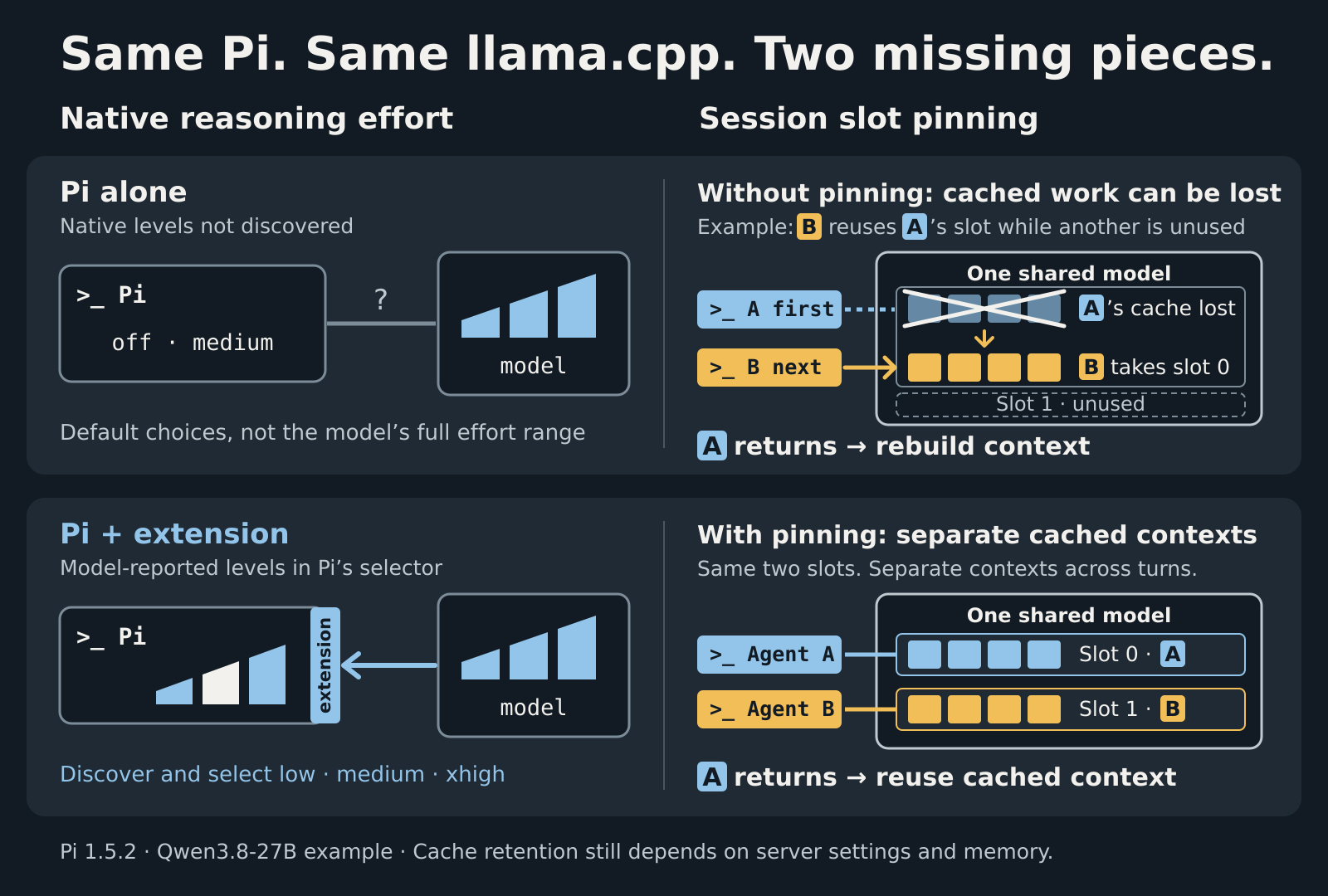
Extends Pi’s built-in llama.cpp integration with native reasoning-effort selection and automatic session slot pinning.
Why use it?
Pi already handles connection, model selection, and generation. This extension adds:
- Native reasoning levels: choose model-reported efforts such as
low,medium, andxhighthrough Pi’s thinking selector. - Automatic slot pinning: keep sessions on separate available server slots across turns, reducing the chance that agents displace each other’s cached conversations.
No replacement provider or new connection setup. Keep Pi’s usual login, model picker, and /llama commands.
Install
Supports Pi 1.5.2 through 1.6.0. Requires Node.js 22.19.0+.
pi install npm:pi-llama-reasoning
Restart Pi after installing.
Use
- Connect to your llama.cpp router with
/login llama.cppif you haven’t already. - Load a model through
/llama, then select it through/model. - Run
/thinkingand choose a reasoning level.
Native efforts use Pi’s thinking token budgets. Explicit reasoning, budget, sampling, slot, and cache settings are preserved. Thinking tokens still count toward the model’s output and context limits.
Sharing a model between agents
A server slot can retain a session’s cached conversation between turns. Assignments are automatic when slots are available; no extra Pi setup is needed.
Run /llama-slots to inspect slots, busy/idle state, counters, and local session assignments. The footer shows your slot or why it has no assignment.
Example output (illustrative values; missing counters appear as ?):
qwen
├─ Slot 0: idle
│  ├─ context 8192; prompt 23; processed 0; cached 0
│  └─ lease: this session (PID 24180)
└─ Slot 1: busy
   ├─ context ?; prompt ?; processed ?; cached ?
   └─ lease: no local lease
Snapshot only. Counters are not total KV memory usage; local leases do not identify external clients.
The server needs slot inspection enabled and enough slots for your sessions. For example, our tested three-slot setup uses:
--slots --parallel 3 --kv-unified --no-cache-idle-slots
These are server options, not Pi options: three slots share one context pool, and idle caches aren’t cleared on every new request. The extension does not change server settings. See the tested setup for details.
- Coordination is local: sessions must share a machine, local cache, server, and model.
- If no slot is available or inspection fails, requests continue without an assignment and Pi shows a warning.
- Pinning supports cache reuse, not guaranteed retention. Other clients, server settings, memory pressure, or model reloads can still force reprocessing.
Limits
- Reasoning levels appear only for loaded models that Pi recognizes as reasoning-capable and whose server reports supported level names.
- If discovery fails or the reported levels are unsupported, Pi keeps its usual behavior.
- Restart Pi after changing a model’s available reasoning levels;
/reloadwon’t refresh them.
See vision.md for design, implementation, and development notes.