
Install
Install with PiG
pig install npm:pi-language-tutorInstall with Pi
pi install npm:pi-language-tutorPackages run code with your permissions and influence agent behavior. Catalog inclusion is not a security audit. Review the source before installing a third-party package.
Pi manifest JSON
The pi field of package.json.
{
  "extensions": [
    "./language-learn.ts"
  ]
}
README
Written by the package's publisher, shown as published in version 0.5.1 (README.md). PiG does not review it.
pi-language-tutor
Learn a foreign language while you code.
A pi extension that reviews your prompts, teaches you how to say what you couldn’t yet, saves new words as flashcards, and turns agent replies into bilingual immersive translations.




English · 简体中文
Install
Tested with Pi 1.0.0.
pi install npm:pi-language-tutor
That’s the only required step. Defaults (learning English, native Simplified Chinese) work out of the box. Another language? Type /lang or run /lang native ja.
Alternative: install from git, or hack on a local clone
pi install git:github.com/mackt/pi-language-tutor
Or symlink a clone into pi’s global extensions directory (auto-discovered via pi.extensions, hot-reloads with /reload):
git clone https://github.com/mackt/pi-language-tutor.git
ln -s "$(pwd)/pi-language-tutor" ~/.pi/agent/extensions/pi-language-tutor
Features
✏ Writing check
Prompt in the language you’re learning. While the agent works, a panel explains each mistake in your native language — fix, why, and a more natural whole sentence.
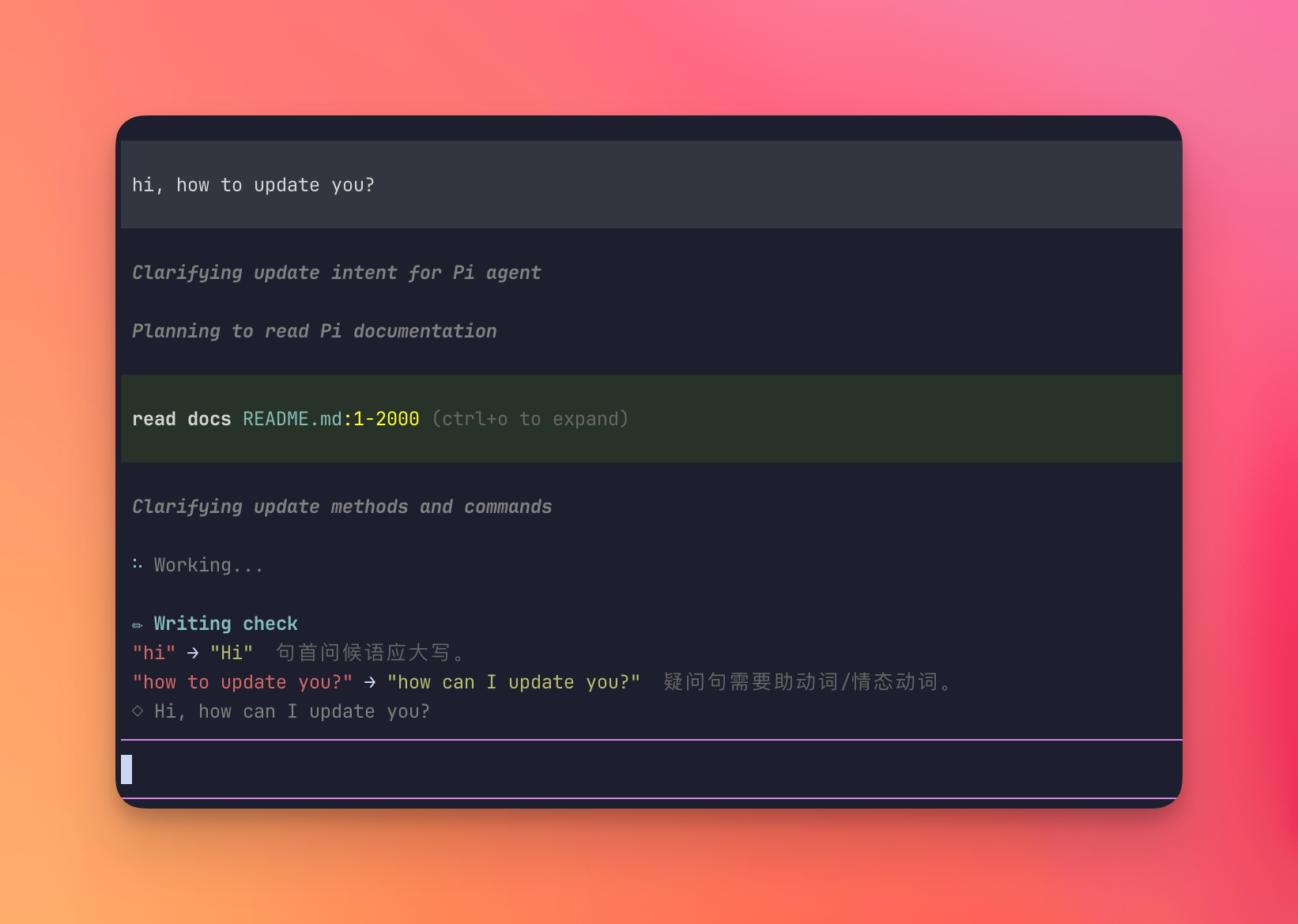
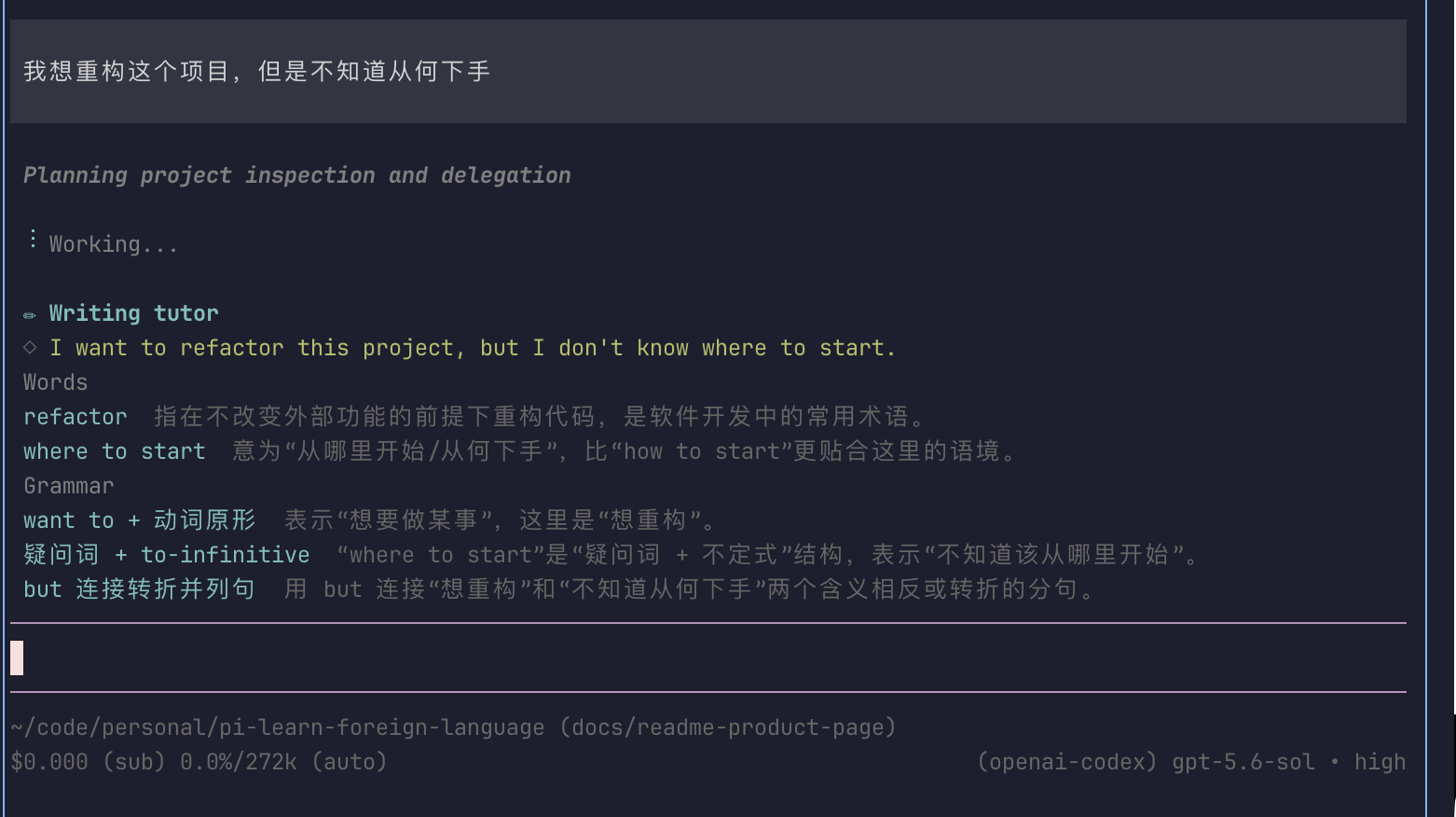
✏ Writing tutor
Prompt in your native language because the thought came faster that way. The tutor teaches the natural whole-sentence form in the learning language, the key words, and the grammar that carries it.
🗂 Flashcard review
Words taught by the Writing tutor are saved automatically. Run /flashcards to study them with an Anki-style flow; an FSRS scheduler decides when each card comes back.
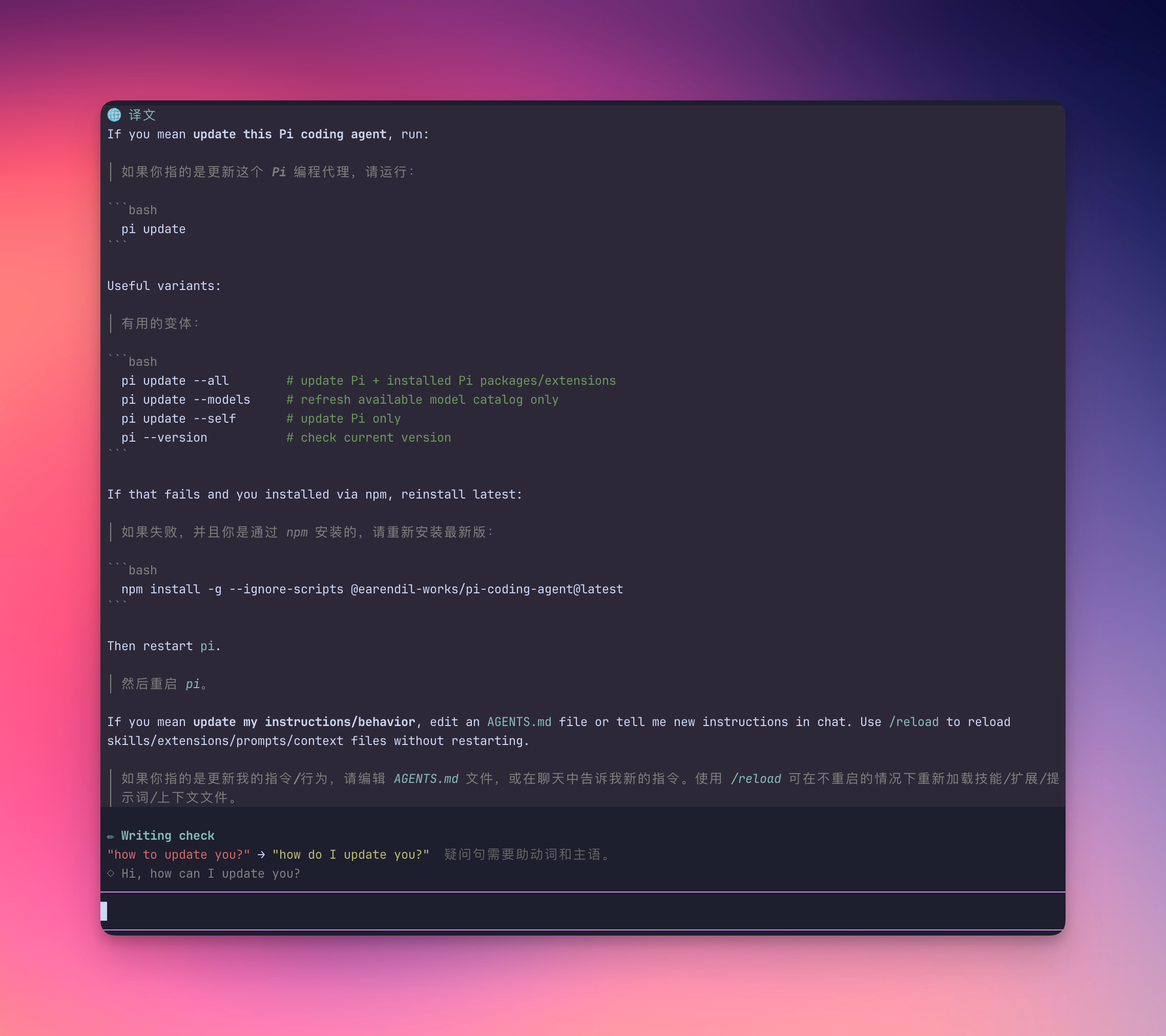
🌐 Bilingual cards
After a reply, press alt+t (macOS: ⌥T) or run /translate. Each paragraph is followed by its translation — immersive-translate style, with short code blocks kept intact.
Try this first
Start
piand send a prompt in your learning language:when agent anwser me, I want translate it, it have three featureThe agent answers as usual. A
✏ Writing checkpanel appears above the editor with fixes and native-language explanations.Write a prompt in your native language instead:
我想重构这个函数但是不知道怎么下手A
✏ Writing tutorpanel appears: a natural whole-sentence rendering, key vocabulary, and grammar.Words from the tutor are now flashcards. Run
/flashcards, show the answer, then rate yourself Again / Hard / Good / Easy.When the agent finishes, press
alt+t(on macOS, enable Option-as-Meta in your terminal, or run/translate). The reply re-renders as a bilingual card.Prefer auto-translate on every final response?
/lang auto on
That’s enough to start.
Design principles
| (blank) | (blank) |
|---|---|
| Nothing ever blocks | Your message goes to the agent immediately; the review runs in parallel. A clean message shows no panel at all. |
| Two panels, never both | Learning language → Writing check. Native language → Writing tutor. One LLM call decides — they never both fire. |
| Nothing pollutes the conversation | Translation cards live only in your terminal — never sent back to the LLM, no context cost. |
| You control the spend | Features use your session model by default; point them at a cheaper one with /lang model. |
Settings
Type /lang for the interactive menu, or set options directly:
| Command | What it does |
|---|---|
/translate or alt+t | Translate the last assistant response |
/flashcards | Review flashcards captured from the Writing tutor |
/lang | Interactive settings menu |
/lang check off | on | context | Writing check & tutor mode (context sees the conversation; /lang on/off still work) |
/lang tutor on | off | Keep / drop the writing tutor alone |
/lang auto on | off | Auto-translate every final response |
/lang native <code> | Native language — translations & explanations (zh-CN, ja, …) |
/lang learning <code> | Language you’re practicing (en, fr, …) |
/lang model [model] | Model for this extension |
/lang model default | Follow the session model |
/lang context on | off | Translations with full session context (off by default) |
Configuration
Settings persist in ~/.pi/agent/language-learn.json.
{
  "learning": "en",
  "native": "zh-CN",
  "model": "openai/gpt-4o-mini",
  "check": "on",
  "tutor": true,
  "auto": false,
  "context": false
}
model defaults to the session model. tutor defaults to on.
Flashcards are stored in ~/.pi/agent/flashcards.json. Review limits and FSRS desired retention are stored in ~/.pi/agent/flashcards-settings.json.
Advanced
Skip heuristics, check vs tutor rules, flashcard scheduling, bilingual card details, custom providers, and context-mode cost trade-offs:
Development
npm install
npm run check   # typecheck
npm test        # unit tests
npm run lint
npm run fmt:check
Layout, scripts, and how product screenshots are produced:
Contributions welcome via PR. Conventions live in AGENTS.md.