
Install
Install with PiG
pig install npm:pi-input-historyInstall with Pi
pi install npm:pi-input-historyPackages run code with your permissions and influence agent behavior. Catalog inclusion is not a security audit. Review the source before installing a third-party package.
Pi manifest JSON
The pi field of package.json.
{
  "extensions": [
    "./index.ts"
  ]
}
README
Written by the package's publisher, shown as published in version 1.1.5 (README.md). PiG does not review it.
pi-input-history
Cross-session prompt history and fuzzy reverse search for pi.


Why
Pi's built-in ↑/↓ history only covers the current session and is lost on reload. This extension persists your last 100 prompts across sessions and adds fuzzy reverse search (default Ctrl+R) to find any past prompt instantly.
Install
pi install npm:pi-input-history
Or from git:
pi install git:github.com/ouzhenkun/pi-input-history
Usage
Persistent History
On session start, your last 100 prompts across all sessions are loaded into the editor. Use ↑/↓ arrows to browse them as usual.
Reverse Search
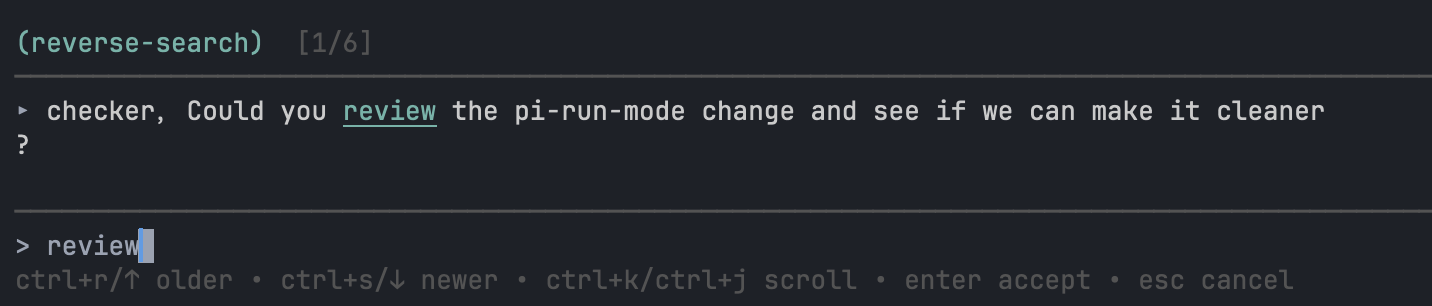
- Press the search shortcut (default Ctrl+R) to open the search overlay.
- Type to fuzzy-filter history (subsequence matching, space-separated multi-token).
- Matched characters are highlighted with your theme's accent color, using minimal-span matching so the highlight stays on the closest contiguous group (e.g.
inhighlightsinininput, notpi'si+input'sn). - The preview viewport shows the matched record; long lines are soft-wrapped (never truncated) and the viewport grows with content up to your terminal's height, then scrolls.
- The first matched line is marked with
▸; the viewport is separated from the input line by a dim divider. - Navigate and accept:
| Key | Action |
|---|---|
search shortcut / ↑ | Cycle to older match |
newer shortcut / ↓ | Cycle to newer match |
ctrl+k / ctrl+j | Scroll the preview viewport (when it exceeds the terminal height) |
Enter | Accept match into editor |
Esc / Ctrl+G | Cancel |
Defaults: search = ctrl+r, newer = ctrl+s, scroll up = ctrl+k, scroll down = ctrl+j.
Configuration
Optional config at ~/.pi/agent/pi-input-history.json:
{
  "searchShortcut": "ctrl+r",
  "newerShortcut": "ctrl+s",
  "scrollUpShortcut": "ctrl+k",
  "scrollDownShortcut": "ctrl+j"
}
| Field | Default | Description |
|---|---|---|
searchShortcut | ctrl+r | Open reverse search; press again in the overlay to cycle older |
newerShortcut | ctrl+s | In the overlay, cycle to a newer match |
scrollUpShortcut | ctrl+k | In the overlay, scroll the preview viewport up |
scrollDownShortcut | ctrl+j | In the overlay, scroll the preview viewport down |
Omit the file or any field to keep the default. After editing, run /reload in pi.
Shortcut conflict with app.session.rename
Pi binds app.session.rename to ctrl+r by default (session picker). This extension can still use ctrl+r; pi logs a non-fatal conflict warning and prefers the extension shortcut at the editor level.
To silence the warning while keeping reverse search on Ctrl+R, rebind rename in ~/.pi/agent/keybindings.json:
{
  "app.session.rename": "ctrl+shift+r"
}
Or change searchShortcut in pi-input-history.json to another chord.
Features
- Cross-session persistence — history survives across sessions automatically.
- Fuzzy subsequence matching — type partial characters in order, multi-token support with spaces.
- Minimal-span highlighting — matched characters form the closest contiguous group, so
inhighlightsinput, not scattered chars. - Soft-wrapped preview — long lines wrap to multiple lines instead of being truncated with
.... - Adaptive viewport height — the preview grows with content up to the terminal height, then scrolls.
- Scrollable viewport —
ctrl+k/ctrl+jto browse the whole record. - Match markers — the first matched line is marked with
▸, separated by a dim divider. - Deduplication — no duplicate entries across sessions.
- Current session awareness — merges live branch history with cached cross-session history.
- Configurable shortcuts — override via
pi-input-history.json.
Development
With Node.js 22.19+ (the Pi runtime requirement):
npm install --ignore-scripts --no-package-lock
npm test
The startup tests use Node's experimental TypeScript transformation and module mocking to defer history loading and verify that it does not dismiss an active selector or replace the editor after loading. No provider requests are made.
Acknowledgments
The reverse search component is inspired by pi-readline-search by @mrshu.
License
MIT