
Install
Install with PiG
pig install npm:pi-file-diffInstall with Pi
pi install npm:pi-file-diffPackages run code with your permissions and influence agent behavior. Catalog inclusion is not a security audit. Review the source before installing a third-party package.
Pi manifest JSON
The pi field of package.json.
{
  "image": "https://raw.githubusercontent.com/wrc093/pi-file-diff/main/docs/images/task-receipt.png",
  "extensions": [
    "./src/index.ts"
  ]
}
README
Written by the package's publisher, shown as published in version 0.1.8 (README.md). PiG does not review it.
pi-file-diff
Task-end file-change receipts and an interactive diff viewer for Pi Coding Agent.




English · 简体中文
After every file-changing Pi task settles, pi-file-diff automatically appends a compact, reviewable receipt—no command or manual check required. It shows which files changed, how many lines were added or removed, and—when you need it—the exact per-file diff in a terminal-native panel. It works in ordinary directories as well as Git repositories.
pi install npm:pi-file-diff
Table of contents
- What it is
- Why it exists
- Demo
- How it compares
- Install
- Commands
- Configuration
- How tracking works
- Development
What it is
Pi agents can edit files through write and edit, or indirectly through shell commands. pi-file-diff records those changes over a conversation and presents them in two layers:
- Automatic task receipt — after every user-visible task that changes files fully settles,
pi-file-diffautomatically appends one concise file list with aggregate+/-counts. No command or prompt is required. Retries, compaction retries, and queued follow-ups are merged into the same receipt instead of producing overlapping summaries. - Interactive review panel — browse every changed file and inspect the full patch without leaving the terminal. The panel uses a dedicated diff gutter, line numbers, and paging to keep multi-file reviews readable.
The extension is intentionally display-only: summaries are appended as TUI entries and are not injected back into the model context. /file-diff is only for revisiting the current conversation’s accumulated changes on demand; it is never required for the automatic receipt to appear.
Each automatic receipt covers only the files actually changed by the current task (one agent_start → agent_settled window); files from earlier tasks never bleed into it. The conversation-wide accumulation stays available via /file-diff or the ctrl+q panel at any time.
Why it exists
The answer to “what did the agent actually change?” is often scattered across tool calls, shell output, and Git status. That is inconvenient when:
- the workspace is not a Git repository;
- the agent changed files outside the repository, such as a temporary configuration file;
- a task involved several tool calls, retries, or follow-up runs;
- you want a quick receipt first and a diff only when something deserves review.
pi-file-diff removes the “remember to check” step. As soon as a file-changing task settles, it automatically appends the receipt—you do not need to type /file-diff, inspect Git status, or run any other command. It provides that low-noise task-end summary by default, then lets you drill into an affected file only when you choose.
Demo
From the automatic task-end receipt to a full per-file patch, the review flow stays inside Pi’s terminal UI.
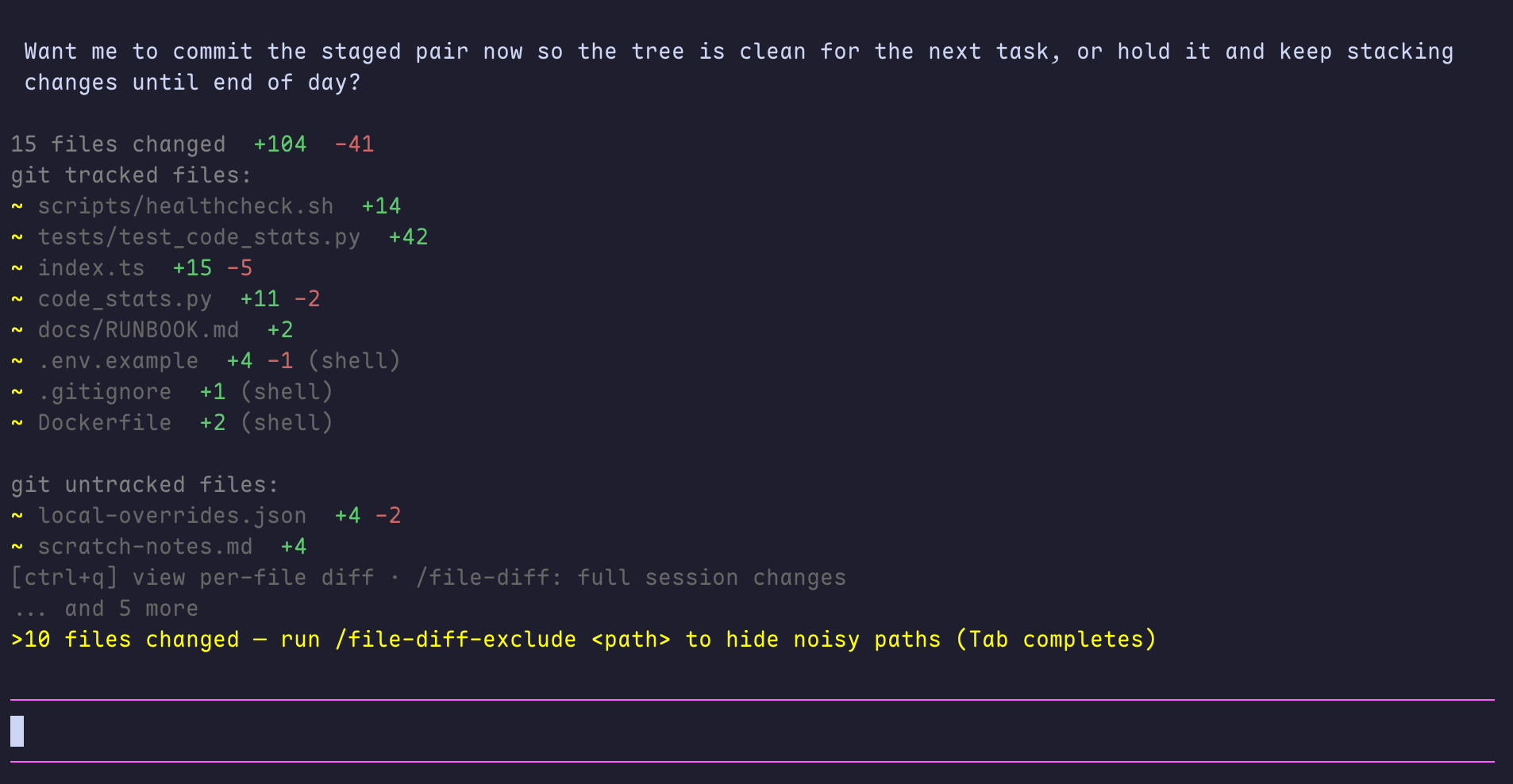
1. Task-end receipt
After a user-visible task that changes files settles, pi-file-diff automatically appends this compact receipt. No command is needed.
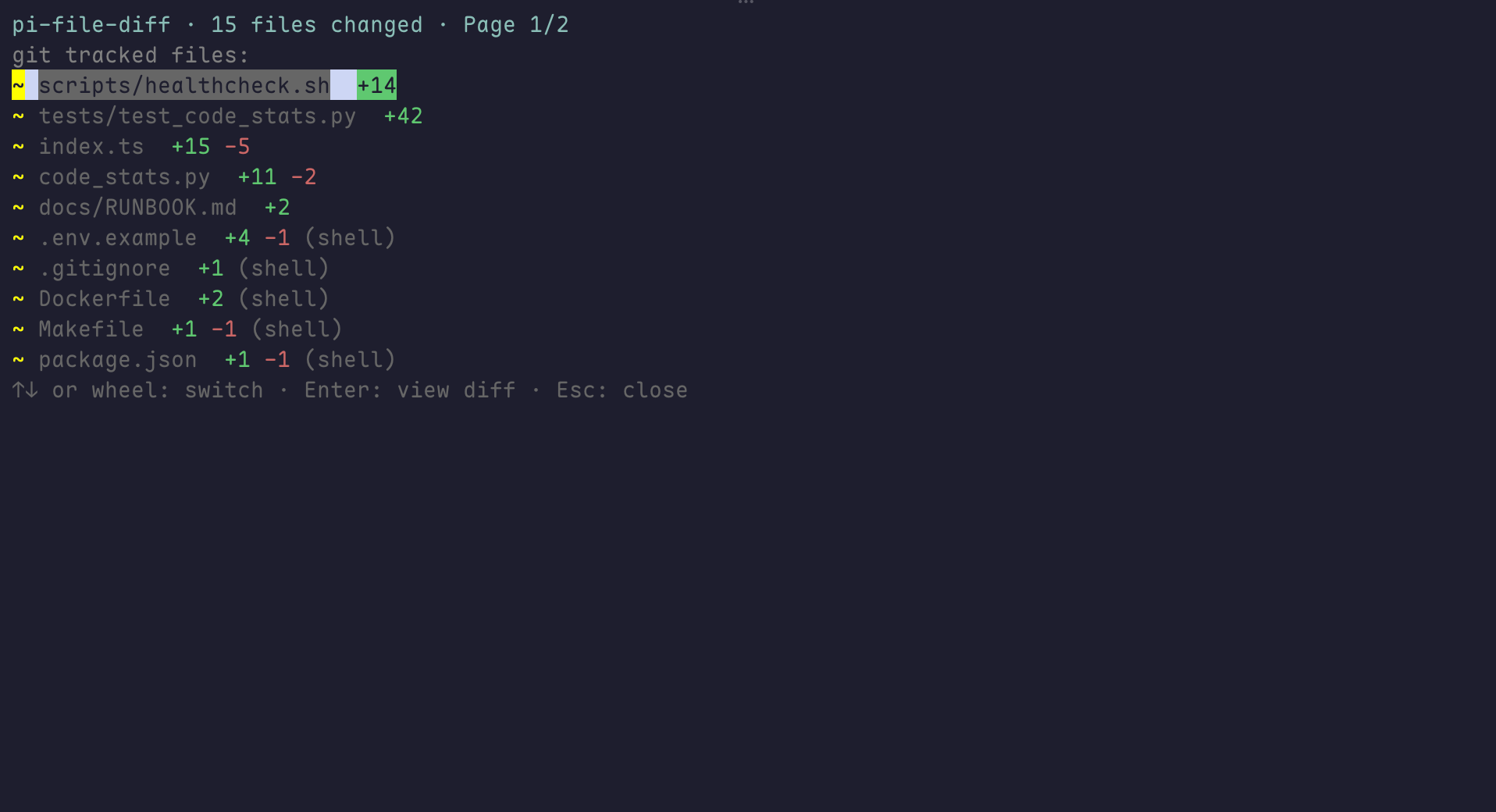
2. File browser
Open the interactive file browser with Ctrl+Q from the receipt to review every changed file, with Git-tracked and untracked paths grouped together.
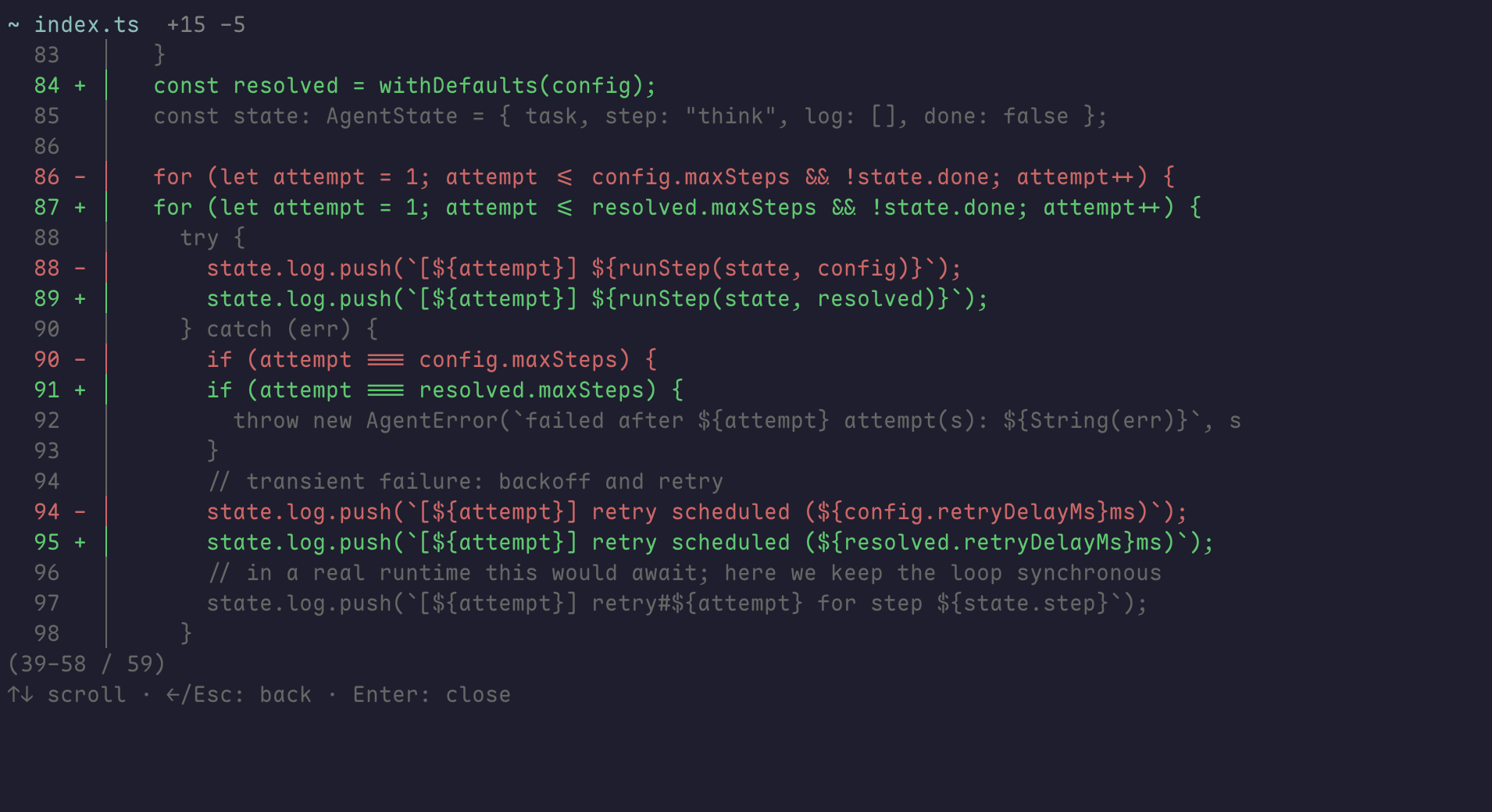
3. Per-file diff
Select a file to inspect its patch. The view keeps additions and deletions in a dedicated gutter and renders the relevant old or new line number alongside each line.
How it compares
These extensions solve adjacent, rather than identical, problems. Pick the surface that fits your workflow; they may be useful together.
| Need | pi-file-diff | @slix/pi-file-tracker | @geminixiang/pi-diff | @kkskcs/pi-diff-inline |
|---|---|---|---|---|
| Primary surface | Task-end receipt + terminal diff panel | Persistent live widget above the input | Browser-based Git diff dashboard | Inline diff renderer in the conversation |
| How the result first appears | Automatic: appended after each settled task with file changes; no command required | Continuously visible live widget | Run /diff to open the dashboard | Render a supplied diff or text comparison |
| Main unit of work | A settled task, with conversation history available on demand | Files touched during a live session | Working tree, staged, and commit diffs | A supplied diff or text comparison |
| Requires a Git repository | No. Git metadata is optional grouping information only. | No | Yes—its /diff command wraps Git diffs | No |
| Review interaction | Paginated terminal per-file diff panel | Live status and file statistics | Browser review workflow and comments | Inline unified or split rendering |
| Best fit | “Show me one reliable receipt when this task is done.” | “Keep a running file-activity widget visible.” | “Review Git changes in a browser.” | “Render a diff block directly in chat.” |
The comparison reflects each package’s public Pi Catalog documentation as of this release; their feature sets can evolve independently.
Install
From npm — recommended
pi install npm:pi-file-diff
If Pi is already running, run /reload; otherwise restart Pi. To remove it later:
pi remove npm:pi-file-diff
From a local checkout — development
From an existing local checkout:
cd /path/to/pi-file-diff
npm install
pi install "$(pwd)"
The npm package is the supported installation path for normal use.
Commands
The extension has four active commands. They are deliberately separate: one answers what changed, one controls how shell changes are detected, one controls which paths should be ignored, and one tunes when directories collapse into a single entry.
/file-diff — inspect the conversation-wide change set
/file-diff
Use this when you want to manually revisit the changes accumulated in the current conversation. It is useful after an automatic receipt has scrolled away, when you have made several follow-up requests and want one consolidated view, or immediately before you review, test, commit, or hand off the work.
Unlike the automatic task receipt, this command is not restricted to the last settled task. It rebuilds the current conversation’s file list from everything the extension has recorded so far, then reports file status and aggregate additions/removals. It is a read-only review action: it does not reset the tracked change set, alter files, or send anything back to the model.
/file-diff-mode — choose shell-change tracking deliberately
/file-diff-mode [status|auto|on|off]
write and edit changes are always tracked. This command controls the additional filesystem scan used to discover changes made indirectly by shell commands—such as generated files, redirections, scripts, sed, cp, or rm.
| Mode | When to use it | Result |
|---|---|---|
status or no argument | You are unsure why a shell-made file did or did not appear. | Shows the configured mode, workspace-file threshold, and observed workspace size. |
auto | The default choice for mixed-size projects. | Enables shell tracking below bashThreshold; automatically skips the more expensive scan for larger workspaces. |
on | The workspace is manageable and shell-generated changes are important to review. | Forces shell tracking even above the automatic threshold. This can make task-end scanning slower. |
off | The workspace is very large, shell output is irrelevant, or you want the lowest possible tracking overhead. | Tracks only Pi-native write and edit operations; shell-only changes are not added to the receipt. |
For example:
/file-diff-mode status
/file-diff-mode on
/file-diff-mode auto
The selected mode is saved to ~/.pi/agent/file-diff.json and applies from the next agent task onward. Use status after changing a project or configuration to verify that the chosen trade-off matches the workspace.
/file-diff-exclude — remove known noise from review
/file-diff-exclude [<path>|remove <path>|clear]
Use exclusions for paths whose churn should never distract from an agent review: generated session logs, caches, lockstep build output, vendor trees, or application data that changes on every run. An exclusion changes only what pi-file-diff tracks and displays; it never deletes, moves, or otherwise changes the target files.
Paths may be relative to the current workspace, absolute, or start with ~. Add either a directory or one file; directory exclusions apply to everything below that directory.
| Intent | Command | When to use it |
|---|---|---|
| Add an exclusion | /file-diff-exclude .pi-dock/sessions | A noisy path keeps appearing in summaries. |
| See active exclusions | /file-diff-exclude | You want to audit why a path is missing. |
| Restore one path | /file-diff-exclude remove .pi-dock/sessions | The path has become relevant again. |
| Restore all paths | /file-diff-exclude clear | You are switching projects or want the default behavior back. |
The list is persisted in ~/.pi/agent/file-diff.json. Add exclusions early in a conversation when possible, then use /file-diff to confirm that the remaining receipt contains only review-worthy files.
/file-diff-threshold — directory aggregation threshold
/file-diff-threshold [<count>|status]
When a directory accumulates a large number of changed files, the receipt and the ctrl+q panel collapse them into one directory entry. The trailing marker lists the subtree's composition, omitting zero counts, e.g. M src/ +40 -12 (10 files modified, 3 files added). A directory's status describes the directory itself: brand-new directory → +, removed directory → -, and an existing directory that only gained files is still M (modified).
Only subdirectories of the current workspace aggregate — the workspace root itself never collapses, and directories below the threshold stay per-file. Inside the panel, select a directory entry and press Enter/ctrl+q to descend; Esc/← returns to the parent level.
The threshold defaults to 5 (minimum 2) and applies immediately; it can also be set via config file or env var (see Configuration).
Configuration
Create or edit ~/.pi/agent/file-diff.json, then run /reload or restart Pi:
{
  "lang": "en",
  "bashTracking": "auto",
  "bashThreshold": 200000,
  "dirThreshold": 5,
  "ignore": ["my_vendor"],
  "exclude": [".pi-dock/sessions"]
}
| Setting | Values | Default | Meaning |
|---|---|---|---|
lang | en, zh | en | UI language. |
bashTracking | auto, on, off | auto | Whether to scan for shell-made changes. auto disables the scan when the workspace exceeds the threshold. |
bashThreshold | positive integer | 200000 | Workspace-file threshold used by auto mode. |
dirThreshold | integer ≥ 2 | 5 | Directory aggregation threshold: a cwd subdirectory with this many changed files collapses into one entry. |
ignore | string array | [] | Additional directory-name ignore rules, case-insensitive. |
exclude | string array | [] | File or directory paths to omit from tracking and summaries. |
PI_FILE_DIFF_LANG, PI_FILE_DIFF_BASH_TRACKING and PI_FILE_DIFF_DIR_THRESHOLD environment variables override the configuration file.
How tracking works
| Change source | Detection | Review result |
|---|---|---|
Pi edit tool | Pi’s unified patch result | Exact patch and line counts. |
Pi write tool | Path and written content | New-file content or tracked write result with counts. |
Shell / bash tool | A bounded workspace snapshot plus an end-of-task scan | Text-file diff when the baseline is available; otherwise a path-level shell-change entry. |
Some intentional boundaries keep the extension responsive:
- Shell scanning is limited to the workspace and skips common dependency, build, VCS, cache, and IDE directories, plus AI-tooling runtime state (
.codex,.claude,.cursor,.gemini,.pi, … — these are written continuously by other agent/tool sessions, so they are ignored by default). - Files tracked by
write/editoutside that scanned scope (a project outside the session workspace, or inside an ignored directory) are still listed from the tool result, but the shell scan neither flags them as shell-modified nor reclassifies them as deleted. - Text snapshots are bounded by file size and total content limits. Large, binary, unreadable, or out-of-bound files may be represented without a textual diff (e.g.
*.sqlite-wal). - The mtime scan can only tell that a file was written within the task window — it cannot tell whether the agent or another process wrote it. If you edit files in parallel, or another agent/tool runs inside the same workspace (SQLite WAL/SHM, caches, logs keep changing), those writes can be attributed to shell activity. Use
/file-diff-excludeto hide such directories, or add names to theignoreconfig; better yet, run the agent in a project directory instead of HOME or another state-heavy location.
Development
Requirements: Node.js >= 22.18.0 and npm.
npm install
npm run typecheck
npm test
Contributing
Bug reports and focused pull requests are welcome. For UI changes, include a terminal screenshot or a test that demonstrates the behavior. Before opening a pull request, run:
npm run typecheck && npm test
License
MIT © 2026 pi-file-diff contributors.