
Install
Install with PiG
pig install npm:pi-enhancedInstall with Pi
pi install npm:pi-enhancedPackages run code with your permissions and influence agent behavior. Catalog inclusion is not a security audit. Review the source before installing a third-party package.
Pi manifest JSON
The pi field of package.json.
{
  "extensions": [
    "./index.ts"
  ]
}
README
Written by the package's publisher, shown as published in version 0.5.0 (README.md). PiG does not review it.
pi-enhanced
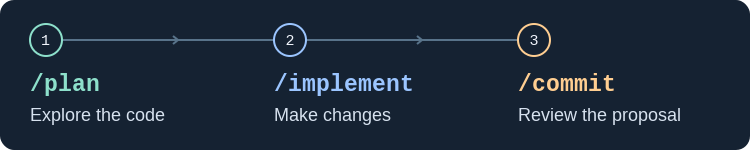
An extension suite for the Pi coding agent. Choose a model, explore a change in read-only mode, then review the diff before committing—all from the same terminal session.
Quick start
With Pi installed, install pi-enhanced from npm, then start Pi:
pi install npm:pi-enhanced
pi
In Pi, keep your current model or use /login to connect a provider and /model to pick a model. Try a read-only task first:
/plan Trace how this project handles configuration. Which file would I change to add a setting?
When you’re ready to make changes, use /implement with your instructions. Afterward, /commit proposes a commit you can edit, approve, or cancel.
Updating and switching from GitHub
To update to the latest published npm release:
pi update npm:pi-enhanced
If you already installed from GitHub, remove that install before switching to npm:
pi remove git:github.com/RaviEdho/pi-enhanced
pi install npm:pi-enhanced
For a project-local install, add -l to both commands. Use only one install source at a time. npm follows published releases; if you prefer to follow the GitHub default branch, use pi install git:github.com/RaviEdho/pi-enhanced instead.
What else can I do?
| Task | Where to start |
|---|---|
| Check account limits | /usage shows quotas, reset times, or balances where the provider reports them. |
| See what’s filling the context window | /context breaks down messages, tool output, and remaining space. |
| Search without flooding the chat | Ask Pi to find a symbol or search the web. Terminal output is condensed; /recall <id> retrieves the original. |
| Delegate a side task | /subagent starts an isolated task; /jobs shows background work. Pick a Subagent Model in /settings-enhanced or inherit the parent model. |
| Work from chat | See the Discord and WhatsApp gateway guides. Only allow people you trust with your local files and shell. |
| Tune the extension | /settings-enhanced controls search, compression, session titles, telemetry, and more. |
Guides
- Providers and accounts — Sign-in, model selection, billing caveats, and failover for Google Antigravity, Command Code, Kenari, Token Harbor, InferHub (experimental), Ollama Cloud, OpenCode Go, and OpenAI Codex.
- Terminal workflows and settings — Plan mode, selective commits, pull requests, web search keys, and the settings reference.
- Discord gateway — Bot permissions, shared threads, file uploads, schedules, and running the gateway at boot.
- WhatsApp gateway — Experimental QR pairing and allowlisted private text DMs with saved Pi conversations.
Development
From a checkout, run npm run typecheck to check TypeScript or pi -e ./index.ts to try the extension without installing it. See UPSTREAM.md for the origins of Scout search and the output compressor, and npm releases for the maintainer guide.