
Install
Install with PiG
pig install npm:pi-dev-teamInstall with Pi
pi install npm:pi-dev-teamPackages run code with your permissions and influence agent behavior. Catalog inclusion is not a security audit. Review the source before installing a third-party package.
Pi manifest JSON
The pi field of package.json.
{
  "skills": [],
  "themes": [],
  "prompts": [],
  "extensions": [
    "./extensions/spend/index.ts",
    "./extensions/dev-team/index.ts"
  ]
}
README
Written by the package's publisher, shown as published in version 0.6.0 (README.md). PiG does not review it.
pi-dev-team
pi-dev-team gives the pi coding agent a team of AI agents. The team writes a spec, makes a plan, builds the code with tests, reviews it and opens a pull request. You approve each important step. pi-dev-team works with every provider that pi supports, for example GitHub Copilot, Anthropic and OpenAI.
Quick start
Install pi and the package:
- Install pi:
npm install -g @earendil-works/pi-coding-agent - Install pi-dev-team:
pi install git:github.com/sanjit-roopra/pi-dev-team - Start pi in a Git repository:
cd my-project && pi - Log in to a provider:
/login
To install for one project only, use pi install -l git:github.com/sanjit-roopra/pi-dev-team in step 2.
Give the team its first task:
- Check the install:
/dev-team doctor - Install each required tool that the report marks
MISSING(see Requirements).semgrepis optional. - Prepare the repository:
/setup - Give the team a task:
/specs add rate limiting to the public API
Result: the team asks about the open points, writes a spec and starts /plan by itself. After you approve the plan, run /build. When /build reports done, run /pr.
Requirements
| Tool | Version | If it is missing |
|---|---|---|
| Node.js | 22.19+ | pi does not start. |
| pi | 1.0+ | The package does not load. |
| Git | recent | Most commands do not work. |
| Python | 3.10+ | The guard hooks (scripts that run around a tool call) are off, and pi shows a warning. The example check cannot run. |
GitHub CLI (gh) | recent | /pr and /ship cannot open a pull request. |
jq | any | Some quality gates do not run. |
lizard | any | The quality bar installs it into the project's environment. |
Give the team a task
Run /ship <task> to run all four steps for you, with the same questions. Or run each command yourself, in this order.
The four commands
The team works in four steps:
| Command | What it does | Result |
|---|---|---|
/specs <task> | Asks questions until the task is clear. Then it writes the spec: intent, architecture notes and acceptance criteria. | A spec file or a GitHub issue |
/plan | Splits the work into slices, and each slice into small steps with their tests. | plans/<task>.md |
/build | Builds one slice at a time: tests, code, review. | Commits on your branch |
/pr | Runs the tests, the linter and a code review, then opens a pull request. | A pull request |
Each approval is a question with a time limit. See Answer, wait or skip questions.
This is the default flow, with the gate review profile. For more review, see Get more review.
A plain request gets a brief first
When you type a request without a command, the team first shows a brief (a short summary of the planned work). The model picks one of these kinds:
| Kind | When | What happens |
|---|---|---|
| question | No file changes | The team answers. There is no brief. |
| tiny | One sentence, at most 3 files | The brief shows 3 lines, and the team goes on. |
| feature | A bigger change | The brief shows "At a glance" (at most 15 lines) and asks for your ok. |
| vague | Decisions that only you can make | The team runs /specs, which asks those decisions in rounds. |
| resume | The message answers a running command | The command goes on. |
For a feature brief, you choose:
| You choose | What happens |
|---|---|
| "Go: build it (recommended)" | The team runs /ship. |
| "Change something" | You type what to change. The team posts a new brief. |
| "Stop" | No files change. The team asks what you want instead. |
| No answer in time | The team runs /ship. /pr lists the assumptions of the brief under "Decide these". |
A tiny change can grow past 3 files or 150 lines. Then pi-dev-team tells the team one time to post a new brief or to stop and run /ship. To turn off the brief, set "routing": "off" (see Configuration).
Answer, wait or skip questions
Each question waits 120 seconds (askTimeoutSec), then the team takes the recommended answer and goes on. Each question shows its time left.
| To do this | Do this |
|---|---|
| Stop the timer for the rest of this set of questions | In a pick-an-option dialog in pi's TUI, press w. |
| Skip a question | Press Esc. The team takes the recommended answer and asks no more questions of that set. |
| Make every question in this session wait for you | Run /dev-team wait. |
| Switch back to timeouts | Run /dev-team timeout. |
| Make one request wait for every answer | Write "grill me" or "ask me everything" in the request. |
| Wait always, in every session | Set "answerMode": "wait" in ~/.pi/agent/dev-team.json. |
The team can also send a phone message.
/specs and approved examples
/specs asks the open decisions in rounds, each with a recommended answer. Then it writes the intent, the architecture notes and the acceptance criteria to a file under docs/specs/ or to a GitHub issue. When you wrote the spec together with the team, /specs starts /plan. For a document that you bring, it offers /plan as the next step.
pi-dev-team saves your request word for word in .pi/dev-team/memory/requests/. The plan and the reviewers check the work against that file, not against a model summary. With the example check on, it saves each plain request that you type while the team is idle. It also saves the text after /specs, /plan and /ship. With the check off, it saves only the command text. An issue number, a URL or a file path alone (/ship 123, /specs docs/spec.md) is not saved. Then the issue or the document is the request. Do not commit the folder (see Keep state out of Git).
With the example check on, /specs also proposes examples for each acceptance criterion that your request shows no example for. Read each example before you approve it. The tests compare the exact outputs: formats, precision, suffixes and error text.
| You choose | What happens |
|---|---|
| Approve | pi-dev-team saves the text that you saw, unchanged. The check then accepts these examples. |
| Edit them first | An editor opens. pi-dev-team saves your edited text instead. |
| Reject | Nothing is saved. The agent asks what is wrong, or proposes other examples. |
No answer in time, Esc, an empty editor, or no human | Nothing is saved. The spec lists the examples under "Decide these". |
Details: Approved examples in /specs and Which requests are saved.
/plan and /build
/plan writes a short plan to plans/<task>.md. A slice is one part of the feature, from input to output, with its own steps and tests. Each step has one line for its code, one for its test and one for its refactor. You approve the plan. Then run /build, or let /ship run it.
/build starts one implementer agent per slice, and each slice gets one commit. A review runs at each slice and fixes only error findings, in one round. The build report lists the warning and suggestion findings.
The gate rules for each step are in docs/review-profiles.md.
/pr and auto-merge
To prevent auto-merge, use one of these commands:
/pr --no-auto-merge/pr --draft/ship --no-auto-merge
/pr runs the tests, the linter and a code review. Then it opens the pull request and turns on auto-merge (gh pr merge --auto --squash). The pull request merges by itself when the checks and the required reviews pass. If the repository does not allow auto-merge, the pull request stays open.
When gh is logged in and the run skipped steps or left problems, /pr files one issue. The pull request links it under "Residual risks". If gh fails, /pr reports it and goes on.
If the team took answers for you, the pull request lists them under "Decide these".
After /setup, the project /pr in .pi/skills/pr/SKILL.md replaces the package /pr in a trusted project. /setup writes that file for your project, so its steps can differ. This section describes the package /pr.
The quality bar and the example check
The quality bar applies to all code: plain requests, /fix, review fixes and /build. Each function has at most 60 lines, at most 5 parameters and a cyclomatic complexity of at most 10. Cyclomatic complexity is the number of paths through the code. The agent runs the linter and lizard before it reports code work done. See The quality bar.
The example check makes the input-to-output examples of your request into acceptance tests in .dev-team/examples.json. It is on by default. You can give the examples yourself, or the team asks you for them:
- Give concrete examples in your request, in fenced code blocks. Examples written only in prose do not become cases. Each fenced block that you paste needs a case, or a skip with a reason.
- If your request shows no example for an acceptance criterion,
/specsproposes examples and asks you to approve or edit them. Only examples that you approve become cases. See /specs and approved examples. - A feature request (through
/ship) and a vague request run/specs. A tiny change does not run/specs, so the team asks no example questions for it. - Without a human (
pi -p, a script) or without an answer in time, the team saves no examples and goes on. The spec lists the examples under "Decide these". - To turn the check off, start pi with
DEV_TEAM_EXAMPLES=off pi.
In 52 SlopCodeBench checkpoints, the check passed 78.2% of hidden tests against 70.3% without it, at about 10% more cost. See Example check.
Other commands
| Command | What it does |
|---|---|
/code-review | About 20 review agents check your change, one topic each, for example security, tests and naming. |
/triage <bug> | Finds the root cause and writes a fix plan. |
/fix <bug> | Triages the bug, proves it with a test, fixes it and opens a pull request. |
/continue | Continues the work of your last session. |
/spend | Shows what your sessions cost. See See where the spend went. |
/telemetry on | Logs the cost of each run for /cost-report. It also logs which commands you use, on your machine only. |
/dev-team | Shows the package status: pi-dev-team <version>, configuration files, tiers, agents and hooks. |
/dev-team models, hooks, doctor | Map tiers to models, list the guard hooks, or check the install. |
/dev-team wait, timeout | Questions wait for you, or time out (this session). |
/help, /help --all | The main commands, or all commands. Neither lists /spend or /dev-team. |
Choose the models
To map tiers to models, run /dev-team models and pick a preset. A tier is a model class that an agent names, for example standard. By default, every tier uses your session model.
| Tier | Used for | Example models |
|---|---|---|
small | Small checks | Claude Haiku 5.5 · GPT-6 Luna · Gemini 4 Hydrogen |
standard | Most work | Claude Sonnet 5.5 · GPT-6.1 Terra · Gemini 4 Neon |
strong | Deep reviews and hard design | Claude Opus 5.5 · GPT-6.2 Sol · Gemini 4 Neon |
max | The strongest tier. No package agent uses it by default. | Claude Fable 5.2 · GPT-6.2 Astra · Gemini 4 Neon |
The old names opus, sonnet, haiku and fable still work as aliases.
The presets are github-copilot, anthropic, inherit (your session model, the default) and custom (you set each tier).
A code review can start about 20 agents, so cheaper lower tiers save money. /dev-team doctor suggests a preset for the provider of your session.
Get more review
To run more review, start pi with another review profile (the review steps of /plan, /build, /code-review and /ship):
DEV_TEAM_REVIEW=lean pi   # more review lenses and plan critics
DEV_TEAM_REVIEW=full pi   # every review step the commands describe
DEV_TEAM_FARLEY=on pi     # also a test-quality score at the end of /build
| Profile | What it runs |
|---|---|
gate | The default: the quality bar, the example check and a short review at each slice. |
lean | Plan critics and four review lenses at each slice. No quality bar in every session and no example check. |
full | Every step that the commands describe, with the Farley Score (a test-quality score of 8 properties). |
Set DEV_TEAM_REVIEW, DEV_TEAM_FARLEY and DEV_TEAM_EXAMPLES in your shell, not in the env of a configuration file. A project file cannot set them, so a cloned repository cannot lower your review. See Choose a profile.
Get a phone message when the team goes on alone
If you do not answer a question in time, the team can tell your phone. It uses ntfy, a free phone app. You need no account.
- Install the ntfy app from the App Store or Google Play.
- Make up a long random name, for example
dev-team-k3v9q2x7m4. - In the app, tap
+and subscribe to that name. - Add the name to
~/.pi/agent/dev-team.json:{ "notify": "ntfy:dev-team-k3v9q2x7m4" }
Result: the message shows what the team builds, or the answers that it took for you.
Anyone who knows the name can read your messages. The name is 1 to 64 letters, digits, - or _. For your own ntfy server, use ntfy:<https url>. The URL must start with https:// and end with the topic. For any other value, pi sends nothing and shows a warning. A message holds at most 3500 characters.
Safety and cost
To limit the work, set these in ~/.pi/agent/dev-team.json:
{ "maxParallelAgents": 2, "subagentTimeoutSec": 900 }
The agents can do what you can do in a terminal. They change files, run commands and make many model calls, with up to 6 agents at once.
- The guard hooks block some actions, for example
gh pr createbefore a code review passes. - The destructive-command guard (a guard hook for risky commands) marks some commands
CAUTION. When you are at the terminal, pi asks before it runs one. No answer in time means no. Without a human, or withaskTimeoutSec: 0and no wait mode, pi only shows the warning. - The same guard blocks
git push --forceandgit branch -Dagainst the default branch, andgit reset --hardon the default branch. While/carefulmode is on, it blocks every risky command. - pi shows each running agent: its time, its cost, its current command and its place in the queue.
- The footer of pi shows the session cost in USD, agents included. With GitHub Copilot, the status line also shows the AI credits of the session.
See where the spend went
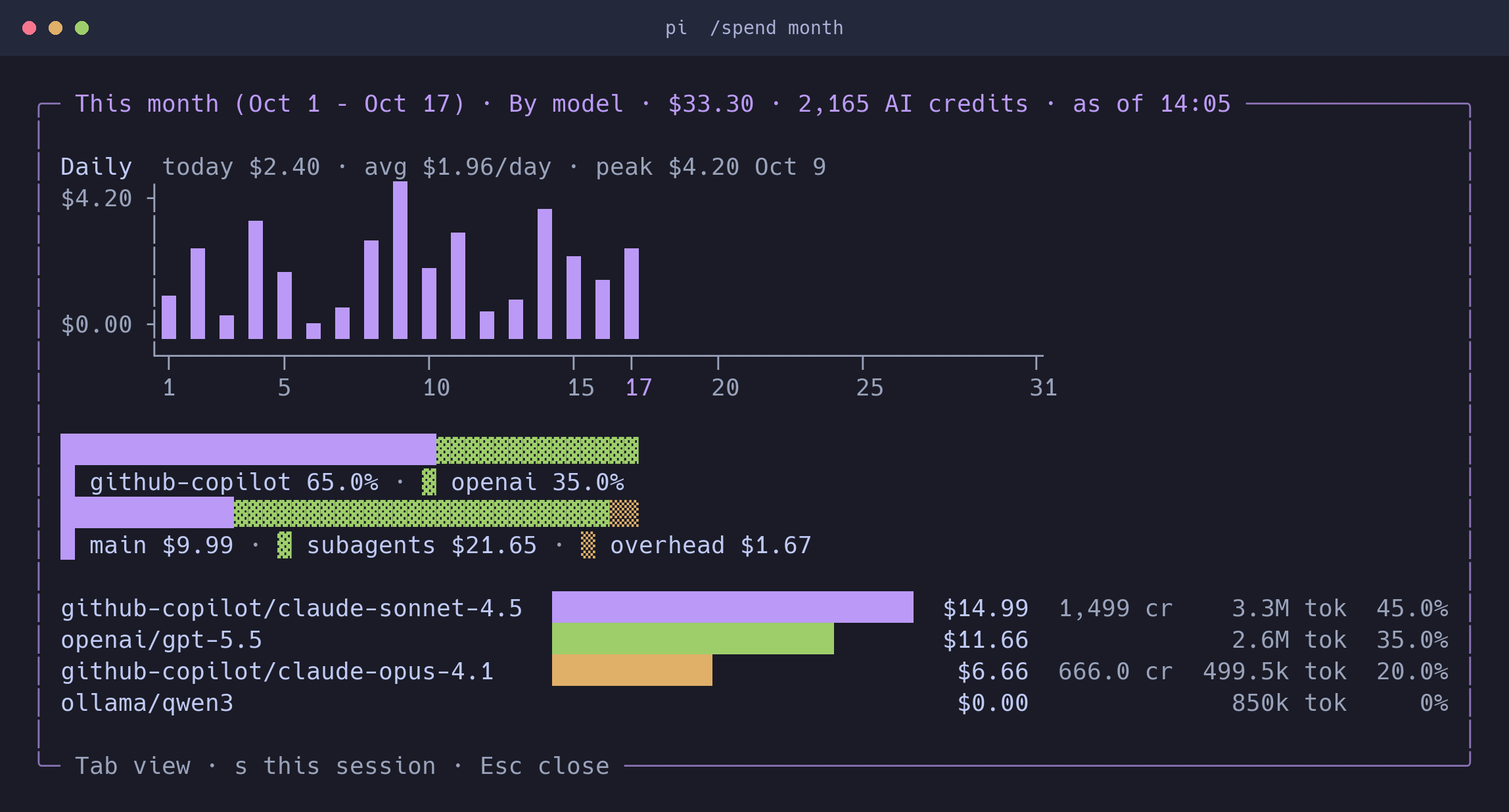
Run /spend for a chart of what your sessions cost, for every provider. Local models count as $0.
| To do this | Do this |
|---|---|
| Switch the view: By model, By provider, By agent | Press Tab. |
| Switch the scope: this session, or this month in all projects | Press s, or run /spend session or /spend month. |
| Close the chart | Press Esc or q. |
In the thread bar, main is █, agents are ▓ and overhead is ▒. Without a terminal UI, /spend prints text. The month starts on the 1st at 00:00 UTC.
| Term | Meaning |
|---|---|
| USD | The catalog price of pi for the tokens. With a subscription plan, for example a ChatGPT plan, this is not what the plan bills. |
| AI credits | The unit of GitHub Copilot: 1 credit per $0.01 of the Copilot USD price, before the allowance of your plan (pricing). |
/spend also works without the team. To use it alone, switch off extensions/dev-team/index.ts with pi config (or pi config --local).
Configuration
Later files override earlier ones:
~/.pi/agent/dev-team.json: yours, for all projects.<project>/.pi/dev-team.json: the project's, in Git.<project>/.pi/dev-team.local.json: yours, for one project, not in Git.
pi-dev-team reads both project files only when pi trusts the project. The local file has the same limits as the project file. "User file only" means ~/.pi/agent/dev-team.json only. PI_CODING_AGENT_DIR replaces the folder ~/.pi/agent. The process environment comes last: DEV_TEAM_MAX_PARALLEL_AGENTS overrides maxParallelAgents.
Agents and models
| Key | Default | What it does |
|---|---|---|
models | every tier "inherit" | Tier to provider/model-id, or inherit for the session model |
thinking | low, medium, high, xhigh, max to the same name | Agent effort to pi thinking level |
maxParallelAgents | 6 | The most agents at once. A project file can set 1 to 16. |
maxSubagentDepth | 2 | How deep agents can start agents |
subagentTimeoutSec | 3600 | Stop an agent after this many seconds. 0 means no limit. |
allowPiSubagents | false | true lets the model use the tools of pi-subagents. User file only. |
Questions, text and routing
| Key | Default | What it does |
|---|---|---|
askTimeoutSec | 120 | Questions wait this long, then the team goes on. 0 means never ask. User file only. |
answerMode | "timeout" | timeout, or wait: questions wait for you. User file only. |
routing | "brief" | brief or off: a brief before a plain request changes files |
notify | "" | "ntfy:<name>": the phone message. User file only. |
githubStyle | "block" | block, warn or off: the text check below |
The team keeps pull request, issue and comment text short and plain. Before gh pr or gh issue create, edit or comment sends text, pi-dev-team checks it. The same rules check the questions (ask_user) and the briefs of the team. With block, a rule break is blocked one time, and the agent gets the fix. With warn, the agent gets only a note. With off, both checks and the style guide in the system prompt are off. The rules are in GitHub text style check.
Context and tools
| Key | Default | What it does |
|---|---|---|
autocompactMaxTokens | 200000 | Compact the session between runs at this many context tokens. 0 means off. A project file can set 0, or 50000 and more. |
autocompactPct | not set | Compact the session between runs at this percent (1 to 100) of the context window of the model. /setup offers 40. |
skillIndex | "compact" | compact, full or off: the command list in the system prompt |
skillIndexChars | 220 | The longest description in that list |
readDedup | true | Reading an unchanged file again gives a short note. |
autoFormat | false | Format files after each edit. /setup sets it. |
cliShim | true | Put bin/dev-team-run on PATH, so scripts that call it run an agent through pi |
For autocompactPct, the first source that sets it wins: DEV_TEAM_AUTOCOMPACT_PCT in the process environment, then .pi/dev-team.local.json, .pi/dev-team.json and ~/.pi/agent/dev-team.json.
Hooks and environment
| Key | Default | What it does |
|---|---|---|
hooks | { "enabled": true, "disabled": [...], "enable": [], "outputToModel": true, "timeoutSec": 60 } | The guard hooks. disabled lists the hooks that are off. enable turns one of them on. User file only. |
env | {} | Environment variables for tools, hooks, scripts and agents, for example "DEV_TEAM_MAX_PARALLEL_BUILDS": "2" |
Setting disabled replaces the default list. To turn off one more hook, copy the defaults and add it. The defaults are cost_meter, subagent_skill_context, code_intelligence_nudge, code_intelligence_turn_mark, phase_marker and version_check. /dev-team hooks shows which hooks are on.
A project file cannot change hooks, so a cloned repository cannot turn off your guards. The env of a project file can set only the tuning variables in PROJECT_ENV_SETTINGS (extensions/dev-team/lib/config.ts). Each value must be plain: at most 64 letters, digits, ., _ or -. /dev-team lists each project key that it ignored.
Allow a file that looks like a secret
To allow a file that looks like a secret, add a pattern to the env of ~/.pi/agent/dev-team.json:
{ "env": { "DEV_TEAM_GUARD_ALLOWED_PATHS": "test/fixtures/*,*.example" } }
Agents cannot write ~/.pi/agent/dev-team.json, so only you can add an exception. A project file cannot set this variable.
The sensitive-file guard blocks the write and edit tools on files such as .env, *.key or *.pem. It does not check bash commands. The full list is in hooks/guards.json. *.md files are exempt. A pattern without / matches the file name only. Approval in chat does not lift the block. See Sensitive-file guard.
Files pi-dev-team keeps in your project
| Path | What it holds | In Git |
|---|---|---|
.pi/dev-team/memory/, metrics/, plans/ | Saved requests, the brief, build and review state, cost rows and review verdicts | No, after /setup |
.pi/dev-team/ (other) | worktrees/, review-summaries/, evals/, hooks/ and state files | No, if you ignore .pi/dev-team/ (see Keep state out of Git) |
.pi/agents/ | Project agents. They take precedence over the package agents. | Yes, to share them |
.pi/skills/pr/SKILL.md | The project /pr that /setup writes. In a trusted project, it replaces the package /pr. | Yes |
.pi/dev-team.json | Project configuration | Yes |
.pi/dev-team.local.json | Your configuration for this project | No |
plans/<task>.md | The plan that /plan writes | No, after /setup |
docs/specs/ | The spec files that /specs writes | Yes |
.dev-team-reports/ | Reports of review and analysis commands | No, except test-improve/ |
.dev-team/examples.json | Cases of the example check | See Keep state out of Git |
AGENTS.md | Project instructions that /setup writes. If the repository has a CLAUDE.md and no AGENTS.md, /setup adds to that file. | Yes |
Your own files are in ~/.pi/agent/: dev-team.json, dev-team/telemetry.json and dev-team/metrics/. For internals, see State on disk.
Keep state out of Git
Do not commit .pi/dev-team/memory/. It holds every request that you typed.
/setup adds these lines to .gitignore:
.pi/dev-team/memory/
.pi/dev-team/metrics/
.pi/dev-team/plans/
.pi/dev-team.local.json
/.dev-team-reports/*
!/.dev-team-reports/test-improve/
memory/
reports/
metrics/
plans/
.pr-review-passed
.mcp.json
The bare plans/ line keeps plans/<task>.md out of Git. .mcp.json holds machine-specific MCP configuration.
Add .pi/dev-team/ yourself to cover the rest, for example worktrees/. Do not ignore all of .pi/, because .pi/dev-team.json and .pi/agents/ belong in Git.
The cases in .dev-team/examples.json quote the saved requests. Cases committed without their requests fail the check on a fresh clone. So do one of these:
- Keep
.dev-team/examples.jsonout of Git too. - Commit both. Remove the
.gitignorethat pi-dev-team writes in.pi/dev-team/memory/requests/, and un-ignore that folder.
Move from older .claude folders
Older versions of pi-dev-team kept project state in .claude/. At session start, pi-dev-team moves that state to .pi/dev-team/ and shows what moved. Some things you must do yourself:
- Move your project agents from
.claude/agents/to.pi/agents/. pi-dev-team no longer reads.claude/agents/. - Remove the old worktrees in
.claude/worktrees/withgit worktree remove. - Move each entry that the notice names as on another filesystem.
- To run the move again, delete
.pi/dev-team/.migrated-from-claude.
The autocompact percent in the env of .claude/settings.json no longer applies. Run /setup again, or set autocompactPct in .pi/dev-team.json. An old claudeShim key still works as cliShim. Other files in .claude/, for example settings*.json and CLAUDE.md, are not pi-dev-team state. pi-dev-team never touches them. The rules are in One-time migration from .claude.
Update
pi update git:github.com/sanjit-roopra/pi-dev-team
/dev-team shows the installed version.
Troubleshooting
| Symptom | Cause | Fix |
|---|---|---|
dev-team: python >= 3.10 not found — hook guards are disabled. | pi found no Python 3.10 or later. pi tries DEV_TEAM_PYTHON, then python3, then python. | Install Python 3.10+, or set DEV_TEAM_PYTHON to a Python 3.10+ binary. Then restart pi. |
/dev-team doctor shows dev-team-run MISSING | cliShim is false. | Set "cliShim": true, or ignore it if no script calls dev-team-run. |
/dev-team doctor shows NO AUTH (/login) | A tier names a model of a provider that you did not log in to. | Run /login, or set that tier to inherit. |
/dev-team doctor shows UNKNOWN MODEL | A tier names a model that is not in the catalog of pi. | Run /dev-team models and pick a preset again. |
gh pr create is blocked | No code review passed in the last 1800 seconds (30 minutes), or the branch changed after the review. | Run /code-review again, or use /pr. To bypass, export PR_GATE_BYPASS_REASON=<reason> before you start pi. An inline prefix on the gh command does not work. |
An agent result says timed out after 3600s | The agent ran longer than subagentTimeoutSec. | Make the task smaller, or raise subagentTimeoutSec. |
More information
- docs/architecture.md: how the extension, the hooks and the agents work together.
- docs/review-profiles.md: the review profiles and the example check in detail, with all measured results.
- CONTRIBUTING.md: tests and changes to the package.
- CHANGELOG.md: the changes in each version.
License
MIT. See LICENSE. pi-dev-team is not part of the pi project.