
Install
Install with PiG
pig install npm:pi-codex-limitInstall with Pi
pi install npm:pi-codex-limitPackages run code with your permissions and influence agent behavior. Catalog inclusion is not a security audit. Review the source before installing a third-party package.
Pi manifest JSON
The pi field of package.json.
{
  "extensions": [
    "./index.ts"
  ]
}
README
Written by the package's publisher, shown as published in version 1.8.2 (README.md). PiG does not review it.

pi-codex-limit
Codex subscription usage footer widget for Pi. Shows 5-hour and weekly usage limits for openai-codex models, and provides a /codex-limit command with an interactive usage dashboard.
Install
Global
pi install npm:pi-codex-limit
Project-local
Writes to .pi/settings.json — portable across teams:
pi install -l npm:pi-codex-limit
Visual Demo
Default Footer

Custom Footer (with pi-footer-mode)
The custom footer adds a minimal usage percentage showing your 5-hour window consumption, giving you instant visibility into remaining quota:

/codex-limit Command
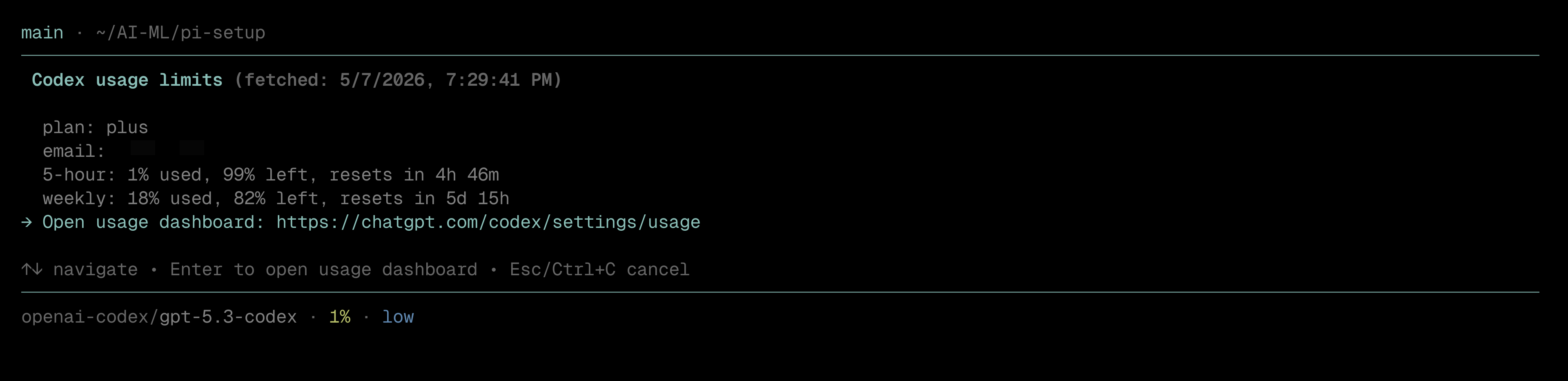
Running /codex-limit opens an interactive dashboard with usage statistics and a shortcut.
Features
- Footer widget showing 5-hour usage percentage when using openai-codex models
/codex-limitcommand — interactive view with plan type, masked email, per-window usage, and a shortcut to open the Codex dashboard