
Install
Install with PiG
pig install npm:pi-broInstall with Pi
pi install npm:pi-broPackages run code with your permissions and influence agent behavior. Catalog inclusion is not a security audit. Review the source before installing a third-party package.
Pi manifest JSON
The pi field of package.json.
{
  "image": "https://raw.githubusercontent.com/tranhoangnguyen03/pi-bro/main/docs/images/social-preview.png",
  "extensions": [
    "./src/bro.ts"
  ]
}
README
Written by the package's publisher, shown as published in version 0.38.1 (README.md). PiG does not review it.
pi-bro




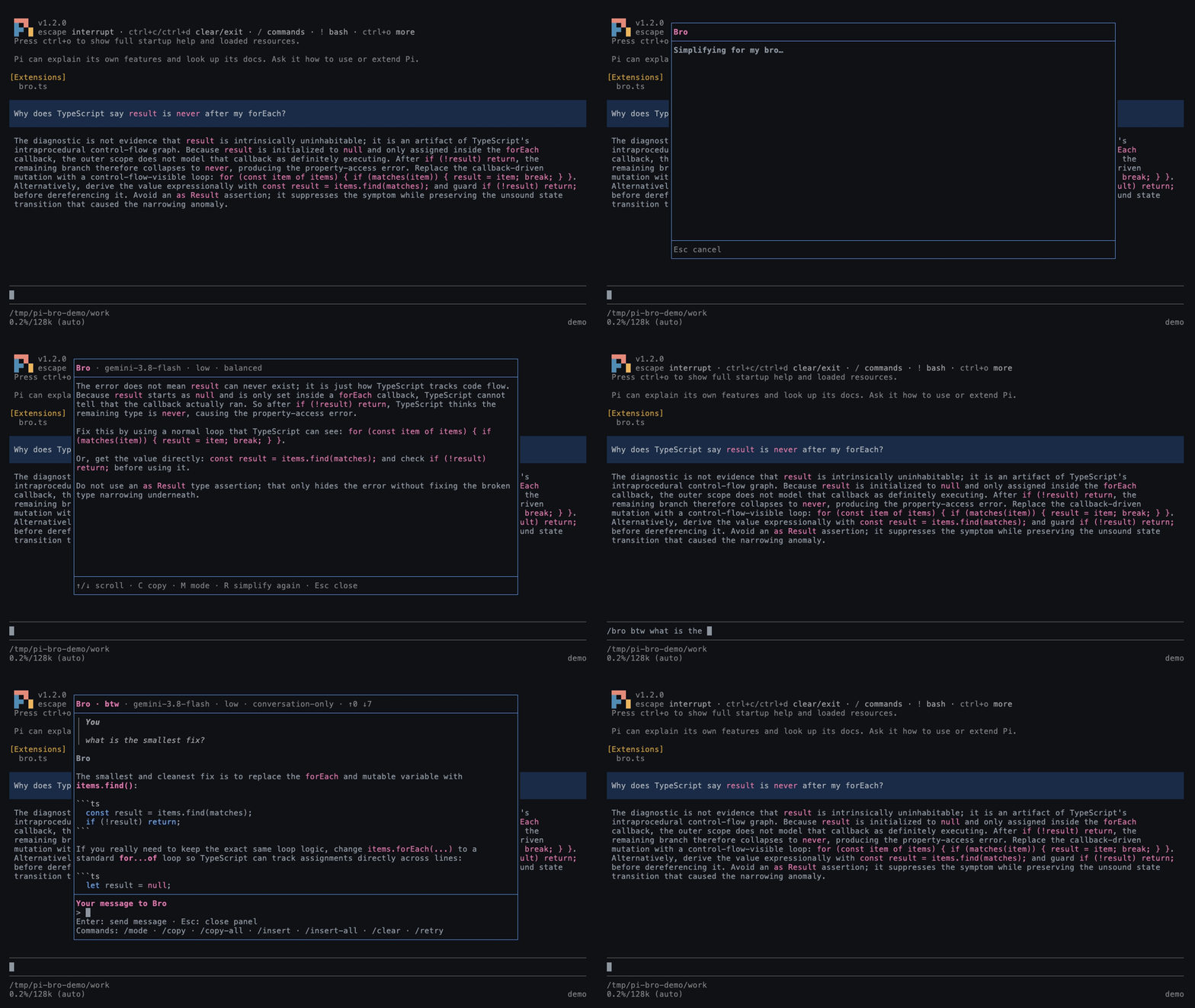
A sidekick for you and your Pi agent: plain-language explanations, side questions, diagrams, PR review and second opinions, without cluttering the agent's context.
pi-bro is an extension for Pi, a
terminal coding agent. Bro opens its answers in a separate window and runs
them through Pi's model or a supported AI coding CLI, so your
main agent's conversation stays clean. Before you install, see
what leaves your machine.
Install
pi install npm:pi-bro
Then restart Pi or run /reload, and check your setup:
/bro doctor
To try Bro without installing it, run pi -e npm:pi-bro. To install from
GitHub, use pi install git:github.com/tranhoangnguyen03/pi-bro.
Try it
On first use, Bro picks the active physical Pi model if one is selected. No extra CLI is needed. Existing Bro settings stay as they are. Try this in Pi:
/bro simplify text A request limit means a service allows only a certain number of calls in a given time.
Expected: Bro opens a separate window and explains that sentence in plain words. Close with Esc. Nothing is sent to your main agent's conversation. The exact words depend on your selected model.
| After that | What happens |
|---|---|
/bro | Opens Simplify and shows the saved result or help. Run /simplify inside to explain the latest reply or /show to draw recent conversation turns. |
/bro copy | Edit and preview the raw Markdown of the last assistant reply before copying |
/bro btw What is a race condition? | Asks a private side question |
/bro architecture | Creates or refreshes docs/architecture/ for this project |
/bro grill-me Should agents talk freely to each other? | Questions your assumptions privately, one at a time |
/bro overthink | Get a private second look with Ctrl+R; automatic checks are opt-in |
/bro elevate Improve how we search company documents | Find expert gaps before giving Pi a task |
File and webpage examples need your own real path or URL; see how to explain them. For a step-by-step first run, see Getting started.
What it does
| Command | What you get |
|---|---|
/bro copy | Copy Markdown. Edit, preview and copy the last completed reply as Markdown, without a model call or saved file. |
/bro, /bro simplify | Simplify. Understand one source at a time: plain-language explanations of replies, text, files, or webpages, or diagrams of recent turns with /show inside the same window. |
/bro architecture [focus] | Architecture Docs. Inspects the project and writes Markdown, diagrams and an offline interactive architecture.html under docs/architecture/. Uses BTW model settings. |
/bro elevate or Ctrl+Shift+E | Elevate. Discover missing expert considerations, select useful improvements, and rewrite your task without submitting it. Shares BTW backend settings. |
/bro remember-me [thought] | Remember Me. Privately clarify and approve short personal memories with unfoldable background. Agents can call about_user to read summaries and expand IDs. |
/bro overthink | Overthink. Get a second look from the active Pi model, with four editable questions. Use Ctrl+R to check now; enable automatic checks in config if you want them. |
/bro grill-me | Grill Me (experimental). A private, opinionated decision interview: light, balanced or exhaustive; one question per round; /consolidate drafts a brief without ending the interview; /copy returns the latest reply or decision brief to the clipboard. Uses BTW model settings; read-only restrictions vary by backend. |
/bro btw | Side questions. A separate conversation seeded with recent context, so you can ask without interrupting the agent. ⚠️ Full-permission mode can edit files. |
/bro guided-review <PR> | Guided Review. An explanation and quality assessment of a GitHub PR, with ranked findings, source evidence and private questions. Claude, Muse, or Pi is recommended for untrusted PRs. |
/bro guided-review delete [PR] | Choose a saved review and explicitly delete its record, questions and captured source after confirmation. No automatic cleanup. |
bro_advisor tool | Second opinion. A tool your agent can call mid-task; a fresh backend process reviews the session snapshot, can inspect the workspace when needed, and returns advice to the agent. ⚠️ Runs with permissions bypassed. |
/bro config, /bro preferences | Settings and preferences. Pick the backend, model and effort per feature, and tell Bro how you like answers. |
For help by task, start with the four human-intent states or the docs home; see the command reference for syntax. Elevate, in practice: Bro points out expert questions or tests you may have missed before you ask Pi to do the work. Review the suggestions, approve only what matters, then edit or submit the resulting request yourself. See the walkthrough for limits, privacy, and copy-only handoff.
Guided Review has its own guide.
Requirements
- Pi
>=1.3.0and Node.js>=22.19.0. Overthink always uses the host Pi model, independently of Bro's backend configuration. - macOS or Linux. Windows is untested; there, cancelling stops only the backend's direct process, not anything it started.
- At least one backend on your
PATH, signed in once from your terminal, or the built-in Pi backend. You only need the one you use:
| Backend | CLI | Notes |
|---|---|---|
| Google Antigravity | agy | Used for new settings if no physical Pi model is selected. Needs >=1.1.15. Guided Review uses --sandbox, which restricts shell commands but still allows writes inside the project. |
| Claude Code | claude | Works for every feature; strict file-only inspection for Guided Review. |
| Grok Build | grok | Guided Review uses its read-only sandbox (shell-enabled). |
| Codex CLI | codex | Guided Review uses its read-only sandbox (shell-enabled). |
| Muse Code | muse | Works for every feature; strict file-only inspection for Guided Review. |
| Pi (in-process) | none | Runs a Pi SDK session inside this process using your Pi models and credentials. No extra install. Restricted features get no tools; Guided Review is file-only; the advisor and full-access BTW get workspace tools. |
- Guided Review also needs Git and an authenticated
gh. Claude, Muse, or Pi is recommended for untrusted PRs (strict file-only inspection); Codex, Grok and Agy run with shell available under their sandbox, with an advisory. - PiG support is experimental.
What leaves your machine
Each feature sends data to the backend you chose and its model provider,
which may keep it under their own policies. Paths below are under
~/.pi/agent/ (or $PI_CODING_AGENT_DIR).
| Feature | What is sent | What Bro keeps on disk |
|---|---|---|
| Copy Markdown | Nothing; it reads the last completed assistant reply already in Pi's session | Nothing; only a temporary draft while the modal is open |
| Explain | The agent's last reply, your pasted text, or text extracted from your file or webpage, plus your preferences | Last result as a private Pi session entry |
| Architecture Docs | Repository source, existing architecture docs, focus and preferences; only selected backend can see snapshot files | Generated Markdown, JSON graph and offline HTML in docs/architecture/; temporary inspection copy is removed |
| Show | User and assistant text from recent turns (no tool calls, tool results, reasoning or images), plus your preferences | Last result in the private Pi session, plus temporary diagram pages in pi-bro-<uid>/ |
| Side questions | Your questions and up to the last 8 turns of conversation text, plus your preferences | Private Pi session entries with completed turns, mode and draft |
| Grill Me | Topic, interview turns, up to the last 8 main-session text turns and preferences; any workspace files the selected inspector reads | Private Pi session entries with the interview and brief |
| Overthink | Current session projection, including tool evidence, plus private user-editable questions and preferences, to the active Pi provider | Global questions in bro-overthink-defaults.json; per-session questions and latest private note in Pi session custom entries |
| Elevate | Your objective, selected findings, all current-branch user/assistant text; Full also includes tool-call arguments and text results, and preferences | Nothing; the workflow stays in memory |
| Guided Review | The PR description and diff, the files the backend reads, your questions, plus your preferences | Reviews and captured source in bro-reviews/, with no automatic cleanup |
| Advisor | The agent's system instructions, tool list and whole conversation, including tool calls and results (reasoning and images omitted), plus your steering | Steering in bro-advisor.md and the session file |
Session-scoped Bro entries live inside Pi's session file. They stay out of the model's conversation, but are not secret from someone who can read, back up, export, or share that file. Check the session content before sharing it; this feature does not encrypt or redact exports.
/bro simplify url also connects straight to the website, which sees your IP address.
Bro runs each CLI as you, with your environment. It never reads or copies an
external CLI's provider credentials, but a CLI signs in its own way, which can
include API keys set in your environment. The built-in Pi backend is the
exception: it runs in-process, so it reads your Pi auth.json and reuses your
Pi provider credentials for the model you select. Nothing Bro produces enters
Pi's conversation unless you paste and submit it, except advisor answers, which return to
the agent as tool results.
[!WARNING] These run the backend in your workspace with its permission checks bypassed:
- Advisor: it can read, edit and run commands. "Advise, don't edit" is only an instruction.
- Grill Me
/access full: explicitly opts into unrestricted workspace permissions. The no-edits prompt is not an access control.- BTW full-permission mode (turned on with
/modeinside BTW): it is meant to edit files and run commands.- Grok: its sandbox is off except during Guided Review, which uses the read-only sandbox. "Answer only from the supplied context" is only an instruction.
Details per backend: Backends: access and retention and Privacy and safety.
Limits
- Documents:
.md,.markdown,.txt,.pdf,.docxonly, no OCR, up to 10 MiB. → Run OCR elsewhere first. - Webpages: one public HTML page; no logins, paywalls, page JavaScript or
proxy settings. → Save the page as PDF or text and use
/bro simplify file. - No fallback: if the chosen backend, model or effort fails, Bro shows that
backend's error instead of switching. → Run
/bro doctor. - Elevate runs fresh restricted calls through the BTW model setting. Restricted does not always mean sandboxed; see access and retention. The shortcut may not work in all terminals: use
/bro elevateinstead. - BTW, Grill Me and Simplify's latest result use private session entries; they survive normal Pi reload/resume. A new session starts fresh and later fork changes stay separate. Abrupt crashes during active calls are not guaranteed.
- Guided Review runs in local interactive Pi only and does not post to GitHub.
Full list: Troubleshooting and current limits.
Stability
Bro is 0.x: a minor version can change commands or settings. Breaking
changes are listed under Breaking in the changelog and the
release notes. Each
release is published to npm from CI with
provenance.
Contributing
npm ci
npm test        # offline: uses fake backend CLIs, never calls a model
pi --tui-mode fullscreen -e ./src/bro.ts
See the contribution and security guides.
License
MIT. See LICENSE and THIRD_PARTY_NOTICES.md.