
Install
Install with PiG
pig install npm:pi-background-taskInstall with Pi
pi install npm:pi-background-taskPackages run code with your permissions and influence agent behavior. Catalog inclusion is not a security audit. Review the source before installing a third-party package.
Video
Declared by the package manifest. Open the file ↗
Pi manifest JSON
The pi field of package.json.
{
  "video": "https://github.com/ZKiteLM/pi-background-task/releases/download/v0.1.0/pi-background-task-demo.mp4",
  "extensions": [
    "./dist/index.js"
  ]
}
README
Written by the package's publisher, shown as published in version 0.1.1 (README.md). PiG does not review it.
pi-background-task
Reliable, interactive background jobs for the Pi coding agent. pi-background-task gives Pi six focused tools to start long-running commands, inspect bounded logs, send terminal input, wait without model polling, and stop jobs. Every task runs in a real tmux PTY with durable output and completion wake-ups, so Pi can keep reasoning while work continues in the background.
The extension is intentionally lightweight and easy to audit: its TypeScript modules have narrow responsibilities, it uses only Node.js standard-library code at runtime apart from Pi's peer packages, and it never interpolates user commands into tmux control commands. Background-task visibility follows Pi's session tree, allowing /resume, /fork, /new, and branch switching without mixing unrelated task histories or unnecessarily stopping live work.
Why use it?
- Non-blocking by design — builds, tests, servers, training runs, and data jobs continue outside the active agent turn.
- A real interactive terminal — send text, Enter, arrows, Escape, or control keys to shells, REPLs, debuggers, and TUIs; attach with tmux when a human should take over.
- No LLM polling loop —
task_waitwaits inside one tool call, while completion notifications wake Pi only when useful. - Complete, durable output — tmux
pipe-panecaptures the full PTY stream; byte-offset pagination keeps large logs out of model context. - Session-tree-aware history — the active Pi branch determines which jobs are visible. Resume returns to the same branch history; sibling branches stay out of the way.
- Careful lifecycle semantics — reload, resume, fork, and new-session transitions do not kill jobs. A real Pi quit cancels jobs owned by that runtime.
- Small runtime footprint — no third-party runtime dependencies beyond Pi's peer packages and the system
tmuxexecutable. - Compact live TUI —
/bg-tasksupdates status and elapsed time automatically and shows highlighted command/output details on demand.
In action
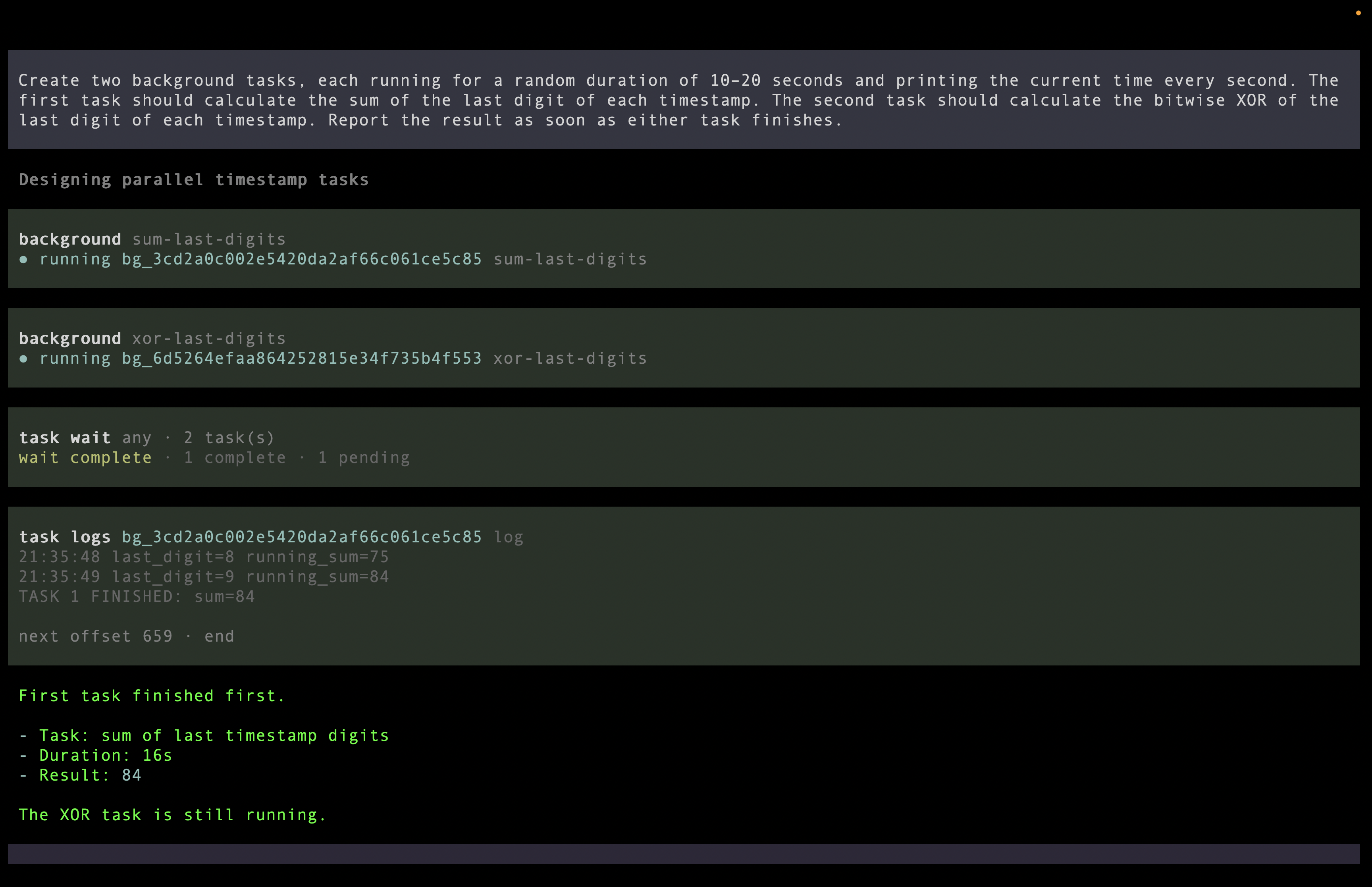
Pi can coordinate multiple jobs with task_start, task_wait, and task_logs while keeping each tool result compact:
Requirements
- Pi
0.85.1or newer - Node.js
20or newer - macOS or Linux; Windows users can run Pi inside WSL
tmuxavailable onPATH
# macOS
brew install tmux

# Debian / Ubuntu
sudo apt-get install tmux
Install
pi install npm:pi-background-task
Agent tools
The extension provides Pi with six tools:
| Tool | Purpose |
|---|---|
task_start | Start a command and return immediately with a task ID |
task_status | Inspect state, elapsed time, and exit code |
task_logs | Read bounded log pages by byte offset or capture the current screen |
task_send | Send literal text, Enter, or an allow-listed control key |
task_wait | Wait for any or all tasks without model polling |
task_kill | Request graceful cancellation or force termination |
Example task_start input:
{
  "command": "python -u train.py",
  "name": "Training",
  "cwd": "./experiment",
  "timeoutSeconds": 3600,
  "notifyOnCompletion": true
}
Example incremental log read:
{
  "taskId": "bg_...",
  "offset": 0,
  "limitBytes": 16384
}
Use the returned nextOffset for the next page. A single read is capped at 64 KiB, so one noisy process cannot flood model context.
User commands
/bg-tasksopens jobs referenced by the current root-to-leaf Pi session branch./bg-tasks allincludes project history./bg-attach <taskId>prints the exact tmux attach command; it never replaces Pi's terminal automatically./bg-clearconfirms and deletes completed records visible on the current branch, including resumed history.
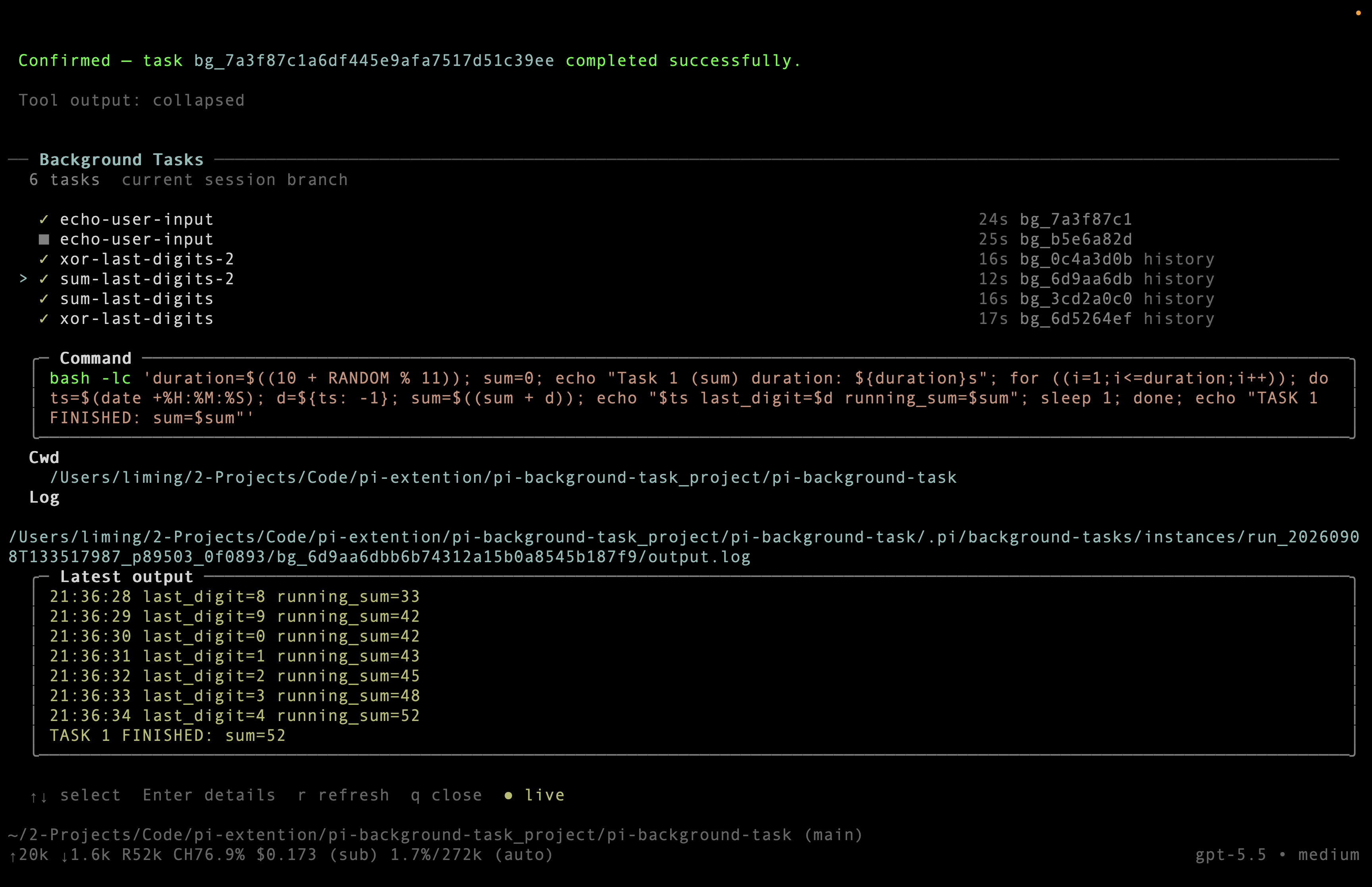
In the task panel, use ↑/↓ to select, Enter to expand, r to force a refresh, and q or Esc to close. Normal updates are event-driven; elapsed time and an expanded log tail update once per second without invoking the model.
Try it
Start two parallel tasks
Create two background tasks, each running for a random duration of 10–20 seconds and printing the current time every second. The first task should calculate the sum of the last digit of each timestamp. The second task should calculate the bitwise XOR of the last digit of each timestamp.
Start two tasks and wait for all results
Create two background tasks, each running for a random duration of 10–20 seconds and printing the current time every second. The first task should calculate the sum of the last digit of each timestamp. The second task should calculate the bitwise XOR of the last digit of each timestamp. Report the result until all tasks finish.
Interact with a waiting task
Create a background task that waits for user input and then prints the input.
While it is waiting, try either:
Input: Ming
or:
Kill this background task.
How it works
The implementation deliberately stays in three main layers:
Pi extension (tools, commands, renderers)
                  │
                  ▼
TaskRegistry (state, branch scope, waits, notifications)
            │                         │
            ▼                         ▼
TaskStore (atomic files)       TmuxBackend (PTY control)
                                          │
                                          ▼
                                 isolated task runner
Starting a task follows a small but important handshake:
- The registry creates private task metadata and an empty log.
- tmux starts the runner in an isolated session.
- The runner waits at a one-way start gate while
pipe-paneis attached. - The registry opens the gate, and the runner reads the command from metadata and executes it through the user's shell.
- The runner atomically writes
result.json; a file watcher plus a low-frequency reconciliation pass updates Pi.
The gate exists solely to prevent the first bytes of fast commands from escaping before log capture is ready. There is no second readiness protocol. User commands are never interpolated into a tmux control command.
Tool results intentionally have two layers: compact content.text gives the model only what it needs for its next decision, while structured details preserves rendering and branch-reconstruction data without duplicating it into context.
Read Architecture for the state machine, persistence format, session-tree visibility, shutdown behavior, and failure boundaries. An editable draw.io source is included.
Data and security
Each project stores private task state under:
.pi/background-tasks/instances/<runtimeId>/<taskId>/
├── meta.json
├── output.log
└── result.json
Runtime IDs, tmux sockets, and internal session names enforce ownership and isolation; ordinary use only needs the job name and bg_... task ID. Keep .pi/background-tasks/ out of version control.
Commands run with the same operating-system permissions as Pi. This extension is an execution coordinator, not a sandbox. Avoid placing secrets in command arguments or logs.