
Install
Install with PiG
pig install npm:pi-agent-hubInstall with Pi
pi install npm:pi-agent-hubPackages run code with your permissions and influence agent behavior. Catalog inclusion is not a security audit. Review the source before installing a third-party package.
Pi manifest JSON
The pi field of package.json.
{
  "extensions": [
    "dist/src/extension/index.js"
  ]
}
README
Written by the package's publisher, shown as published in version 1.2.0 (README.md). PiG does not review it.
pi-agent-hub
Pi-native tmux hub for long-running coding-agent sessions, skills, and MCP.
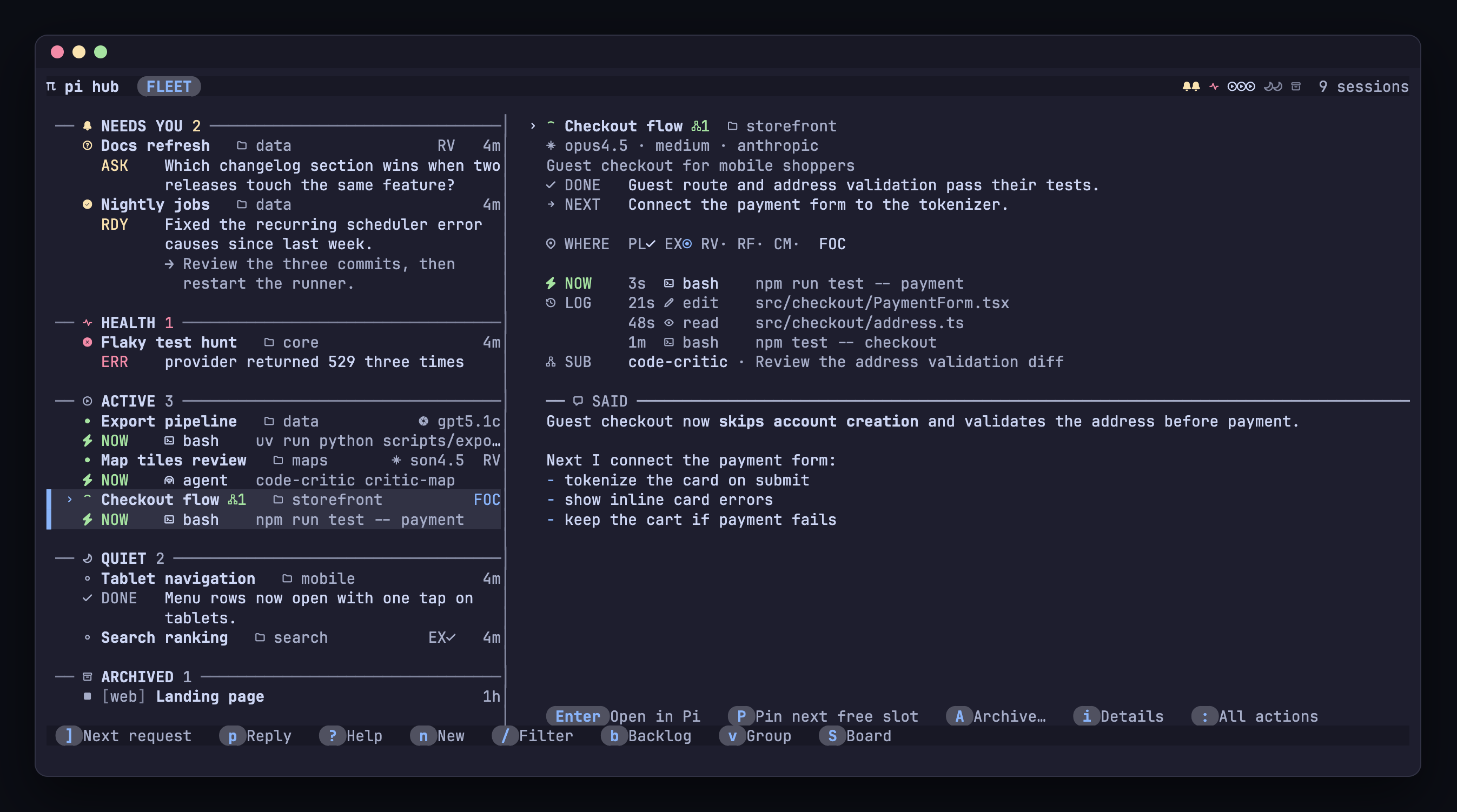
Use pi-hub to keep multiple Pi sessions visible, grouped, restartable, and easy to jump between from one terminal dashboard.
New here? See Features for the dashboard workflow and core capabilities.
Why pi-agent-hub?
Most agent managers try to become the runtime. pi-agent-hub stays small: Pi runs the agents, tmux keeps them alive, and the hub gives you one keyboard-driven dashboard to manage them.
| Feature | Why it matters |
|---|---|
| Pi-native | Uses Pi sessions, extensions, skills, MCP, and project state directly. |
| tmux-native | Sessions keep running as normal tmux sessions; you can attach, switch, or recover manually. |
| One stable dashboard | pi-hub always brings you back to the same control center. |
| Return shortcuts | Ctrl+Q jumps from a managed session back to the dashboard; Alt+R opens rename from inside a session. |
| Project-scoped skills/MCP | Pick skills and MCP servers for the selected session's primary repo. |
| Multi-repo workspaces | Extra repos are symlinked into a runtime workspace; source repos are not moved or owned. |
| Hub-owned worktrees | Create isolated one-repo branch sessions from the new-session form; finish, forget, or discard them explicitly from the dashboard. |
| Small surface area | No cloud service, no custom agent runtime, no hidden repo scanning. |
Quick start
Requirements: Pi and tmux.
pi install npm:pi-agent-hub
pi-hub doctor
pi-hub
Inside the dashboard:
| Key | Action |
|---|---|
n | Create a new Pi session |
Enter | Open or switch to the selected session |
/ | Filter sessions |
p | Send a one-line message to the selected live session without opening it |
? | Show help and status legend |
q | Quit the dashboard |
r | Open restart choices (r selected, n new conversation, a all) |
R | Rename the selected session |
d | Delete or forget the selected session |
f | Fork the selected session |
a | Mark the selected waiting session read |
w | Finish a hub-owned worktree session |
N | Sync the selected hub title from Pi's /name |
↑↓ / j / k | Move selection |
g / G | Move a session to a group or rename its group |
K / J | Move the selected session up/down within its group |
s / m | Pick project skills or MCP servers; ←→ switches Enabled/Available |
Install
The npm package is still pi-agent-hub; it exposes both commands, with pi-hub as the shorter daily-use command and pi-agent-hub kept for compatibility.
For local development, see Development.
Common commands
pi-hub              # create/attach/switch to the dashboard tmux session
pi-hub tui          # run the TUI directly in the current terminal
pi-hub doctor
pi-hub list
pi-hub add . -t api -g default
pi-hub add ./api -t fullstack --add-cwd ../web --add-cwd ../shared
pi-hub delete <session-id>
pi-hub mcp-pool     # run the pooled MCP socket daemon
pi-hub config get
pi-hub config set session-prelude '<shell snippet>'
pi-hub config unset session-prelude
add --add-cwd creates a multi-repo session: cwd stays the primary repo, extra paths are symlinked into a per-session workspace, and Pi starts from that workspace. Worktree sessions are created from the TUI new-session form with Ctrl+T; the branch name is also the session title. delete stops the tmux session if it is still alive, removes the registry row, removes the heartbeat file, and removes any owned multi-repo workspace. Pi conversation/session files, source repos, and hub-owned worktree directories are kept by normal delete; use dashboard w to merge and remove a clean hub-owned worktree, or d then Shift+D to discard a clean worktree and branch without merging.
Documentation
- Features: dashboard workflow, keybindings, groups, status vocabulary, multi-repo workspaces, and worktree behavior.
- Configuration: runtime state, global config, Skills/MCP selection, themes, and state paths.
- Development: local setup, tests, package checks, and smoke testing.
- Structure: project layout and architecture notes for contributors.
Acknowledgements
Thanks to Ashesh Goplani for Agent Deck. This project ports its core session-dashboard idea into a smaller Pi-native extension. It is not affiliated with Agent Deck. See LICENSE for the Agent Deck MIT notice.