
Install
Install with PiG
pig install npm:gentle-timestampsInstall with Pi
pi install npm:gentle-timestampsPackages run code with your permissions and influence agent behavior. Catalog inclusion is not a security audit. Review the source before installing a third-party package.
Video
Declared by the package manifest. Open the file ↗
Pi manifest JSON
The pi field of package.json.
{
  "image": "https://raw.githubusercontent.com/mln6666/gentle-timestamps/main/docs/preview.png",
  "video": "https://raw.githubusercontent.com/mln6666/gentle-timestamps/main/docs/demo.mp4",
  "extensions": [
    "./gentle-timestamps.ts"
  ]
}
README
Written by the package's publisher, shown as published in version 1.0.6 (README.md). PiG does not review it.
Gentle Timestamps
gentle-timestamps is a Pi / Gentle Shell extension, gentle-timestamps.ts, that paints a
timestamp in the top-right corner of every user, assistant and tool box in the chat.
Settings apply live, with no restart.
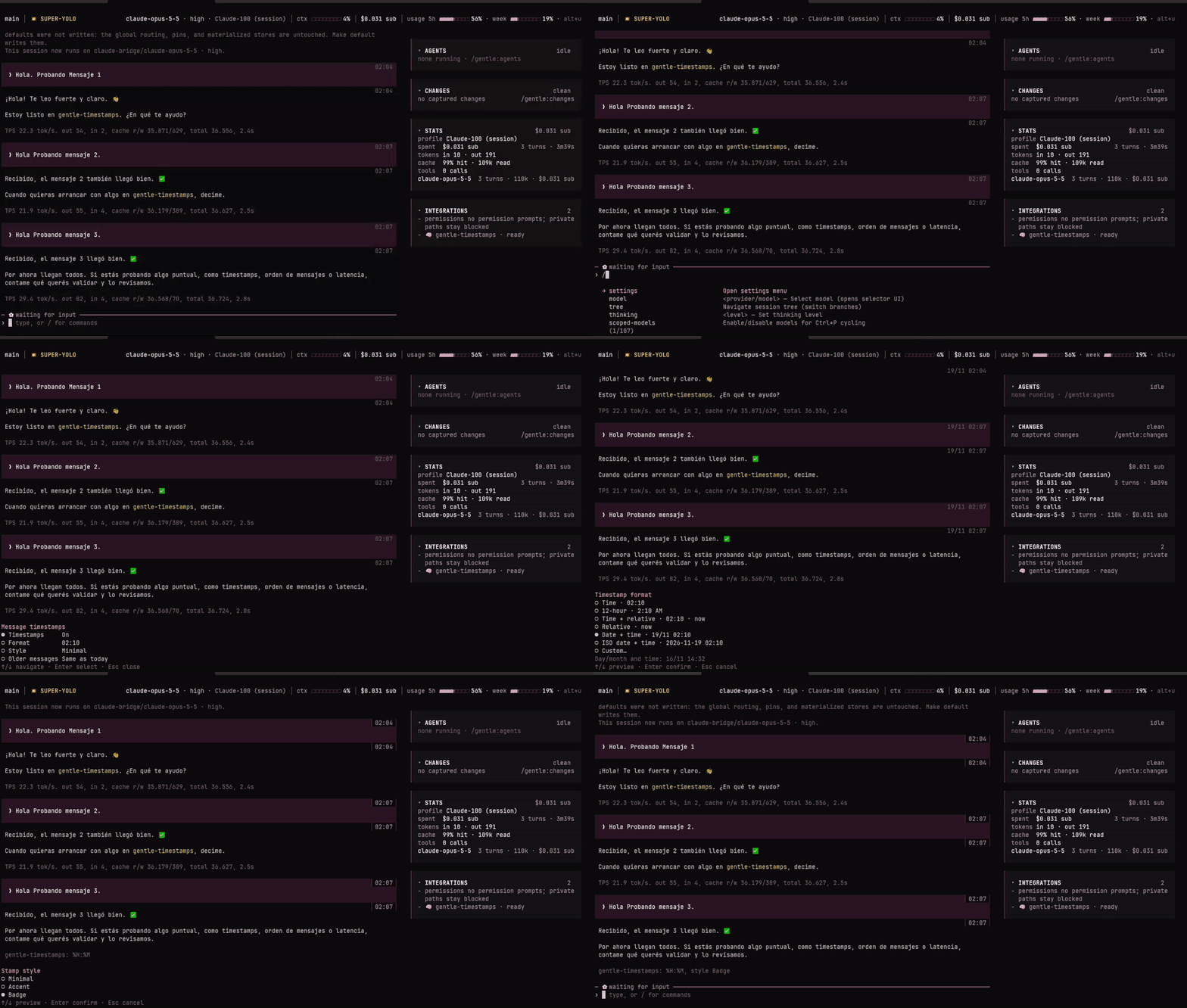
The menu, live format and style previews, and the stamps on every box (MP4 version).
Install
pi install npm:gentle-timestamps             # Pi
gentle-shell install npm:gentle-timestamps   # Gentle Shell
npm run install-extension                    # or, from a clone: copy the file into the extensions folder
Use one install method: a package install next to a copied gentle-timestamps.ts in the
extensions folder registers the extension twice.
Upgrading from gentle-when keeps your settings (they are copied from when.json); remove the old
gentle-when.ts from the extensions folder (npm run install-extension does it).
Usage
/gentle:timestamps with no argument opens a menu:
| Row | Effect |
|---|---|
| Timestamps | Enter toggles on / off and saves at once; the menu stays open |
| Format | Today's messages: Time, 12-hour, Time + relative, Relative, Date + time (16/11 14:32), ISO date + time, the current custom format, or Custom… (strftime) |
| Style | Minimal (text toned from the box background), Accent (theme accent color) or Badge (▏23:17▕: thin bars in the border color framing the panel surface, muted text); stored as plain / accent / block |
| Older messages | Earlier days: Same as today, Smart, Smart numeric (default), Date + time (16/11 14:32), ISO date + time, Relative, or Custom… |
The format pickers show a help line for the option under the cursor (what Smart
or Relative do, Custom… examples). Pickers preview live as you move the cursor: Esc restores the previous
setting, Enter saves it. An empty Custom… answer cancels; to hide the stamps use the Timestamps toggle.
Choosing a format after both today's and the older format were hidden restores the default older format.
Arguments skip the menu:
| Command | Effect |
|---|---|
/gentle:timestamps on | Show timestamps |
/gentle:timestamps off | Hide timestamps (Pi's untouched render) |
/gentle:timestamps reset | Restore the defaults |
/gentle:timestamps <format> | Set today's format (e.g. /gentle:timestamps %H:%M:%S); the older-messages format is kept |
Formats
strftime subset, English names:
| Token | Output | Token | Output |
|---|---|---|---|
%a | Mon | %I | hour 01–12 |
%A | Monday | %j | day of year 001–366 |
%b | Jan | %M | minute 00–59 |
%B | January | %m | month 01–12 |
%d | day 01–31 | %p | AM / PM |
%e | day, space-padded | %R | %H:%M |
%F | %Y-%m-%d | %S | second 00–59 |
%H | hour 00–23 | %T | %H:%M:%S |
%Y | 2026 | %y | 26 |
%% | % |
A - flag drops the padding: %-I:%M %p gives 2:05 PM, %-d %b gives 5 Jan.
Unknown tokens are shown verbatim, so a typo is visible instead of vanishing.
Pseudo-formats:
relative—now,3 min ago,2 h ago,1 d ago,2 w ago,3 mo ago,1 y ago(always floored;nowcovers the first minute).relative-time—14:05 · 3 min ago.smart— the time is always shown and the date grows with the age:14:32today,16 Nov 14:32this year,16 Nov 2025 14:32another year.smart-numeric— the same rule with numeric dates:16/11 14:32this year,16/11/25 14:32another year.- empty string — no stamp.
Settings file
Default path: ~/.gentle-shell/gentle-ai/timestamps.json.
GENTLE_TIMESTAMPS_CONFIG— full path to the file.GENTLE_PI_CONFIG_HOME— directory that holdstimestamps.json.
| Key | Default | Meaning |
|---|---|---|
enabled | true | false restores Pi's untouched render |
format | "%H:%M" | Format for today's messages |
formatOlder | "smart-numeric" | Format for earlier days; null = same as format |
style | "plain" | "plain", "accent" or "block"; unknown values (e.g. the removed "brackets") read as "plain" |
Each key falls back to its default on its own; unknown keys, including a legacy
locale, are ignored. The file is written atomically. If saving fails, a
warning is shown and the change applies to the current session only.
Long sessions
- Each chat component caches its resolved time and painted row; steady frames cost a few string comparisons.
- No per-frame copies of the session: tool-call times come from an incremental index that only reads new entries when the entry count changes.
- A relative stamp is recomputed only when its text changes (the next minute, hour or day of its age), not on a fixed interval.
- Relative stamps refresh every 30 s while idle, only when a relative format is active; absolute formats never wake the UI.
- A stamp that does not fit is dropped: the extension never emits a line wider than the terminal.
Pi compatibility
Message times are read from internal fields of Pi's chat components. The extension
warns once per process, gentle-timestamps: could not read message times (Pi may have changed),
when those fields are missing on three boxes of one kind in a session: a user box without
its text, a tool box without its call id, or an assistant box that stays a minute without
a readable time while no assistant box got one. A time that is merely unknown (a slow tool
call, a user box that matches no saved message) never warns.
Development
npm test                                    # Node >= 22.15; Pi packages stubbed via test/setup.mjs
npm run typecheck                           # tsc --noEmit against the real Pi type declarations; run npm install once first
npm run test:contract                       # the extension against the real Pi components
npm run install-extension [-- <dir>]        # copy gentle-timestamps.ts into the extensions folder
npm test runs against stubs: it never touches Pi and needs no npm install.
npm run typecheck and npm run test:contract are the two checks that run against
the real Pi: they catch a Pi release that renames an export, a theme token or one of
the component fields message times are read from. Only npm run typecheck needs
npm install once, for the devDependencies (TypeScript). Both look for a
node_modules folder holding @earendil-works/pi-coding-agent and
@earendil-works/pi-tui in this order: $GENTLE_TIMESTAMPS_PI_ROOT, this repository's
node_modules, <npm root -g>/gentle-pi/node_modules, then <npm root -g>. When
Pi is not found they skip and exit 0 (typecheck skipped: Pi packages not found (set GENTLE_TIMESTAMPS_PI_ROOT); every contract test reported as skipped).
The install target defaults to ~/.gentle-shell/agent/extensions, or
$GENTLE_TIMESTAMPS_EXTENSIONS_DIR; a legacy gentle-when.ts there is removed. Then restart
Gentle Shell or run /reload: the render logic hot-reloads.