Install
Install with PiG
pig install npm:gentle-decksInstall with Pi
pi install npm:gentle-decksPackages run code with your permissions and influence agent behavior. Catalog inclusion is not a security audit. Review the source before installing a third-party package.
Pi manifest JSON
The pi field of package.json.
{
  "skills": [
    "./skill"
  ]
}
README
Written by the package's publisher, shown as published in version 0.3.1 (README.md). PiG does not review it.
gentle-decks
Ask your agent for a presentation. Get one HTML file you can present anywhere.
Works in Gentle Shell and Pi. The agent writes the slides in markdown; the renderer handles layout, theme and navigation, and produces one self-contained HTML file with no external requests.
What it solves: slide tools are slow to drive from an agent, and generated HTML decks drift on every edit. Here the agent only writes markdown, the same markdown always renders the same file, and a fix is an edit to one slide — with a studio to comment on slides while the agent writes.
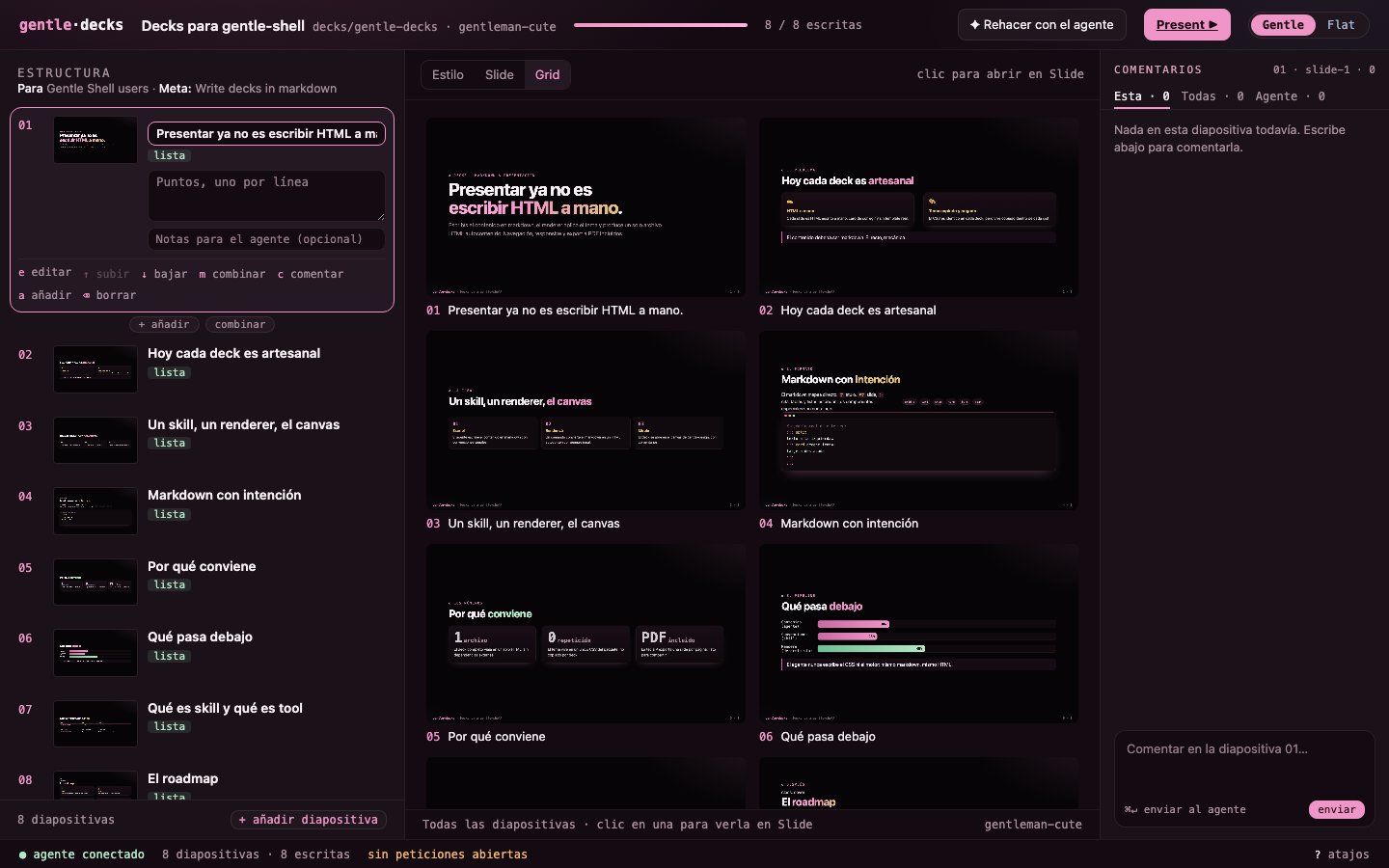
The studio: edit the outline, watch the slides fill in, comment on any slide.
Quick start
# Gentle Shell
gentle-shell install npm:gentle-decks

# Pi
pi install npm:gentle-decks
To try unreleased changes from main, install from Git instead:
pi install git:github.com/WilberC/gentle-decks.
Restart the session (or /reload) and ask: "Make a presentation about …".
Requires Node.js 18 or later. decks pdf needs Chrome (BROWSER/CHROME_PATH) and Node 22+; the CLI warns once when a newer gentle-decks is published.
What you get
| Feature | What it does |
|---|---|
| Guided flow | The agent asks about audience, goal and length, proposes an outline, then writes slide by slide. Every content slide carries a visual element: figures with embedded images, charts, terminal blocks, structured layouts. |
| Studio | A local web app to edit the outline, pick a theme, and comment on slides while the agent writes. Comments go one by one or in batches; a banner shows the writing queue; approving hands delivery to the agent and shuts the studio down. |
| One file out | Theme CSS, navigation and every image are inlined (self-contained HTML, so PDF export never loses images), with slides in the established outline order. Arrows or swipe to navigate, F fullscreen, P to export to PDF from the browser, decks pdf to print the static PDF straight from the CLI, plus an Export download from the studio. |
| Motion | Per-slide entrance animations (animate: fade-up, with automatic stagger) and container-level choreography, plus deck-wide transition: fade|slide|none. Reduced-motion disables everything and print always shows the final state. |
| Design canvas link | The studio's Estilo view offers Ver en gentle design ↗ when the agent opens the design canvas, so you review directions without leaving the decks experience — deck, view and comment drafts stay intact. |
| Small diffs | The same markdown always renders byte-identical HTML, so a fix is an edit to one slide. |
| Themes | gentleman-cute, fair-test and fair-test-gentle, or have the agent propose a new one for your topic — from the chat, from a reference image or PDF, or designed as visual directions on the gentle-design canvas before it becomes CSS. Manage your own in the studio's Mis estilos view (where themes live). |
What the rendered slides look like (gentleman-cute theme):
 |
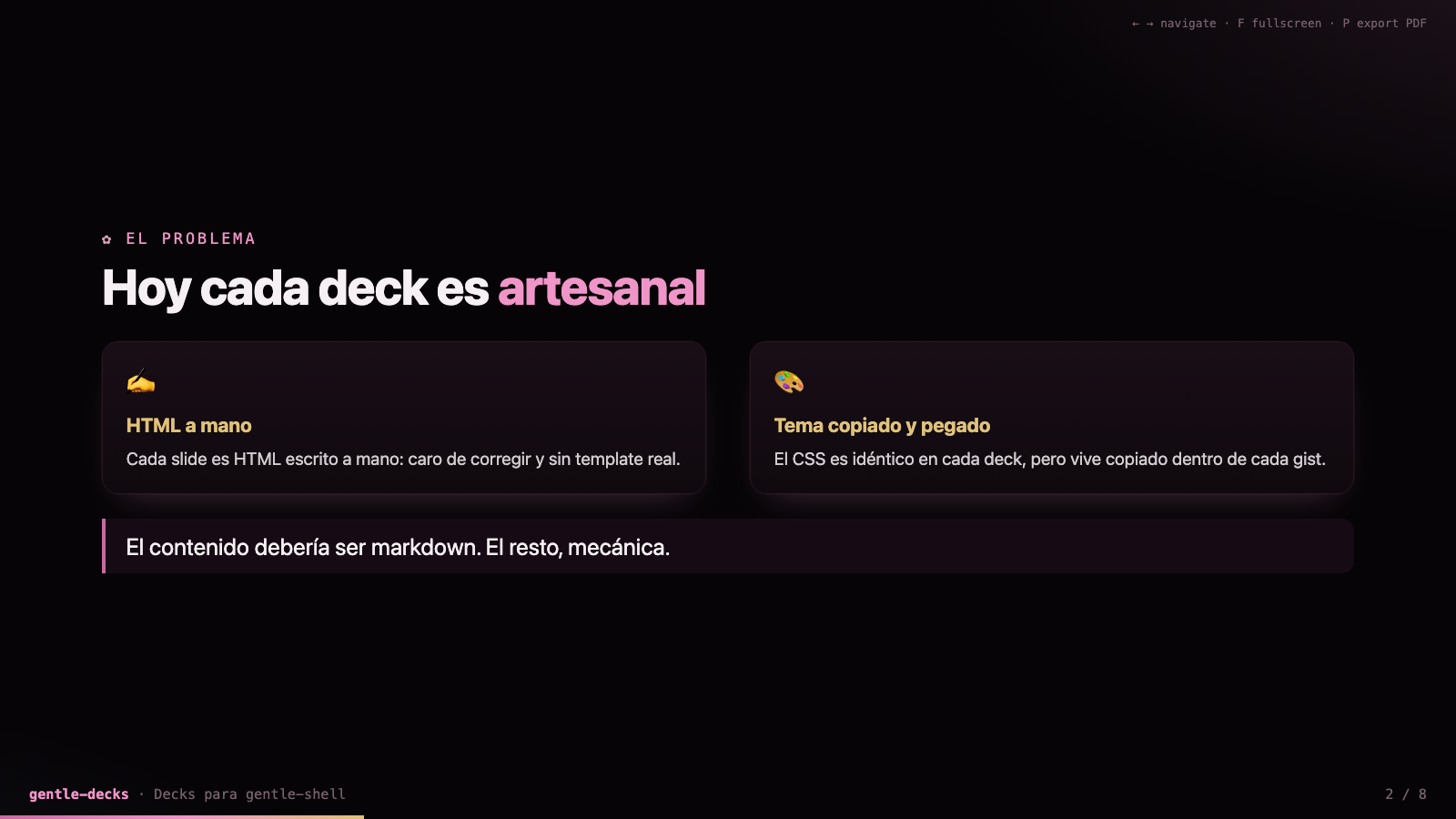 |
| Cover slide | Cards and a callout |
Learn more
| I want to… | Read |
|---|---|
| Write or fix slides by hand | FORMAT.md |
| Use the studio | docs/studio.md |
| Run the CLI directly | docs/cli.md |
| Make a theme | themes/CONTRACT.md |
| Where themes live, and keep my own | docs/themes.md |
| See what the agent does | skill/gentle-decks/SKILL.md |
| Contribute or run the checks | docs/development.md |
The canvas preview uses Gentle Shell's gentle_design tool; in plain Pi the
renderer and the studio work the same.
License
MIT. See LICENSE.