
Install
Install with PiG
pig install npm:cc-my-piInstall with Pi
pi install npm:cc-my-piPackages run code with your permissions and influence agent behavior. Catalog inclusion is not a security audit. Review the source before installing a third-party package.
Pi manifest JSON
The pi field of package.json.
{
  "themes": [
    "./themes/cc-my-pi-dark.json"
  ],
  "extensions": [
    "./extensions/index.ts",
    "./extensions/spinner.ts"
  ]
}
README
Written by the package's publisher, shown as published in version 1.4.3 (README.md). PiG does not review it.
cc-my-pi
If you're like me — you love Claude Code, but running other models or providers through it never feels reliable — this brings the Claude Code experience to Pi, which works with any model.
Personal Pi UI bundle — Claude Code-inspired tool rendering, spinner, themes, and esc/queue steering. Fork of pi-cc-tools (npm
pi-claude-code-ui), heavily adapted. See Credits & provenance.
What's new in v1.4.3
- The startup header no longer crashes Pi after shutdown: print/JSON runs exit cleanly, and reloading or switching sessions cancels pending header work.
pi install npm:cc-my-piworks again: no moreCannot find module 'ioredis'oreffect/Deferrederrors at startup.- Delayed ShiftEnter/editor installation survives reloading, forking or switching sessions (PR #10).
- The git statusline stops quietly after a subagent finishes instead of logging errors every few seconds.
- Thinking follows Pi's own
Ctrl+Tsetting: when it is visible it stays visible, also after tool calls are grouped. - Upgrade impact: with thinking shown in Pi, you now see thinking text in the
transcript again. Press
Ctrl+Tto hide it.
Every module below is optional and individually toggleable — turn any of
them off in settings and the rest keeps working. Core tool rendering (the
Claude-style diffs, status dots, and borders) is the base module: it's on
whenever the package is loaded, and toolBackground: "default" gets you
closest to stock Pi.
Install
Install from npm:
pi install npm:cc-my-piOr for development: clone this repo and add its absolute path to the
packagesarray in~/.pi/agent/settings.json("packages": ["/path/to/Pi-config/cc-my-pi"]).Remove any standalone
npm:@tintinweb/pi-taskspackage entry; task tracking is bundled and locally adapted by cc-my-pi. Then run/reload(or restart Pi).First load auto-starts the guided setup wizard (
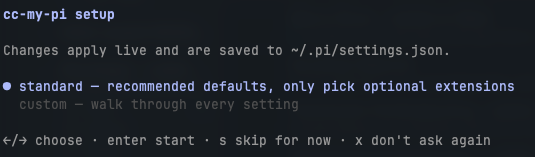
/cc-my-pi setup). Its intro asks whether you want the standard setup (recommended defaults, you only pick optional extensions) or custom (walk through every setting) — use←/→to choose.sskips for now (re-opens next session) andxnever asks again. Both paths then show a single optional extensions checkbox screen (see Goes well with):↑/↓move,spaceselects,enterinstalls the checked packages via the realpi installCLI (they activate after/reload). Only custom then continues into the full per-setting walkthrough. Re-run any time with/cc-my-pi setup.
To uninstall, remove the npm:cc-my-pi (or path) entry from packages and /reload.
Quick start
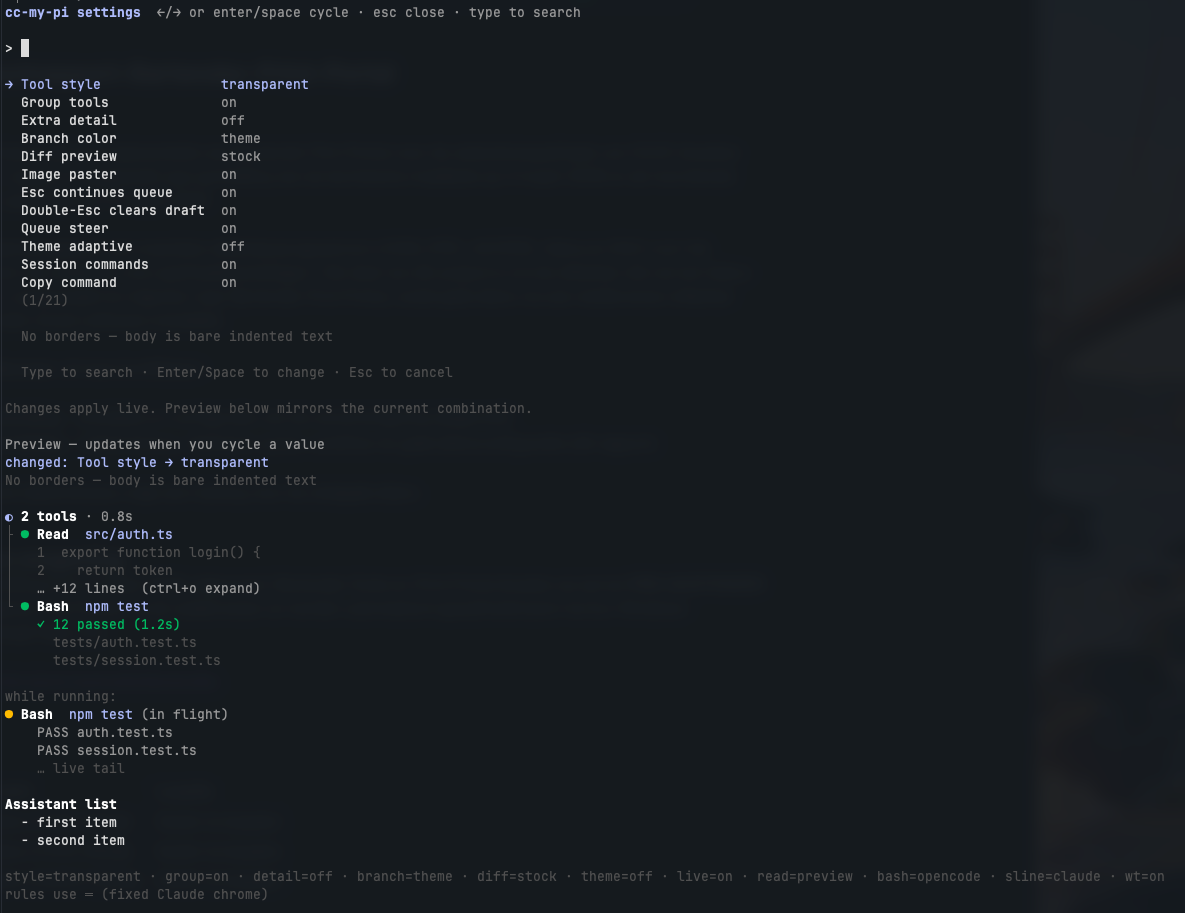
/cc-my-pi                 # open interactive settings panel (live ASCII preview)
/cc-my-pi setup           # guided walkthrough of every setting (auto-runs once on first load, re-runnable any time)
/cc-my-pi status          # text dump of style, grouping, branch, diff
Every subcommand hangs off the single root command /cc-my-pi:
/cc-my-pi ui|settings|status|outlines|transparent|default|group|detail|branch|diff|theme|spinner|setup
Thinking visibility follows Pi's native Ctrl+T / hideThinkingBlock setting.
Visible thinking stays in the transcript when actions or tool summaries arrive.
Thinking-bearing messages remain available even while hidden, so toggling thinking
back on can reveal them; tool grouping never deletes these messages.
Screenshots
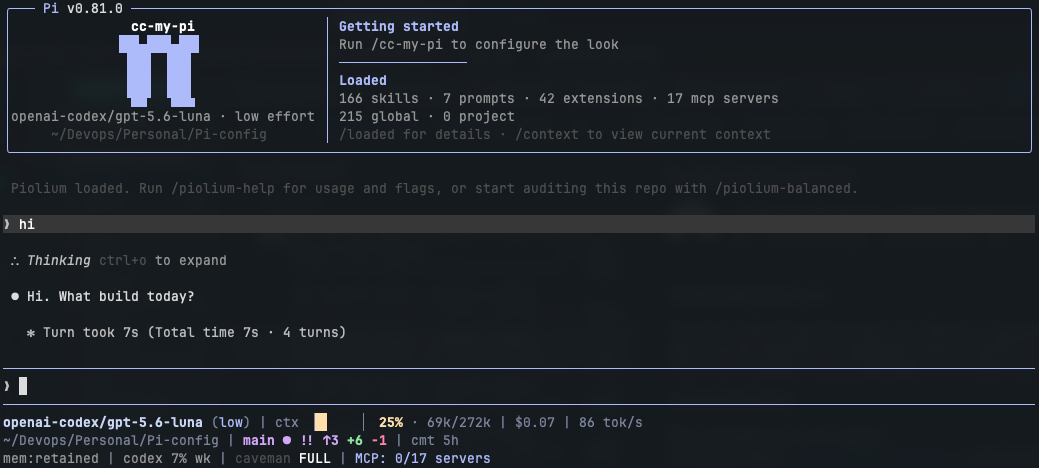
Tool rendering — individual Claude-style call/result rows by default; compact groups remain optional
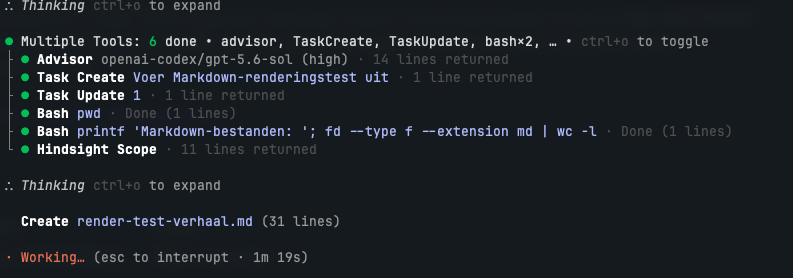
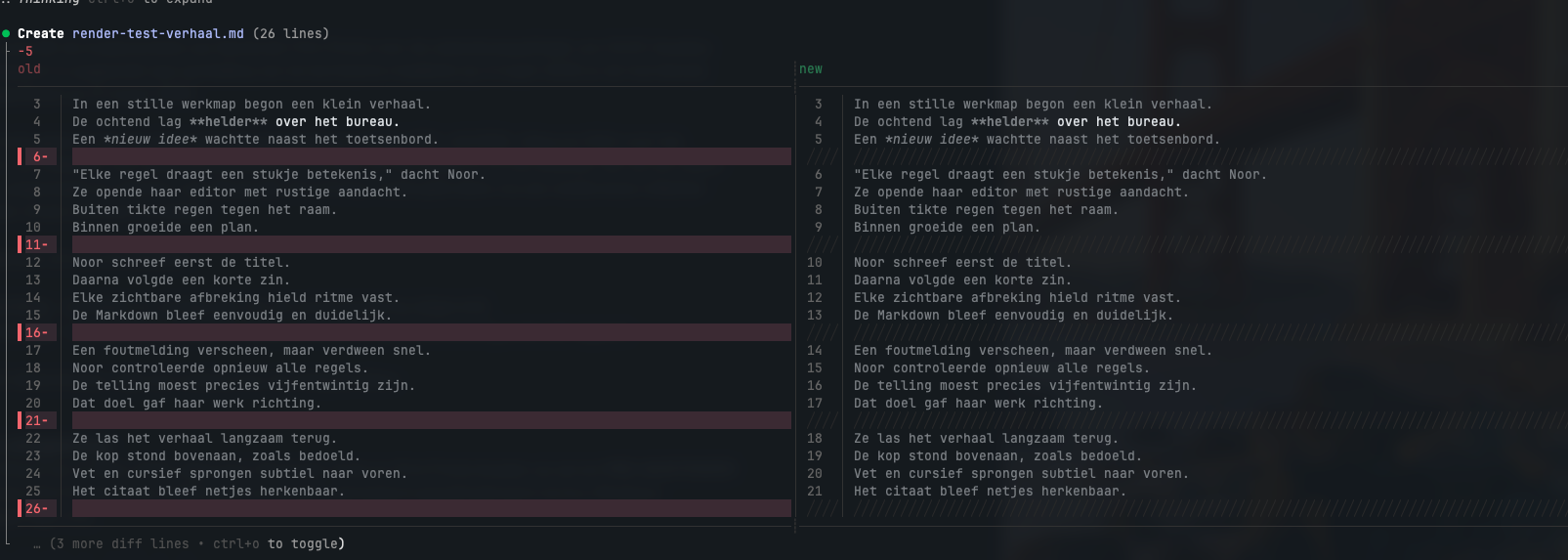
Diff rendering — side-by-side edit/write diff
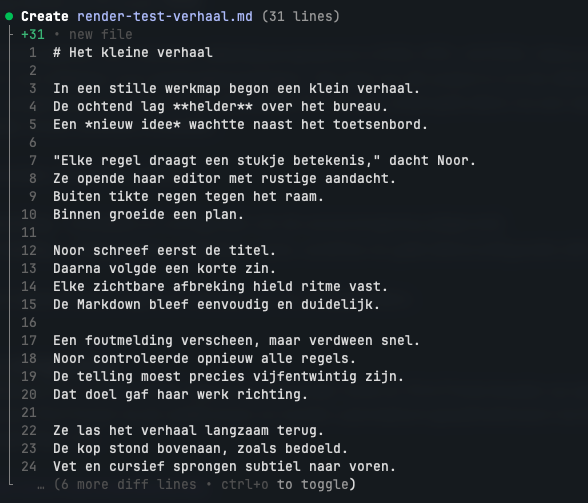
New-file create — plain new-file preview with line numbers
Settings panel — /cc-my-pi with live ASCII preview
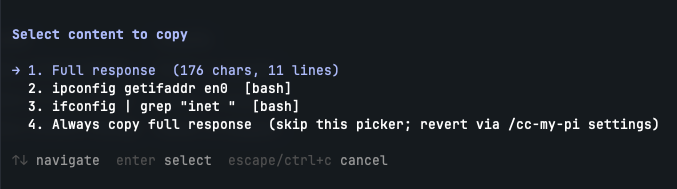
/copy-code content picker
Statusline — model/ctx gauge, git segment, MCP status

Spinner — Claude-style verb + esc hint
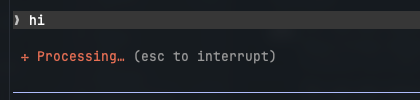
Queue steer — visible steering/follow-up queue with inline editing

Setup wizard — first-run intro: standard vs custom
Modules
All settings live in ~/.pi/settings.json (or ./.pi/settings.json for a
project override) as plain JSON keys — the panel and wizard just write to the
same file.
| Module | What you get | Setting | Default | Applies |
|---|---|---|---|---|
| Core tool rendering | Compact read/bash/grep/find/ls/edit/write rows, Claude-style OpenAI/apply_patch tools, minimal diff chrome, thinking labels, MCP-aware rendering | — (base module, always on while loaded) | on | — |
| Spinner | Claude-style spinner verb + status text (falls back to Pi's stock spinner when off) | spinnerEnabled | true | reload |
| Startup header | Boxed header (forked from pi-claude-code-tui) — Claude Code proportions: a narrow left column with an animated π mascot + model/effort/cwd, and a wide right column with a Loaded panel counting skills · prompts · extensions · mcp (with a global/project split) plus a /loaded for details hint; off falls back to the one-line ✻ Welcome to Pi header | claudeHeaderEnabled | true | reload |
| Quiet startup | Sets Pi's native quietStartup (in ~/.pi/agent/settings.json) to hide the startup resource listing — use /loaded to see it on demand. The wizard defaults this on when the header is enabled | quietStartup | false | next session |
/loaded command | Always registered — prints loaded skills, prompts, extensions, themes and MCP servers, grouped global vs project | — (always on) | on | — |
| Session commands | /exit (clean shutdown) and /clear (alias for /new; replaces the pi-clear npm package) | sessionCommandsEnabled | true | reload |
| Copy command | /copy-code — Claude-style picker to copy the last response or one of its code blocks to the clipboard | copyCommandEnabled | true | reload |
| Image paster | Clipboard images and pasted image paths become first-class attachments (bundled pi-paster) | imagePasterEnabled | true | reload |
| Esc steer | Esc while the agent runs aborts and auto-continues whatever was queued | escSteerEnabled | true | live |
| Double-Esc clear | Double-Esc (within 800ms) on a non-empty idle draft clears it | doubleEscClearEnabled | true | live |
| Queue steer | Vendored pi-queue-steer — visible steering/follow-up queue | queueSteerEnabled | true | live |
| Task tracking | Vendored @tintinweb/pi-tasks — one persistent static list above the editor using ✓/□; Task tool calls stay hidden from chat and display has no IDs, animation, runtime/token stats or truncation | — (always on) | on | reload |
| Theme-adaptive palette | Borders, branch connectors, dim text, spinner accent, and diff backgrounds follow the active pi theme | themeAdaptive | true | live |
| Grouped tool calls | Opt-in compact activity prose instead of individual Claude-style call/result pairs | groupToolCalls | false | live |
| Cross-turn tool groups | Extend groups across empty/tool-only assistant turns; thinking and text remain boundaries so they can be shown later | groupToolCallsAcrossTurns | true | live (future groups) |
| Compact group status dots | Show pre-1.3 green/pending dots before compact groups settle | showCompactToolStatusDots | false | live |
| Multiline composer alignment | Every continuation row aligns beneath text after the ❯ prompt | — (always on) | on | — |
| Live tool preview | Opt-in output tail for still-running calls; off keeps tool rows height-stable | liveToolPreview | false | live |
| Statusline | Bundled footer module: model/ctx gauge, git segment (with the +N −N line diffstat), MCP status, and a thinking level color-coded to match the editor border. Sub-settings statuslineCtxStyle (context gauge style) and statuslineShowWorktree (wt <name> segment) apply live (≤5s) | statuslineEnabled (module on/off), statuslineCtxStyle, statuslineShowWorktree | true, "claude", true | statuslineEnabled reload; sub-settings live (≤5s) |
One example per module — set just the key(s) you want to change:
{ "spinnerEnabled": false }
Disables the Claude-style spinner; Pi's stock spinner takes over after /reload.
{ "claudeHeaderEnabled": false }
Falls back to the one-line ✻ Welcome to Pi header after /reload (the animated
boxed header is off). Don't install npm:pi-claude-code-tui alongside cc-my-pi —
its header is already vendored here, and running both would draw two headers.
The startup header installs on the next timer turn, after synchronous startup handlers, and keeps the statusline's TUI hook. Pending installation belongs to that session: shutdown (including replacement or reload) cancels it, and a new start supersedes any earlier pending installation. Abandoned callbacks do not access the old context. Print, JSON and RPC modes schedule no terminal header work. Unexpected errors in a live installation or hook are not suppressed. This header lifecycle fix is separate from PR #10's delayed ShiftEnter fix.
{ "sessionCommandsEnabled": false }
/exit and /clear are no longer registered after /reload.
{ "copyCommandEnabled": false }
/copy-code is no longer registered after /reload. When enabled, /copy-code copies
the last assistant response to the clipboard. If that response contains fenced
code blocks it first shows a Select content to copy picker — the full
response (with char/line count), each code block (labelled by language), and an
Always copy full response entry that persists a skip-the-picker preference.
Turn the picker back on with the Copy picker toggle in /cc-my-pi settings.
{ "imagePasterEnabled": false }
Clipboard/pasted images are no longer captured as attachments; reload to apply.
{ "escSteerEnabled": false }
Esc goes back to only pausing the run — no auto-continue of queued follow-ups.
{ "doubleEscClearEnabled": false }
Double-Esc on a non-empty draft no longer clears it.
{ "queueSteerEnabled": false }
Removes the visible steering/follow-up queue; Pi's native queue still works.
{ "themeAdaptive": false }
Keeps the fixed Claude-style palette regardless of the active pi theme.
Individual Claude-style call/result pairs are the default:
● Read(extensions/index.ts)
  ⎿ Read 120 lines

● Bash(npm test)
  ⎿ 42 tests passed
Enable compact activity grouping explicitly:
{ "groupToolCalls": true }
{
  "groupToolCallsAcrossTurns": false,
  "showCompactToolStatusDots": true
}
Restores the pre-1.3 tool-group details: same-turn-only groups and transient compact-group status dots. These settings are also available in /cc-my-pi settings and the custom setup wizard.
1.3 interaction examples
Multiline composer alignment (always on)
Every continuation row aligns beneath the first row's text, for drafts of any length:
❯ first line
  second line
  third line
  fourth line
groupToolCallsAcrossTurns
true (default) combines parallel calls and sequential calls separated only by empty or tool-only assistant turns (thinking and text stay boundaries):
Called Skill, Bash 2 times, Read, Ctx Execute 3 times
false restores pre-1.3 same-turn grouping; later sequential calls remain separate:
Called Skill, Bash 2 times

Read ./package.json
Ctx Execute inspect settings
Ctx Execute run checks
Actual assistant prose always ends a group in both modes.
showCompactToolStatusDots
false (default) keeps compact group shape stable while work runs:
Called Bash 2 times, Read · 1 running
Called Bash 2 times, Read
true restores pre-1.3 pending/error dots:
● Called Bash 2 times, Read · 1 running
Called Bash 2 times, Read
Transient output is hidden by default so tool rows do not flash between partial and final states. Enable it explicitly when a live tail is useful:
{ "liveToolPreview": true }
{ "statuslineEnabled": false }
Disables the bundled statusline module (model/ctx gauge, git segment, MCP status); Pi's stock footer takes over after /reload.
{ "statuslineCtxStyle": "plain", "statuslineShowWorktree": false }
Statusline switches to a plain context style and drops the wt <name> worktree segment.
Theme
The package ships the cc-my-pi-dark theme (Claude Code-style dark palette),
registered automatically via the package manifest. Activate it by setting
"theme": "cc-my-pi-dark" in ~/.pi/agent/settings.json (or via Pi's theme
switcher), then /reload.
Goes well with
Not bundled (standalone npm packages). Both /cc-my-pi settings and the setup
wizard list these as optional companion rows with their install state
(✓ installed / ✗ not installed). In the panel, cycle a row to ⏎ install;
in the wizard, space-select them on the optional-extensions screen. Either way
they install via the real pi install CLI and activate after /reload.
Skipping is the default.
pi-context-view(npm:pi-context-view, MIT — Dmitry Makarov) — visualizes what fills the model's context and lets you inspect the normally hidden parts (base prompt, tool schemas, extension injections). Pairs nicely with the statusline's context gauge.pi-mcp-adapter(npm:pi-mcp-adapter, MIT) — adapter that lets Pi use MCP (Model Context Protocol) servers, exposing their tools inside your session.pi-subagents(npm:pi-subagents, MIT) — delegate work to subagents with chained and parallel execution and a TUI for clarifying questions.
Configuration reference
Full settings block (see Modules above for module toggles — not repeated here):
{
  "toolBackground": "border",
  "readOutputMode": "preview",
  "searchOutputMode": "preview",
  "mcpOutputMode": "preview",
  "previewLines": 8,
  "expandedPreviewMaxLines": 4000,
  "extraExpandedPreviewMaxLines": 12000,
  "extraToolOutputExpanded": false,
  "groupToolCalls": false,
  "groupToolCallsAcrossTurns": true,
  "showCompactToolStatusDots": false,
  "bashOutputMode": "opencode",
  "bashCollapsedLines": 10,
  "liveToolPreview": false,
  "liveToolPreviewLines": 5,
  "diffCollapsedLines": 24,
  "diffTheme": "github-dark"
}
Output modes
| Setting | Values | Default |
|---|---|---|
readOutputMode | hidden, summary, preview | preview |
searchOutputMode | hidden, count, preview | preview |
mcpOutputMode | hidden, summary, preview | preview |
bashOutputMode | opencode, summary, preview | opencode |
Display settings
| Setting | Default | Description |
|---|---|---|
previewLines | 8 | Lines shown in collapsed preview mode |
expandedPreviewMaxLines | 4000 | Max lines when expanded with Ctrl+O |
extraExpandedPreviewMaxLines | 12000 | Max lines after Ctrl+Shift+O extra-detail mode |
extraToolOutputExpanded | false | Start with Ctrl+Shift+O extra-detail mode enabled |
groupToolCalls | false | Opt into compact activity groups instead of individual call/result pairs |
groupToolCallsAcrossTurns | true | Keep grouping across empty/tool-only assistant turns |
showCompactToolStatusDots | false | Show legacy transient dots on pending compact groups |
bashCollapsedLines | 10 | Lines for collapsed bash output |
liveToolPreview | false | Opt into a temporary output tail while a tool runs |
liveToolPreviewLines | 5 | Lines shown when live preview is enabled |
diffCollapsedLines | 24 | Diff lines before collapsing |
Assistant Markdown unordered lists always render with - markers (Claude Code parity; not configurable).
Tool background modes
| Value | Behavior |
|---|---|
default | Standard Pi tool backgrounds |
transparent | Transparent tool backgrounds |
border | Transparent backgrounds with top/bottom border lines |
/cc-my-pi outlines        # tool style: outlines, transparent, or default
/cc-my-pi group toggle    # toggle grouped adjacent/concurrent tool calls
/cc-my-pi group off       # disable grouping (also ungroups current grouped rows)
/cc-my-pi detail toggle   # same mode as Ctrl+Shift+O
The settings panel and custom setup wizard list style, grouping, cross-turn grouping,
compact-group status dots, extra detail, branch color,
image paster, Esc continues queue, double-Esc clears draft, theme-adaptive,
spinner verb/status colors, live preview, and read/bash output modes. Most changes
apply immediately; changing image paster or the
spinner module requires /reload. The preview block under the list shows a
mock tool tree for the current combination.
Theme integration
When themeAdaptive is true (default), the following colors are derived from the active pi theme on every render and re-derived whenever the theme changes:
| Element | Derived from |
|---|---|
| User box, tool rules, code fences | dim → muted → borderMuted → thinkingText |
Branch connectors (├, └, │) | fixed rgb(128) by default (theme-independent); /cc-my-pi branch theme to follow pi theme |
| "✻ Turn took Ns" line (final message only, with session total + turn count) | muted |
Thinking-block text and ∴ marker (marker hidden when thinking is collapsed) | muted |
| Diff add/remove accents | toolDiffAdded / toolDiffRemoved |
| Diff background tints | mixed against toolSuccessBg base |
Spinner verb text (Working…) | borderAccent (fallback: accent) |
| Spinner status text | muted |
User-supplied diffTheme presets and diffColors overrides always win over theme-derived defaults. File-type icons (e.g. ts, py, rs) keep their language-identity colors and are not theme-derived.
Set themeAdaptive: false to keep the original fixed Claude-style palette regardless of the active pi theme.
On /resume, /new, or /fork, tool chrome is rebound from the current pi theme (no coupling to Ghostty or other theme extensions). If you use Ghostty sync, listing it above this extension in settings.json is recommended so setTheme runs before chrome rebind.
Toggle at runtime with /cc-my-pi theme
/cc-my-pi theme           # show current setting + theme name
/cc-my-pi theme status    # show current setting + color preview (incl. spinner)
/cc-my-pi theme on        # follow pi theme
/cc-my-pi theme off       # keep fixed Claude palette
/cc-my-pi theme toggle    # flip the current value
The selection is persisted to ~/.pi/settings.json and applied to the next rendered tool row. No restart required.
Repaint the spinner with /cc-my-pi spinner
The spinner glyph itself is still colored by pi's loader using accent, while the verb text (e.g. Cooking…) follows borderAccent by default so it stays lively without being the exact same color as the glyph. The status suffix (e.g. (thinking · ↓ 10 tokens · 2s)) follows muted. Use /cc-my-pi spinner to bind either text element to any other theme color key:
/cc-my-pi spinner preview          # list every common theme key with a colored sample
/cc-my-pi spinner verb <key>       # change the verb color (e.g. thinkingHigh, mdHeading)
/cc-my-pi spinner status <key>     # change the status suffix color
/cc-my-pi spinner reset            # restore defaults (verb=borderAccent, status=muted)
The selection is persisted as spinnerVerbColor / spinnerStatusColor in ~/.pi/settings.json and applied on the next spinner tick.
spinnerVerbColor, spinnerStatusColor, and spinnerGlyphColor also accept a #rrggbb hex literal instead of a theme key — a hex value bypasses theme lookup entirely and always renders that exact color, even with themeAdaptive: false or no theme loaded. spinnerGlyphColor (unset by default) overrides the glyph color that pi's loader would otherwise pick; set it to bind the glyph to the same brand color as the verb, e.g.:
{
  "spinnerVerbColor": "#d77757",
  "spinnerGlyphColor": "#d77757"
}
Bundled Esc behaviors
Two Escape reflexes from Claude Code ship bundled and default to on. Toggle
either live from the /cc-my-pi settings panel (no reload needed):
| Setting | Default | Behavior |
|---|---|---|
escSteerEnabled | true | While the agent runs, Esc aborts the current run and then auto-continues whatever was queued (steer / follow-up) instead of only pausing. Composes with the optional git:github.com/tmustier/pi-queue-steer package and with Pi's native queue. |
doubleEscClearEnabled | true | On a non-empty idle draft, double-Esc (within 800 ms) clears the editor, matching Claude Code. Pi's own empty-editor double-Esc (tree / fork selector) is untouched. |
escSteerEnabled is the bundled copy of the standalone pi-esc-steer package
and shares its feature marker, so the two are mutually exclusive automatically.
doubleEscClearEnabled is vendored from
@thisux/pi-double-esc-clear
v1.0.3 (MIT, author Sanju https://sanju.sh/).
If you previously installed either standalone package, remove it so it is not loaded twice:
pi remove npm:pi-esc-steer
pi remove npm:@thisux/pi-double-esc-clear
esc-steer dedups automatically via the shared feature marker; double-esc-clear cannot detect the standalone package, so a leftover install would double-wrap (harmless — the inner clear empties the draft and the outer sees nothing to do — but removing it is cleaner).
Notes
This package targets recent Pi versions where tool renderers use:
renderCall(args, theme, context)renderResult(result, { expanded, isPartial }, theme, context)
Unknown/custom tools do not have a public global renderer hook in Pi, so this package patches container rendering to add top/bottom borders for all tool executions in border mode.
Credits & provenance
cc-my-pi is not an original work — it stands on these projects:
| Component | Upstream | Author | License |
|---|---|---|---|
| Core tool rendering, diffs, spinner, settings UI (base fork) | FammasMaz/pi-cc-tools (npm pi-claude-code-ui) | FammasMaz | MIT |
extensions/pi-tasks/ (vendored, adapted) | tintinweb/pi-tasks v0.7.2 | tintinweb | MIT |
extensions/queue-steer/ (vendored, adapted) | tmustier/pi-queue-steer | Thomas Mustier | MIT |
extensions/esc-steer.ts (vendored, adapted) | pi-esc-steer | Thomas Mustier | MIT |
extensions/double-esc-clear.ts (vendored, adapted) | @thisux/pi-double-esc-clear v1.0.3 | Sanju | MIT |
extensions/claude-header/ (forked — header only; layout, π mascot and Loaded panel are original cc-my-pi work) | Phoobobo/pi-claude-code-tui v0.1.10 | Phoobobo | MIT |
| Visual design reference | Claude Code (Anthropic) — glyphs, colors, and layout re-implemented, no code copied | — | — |
| Syntax highlighting | Shiki (@shikijs/cli) | Shiki contributors | MIT |
| Diff engine | jsdiff (diff) | Kevin Decker & contributors | BSD-3-Clause |
| Image pasting | beowulf11/pi-paster (npm pi-paster) | beowulf11 | MIT (package.json; no LICENSE file upstream) |
The base fork itself builds upon and was inspired by:
- @heyhuynhgiabuu/pi-pretty by huynhgiabuu — Pretty terminal output with syntax-highlighted file reads, colored bash output, and tree-view directory listings
- @heyhuynhgiabuu/pi-diff by huynhgiabuu — Shiki-powered terminal diff renderer with word-level diffs in split and unified views
- pi-tool-display by MasuRii — Compact tool call rendering, diff visualization, and output truncation
Vendored-copy details, pinned versions, and the exact local deltas live in
VENDOR.md. The base fork has diverged substantially from
upstream (see CHANGELOG.md and the plans/ history in the
parent Pi-config repo); bugs here are mine, not the upstream authors'.
License
MIT — see LICENSE. Fork it, tweak it, ship your own variant; just keep the copyright notices (this fork's, FammasMaz's original, and the vendored components' — see Credits & provenance).