
Install
Install with PiG
pig install npm:billion-context-pi-leanInstall with Pi
pi install npm:billion-context-pi-leanPackages run code with your permissions and influence agent behavior. Catalog inclusion is not a security audit. Review the source before installing a third-party package.
Pi manifest JSON
The pi field of package.json.
{
  "extensions": [
    "./lean/index.ts"
  ]
}
README
Written by the package's publisher, shown as published in version 0.5.0 (README.md). PiG does not review it.
billion-context-pi-lean
Pi sessions that run for days, with a cheap model writing the summaries.
简体中文 · Full setup: My Lean Pi Setup
Context management for the Pi coding agent that lets long sessions keep going: as context fills up, the model folds finished work into summary blocks, and the originals stay recoverable on demand.
This is a fork of billion-context-pi v0.1.83 that focuses on runtime stability and on spending fewer tokens. It keeps upstream's compression engine (ACP); the main additions are that a cheap model can write the summaries, that context management itself costs fewer tokens, and that a long session is compressed while you are away, before the prompt cache expires. Upstream has moved on to billion-context; this fork stays on 0.1.83 and picks upstream fixes by hand. It is not affiliated with upstream.
Install
pi install npm:billion-context-pi-lean
Append @<version> to pin a version from Releases. Installing from git works too: pi install git:github.com/kunkun9527/billion-context-pi-lean.
- The dedicated summary model needs Pi 1.x or later.
- Do not enable it together with
billion-context-piorbillion-context: tools and hooks would register twice. - Pi's built-in compaction is turned off while this extension is active.
How it works
ACP does not compress on its own. When old, finished work piles up, it adds a short compress nudge to the next request, listing the message ranges that could be folded. The main model picks ranges and calls compress; the summary model (the main model itself unless you choose another) writes the summaries, and each range is replaced by its summary block. The originals stay in the session and can be brought back.
The model sees two tools:
compress: fold finished message ranges into summary blocks.acp_context:decompress,search_context,acp_status,acp_cacheandhelp, e.g.{ "op": "search_context", "args": { "query": "authentication" } }, to bring originals back or look things up.
Malformed calls are repaired before validation instead of failing: JSON-string args or content, op fields written at the top level, an omitted op (inferred only from unambiguous fields such as blockId), and a range array put in summary instead of content.
With Idle compact on, the same nudge is also shown once when you step away, while the prompt cache is still warm, so you come back to a shorter context. When the settings make the nudge appear is up to you; as a last resort, at 95% of the window ACP cuts large tool outputs regardless.
Main differences from upstream 0.1.83
| (blank) | Upstream 0.1.83 | This fork |
|---|---|---|
| Who writes summaries | The main model, usually the expensive one | A dedicated summary model of your choice, e.g. a cheap one; the main model only picks the ranges |
| Compression rules | Sent to the main model in every compression nudge (about 1,460 tokens; 720 with promptPack: "lean") | Sent only to the summary model, so they no longer take up the main model's context; its nudge carries only a short range-picking note (about 220 tokens)* |
| Summary quality | General compression rules; only length is checked | Also: user requests are kept apart from what tools showed; open items are split into user objectives, suggestions and unverified risks. A failed or malformed summary is not folded; the range waits for a later attempt |
| Coming back after a break | The first request rewrites the whole long context at uncached prices | Idle compact: before the cache expires, the model gets one chance to compress, so the request you send on return is shorter |
| Claude prompt cache after a fold | No cache marker of its own on a *responses API; a proxy such as CLIProxyAPI caches only the system prompt and the latest message, so after each fold the unchanged older prefix is rewritten uncached | Claude fold anchor (on by default, Claude only; panel setting, compress.claudeFoldAnchor in acp.json): also marks the prefix the next fold will not touch, so it stays cached (CONFIGURATION.md) |
| Settings | Edit acp.json by hand | /acp-config panel: pick values in the TUI, applied at once without restarting; acp.json still works |
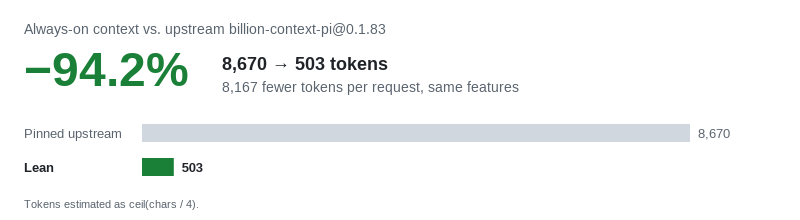
| Tools and resident prompt | 5 context tools + 3 delegation tools, about 8,700 tokens (4,900 with promptPack: "lean") | compress + acp_context, 503 tokens (benchmark). The resident prompt keeps only rules needed before a call; the rest arrives with nudges, errors and tool results |
| System prompt | Returns a whole system prompt, which on Pi 1.x drops prompt additions from extensions loaded after it | Added as its own section; other extensions keep theirs |
| Sub-agent delegation, auto-update | Built in | Removed. Use a dedicated sub-agent extension; ACP still manages their sessions |
| bash default timeout, tool output cap | Built in (toolBashDefaultTimeout, toolOutputMaxBytes) | Removed: not context management. Pi already caps bash/read/grep output; leave timeouts to the bash tool or a bash extension |
* Estimated as ceil(chars / 4) from the length of the rule text in the nudge, not billed tokens.
Smaller upstream issues fixed in this fork
- Emergency truncation was computed but never reached the request.
- Emergency truncation could cut the latest user message.
- A fold crossing a protected question could move its replies into a summary above it.
- Emergency-truncated history could expand again when pressure dropped; matching clips now survive resume/fork without replaying edited content.
- The token meter reused an old count and ignored newly added messages.
- Reasoning inside
compresscalls was not counted. - Concurrent state saves could fail (
ENOENTon a shared temp file), and releasing the session lock could let a later caller jump the queue. - After
/treeinto the middle of a block, its summary could show decisions from messages the current branch never reached. - Decompressing to a file failed on Windows when the message ref contained
|. - The test suite wrote into the real
~/.pi. - After a failed request Pi re-estimates the raw, unfolded history; ACP took that as a floor and showed 120–170% with a false EMERGENCY nudge until the next successful reply.
- Pi
context_editentries were ignored, so attempts Pi had omitted after a failure were sent again.
Details: CHANGELOG.md, MAINTENANCE.md (Chinese).
Token comparison
With only this extension enabled, what the model reads on every turn:
| Variant | Breakdown | Total |
|---|---|---|
Lean billion-context-pi-lean@0.4.2 | compress (231) + acp_context (87) + prompt (185) | 503 |
Upstream billion-context-pi@0.1.83 with promptPack: "lean" | compress (389) + decompress (271) + search_context (90) + acp_status (227) + acp_cache (204) + acp_delegate (1,452) + acp_delegate_wait (342) + acp_delegate_cancel (83) + prompt (1,819) | 4,877 |
Upstream billion-context-pi@0.1.83 | compress (549) + decompress (546) + search_context (210) + acp_status (339) + acp_cache (204) + acp_delegate (1,452) + acp_delegate_wait (342) + acp_delegate_cancel (83) + prompt (4,945) | 8,670 |
This saves 8,167 tokens (94.2%) against upstream's default, and 4,374 tokens (89.7%) against its lean prompt pack. The three acp_delegate* tools (1,877 tokens) belong to sub-agent delegation, which this fork removed; leaving them out, the savings are 92.6% and 83.2%.
Compression nudges come on top of this and only when context fills up. With a dedicated summary model, the rules in each nudge drop from about 1,460 tokens to about 220 (setup).
Method: npm run measure on Pi 1.3.0, each variant measured in its own temporary process with an empty working directory and configuration. Built-in tools, skills, context files, session history, user messages, other extensions, runtime UI and slash commands are not counted; before_agent_start additions are. Tokens are estimated as ceil(characters / 4), not billed tokens.
Configuration
Type /acp-config in Pi to open the settings panel. Up/Down picks a setting; Left/Right steps through its choices back and forth (Enter or Space steps forward); Esc closes. On a number setting you can also just type a whole number: it is edited in place, Enter saves it, Esc cancels. The allowed range is shown under the description; on per-model settings, clear it and press Enter to inherit. Changes apply at once, no restart needed.
Settings
The panel lists these, most used first. Under the selected setting it shows what it does and, on its own line, its default.
| Setting | What it does | Default |
|---|---|---|
| Summary model | Who writes the summaries. main model: the main model writes them itself. session: the current model, in a separate call that reuses its cached prefix. Or pick any model Pi can use (Enter opens the list; type to filter), e.g. a cheap one. If that model's call fails, the range stays uncompressed and is tried again next time. | main model |
| Idle compact | Compress once while you are away, before the prompt cache expires (how it works). | off |
| Idle minutes | How long the session must be idle first. Keep it a little under your models' cache lifetime: 29 fits a 30-minute cache. | 29 |
| Context threshold | When the context grows past this share of the window, the model is reminded to compress more often: whenever at least Minimum benefit could be freed, instead of waiting for Nudge interval. Lower keeps the context small; higher lets it run fuller. Not a hard cap: the context can still grow beyond it. | 75% |
| Emergency threshold | Last-resort safety net. Once the context reaches this share of the window, older big tool outputs and long messages are cut down to their beginning and end, with no summary, so the session does not overflow. The newest messages (as many as Recent messages) are left alone. If you set it below Context threshold, Context threshold drops to match, so compress reminders start no later than truncation; when the two are equal, both happen on the same turn. | 95% |
| Nudge interval | Until Context threshold is reached, the model is reminded to compress only after about this many tokens of old content have piled up. Bigger: fewer reminders, more folded each time. Smaller: frequent small compressions, a leaner context. | 50K |
| Minimum benefit | No reminder to compress, and no idle compact, when less than this could be freed: saving a few thousand tokens isn't worth breaking the cache. | larger of 5K and 1% of the window |
| Recent messages | How many of the newest messages compress must leave alone. Each tool call and each result counts as one. read and bash output is not counted and can be folded right away, because it is easy to get again (Protect recent reads keeps reads). Unless this is 0, your latest message is kept too. Emergency truncation also spares this many newest messages, counting everything. | 5 |
| Recent tokens | Compress also leaves alone the newest messages, up to about this many tokens. Whichever of this and Recent messages covers more applies. Skips the same tools as Recent messages. 0 turns it off. Emergency truncation ignores it. | 5K |
| Protect recent reads | Off: a file the model just read can be folded right away, like bash output. On: recent read results are kept like other tools' results, so the recent zone gets a bit bigger. Turn on if the model keeps re-reading the same file. Stored as "read" in preserveRecentTools. | off |
| Claude fold anchor | Claude models through a *responses API only. Keeps the prompt cache alive after a compress: the part of the history that compress won't touch gets a cache mark, so the next request doesn't pay full price for it again. tool-output may also put the mark on a tool output, which usually keeps more cached (needs CLIProxyAPI 8.1.1+; other endpoints may reject it). Other models ignore this. Saved as compress.claudeFoldAnchor. | on |
| Debug log | Writes detailed events to ~/.pi/acp.log for troubleshooting. Errors and the main events are always logged. | off |
Context threshold, Nudge interval and Minimum benefit depend on the model's window and price, so the panel sets them for the current model only; switch models to set another one. inherit drops the model's own value; a provider-wide or global value from acp.json, or else the default, applies.
Nudge interval is not a context size. It counts only old content that can be compressed, measured by ACP's own rough estimate, which runs below the tokens you are billed for. So when the nudge appears, context is roughly what was left after the last compress plus about 1.9 × Nudge interval. In my Opus sessions (1M window, mostly Chinese), about 54k is left after a compress:
| Nudge interval | Context when the nudge appears |
|---|---|
| 50K (default) | about 150k |
| 70K (what I use) | about 185k; the measured median over 42 nudges was 184k |
| 100K | about 245k |
The 1.9 ratio depends on language and on how much of your context is tool output, so treat the table as a starting point: watch Pi's context meter when a nudge appears and adjust. For how to pick a target size, see Why compact at 150k–200k.
Regardless of these settings, at 95% of the window ACP cuts large tool outputs as a last resort.
Idle compact
Coming back to a long session after the prompt cache expired means the first request rewrites the whole context uncached. With Idle compact on, after Idle minutes without activity ACP starts one turn that shows the main model the compress nudge; the model decides whether to compress.
- Activity means a real model request: your messages, and also a sub-agent waking the session, so long background work does not count as idle.
- At most one such turn per idle period. Skipped when less than Minimum benefit could be reclaimed, outside the TUI and RPC modes, or when the timer fires more than a minute late (the machine slept).
- During that turn only ACP tools may run. If you type or a sub-agent result arrives, it becomes a normal turn.
- Idle minutes applies to every model. With a shorter cache (e.g. 5 minutes) that turn itself reads the long context uncached once.
Editing acp.json
The panel saves to ~/.pi/acp.json and keeps every other key there. Edit the file yourself only for what the panel cannot do:
- Per project:
<project>/.pi/acp.jsonoverrides the global file. The panel shows the value in effect and warns when the project file overrides it. - Per provider: the three compression timing settings can also be set for a whole provider or globally, not only for one model (how).
- Options not in the panel, e.g.
compress.emergencyThresholdPercent. The full list is in CONFIGURATION.md, with these exceptions:autoUpdateandACP_AUTO_UPDATEare gone (update withpi install); the removed delegation keys (delegate.*,displayUsage,delegatePrompt) are ignored;promptSections.*is ignored with a one-time warning, because this fork injects its own prompt.
Panel settings map to these keys: Summary model compressionModelId, Idle compact idleCompact.enabled, Idle minutes idleCompact.idleMinutes, Debug log debug.
/acp compact <provider/model> sets the summary model from the command line (/acp compact shows it, reset returns to the main model).
Development
npm ci
npm run check   # typecheck, tests, build and facade checks
npm run measure # tool + prompt footprint vs upstream (needs ../my-lean-pi-setup)
dist/ is committed because Pi installs git packages without building them; commit it together with source changes. Maintenance notes: MAINTENANCE.md.
License
MIT. Based on billion-context-pi by ranxianglei and contributors (MIT), including the dedicated summary model from upstream PR #241.