
Install
Install with PiG
pig install npm:ayanokoji.mdInstall with Pi
pi install npm:ayanokoji.mdPackages run code with your permissions and influence agent behavior. Catalog inclusion is not a security audit. Review the source before installing a third-party package.
Pi manifest JSON
The pi field of package.json.
{
  "skills": [
    "./skills"
  ],
  "extensions": [
    "./pi-extension/index.js"
  ]
}
README
Written by the package's publisher, shown as published in version 1.0.4 (README.md). PiG does not review it.

Ayanokoji — Strategic Execution Protocol
A universal strategic execution protocol for AI coding agents. It replaces reactive, error-prone behaviors with pre-calculated, structured planning and verification. Works across Claude Code, Cursor, Windsurf, GitHub Copilot, Cline, Kiro, OpenCode, Hermes, and any LLM agent.
Key Features
- Methodical Intake: The agent silently analyzes tasks and asks at most 9 targeted questions to define the end state, hard constraints, and acceptance criteria before writing any code.
- Persistent Memory Scaffold: Generates four root-level markdown files to maintain state across resets:
AGENTS.md— Rulebook (hard-capped at 60 lines) with constraints and operating principles.CONTEXT.md— High-level architecture map and stack definition.TASK.md— Bounded mission brief (files in scope, approach, risks, and criteria). Overwritten per task.PROGRESS.md— Intelligence log of completions (with proof), failures (with exact errors), and blockers.
- Mandatory Verification Gate: Enforces execution of TASK.md's exact acceptance criteria. "Tests passed" is not allowed; concrete command outputs or detailed checks must be logged in PROGRESS.md.
- Fluff & Slop Control: Restricts LLM outputs to direct code, plan updates, and answers, forbidding greetings (hi, hello) or verbose explanations of what the code does.
Workflow
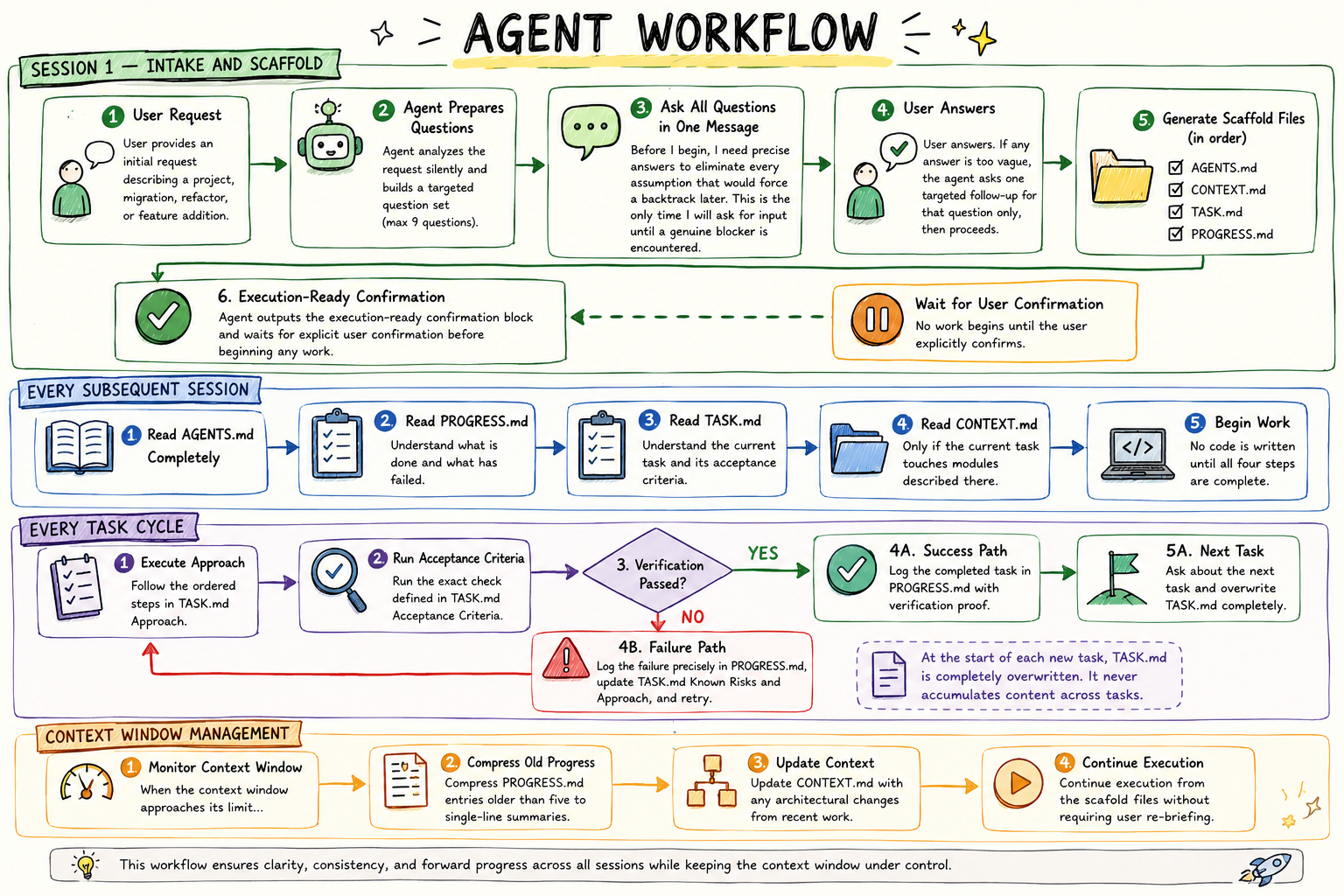
Commands
All commands are available as slash commands, @mentions, or natural language directives.
| Command | Action |
|---|---|
/ayanokoji | Activate the strategic execution protocol for this project. |
/ayanokoji-task [desc] | Overwrite and initialize TASK.md with the new task description. |
/ayanokoji-gate | Verify the current task's acceptance criteria and update scaffold logs. |
/ayanokoji-status | Display the current task summary, blockers, failures, and scaffold health. |
/ayanokoji-review | Inspect the active TASK.md for completeness and risks before starting. |
/ayanokoji-audit | Audit all four scaffold files for protocol compliance and syntax errors. |
/ayanokoji-debt | List all deferred decisions, [TO BE DEFINED] blocks, and blockers. |
/ayanokoji-gain | Summarize project stats: completed tasks, retry rate, and verification quality. |
/ayanokoji-help | Display the protocol quick-reference guide. |
Deactivate by saying "stop ayanokoji" or "normal mode".
Setup Guide
Instant Setup (Recommended)
Run in your project directory. Ayanokoji auto-detects your IDE from directory markers and writes only the relevant rule files:
npx ayanokoji.md
Auto-detection rules:
.claude/orCLAUDE.md→ Claude Code ·.cursor/→ Cursor ·.windsurf/→ Windsurf ·.clinerules/→ Cline ·.kiro/→ Kiro ·.github/→ GitHub Copilot. If none are found, all rulesets are written.
Target a Specific Agent
Pass a flag to skip auto-detection and configure exactly one agent:
# npx (one-shot, nothing installed in node_modules)
npx ayanokoji.md --claude       # Claude Code  → CLAUDE.md
npx ayanokoji.md --cursor       # Cursor       → .cursor/rules/ayanokoji.mdc
npx ayanokoji.md --windsurf     # Windsurf     → .windsurf/rules/ayanokoji.md
npx ayanokoji.md --cline        # Cline        → .clinerules/ayanokoji.md
npx ayanokoji.md --kiro         # Kiro         → .kiro/steering/ayanokoji.md
npx ayanokoji.md --copilot      # GitHub Copilot → .github/copilot-instructions.md
npx ayanokoji.md --all          # Every agent at once
You can also stack flags to configure multiple agents in one run:
npx ayanokoji.md --claude --cursor
Using npm install with a flag
When installing via npm install, pass the same flag — npm forwards it to the postinstall script automatically:
npm install ayanokoji.md --claude
npm install ayanokoji.md --cursor
npm install ayanokoji.md --all
After setup completes, the package removes itself from your
package.jsonautomatically — it is a one-shot tool, not a runtime dependency. Thenode_modules/ayanokoji.mdfolder will be gone on the nextnpm install.
Environment variable fallback
If flags are inconvenient (CI pipelines, scripts), use AYANOKOJI_FOR:
AYANOKOJI_FOR=claude npx ayanokoji.md
AYANOKOJI_FOR="claude,cursor" npx ayanokoji.md
Setup Output
Every run prints a summary of what was configured:
♟️  Ayanokoji — Strategic Execution Protocol Setup

✅ Configured Master Rulebook (AGENTS.md): AGENTS.md
✅ Configured Claude Code (CLAUDE.md): CLAUDE.md
✅ Installed skill: .openclaw/skills/ayanokoji/SKILL.md
...

♟️  Setup complete.
   Configured for: Claude Code
   Instruct your agent to read AGENTS.md before writing any code.
Manual IDE Setup Guide
1. Cursor
Copy the cursor rule to your project:
mkdir -p .cursor/rules
cp .cursor/rules/ayanokoji.mdc .cursor/rules/ayanokoji.mdc
The rule will automatically steer all composer and chat sessions.
2. Windsurf
Copy the windsurf rule to your project:
mkdir -p .windsurf/rules
cp .windsurf/rules/ayanokoji.md .windsurf/rules/ayanokoji.md
3. Claude Code / Gemini CLI / Antigravity CLI
Install as a plugin:
claude mcp add ayanokoji https://github.com/Sahnik0/ayanokoji.md
Or use the native commands configured in commands/ and gemini-extension.json.
4. GitHub Copilot
- Instruction-tier: Copy
.github/copilot-instructions.mdto your repository. - Plugin-tier: Add it through the Copilot Plugin Marketplace.
5. Cline
Copy the rules file to your project:
cp .clinerules/ayanokoji.md .clinerules
6. Kiro
Copy the steering rule:
mkdir -p .kiro/steering
cp .kiro/steering/ayanokoji.md .kiro/steering/ayanokoji.md
7. OpenCode
Add the plugin dependency to your opencode.json:
{
  "plugins": ["ayanokoji.md"]
}
8. Hermes Agent
Install and enable the plugin:
hermes plugins install ayanokoji
hermes plugins enable ayanokoji
Project Structure
ayanokoji.md/
  ├── AGENTS.md                          — Canonical ruleset (copied by agents)
  ├── skills/                            — Full protocol markdown files
  │   ├── ayanokoji/SKILL.md             — Base strategic protocol
  │   └── ayanokoji-[sub]/SKILL.md       — Sub-skill rules (review, status, etc.)
  ├── commands/                          — Slash command descriptors (.toml)
  ├── hooks/                             — Adapter hooks & scripts for shells/CLIs
  ├── pi-extension/                      — Personal AI (pi) extension files
  ├── scripts/                           — Development lint, build, & sync scripts
  ├── tests/                             — Complete functional unit test suite
  ├── benchmarks/                        — Correctness and LOC graders
  ├── __init__.py                        — Hermes plugin runtime entry
  └── plugin.yaml                        — Hermes plugin manifest
"Emotions are inefficiencies. I calculate, therefore I execute."