
Install
Install with PiG
pig install npm:awesome-pi-themesInstall with Pi
pi install npm:awesome-pi-themesPackages run code with your permissions and influence agent behavior. Catalog inclusion is not a security audit. Review the source before installing a third-party package.
Pi manifest JSON
The pi field of package.json.
{
  "image": "https://raw.githubusercontent.com/isashi/awesome-pi-themes/main/docs/screenshots/halcyon-rivet.jpg",
  "themes": [
    "./themes"
  ],
  "extensions": [
    "./extensions"
  ]
}
README
Written by the package's publisher, shown as published in version 1.2.19 (README.md). PiG does not review it.
Awesome Pi Themes



A curated collection of 71 original dark themes for pi, with a standalone browser preview and ready-to-copy JSON theme files.
The goal of this project is to make pi feel more personal and readable during real coding sessions. Feedback is very welcome, especially on contrast, syntax colors, warnings/errors, diffs, and long-session readability.
Preview
Browse the live gallery:
https://isashi.github.io/awesome-pi-themes/
Featured theme:
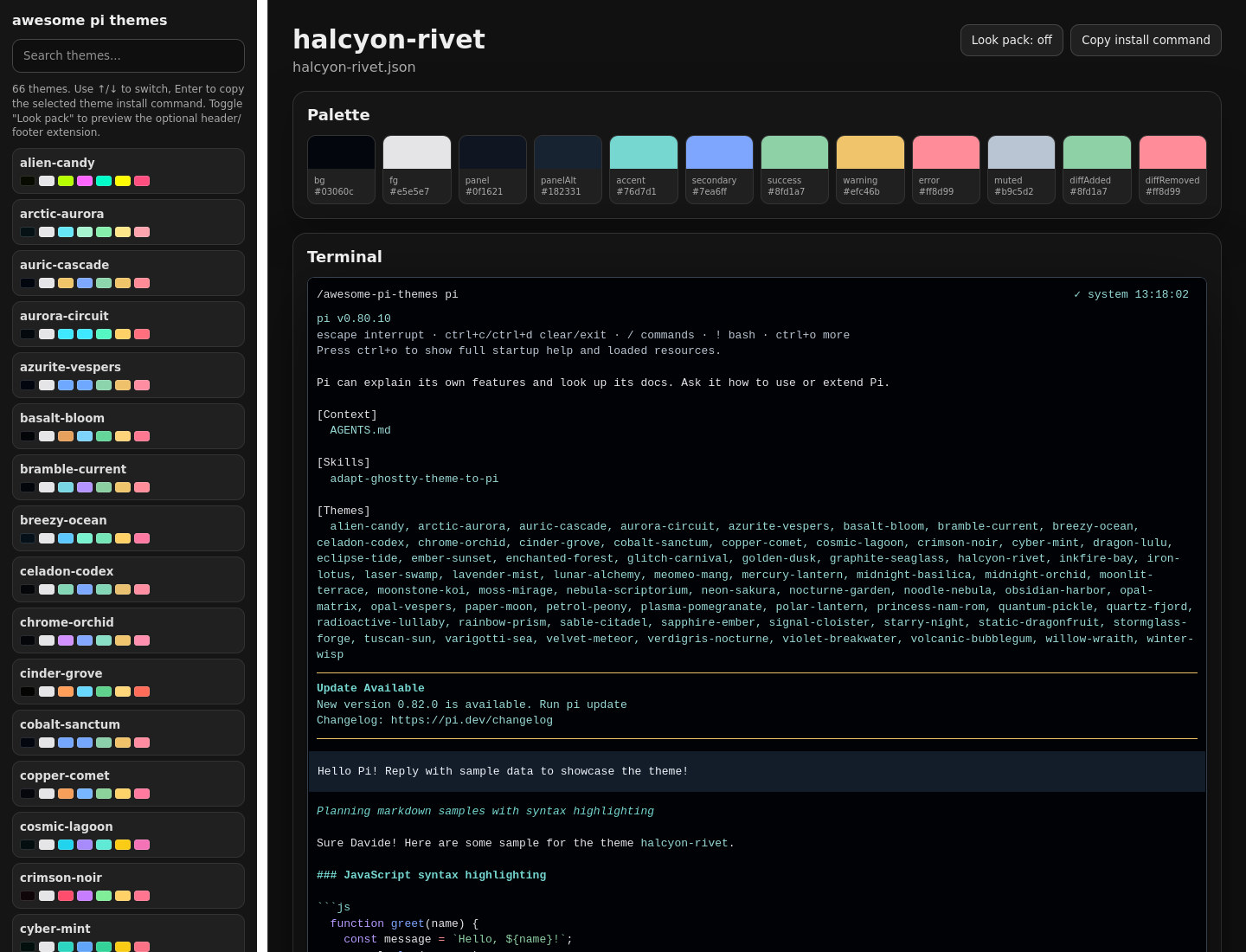
Install
Install all themes from npm
pi install npm:awesome-pi-themes
Then select a theme from /settings, or set it in your pi settings file:
{
  "theme": "princess-nam-rom"
}
Install one theme manually
This uses pi's documented theme directory, honoring PI_CODING_AGENT_DIR when set.
PI_AGENT_DIR="${PI_CODING_AGENT_DIR:-$HOME/.pi/agent}"
mkdir -p "$PI_AGENT_DIR/themes"
curl -fsSL "https://raw.githubusercontent.com/isashi/awesome-pi-themes/main/themes/princess-nam-rom.json" \
  -o "$PI_AGENT_DIR/themes/princess-nam-rom.json"
Then select princess-nam-rom from /settings, or set it as your active theme.
Try a local theme without installing it
pi --theme ./themes/princess-nam-rom.json
Optional: look pack (header/footer)
This package also ships an opt-in extension, extensions/look-pack.ts, that
replaces pi's built-in startup header with a branded banner and the footer
with a bolder, powerline-style status line: git branch, a context-usage
gauge, model, tokens, and cost, each in its own colored pill. Every color and
background comes from the active theme's own tokens, so it matches whichever
of the 71 themes you have selected. Preview it in the
live gallery — toggle "Look
pack" above the terminal mock to compare it against the default footer.
Installing npm:awesome-pi-themes for the colors alone changes nothing — the
look pack does nothing until you explicitly turn it on:
/look-pack
Run it again to turn it off. The choice is saved (per machine, not per
project), so it stays enabled across restarts until you toggle it off. The
footer updates immediately. The header only draws at the very top of a
session — like pi's own built-in banner, it can't be redrawn once the
conversation has scrolled past it — so after enabling it, run /new or
restart pi to see it.
If you'd rather try it without installing the full package first:
pi -e ./extensions/look-pack.ts
Themes
Click a name to open the live preview for that theme.


Feedback wanted
If you try these themes, please open an issue with notes about:
- readability during longer coding sessions
- low-contrast text, borders, warnings, or errors
- confusing diff colors
- themes you would add, remove, rename, or tune
- screenshots or terminal/font combinations where a theme looks worse than expected
Issues: https://github.com/isashi/awesome-pi-themes/issues
Local development
Requirements:
- Node.js 18+
- npm
Install dependencies:
npm install
Run the local preview server:
npm run preview
Use the project prompt template for the repeatable add-theme patch release workflow:
/new-theme-patch-release [optional style or name hint]
Build the static GitHub Pages site:
npm run build
Validate the project:
npm run check
Add a new theme
- Create a JSON file in
themes/, for examplethemes/my-theme.json. - Make sure the theme
namematches the file slug, for examplemy-theme. - Run:
npm run check
npm run build
- Commit the theme and regenerated
docs/index.html.
Project structure
awesome-pi-themes/
  preview-themes-web.js
  package.json
  README.md
  themes/
    *.json
  docs/
    index.html
    screenshots/
      *.jpg
Changelog
See CHANGELOG.md.
License
MIT