
Install
Install with PiG
pig install npm:avtc-pi-subagentInstall with Pi
pi install npm:avtc-pi-subagentPackages run code with your permissions and influence agent behavior. Catalog inclusion is not a security audit. Review the source before installing a third-party package.
Pi manifest JSON
The pi field of package.json.
{
  "image": "https://raw.githubusercontent.com/avtc/avtc-pi-subagent/main/assets/images/cover.png",
  "extensions": [
    "./index.ts",
    "../avtc-pi-subagent-ui-bridge/index.ts"
  ],
  "allowedCodeDeps": [
    "avtc-pi-logger",
    "avtc-pi-settings-ui"
  ]
}
README
Written by the package's publisher, shown as published in version 1.1.2 (README.md). PiG does not review it.
avtc-pi-subagent
A subagent tool supporting context compaction and nested subagents — user-customizable models (with round-robin) and tool policies, extensible via hooks.
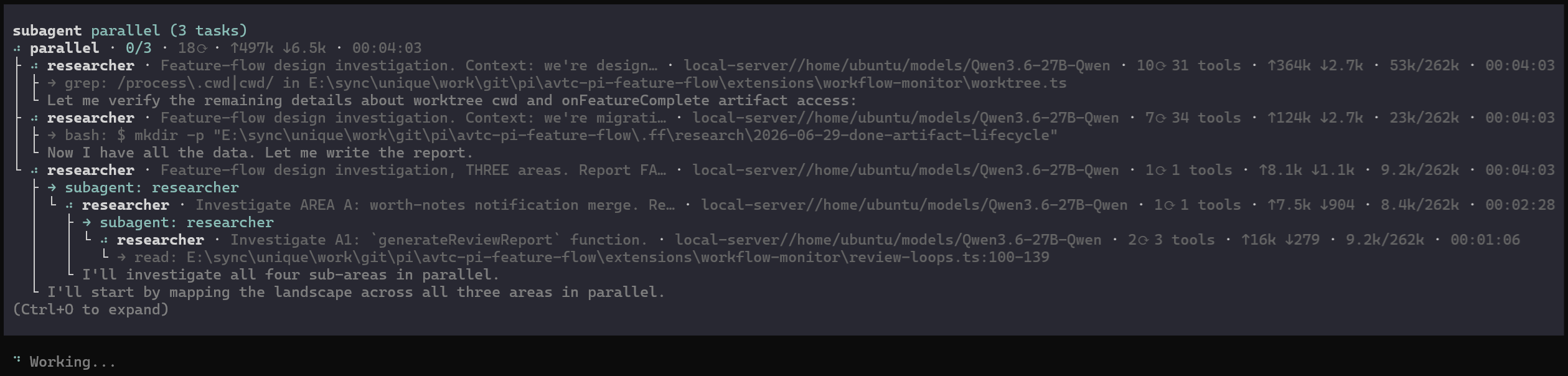
Features
- Isolated context — each subagent runs in its own session with its own tools, system prompt, model, and skills.
- Three dispatch modes — single, parallel (concurrent), chain (sequential with
{previous}hand-off). - Overridable
cwd— dispatch a subagent into a specific directory (e.g. a feature worktree) instead of the main repo. - Fork mode — fork a subagent from the parent's session to reuse its prompt cache (see Fork mode).
- Model routing — per-call override (per call or per task, with a user-controlled precedence and an optional list of models the agent may choose), per-agent config by name or glob with round-robin rotation, and pluggable resolvers (see CONFIGURATION.md).
- Skills — agents declare
skills:in frontmatter; resolved and injected at dispatch; extra skill paths registerable. - Tool policy — control which tools each subagent can use, per agent or by glob: add, block, or whitelist tools, with reusable named tool sets and
$all(see CONFIGURATION.md). - Agent visibility — hide agents from announcements or disable them entirely via config globs (
hidden-agents,disabled-agents). - Concurrency & timeouts — parallel limit, subagent timeout, inactivity timeout, and a nesting-depth cap to bound recursion.
- Orphan-safe — subagents self-terminate if the parent process dies.
- Extensible — other extensions integrate via the
pi-subagent:readyevent (model resolvers, prompt transformers, agent/skill paths). - Background subagents — in the main session every subagent call returns at once; one report per call arrives as a follow-up message when all its subagents finish (see Background subagents).
- Subagent control — the agent lists, steers (RPC), stops, and continues its subagents with
subagent_control; a finished or stopped subagent resumes its own session. - Subagents panel —
alt+aor/subagents: the session's subagents with live progress or the full transcript; steer, stop, continue a finished subagent, or forward its last message to the agent; a widget above the editor counts running, queued, and finished subagents.
Installation
pi install npm:avtc-pi-subagent
Defining agents
Agents are markdown files (YAML frontmatter + system prompt body) in ~/.pi/agent/agents/. Frontmatter fields: name, description, tools, model, skills, extensions, hide-from-agents-list.
hide-from-agents-list: true omits the agent from the subagent tool's "Available agents" list. The agent stays fully usable when called by name (by a user, skill, or other agent).
Fork mode
A -fork suffix marks a subagent as forked: it copies the parent's session system prompt and conversation history, so the prefill cache works. Set via the PI_SUBAGENT_FORK_MODE env var:
fork— every subagent runs forked.new+fork— each subagent runs twice in parallel: a fresh copy and a forked copy.- (unset) — every subagent runs as a fresh session (default).
Spawn mode
Controls how subagent child processes run. Set via the /subagent:settings Spawn mode dropdown:
- JSON — each subagent runs as a single-shot process: it receives the task, runs to completion, and exits.
- RPC — each subagent runs as a long-lived process that the parent talks to over a request/response protocol. A long-running subagent that compacts its own context keeps going on its own (and the parent can recover it if compaction is cancelled), so long tasks run without stalling or aborting as the conversation grows. This is the default.
Background subagents
With Background subagents on (the default), every subagent call from the main session runs in the background: the tool immediately returns the call id and each subagent's id, model, and session file, and the agent keeps working. When all subagents of a call are done, one report for that call arrives as a follow-up message and starts a turn if the agent is idle. The report carries each subagent's final answer; a stopped or failed subagent reports its status, the failure reason, and its session file.
subagent_controllets the agentlistits subagents (all, or those matching a regexquery),steera running one (RPC spawn mode),stopa subagent or a whole call, andcontinuea subagent — a running one receives a follow-up message, a finished or stopped one resumes its session.alt+aor/subagentsopens the subagents panel: running calls first, then finished ones (latest first); a detail view with the live progress or the full transcript (t), steering (s), stopping a subagent — or, on a call's header, the whole call (xtwice), continuing a finished or stopped subagent (c— its report joins the chat without starting the agent's turn), and forwarding its last message to the agent (r).- A widget above the editor shows how many subagents are running, queued, and finished; it stays (dim) while the session has subagents, as a reminder of
alt+a. - Background subagents keep running across
/reload;/new,/resume, fork, and quitting pi stop them. A resumed session lists its earlier subagents again, so they can still be inspected, continued, and forwarded. - Subagents run their own nested subagents in the foreground.
Configuration
- Operational settings (concurrency, timeouts, max depth, spawn mode, agent model override, background subagents) — edit via
/subagent:settings. - Model overrides (which model each subagent uses) — see CONFIGURATION.md.
- Tool policy (which tools each subagent can use: add / block / only, named sets, hide/disable agents) — see CONFIGURATION.md.
Extensibility
Building an extension that integrates with subagents (model resolvers, prompt transformers, agent/skill paths, env hooks)? See EXTENSIBILITY.md.
Tools
| Tool | Description |
|---|---|
subagent | Delegate a task to a specialized agent (single / parallel / chain modes) |
subagent_control | List or search, steer, stop, or continue the session's subagents (main session only) |
Commands
| Command | Description |
|---|---|
/subagent:settings | Open the settings UI (concurrency, timeouts, max depth, spawn mode, agent model override, background subagents) |
/subagents | Open the subagents panel (also alt+a) |
Full suite
Check out the full suite of related extensions, avtc-pi — deterministic feature development, subagent delegation, working-memory, behavioral learning, parallel-work guardrails, durable decisions, notifications, and more.
Developed with Z.ai — get 10% off your subscription via this referral link.
License
MIT