
Install
Install with PiG
pig install npm:@xl0/pi-lovely-codexInstall with Pi
pi install npm:@xl0/pi-lovely-codexPackages run code with your permissions and influence agent behavior. Catalog inclusion is not a security audit. Review the source before installing a third-party package.
Pi manifest JSON
The pi field of package.json.
{
  "extensions": [
    "./extensions"
  ]
}
README
Written by the package's publisher, shown as published in version 0.2.5 (README.md). PiG does not review it.
@xl0/pi-lovely-codex
GPT "Fast mode" control and Codex-style apply_patch tool.
Install
pi install npm:@xl0/pi-lovely-codex
Or use without installing:
pi -e npm:@xl0/pi-lovely-codex
/lovely-codex
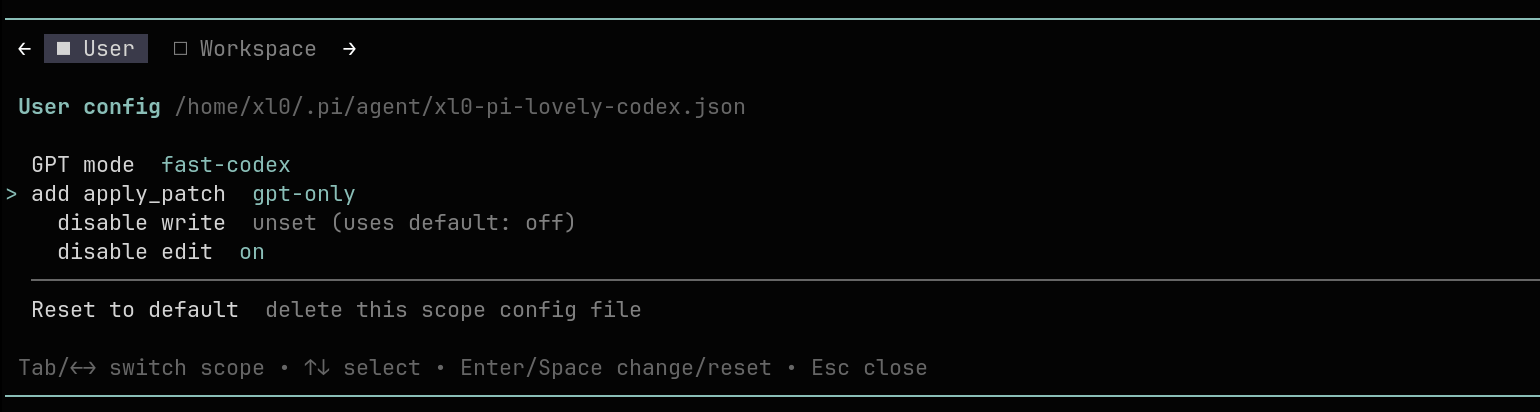
GPT fast mode 🏎️
Sends service_tier: "priority" to request priority serving:
default— don't sendservice_tierfast— priority on bothopenaiandopenai-codexfast-codex— priority onopenai-codexonly
GPT models on those two providers only. Fast mode shows 🏎️ in the status line.
Availability and billing depend on your account and model. Codex responses can report
service_tier: "default"even when priority measurably increases throughput; that field alone does not tell you whether Fast mode worked.
apply_patch
GPT models are trained on Codex's apply_patch; with Pi's edit tool, muscle
memory shows — silly mistakes creep in. This extension gives them the tool they
were trained on.
By default, apply_patch is a plain JSON tool { input: string }. For models
that support OpenAI grammar tools, it can instead be a freeform custom tool
constrained by Codex's Lark grammar.
Patches are applied by shelling out to
codex --codex-run-as-apply-patch. The Codex CLI must be installed and on PATH.
Settings:
add apply_patch—on,off, orgpt-only(default: only for model ids starting withgpt-or containing/gpt-).enable freeform— use the grammar-constrained custom tool when supported (off by default).disable write/disable edit— drop the now-redundant built-in tools whileapply_patchis active (off by default); restored after, but never beyond what the session started with.disable read—on,off, orgpt-only(default: only for GPT model ids, independent ofapply_patch). Forces bounded shell reads (sed -n/head) instead of whole-file reads, conserving context the way Codex's toolset does. Whilereadis gone, aview_imagetool takes over image reading (which the shell can't provide); turn it off withadd view_image.
Config files
- User:
~/.pi/agent/xl0-pi-lovely-codex.json - Workspace:
<cwd>/.pi/xl0-pi-lovely-codex.json
Workspace overrides User. All keys optional.
Related projects
| (blank) | (blank) |
|---|---|
| Pi Lovely Web | web_search, web_fetch, web_image tools |
| Pi Lovely Dev Tools | interactive debugging helpers /tool, /show-sysprompt, /show-context, /llm-stats |
| Pi Lovely IDE | IDE integration |
| Pi Lovely Config | scoped config helpers for Pi extensions |
| Pi Lovely Comment | open the last assistant message in your editor and sync edits back into the prompt |
| Pi Lovely Rename | automatic and manual session naming |
Like this work? Hire me