
Install
Install with PiG
pig install npm:@vitos-pizza/vitos-pizzaInstall with Pi
pi install npm:@vitos-pizza/vitos-pizzaPackages run code with your permissions and influence agent behavior. Catalog inclusion is not a security audit. Review the source before installing a third-party package.
Pi manifest JSON
The pi field of package.json.
{
  "skills": [
    "node_modules/@vitos-pizza/subagents/skills"
  ],
  "extensions": [
    "node_modules/@hypabolic/pi-hypa/extensions",
    "node_modules/@vitos-pizza/permission-system/extensions",
    "node_modules/@vitos-pizza/settings-preset/extensions",
    "node_modules/@vitos-pizza/hypa/extensions",
    "node_modules/@vitos-pizza/question/extensions",
    "node_modules/@vitos-pizza/ui-enhancements/extensions",
    "node_modules/@vitos-pizza/subagents/extensions",
    "node_modules/@vitos-pizza/websearch/extensions",
    "node_modules/@vitos-pizza/session-title/extensions",
    "node_modules/@vitos-pizza/keybindings/extensions",
    "node_modules/@vitos-pizza/agent-mode/extensions",
    "node_modules/@vitos-pizza/todoist/extensions",
    "node_modules/@vitos-pizza/git/extensions"
  ]
}
README
Written by the package's publisher, shown as published in version 0.4.2 (README.md). PiG does not review it.

维多披萨 · Vito's Pizzeria
加菲猫同款 Pi 发行版 — 一次安装,开箱即用
vitos-pizza
Vito's Pizzeria is a personal Pi distribution — like LazyVim for Neovim. One install gives you a curated set of extensions and workflows. Built on upstream Pi, not a fork.
Inspired by Vito's Pizzeria from Garfield — Garfield's favorite pizza place.
Architecture
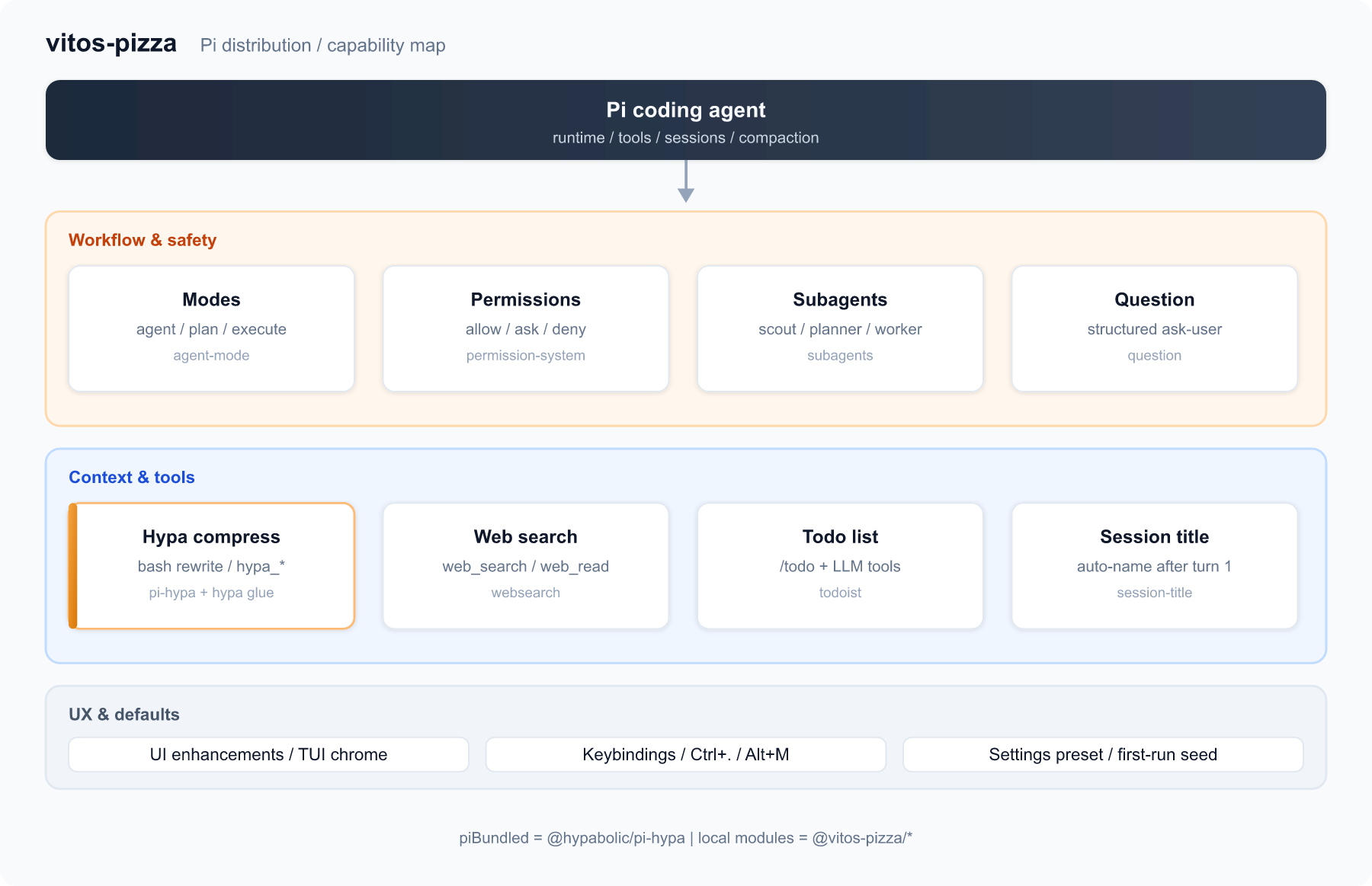
Typical flow: plan → optional scout → planner → confirm → execute / worker. Shell output is compressed via Hypa bash rewrite; scout/planner/worker explore with hypa_* only (main session may still use builtin reads).
| Capability | Module | What you get |
|---|---|---|
| Modes | @vitos-pizza/agent-mode | agent / plan / execute — /mode, Ctrl+. / Alt+M |
| Permissions | @vitos-pizza/permission-system | allow / ask / deny presets per mode |
| Context compression | @hypabolic/pi-hypa + @vitos-pizza/hypa | bash rewrite, hypa_* tools, /hypa (MCP proxy off) |
| Subagents | @vitos-pizza/subagents | scout · planner · worker (+ title/commit internally) |
| Structured questions | @vitos-pizza/question | question tool |
| Web | @vitos-pizza/websearch | web_search / web_read |
| Tasks | @vitos-pizza/todoist | /todo + LLM tools |
| Git ship | @vitos-pizza/git | /cp /bcp |
| Session titles | @vitos-pizza/session-title | auto-name after first turn |
| TUI | @vitos-pizza/ui-enhancements | border status, execute prompt chrome |
| Shortcuts | @vitos-pizza/keybindings | centralized vitos-shortcuts.json |
| Defaults | @vitos-pizza/settings-preset | seed Pi settings on first session |
Prerequisites
- Node.js >= 22.19.0
- Pi installed globally:
npm install -g --ignore-scripts @earendil-works/pi-coding-agent
Context compression uses bundled Hypa (@hypabolic/pi-hypa). The matching platform binary comes from npm optionalDependencies (Linux / macOS / Windows, x64 / arm64). Use /hypa in a session for diagnostics. MCP proxy stays off (this distribution does not use MCP).
Install
# npm (recommended)
pi install npm:@vitos-pizza/vitos-pizza@0.4.2

# git (pinned tag)
pi install git:github.com/xin2017338/vitos-pizza@v0.4.2
From source:
git clone https://github.com/xin2017338/vitos-pizza.git vitos-pizza
cd vitos-pizza
npm install

# Global Pi settings (~/.pi/agent/settings.json)
npm run install:pi
# or: pi install .

# Project-local settings (.pi/settings.json)
npm run install:pi:local
# or: pi install -l .

# Try without installing
npm run try:pi
# or: pi -e .
After install, start pi. Sessions are auto-titled from the first meaningful user message (see Session auto-title below). Delegate work with subagents (see below). When you change extension code, use /reload.
Structure
vitos-pizza/                 # Pi distribution (install this)
├── assets/logo.svg
├── assets/architecture.svg  # editable capability map source
├── assets/architecture.png  # README preview (rendered from SVG)
├── package.json             # distro manifest + pi-package entry
├── AGENTS.md
└── packages/                # built-in modules (not installed separately)
    ├── ui-enhancements/     # @vitos-pizza/ui-enhancements — TUI display optimizations
    ├── agent-mode/          # @vitos-pizza/agent-mode — agent / plan / execute mode switching
    ├── permission-system/   # @vitos-pizza/permission-system — allow/ask/deny gates
    ├── settings-preset/     # @vitos-pizza/settings-preset — seed default Pi settings
    ├── hypa/                # @vitos-pizza/hypa — Hypa defaults (additive, no MCP proxy)
    ├── question/            # @vitos-pizza/question — structured ask-user question tool
    ├── session-title/       # @vitos-pizza/session-title — auto session naming
    ├── subagents/           # @vitos-pizza/subagents — scout/planner/worker delegation
    ├── websearch/           # @vitos-pizza/websearch — web_search / web_read tools
    ├── todoist/             # @vitos-pizza/todoist — in-memory task list + TUI widget
    ├── git/                 # @vitos-pizza/git — /cp /bcp quick commit+push
    └── keybindings/         # @vitos-pizza/keybindings — centralized shortcut bindings
Built-in modules are wired via scripts/sync-pi-manifest.mjs (supports pi.requires load order). Third-party Pi packages listed in root piBundled (currently @hypabolic/pi-hypa) are merged into the same manifest.
Quick git commit & push
Module @vitos-pizza/git ships changes with an AI-written commit message (Pi session only):
| Command | What it does |
|---|---|
/cp | Commit message → confirm → commit + push |
/bcp | Suggest branch + message → confirm → checkout -b → commit + push -u |
After pi install . (or /reload), use these from the Pi TUI. Never force-pushes; aborts on empty trees or likely secret paths (e.g. .env).
| Path | Role |
|---|---|
| Repo root | The distribution — pi install . |
packages/<module>/ | Built-in capability modules |
scripts/sync-pi-manifest.mjs | Wires modules into the root pi manifest |
Session auto-title
Built-in module @vitos-pizza/session-title names sessions asynchronously after the first agent reply:
- Waits for the first turn to finish, then summarizes user intent + assistant reply via the subagents
titleagent (RPC, not a direct LLM call) - Title is ≤20 characters; trivial greetings are skipped via fast rules
- Runs in the background — does not block the main agent
- Optional dedicated model via
.pi/settings.json; defaults to the current session model
Example settings (also in .pi/settings.example.json):
{
  "session": {
    "autoTitle": {
      "enabled": true,
      "model": "google/gemini-2.5-flash",
      "minCharsForLlm": 4,
      "fastRules": true
    }
  }
}
Use /name to override manually. See auto titles in /resume.
Subagents & permissions
Built-in @vitos-pizza/subagents lets the main agent delegate via the subagent and wait tools:
subagent({ agent: "scout", task: "map the auth module" })
subagent({ chain: [{ agent: "scout", task: "..." }, { agent: "planner", task: "plan from {previous}" }] })
subagent({ tasks: [{ agent: "scout", task: "scan src" }, { agent: "scout", task: "scan tests" }] })
subagent({ agent: "worker", task: "...", async: true })  →  wait({ id: "<runId>" })
Built-in agents: scout, planner, worker. Other modules request runs over pi.events RPC — import requestSubagentRun from @vitos-pizza/subagents/rpc/client.
Web search
Built-in @vitos-pizza/websearch adds web_search and web_read tools. Works out of the box via Exa MCP and keyless Firecrawl — no API keys required for basic use.
web_search({ query: "TypeScript 5.8 release notes" })
web_read({ url: "https://docs.example.com/guide" })
/search-status
Default backends: Exa MCP → Firecrawl → optional keyed providers. Configure globally at ~/.pi/agent/extensions/search.json or per-project at .pi/search.json (see .pi/search.example.json).
Permissions: web_search and web_read are ask in agent and plan modes (subagent ask prompts forward to the parent session); allow in execute mode.
Do not install community search extensions (e.g. pi-web-access, pi-search-hub) alongside vitos-pizza — tool names would collide.
Built-in @vitos-pizza/ui-enhancements improves TUI readability: built-in tools use smart compact rendering (read-only bash/grep/read collapsed by default; write/edit/dangerous commands always show full output). Toggle expansion with Ctrl+O. Welcome header and border status bar are on by default (no settings required). Use /vitos-ui for status; /builtin-header restores Pi's built-in header.
Built-in @vitos-pizza/permission-system enforces allow / ask / deny on tools, bash, and paths. Child subagent ask prompts forward to the parent session UI automatically.
Agent modes
@vitos-pizza/agent-mode provides three session-level modes. Switch with:
/mode                         # interactive picker
/mode plan                    # or agent | execute
Or press Ctrl+. or Alt+M to cycle agent → plan → execute. Use /vitos-shortcuts to view bindings.
| Mode | Permissions | Behavior |
|---|---|---|
agent | default | Balanced — read/grep/find/ls allowed in the git repo; bash ask for other commands |
plan | plan | Read-only — explore without edits or shell; subagent / question for scout/planner |
execute | yolo | Minimal gates — only blocks .env, ~/.ssh, rm -rf |
Current mode is shown in the border status bar (· plan / · execute). Mode is per session (new sessions start in agent); switching does not rewrite project permission config. On first session in a project, a default preset is written to .pi/extensions/pi-permission-system/config.json if missing. Use /permission-system for debug/YOLO runtime toggles. See config.example.json.
Optional subagents settings in .pi/settings.example.json (subagents.disableThinking, model overrides, etc.).
Adding a module
- Have AI (or you) create
packages/<name>/withpackage.json,extensions/, etc. - Set
"name": "@vitos-pizza/<name>"in the module'spackage.json. - Run:
npm run sync
npm install
pi install .   # or /reload in Pi
Development
npm run sync         # Regenerate root pi manifest from packages/*
npm run typecheck
npm run lint
npm run lint:fix
Pi loads TypeScript extensions directly — no build step.
Acknowledgments
vitos-pizza builds on the Pi ecosystem and several open-source projects. We are grateful to their authors and contributors.
Convention: any new feature, module, or dependency that references external open source must add a row here (see AGENTS.md → Open-source acknowledgments).
Platform & distribution model
| Project | Role | Link |
|---|---|---|
Pi (@earendil-works/pi-coding-agent) | Agent runtime, extension API, and TUI — the foundation this distribution installs on top of | pi.dev · GitHub |
| LazyVim | Inspiration for the “one install, curated defaults” distribution model (Pi distribution ≈ LazyVim for Neovim) | GitHub |
Features referenced or adapted
| Project | Used in | Notes |
|---|---|---|
| Pi official subagent example | @vitos-pizza/subagents | Subprocess spawn, chain/parallel delegation, agent markdown discovery |
Pi official question example | @vitos-pizza/question | Structured ask-user UI (ctx.ui.custom); adapted with subagent parent-session forwarding |
| @gotgenes/pi-permission-system | @vitos-pizza/permission-system | Flat permission config format, preset modes, subagent prompt forwarding — reimplemented in-tree |
| @ryan_nookpi/pi-extension-auto-name | @vitos-pizza/session-title | Fire-and-forget async title via completeSimple |
| djdembeck/pi-session-title | @vitos-pizza/session-title | Early community session naming patterns |
| pi-subagents (nicobailon) | Subagent design | Community reference when shaping chain/parallel UX |
| pi-search-hub | @vitos-pizza/websearch | Backend registry, config merge, auto-fallback dispatch, /search-status |
| pi-web-access | @vitos-pizza/websearch | Zero-config Exa MCP default chain and tool prompt guidelines |
| pi-web-search | @vitos-pizza/websearch | session_start config refresh lifecycle pattern |
Pi minimal-mode / built-in-tool-renderer examples | @vitos-pizza/ui-enhancements | Compact built-in tool rendering and smart bash collapse |
| Virgil-Bulens minimal-mode gist | @vitos-pizza/ui-enhancements | Read-only bash whitelist and session collapsed-by-default UX |
| pi-statusbar | @vitos-pizza/ui-enhancements | Welcome header layout and loaded-counts information architecture |
| pi-powerline-footer | @vitos-pizza/ui-enhancements | Welcome panel design and recent-sessions discovery |
Pi border-status-editor example | @vitos-pizza/ui-enhancements | Editor-border status bar (model, thinking, context, cwd, git) |
| sf-welcome | @vitos-pizza/ui-enhancements | Welcome header session lifecycle and tips layout |
| Claude Code permission UX | Agent modes (agent / plan / execute) | Preset naming and mode-switching inspiration (not a code dependency) |
| Claude Code system prompts (plan-mode reminders) | @vitos-pizza/agent-mode plan instructions | Short sticky reminder + supersede pattern for plan mode (not a code dependency) |
| OpenAI Codex base instructions | Plan / subagent prompt style | Concise hard rules and precedence over conflicting guidance (not a code dependency) |
| Claude Code TodoWrite / Task tools | @vitos-pizza/todoist | Complete = status done; delete only when no longer relevant (cancelled / mistaken) |
| @capyup/pi-basic-tools todo | @vitos-pizza/todoist | completed vs deleted prompt boundary for task-list tools |
| pi-package-template | Repo layout | Pi package monorepo conventions |
Hypa (@hypabolic/pi-hypa) | @vitos-pizza/hypa + distro bundle | Additive bash rewrite / hypa_* tools; MCP proxy off (FSL-1.1-ALv2) |
Runtime & tooling libraries
| Library | Used in | Link |
|---|---|---|
| tree-sitter-bash + web-tree-sitter | @vitos-pizza/permission-system | Bash command parsing for permission gates |
| Zod | @vitos-pizza/permission-system | Config validation |
| Biome | Dev tooling | Lint and format |
| Vitest | Tests | Unit and integration tests |
| TypeScript | All packages | Type checking |
If we missed a project you rely on, please open an issue or PR — we want to credit every upstream contribution properly.
License
MIT