
Install
Install with PiG
pig install npm:@thinkscape/pi-statusInstall with Pi
pi install npm:@thinkscape/pi-statusPackages run code with your permissions and influence agent behavior. Catalog inclusion is not a security audit. Review the source before installing a third-party package.
Pi manifest JSON
The pi field of package.json.
{
  "image": "https://raw.githubusercontent.com/Thinkscape/pi-status/main/assets/demo.gif",
  "extensions": [
    "./src/index.ts"
  ]
}
README
Written by the package's publisher, shown as published in version 0.3.6 (README.md). PiG does not review it.
@thinkscape/pi-status
A pi extension that shows a configurable status bar in the terminal tab title while pi is working, then restores the title when the turn finishes. Also supports Ghostty's native OSC 9;4 progress bar. Compatible with all libghostty-based terminals like cmux, muxy, etc.
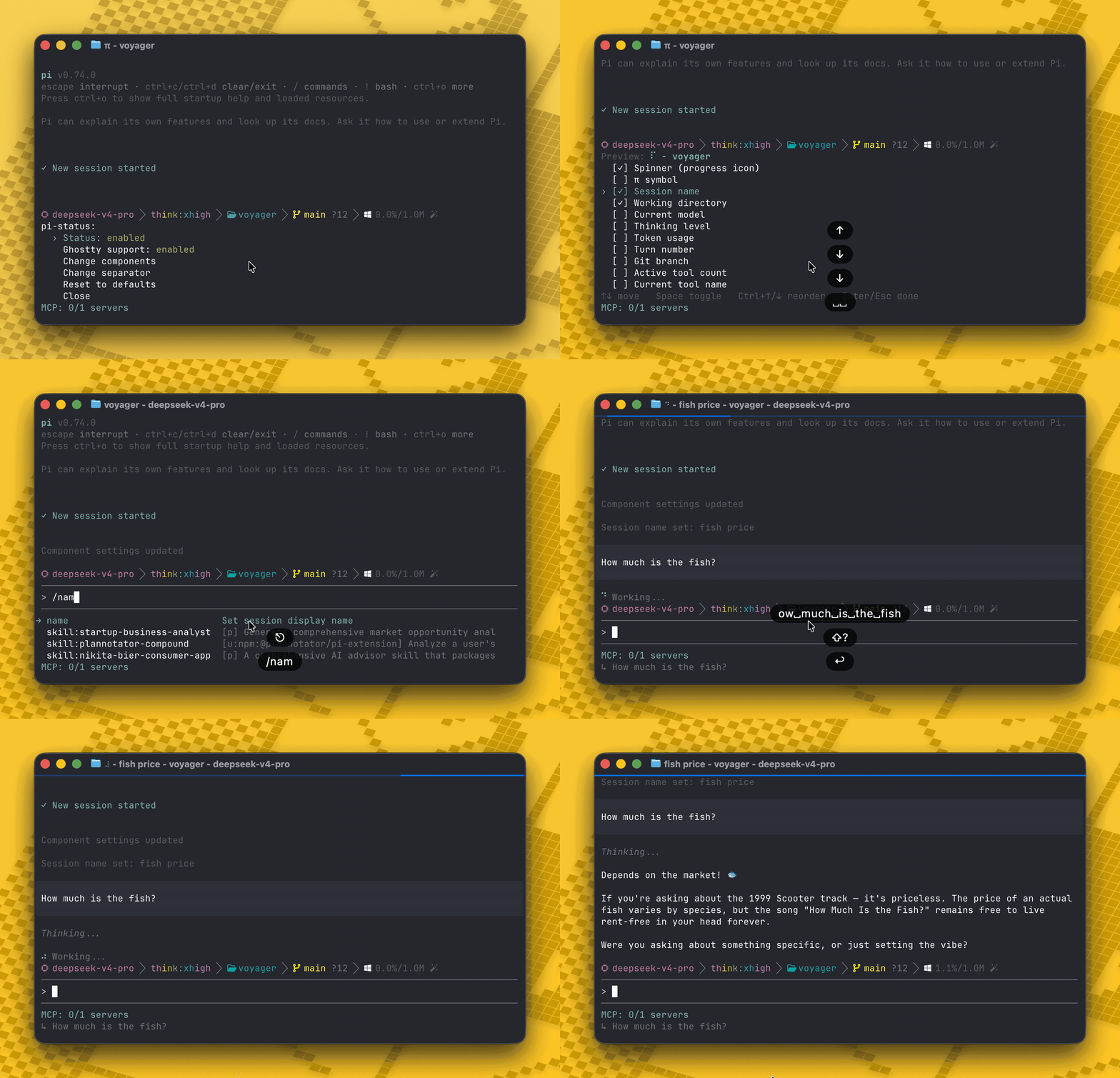
Install
pi install @thinkscape/pi-status
Or test it for one run:
pi -e @thinkscape/pi-status
Screenshots
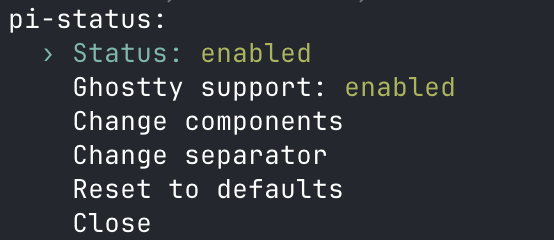
Main menu (/pi-status)
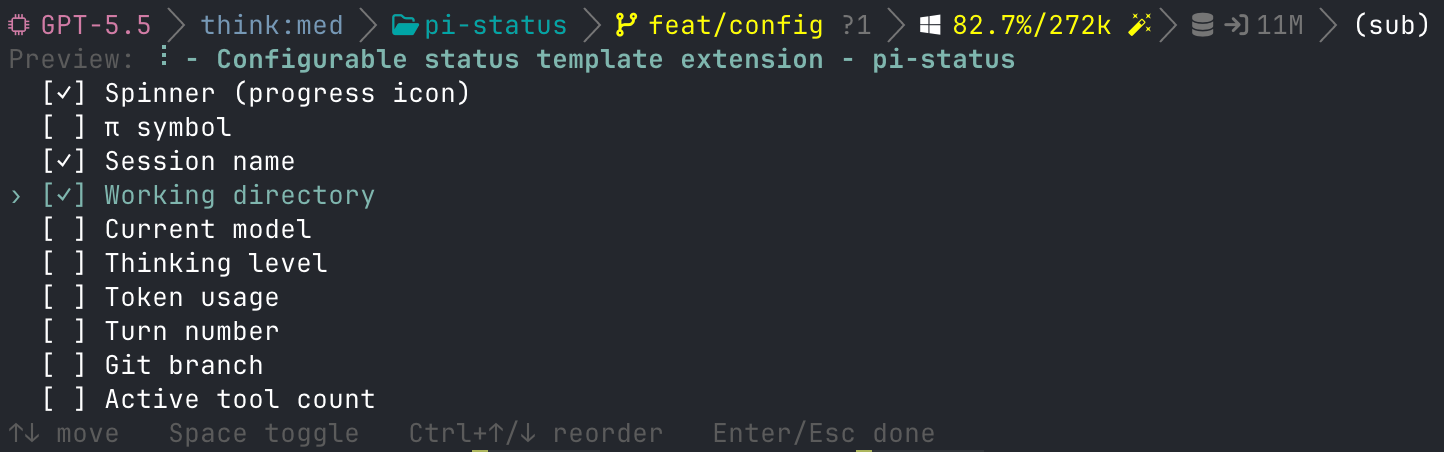
Component picker (/pi-status components)
Commands
Typing /pi-status with no arguments opens an interactive menu with these actions:
- Status: enabled/disabled — toggle pi-status on/off inline (press Enter/Space)
- Ghostty support: enabled/disabled — toggle Ghostty OSC 9;4 native progress bar
- Change components — open the component picker
- Change separator — change the separator character
- Reset to defaults — restore the default config
- Close — exit the menu
You can also invoke subcommands directly:
/pi-status                open interactive menu
/pi-status status         open interactive menu
/pi-status on             enable pi-status for this session
/pi-status off            disable pi-status for this session
/pi-status ghostty on     enable Ghostty progress bar
/pi-status ghostty off    disable Ghostty progress bar
/pi-status components     open TUI to toggle & reorder status components
/pi-status separator      change the separator character between elements
/pi-status reset          restore default pi-status configuration
components TUI
Opens an interactive picker with a live preview of the current title at the top. You can:
- Toggle components on/off with
Space - Reorder components with
Ctrl+↑/Ctrl+↓ - Navigate the list with
↑/↓ - Exit with
EnterorEscape
The order in the list determines the display order in the tab title. Changes are saved immediately.
Available components
| Component ID | Description | Default |
|---|---|---|
spinner | Progress spinner (⠋ ⠙ ⠹ ...) | on |
pi_symbol | π symbol | on |
session | Session name | on |
cwd | Working directory basename | on |
model | Current model (e.g., claude-sonnet-4-5) | off |
thinking | Thinking level (e.g., high) | off |
tokens | Context token usage | off |
turn | Current turn number | off |
git_branch | Current git branch name | off |
tools_count | Number of active tools | off |
current_tool | Currently executing tool name | off |
separator
Prompts for a new separator string (max 5 characters). The separator is placed between each enabled component.
Default: " - "
reset
Restores all pi-status configuration to the defaults shown above.
ghostty
Enables or disables Ghostty's native OSC 9;4 progress bar. When enabled:
- Indeterminate pulse while the agent is working (
OSC 9;4;3), refreshed every second like pi's built-in terminal progress - Green completion flash at 100% when the agent finishes (
OSC 9;4;1;100) - Clears on interaction (
OSC 9;4;0) when you press a key, focus the terminal, start another agent turn, disable Ghostty support, or shut down pi
Works in Ghostty 1.2+ and any libghostty-based terminals. Enabled by default. The extension enables terminal focus reporting while Ghostty support is on and disables it on shutdown/reload.
Configuration
Settings are stored in pi's settings files under the piStatus key:
~/.pi/agent/settings.json(global).pi/settings.json(project-local, overrides global)
Example with custom separator and additional components:
{
  "piStatus": {
    "separator": " | ",
    "ghosttySupport": true,
    "components": [
      { "id": "spinner", "enabled": true },
      { "id": "pi_symbol", "enabled": true },
      { "id": "model", "enabled": true },
      { "id": "session", "enabled": true },
      { "id": "cwd", "enabled": true },
      { "id": "thinking", "enabled": true },
      { "id": "git_branch", "enabled": true },
      { "id": "tokens", "enabled": false },
      { "id": "turn", "enabled": false },
      { "id": "tools_count", "enabled": false },
      { "id": "current_tool", "enabled": false }
    ]
  }
}
This would produce: ⠋ | π | claude-sonnet-4-5 | my-session | my-project | high | feat/config
Environment
Disable the extension by default:
PI_STATUS_DISABLED=1 pi
Accepted truthy values are 1, true, yes, and on.
Development
bun install
bun run check
Releasing
# Bump version only (patch/minor/major)
bun run version:patch

# Full release: check → bump → commit → tag
bun run release:patch

# Then push the tag to trigger GitHub Actions auto-publish:
git push origin main --tags
CI runs on every PR (bun run check + dry-run pack). Tag pushes trigger the publish workflow to npm.