
Install
Install with PiG
pig install npm:@senad-d/analysemeInstall with Pi
pi install npm:@senad-d/analysemePackages run code with your permissions and influence agent behavior. Catalog inclusion is not a security audit. Review the source before installing a third-party package.
Pi manifest JSON
The pi field of package.json.
{
  "image": "https://raw.githubusercontent.com/senad-d/AnalyseMe/main/img/demo.gif",
  "extensions": [
    "./src/extension.ts"
  ]
}
README
Written by the package's publisher, shown as published in version 0.1.5 (README.md). PiG does not review it.



SonarQube and SonarCloud analysis for pi.
Let agents inspect quality gates, active issues, source context, and security hotspots from the terminal.
AnalyseMe is a Pi extension for coding agents. It reads existing SonarQube/SonarCloud analysis data, summarizes project health, lists actionable findings, and fetches issue or hotspot details with Sonar-provided guidance.
| AnalyseMe demo |
|---|
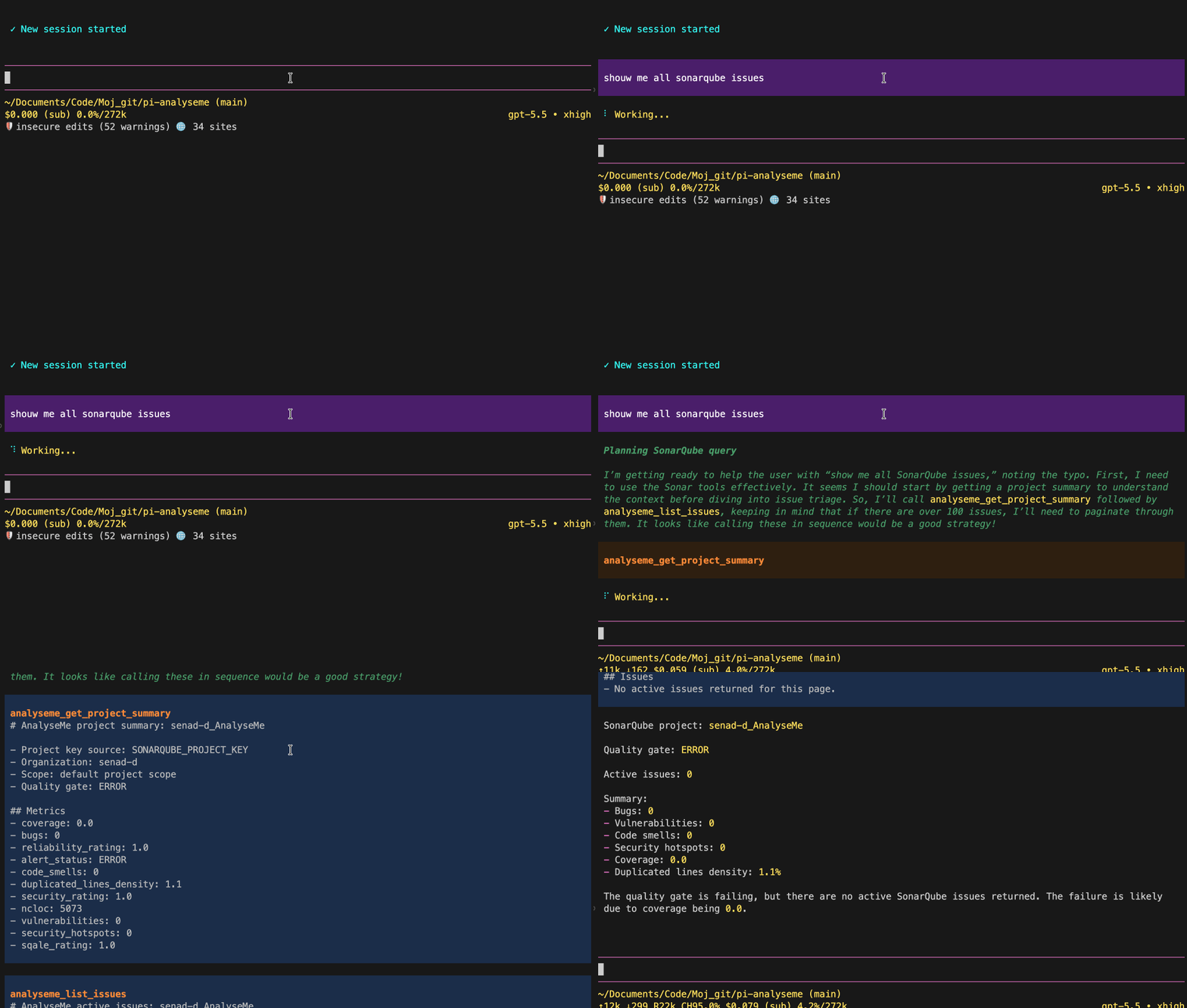
|
- Read-only boundary: the read tools never mutate Sonar issues, write to the repository, comment, assign, or change configuration. The only write path is
analyseme_run_scan, which submits a new analysis to the server. - Agent-ready context: quality gates, metrics, locations, snippets, rule guidance, and hotspot guidance are returned in pi tool output.
- Project-aware: resolves project keys from tool input, environment, or
sonar-project.properties. - Scope-aware: supports branch and pull request analysis contexts.
- Secret-safe: Sonar tokens are masked in command output, tool output, details, errors, and tests.
Security: pi packages run with your full system permissions. AnalyseMe reads local configuration and sends read-only requests to your configured Sonar URL;
analyseme_run_scanadditionally runs the localsonar-scannerCLI and uploads analysis results to that URL. ReadSECURITY.md.
Table of Contents
- Quick Start
- Installation
- Configuration
- Commands and Tools
- Troubleshooting
- Development and Validation
- Update and Uninstall
- Publishing
- License
Quick Start
pi install npm:@senad-d/analyseme
Set the Sonar variables shown in Configuration, then start pi:
pi
Check status and help:
/analyseme
/analyseme help
Ask the agent to use AnalyseMe:
Use AnalyseMe to inspect the project summary and list the top 10 active Sonar issues.
AnalyseMe reads existing Sonar analysis data. With the optional analyseme_run_scan tool it can also run the local sonar-scanner CLI and submit a fresh analysis to your Sonar server.
Installation
| Scope | Command | Notes |
|---|---|---|
| Global | pi install npm:@senad-d/analyseme | Loads in every trusted pi project. |
| Project-local | pi install npm:@senad-d/analyseme -l | Writes to .pi/settings.json in the current project. |
| One run | pi -e npm:@senad-d/analyseme | Try without changing settings. |
| Git | pi install git:github.com/senad-d/analyseme@<tag> | Pin a tag or commit. |
| Local checkout | pi --no-extensions -e . | Develop or smoke-test this repository in isolation. |
Source checkout:
git clone https://github.com/senad-d/analyseme.git
cd analyseme
npm ci
npm run validate
pi --no-extensions -e .
Configuration
AnalyseMe reads shell environment variables first, then a local project .env file. Shell variables win, and AnalyseMe never writes configuration files.
| Variable | Required | Meaning |
|---|---|---|
SONARQUBE_URL | Yes | SonarQube/SonarCloud base URL. Use HTTPS unless explicitly testing a trusted local HTTP server. |
SONARQUBE_TOKEN | Yes | Sonar API token with read access to the target project. |
SONARQUBE_ORGANIZATION | SonarCloud usually | SonarCloud organization. |
SONARQUBE_PROJECT_KEY | Usually | Default project key when no tool projectKey is passed. |
SONARQUBE_BRANCH | No | Branch analysis scope. Do not set with SONARQUBE_PULL_REQUEST. |
SONARQUBE_PULL_REQUEST | No | Pull request analysis scope. Do not set with SONARQUBE_BRANCH. |
SONARQUBE_ALLOW_INSECURE_HTTP=true | No | Development-only opt-in for trusted non-TLS Sonar URLs. |
SONARQUBE_SCANNER_PATH | No | Path to the sonar-scanner CLI binary used by analyseme_run_scan when it is not on PATH. |
Minimal local setup:
SONARQUBE_URL="https://sonarcloud.io"
SONARQUBE_TOKEN="replace-with-local-token"
SONARQUBE_ORGANIZATION="your-organization"
SONARQUBE_PROJECT_KEY="your-project-key"
Resolution order:
- Project key: explicit tool input →
SONARQUBE_PROJECT_KEY→sonar-project.propertiessonar.projectKey. - Analysis scope: explicit tool input → configured branch/PR variable → GitHub Actions context.
GitHub Actions example:
jobs:
  analyseme:
    runs-on: ubuntu-latest
    steps:
      - uses: actions/checkout@v4
      - name: Run Pi with AnalyseMe
        env:
          SONARQUBE_URL: ${{ secrets.SONARQUBE_URL }}
          SONARQUBE_TOKEN: ${{ secrets.SONARQUBE_TOKEN }}
          SONARQUBE_ORGANIZATION: ${{ secrets.SONARQUBE_ORGANIZATION }}
          SONARQUBE_PROJECT_KEY: ${{ vars.SONARQUBE_PROJECT_KEY }}
          SONARQUBE_BRANCH: ${{ github.ref_name }}
        run: |
          pi --no-session -e npm:@senad-d/analyseme \
            -p "Use AnalyseMe to inspect the project summary and active issues."
Commands and Tools
| Surface | Name | Use it for |
|---|---|---|
| Command | /analyseme | Show masked configuration/status output. |
| Command | /analyseme help | Show setup, CI, and usage guidance. |
| Tool | analyseme_get_project_summary | Quality gate and summary metrics. |
| Tool | analyseme_list_issues | Active actionable issues with pagination. |
| Tool | analyseme_get_issue | One issue's location, flows, source snippets, links, and Sonar rule guidance. |
| Tool | analyseme_list_security_hotspots | Security hotspots requiring review. |
| Tool | analyseme_get_security_hotspot | One hotspot's location, source context, links, and Sonar security guidance. |
| Tool | analyseme_run_scan | Run the local sonar-scanner CLI and submit a fresh analysis to the configured Sonar server. |
Suggested workflow:
- Start with
analyseme_get_project_summary. - Page through
analyseme_list_issuesoranalyseme_list_security_hotspotswith a boundedlimit. - Fetch a specific issue or hotspot before changing code.
- After changing code, run
analyseme_run_scan(optionally withwaitForQualityGate) to refresh the server analysis, then re-read the summary.
analyseme_run_scan requires the SonarScanner CLI (v5+) on PATH or via SONARQUBE_SCANNER_PATH. The Sonar URL and token are passed to the scanner only through its environment (SONAR_HOST_URL, SONAR_TOKEN), never on the command line, and connection/credential properties (sonar.host.url, sonar.token, sonar.login, sonar.password) are rejected from tool input.
Large results include visible truncation notices and structured metadata in details.
Troubleshooting
| Problem | Try |
|---|---|
| Missing URL or token | Set SONARQUBE_URL and SONARQUBE_TOKEN. |
| SonarCloud cannot find the project | Set SONARQUBE_ORGANIZATION and SONARQUBE_PROJECT_KEY, or pass them as tool inputs. |
| Wrong project is queried | Pass projectKey explicitly or fix SONARQUBE_PROJECT_KEY. |
| Branch/PR conflict | Set only one of SONARQUBE_BRANCH or SONARQUBE_PULL_REQUEST. |
| HTTP URL is rejected | Prefer HTTPS, or set SONARQUBE_ALLOW_INSECURE_HTTP=true only for trusted local development. |
| 401/403 response | Verify the token can read the target project and analysis scope. |
| Too much output | Use limit, page, or fetch a single issue/hotspot. |
sonar-scanner not found | Install the SonarScanner CLI or set SONARQUBE_SCANNER_PATH to the binary. |
| Scan succeeds but results look stale | The server processes analyses asynchronously; wait for the reported CE task or pass waitForQualityGate: true. |
Development and Validation
npm ci
npm run typecheck
npm run lint
npm run format:check
npm run test
npm run check:pack
npm run validate
npm run smoke:pi
Isolated interactive smoke test:
PI_SKIP_VERSION_CHECK=1 PI_TELEMETRY=0 pi --no-extensions -e .
npm run validate includes type checking, linting, formatting checks, tests, package script checks, and package dry-run validation. CI runs the same validation chain.
Project docs:
docs/STRUCTURE.md— repository layout and boundaries.docs/VALIDATION.md— validation and smoke-test details.specs/spec-architecture.md— architecture plan.specs/spec-guidelines.md— implementation guidelines.specs/spec-tasks.md— implementation task list.
Update and Uninstall
pi update --extensions                       # update installed pi packages
pi update npm:@senad-d/analyseme          # update AnalyseMe only
pi remove npm:@senad-d/analyseme          # remove global install
pi remove npm:@senad-d/analyseme -l       # remove project-local install
Publishing
AnalyseMe publishes to npm as @senad-d/analyseme.
npm login
npm whoami
node scripts/publish-npm.mjs
Run the publish script only from a clean working tree after updating CHANGELOG.md.
License
MIT