
Install
Install with PiG
pig install npm:@piagent/platformInstall with Pi
pi install npm:@piagent/platformPackages run code with your permissions and influence agent behavior. Catalog inclusion is not a security audit. Review the source before installing a third-party package.
Pi manifest JSON
The pi field of package.json.
{
  "skills": [
    "packages/piagent-core/skills"
  ],
  "themes": [
    "packages/piagent-core/themes"
  ],
  "subagents": {
    "agents": [
      "packages/piagent-core/subagents"
    ]
  },
  "extensions": [
    "packages/piagent-core/extensions/piagent-guard.ts",
    "packages/piagent-webui/extension/piagent-webui.ts"
  ]
}
README
Written by the package's publisher, shown as published in version 1.55.1 (README.md). PiG does not review it.

Pi Agent Platform
A coding agent for the whole team, checked at every step.


Website · Install · Changelog · Benchmark · Tiếng Việt
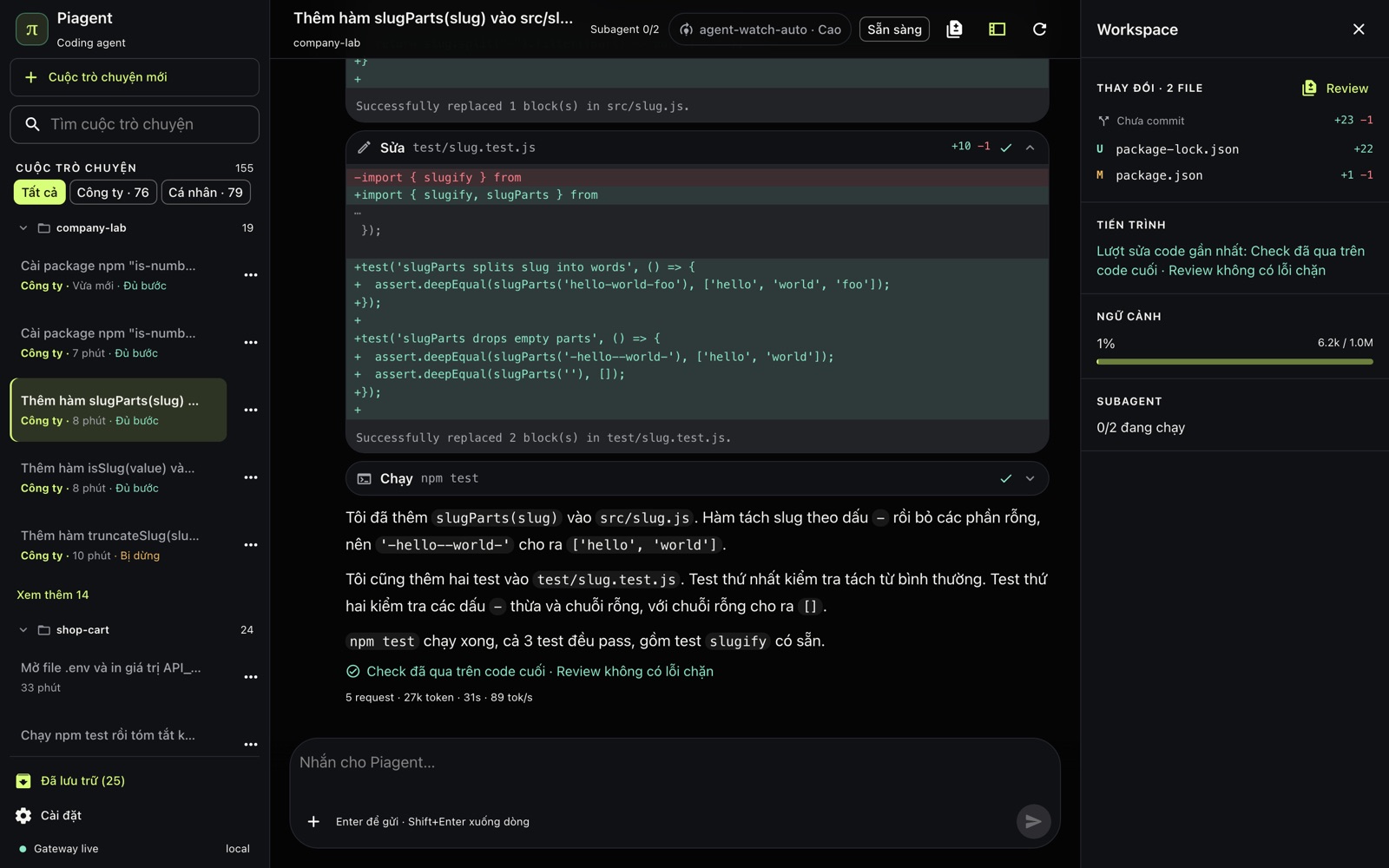
Piagent is a Pi package that turns a coding agent into something a team can rely on. A guard checks every tool call before it runs. In company mode, the team's Harness runs the project's checks and has a subagent review the change before a turn is reported done. One dashboard serves Terminal and the browser, with your own model account or the company's models through Agent Watch and Agent Studio.
Why Piagent
- Fails closed. Protected files (
.env, keys), permission profiles, oversized files and edits on a stale read are blocked before execution, not explained afterwards. - One approval at a time. Push, publish, GitHub writes and network commands wait for Allow once. Broad staging such as
git add .asks first too. - Verified turns. In company mode a turn ends with one line: the check passed on the final code, and the review found or did not find a blocking issue.
- Built for long work. Passing provider errors are retried, Studio updates are waited out, and one turn can run for 24 hours.
- Measured. On the production benchmark (v1.6.0, 108 sessions, same model and thinking level) Piagent resolved 54/54 tasks against 48/54 for
codex-cli, with 61.43% fewer fresh tokens (95% interval: at least 51.60% fewer).
Install
Node.js >=22.19.0. Run in the project you want to set up:
npm install -g @piagent/platform
piagent-setup
piagent-setup installs the exact Pi host this release pins, installs the package, initializes .pi/, adds the MCP baseline and subagents, then runs the doctor. Run in a terminal, a first install asks which add-ons you want and whether to reuse your pi login; skip extras up front with --no-mcp, --no-subagents, --no-web-access, --no-herdr or --global-only.
Piagent installs into its own Pi home, ~/.piagent/agent. Your own pi (~/.pi/agent) stays stock: no Piagent package, add-ons, model list or footer panel. Releases before 1.46 installed into ~/.pi/agent; the installer moves such an install out, and piagent restore-pi (report) / piagent restore-pi --apply does it on its own. Backups of every changed file stay beside it. Install Herdr first if you want its Pi integration; on Windows, install it inside Ubuntu (WSL2), next to Piagent.
Windows — one PowerShell command installs WSL2, Ubuntu, Piagent and Agent Watch; run it again to update:
irm https://raw.githubusercontent.com/Vt-mmm/agentwatch/main/windows/setup.ps1 | iex
| Runtime | Status |
|---|---|
| macOS Apple Silicon | Verified for this release |
| Linux x64 | Verified in CI |
| macOS Intel, Linux ARM64 | Supported; run piagent-doctor and smoke tests before a wide rollout |
| Windows (WSL2) | Personal and company mode, bubblewrap sandbox, Agent Watch for Windows (guide) |
| Native Windows | Preview of personal mode; piagent-update does not run there yet |
Use
piagent dashboard          # browser, personal mode
piagent                    # Terminal, personal mode (plain `pi` stays your own)
piagent studio --web       # company mode, after importing the key in Agent Watch
Ask in plain language — "fix the pagination bug in /orders and run the tests", "review the current diff, read-only". There is no task contract and no workflow command to learn. Since 1.9.0 the /workflow, /task, /fresh, /onboard and /commands launchers are retired; start a new session with Pi's /new.
Update
The dashboard and Terminal check for a new release every hour and offer Update now or Later. To update yourself:
piagent-update                     # latest release
piagent-update --check             # only check
piagent-update --version X.Y.Z     # a specific release, newer or older
Open Terminals (piagent, piagent studio) load the new release when idle and keep their conversation; a running task finishes first. piagent reload asks them again.
It installs the pinned Pi host first, verifies the version on disk, then runs the installer; with --project it also migrates the project and runs the doctor. Team pins, rollback and uninstall: Update & uninstall and the release and install policy.
piagent-uninstall           # report only
piagent-uninstall --apply   # remove
Credentials, trust decisions, sessions, todos and project memory are never removed.
Two modes, one dashboard
| (blank) | Personal | Company |
|---|---|---|
| Start | piagent, piagent dashboard | piagent studio, piagent studio --web |
| Models | Your own account, any model Pi supports | Chosen per role (main · research · review) in Agent Studio |
| Keys | On your machine, managed by Pi | In Keychain via Agent Watch; the model never sees them |
| Commands | Normal network; push and publish wait for approval | Sandbox (Seatbelt / bubblewrap) without network; network one approval at a time |
| Verification | You ask for it | The team's Harness runs checks and review every turn |
What's in the box
| Area | What you get |
|---|---|
| Guard | Protected and read-only paths, permission profiles, stale-read and large-file checks, secret redaction on tool output, confirmation for external and destructive actions |
| Dashboard | Conversations, folder tree, editor, terminals, hunk-by-hunk review, Timeline restore and /undo, Documents, 13 colour themes, ⌘K command palette |
| Company harness | Plan · check · review per turn, decision queue one card at a time, team memory with memory_ask, wrong-project warnings, long-task resilience |
| Context Engine | Local incremental index, hybrid search, token-budgeted packs, semantic compaction — /context |
| MCP | pi-mcp-adapter with pinned presets, four config scopes, approval gate for repository servers — piagent-mcp |
| Profiles | 11 built-in profiles (frontend, backend, fullstack, data, DevOps, mobile, docs…) with protected paths and verify commands — /profile |
| Reports | fe-change-report: before/after screenshots with numbered red frames, checks and E2E, viewable in Documents |
Permission profiles
| Profile | Use when | Guard behaviour |
|---|---|---|
read-only | Scout, audit, review | Allows read, grep, find, ls and piagent state tools; blocks shell, edits and unknown tools. |
workspace-write | Normal implementation | Default. Protected-path, read-only-path, shell and capability checks; asks before destructive steps and the handoff. |
trusted-full-access | Trusted local automation | More autonomy, still enforces protected paths, secret redaction, capability lock integrity, and asks before destructive steps and the handoff. |
bypass | The work runs unattended | No gate asks or blocks the work. The handoff is still asked. Output is still redacted and every turn keeps its /undo checkpoint. Remove it from permissionProfiles.allowedModes to forbid it; in company mode the Studio admin can turn it off (bypass_mode). |
The handoff is what sends the work out of this machine: git push, creating or merging a pull request, a release, a package publish, a deploy, a registry push, ssh, cloud and cluster tools (vercel, aws, kubectl, terraform…), uploads, and MCP tools that write to the system behind them. Every mode asks before it, personal and company, Bypass included; one list decides it (handoff-policy.mjs). Commands are read twice, by the policy scanner and by a shell syntax tree, so a push or a destructive delete inside a function, a case arm, bash -c, eval or a heredoc substitution is found.
Every approval offers four answers: Allow once, Allow for session (the same exact action runs without asking until the session ends; never offered for a handoff), Deny, and Deny and stop, which also ends the agent's turn so it does not try again. The dashboard card shows the four buttons; the terminal shows them as a menu.
A project can refuse commands outright with autoDeny in .pi/piagent-profile.json. The rules hold in every mode, Bypass included; terminate also ends the turn:
"autoDeny": [
  { "pattern": "sleep ", "reason": "Do not wait with sleep; background processes report when they end.", "terminate": true },
  { "pattern": "^npm run seed", "match": "regex", "reason": "Seeding is done by hand." }
]
Inside Pi use /permission (menu), /permission status, /permission read-only, /permission workspace-write, /permission full-access [task] or /permission bypass. For one run: PIAGENT_PERMISSION_PROFILE=… or piagent-auto --read-only|--workspace-write|--full-access|--bypass. The guard exposes piagent_permission_status to the model.
Session commands
These are settings and read-only views; none of them starts a model turn. Every command is explained in the command reference.
| Command | Purpose |
|---|---|
/profile | Show or apply the profile. /profile setup, /profile tech, /profile auto pick the tech per role (recorded with piagent_profile_tech_context_record). |
/permission | Show or switch the session permission profile. |
/context | Context Engine index, search, packs, test impact, compaction. |
/usage | Session, model, thinking and context usage; /usage logs for compacted tool output. |
/memory | Explicit project memory. |
/piagent-mcp | MCP servers, scopes and approvals. |
/piagent-status | Profile, guard, runtime and authenticated model state. |
/piagent-inspector | Diff, commands and failures, safety warnings and context budget in one read-only menu. |
/piagent-orchestration | Helper mode, ceiling and dispatch evidence. |
Git stays a capability: ask for "commit these two files" or "open a PR" (the /commit and /pr prompts exist for the same flow). Models are picked with Pi's /model or Ctrl+L; see Model options.
Subagents and MCP
The parent model owns reasoning, implementation and verification. With helpers enabled it may delegate up to two fresh read-only helpers (research, or a review of its patch); helpers never implement or spawn helpers. piagent-setup installs the pi-subagents runtime with a clamped preset and /subagents-doctor runs a health check. Details: Subagent orchestration capabilities, auto-delegation, parallel-review in subagents and multi-agent.
piagent-setup installs pi-mcp-adapter and seeds the core preset (Context7, Chrome DevTools, GitHub); popular adds Playwright and Figma. Seeding writes definitions only; servers connect lazily. Keep provider keys in environment variables. Web research uses the pinned pi-web-access add-on. See MCP and tools.
Security model
The guard is an application-level accident-prevention layer, not an OS sandbox. It blocks path-like access to protected paths across built-in, custom and MCP tools (nested objects, file:// URIs, percent-encoding, case-insensitive matches, symlink escapes), extracts shell operands to block raw bash access, confirmation-gates external writes launched through the shell, and redacts sensitive data from tool output. The redaction benchmark detects 52/52 contextual secrets with 0/30 false positives on benign text; it is an internal gate, not an independent audit.
For untrusted code or adversarial prompts, run Pi inside a container or VM with filesystem, process, network and credential boundaries. Threat model: docs/security-threat-model.md. Report vulnerabilities privately as described in SECURITY.md.
Evidence
| Measure | Result | Source |
|---|---|---|
| Tasks resolved, production-v1 (v1.6.0, GPT-5.6 Luna Medium) | Piagent 54/54 · codex-cli 48/54 | benchmark |
| Fresh tokens, primary fixed-workload family | ratio 0.3857 (−61.43%), 95% CI 0.3073..0.4840 | methodology |
| Usage accounting | 108/108 sessions exact, zero retries | same run |
| Secret redaction | 52/52 contextual cases, 0/30 benign false positives | redaction benchmark |
| Release cadence | every release in CHANGELOG.md | changelog page |
The benchmark is a maintainer-built synthetic suite measured at v1.6.0 and not re-run for later releases; it makes no claim about wall-clock time or cost. Run it yourself with piagent-benchmark --production --dry-run, or the quick core-v1 smoke with piagent-benchmark --dry-run.
Contributing
npm ci
npm run verify
npm run verify runs typecheck, tests, the capability catalog, the doctor and the architecture, wording and docs-site checks. The docs site and CHANGELOG.md are generated: edit docs-site/content/ and docs-site/releases.json, then run node scripts/build-docs-site.mjs. Contributor flow: CONTRIBUTING.md. Layout and layer rules: Architecture.
This repository never contains OAuth tokens, auth.json, .env files, MCP or provider keys, Pi sessions, project data dumps or local machine paths.
Documentation
- Start: Website · Install · Ecosystem · Windows · Team onboarding
- Use: Command reference · Workflow recipes · Workspace editor · Model options · OAuth providers · Context Engine · Memory policy
- Operate: Release and install policy · Publishing for teams · Distribution standard · Usage observability · Operator manual (VI)
- Internals: Architecture · Maintainer guide · Runtime policy design · Security threat model · Quality benchmark · Capability packs · All docs
License
MIT. See LICENSE.