
Install
Install with PiG
pig install npm:@pi-unipi/kanboardInstall with Pi
pi install npm:@pi-unipi/kanboardPackages run code with your permissions and influence agent behavior. Catalog inclusion is not a security audit. Review the source before installing a third-party package.
Pi manifest JSON
The pi field of package.json.
{
  "skills": [
    "./skills"
  ],
  "themes": [],
  "prompts": [],
  "extensions": [
    "./index.ts"
  ]
}
README
Written by the package's publisher, shown as published in version 3.0.3 (README.md). PiG does not review it.
Kanboard
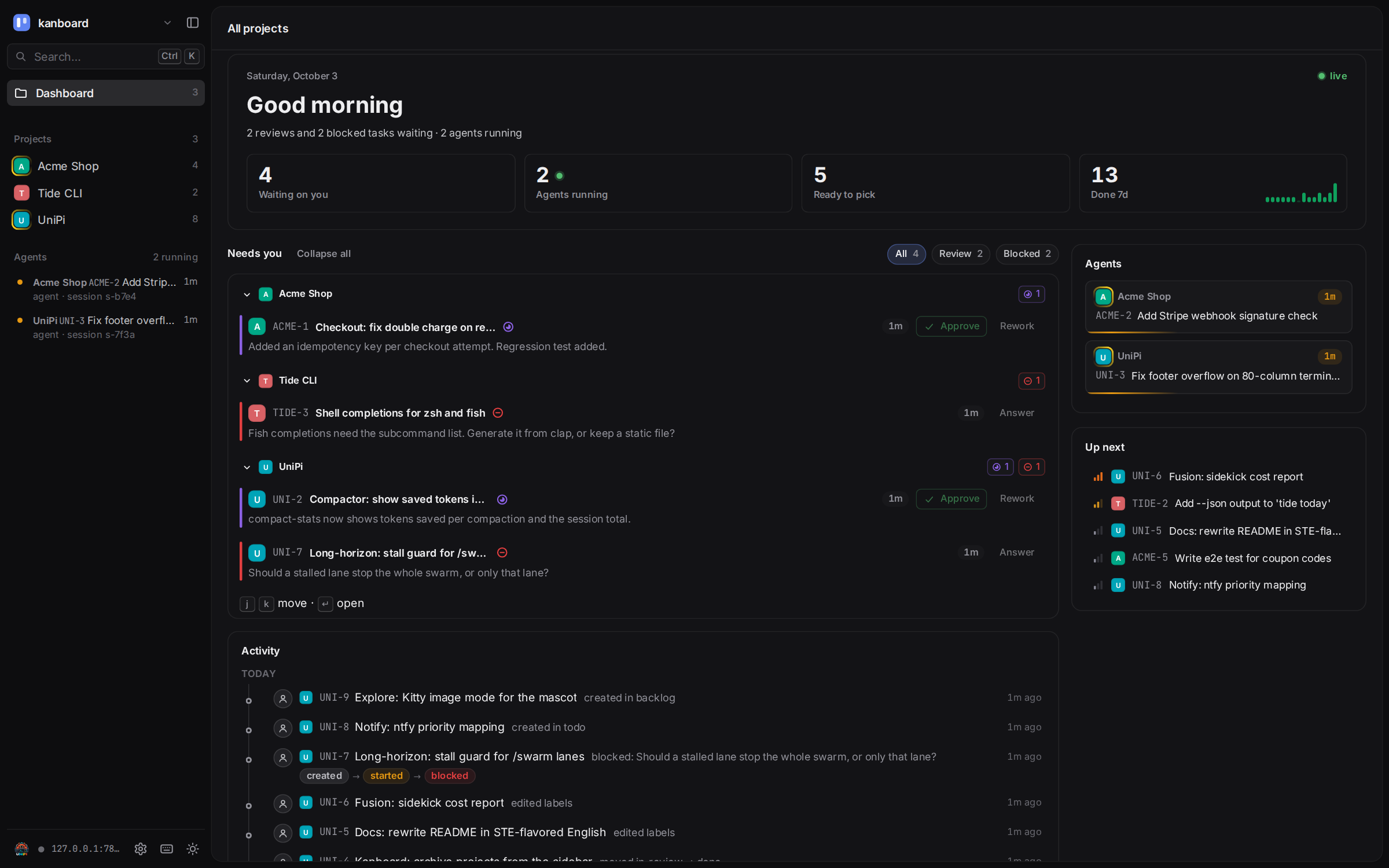
Keep a per-project board of work for later, and let the agent work the tasks when you allow it.
@pi-unipi/kanboard · part of UniPi
What it does
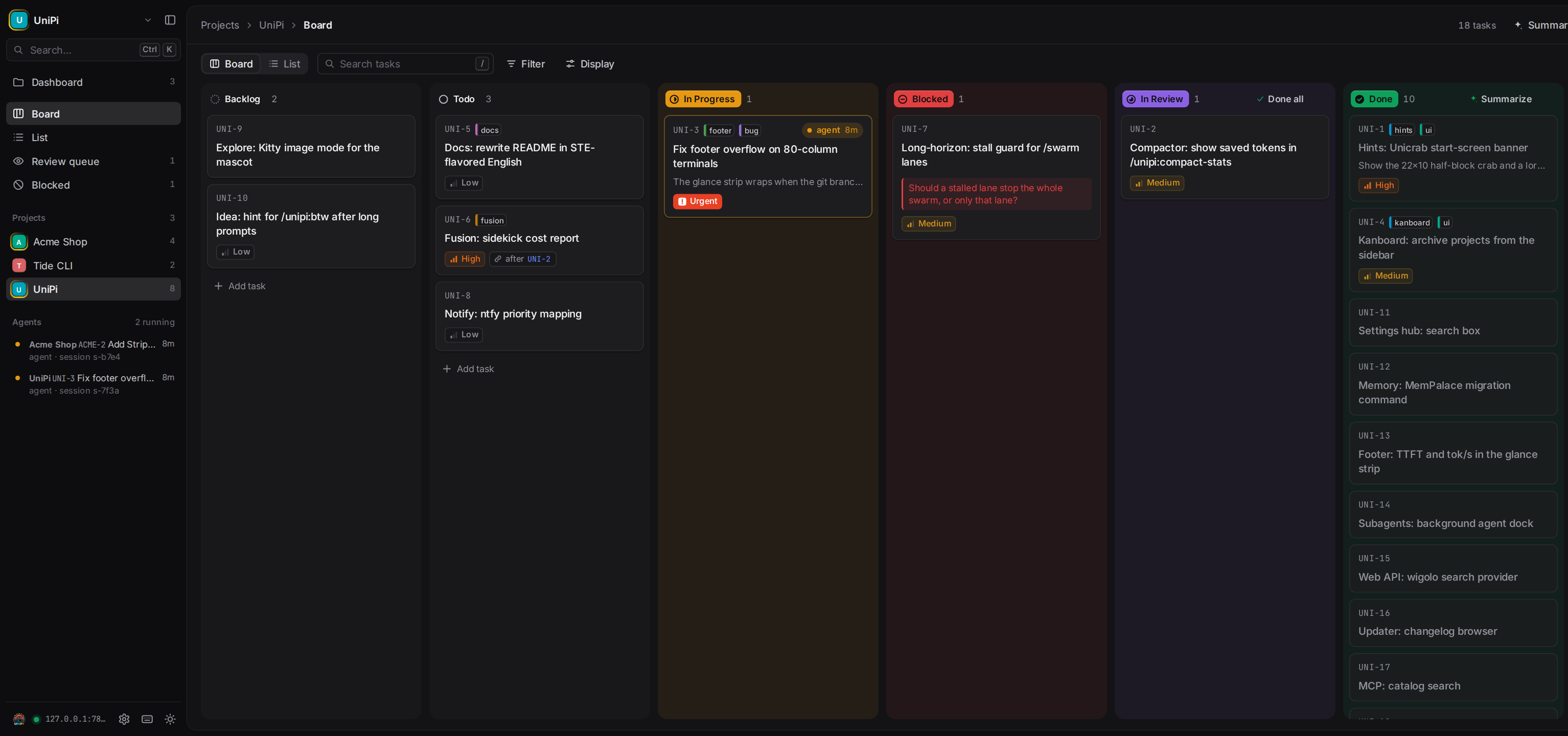
- Keeps tasks in lanes: Backlog, Todo, In Progress, In Review, Blocked, Done, Cancelled and Archived.
- Opens a web board for each project. The board updates when the agent or the CLI changes a task.
- Lets you add a task from the prompt with no agent turn.
- Lets the agent work tasks only within a budget that you give it, or in autowork.
- Asks the agent to continue a task that it started and did not finish.
- Stores tasks as markdown files. The Rust binary
unipi-kanboardwrites all changes. Refer to the crate README.
Quick start
UniPi installs this package:
pi install npm:@pi-unipi/unipi
To install this package alone:
pi install npm:@pi-unipi/kanboard
npm installs the binary for your platform as an optional package: Linux x64 and arm64, macOS x64 and arm64, and Windows x64.
- Run
/unipi:kanboard onboardto register the project. - Run
/unipi:kanboard-add Fix the flaky login testto add a task. - Run
/unipi:kanboard openand open the link that it prints. - Run
/unipi:kanboard-do work the login tasksto let the agent work them.
Commands
| Command | What it does |
|---|---|
/unipi:kanboard | Lists the commands. |
/unipi:kanboard open [--host H] [--port N] | Starts the board daemon if it does not run, and prints the board link. |
/unipi:kanboard close | Stops the board daemon. Tasks in progress do not change. |
/unipi:kanboard onboard | Registers this project. You can run it again with no effect. |
/unipi:kanboard status | Shows the daemon and the active claims. |
/unipi:kanboard show [--all] | Shows the board in the chat. |
/unipi:kanboard doctor | Examines the setup: binary, daemon, project and bind address. |
/unipi:kanboard-add [-p 1-5] [--after ID] [--status backlog|todo] <title> | Adds a task. Lines below the title become the description. A file path in the description becomes an attachment. |
/unipi:kanboard-do <request> | Gives the request to the agent with a task budget. off removes the budget. |
/unipi:kanboard-autowork start|stop | start lets the agent work all ready tasks, one at a time. stop stops the offers of new tasks. |
Priority -p: 1 none, 2 low, 3 medium, 4 high, 5 urgent.
The output of these commands shows in the chat. It does not go into the model context.
Task budget
/unipi:kanboard-do gives the agent two budgets:
- Task slots (
doTasks, default 5). Eachstartuses one slot. - Board writes (
doWrites, default 10).add,edit,link,order, a move between Backlog and Todo, and anoteon a task of another session each use one write.
Some operations are always free: reads, and finish, move <ID> blocked, note and attach on tasks that this session started. The budget stays until the agent uses it. A new -do fills the budget again. It does not add to the old budget.
In autowork, the agent has no budget. It can use any mode, for example goal or ralph.
Subagents and sidekicks can read the board, but cannot write to it. The guard tells them to report to the lead.
Settings
Open /unipi:settings → Kanboard. The file is ~/.unipi/config/kanboard/config.json.
| Key | Default | What it does |
|---|---|---|
chainGate | in_review | Status that a dependency must reach before the next task is ready: in_review or done. The web board uses it. |
idleMin | 10 | Minutes with no board open before the daemon stops. |
host | 127.0.0.1 | Bind address. Any other address needs an access token. |
port | 0 | Daemon port. 0 lets the OS select a port. |
archiveAfterDays | 0 | Archives done and cancelled tasks after this many days. 0 turns it off. |
retentionDays | 90 | Moves archived and cancelled tasks to cold storage after this many days. |
openBrowser | false | Opens the board in a browser on open. |
requireAuth | false | Asks for the token on 127.0.0.1 too. |
keepToken | false | Uses the same token after a daemon restart. |
maxSessions | 2 | Number of sessions that can hold In Progress tasks in one project. |
turnAddLimit | 20 | add calls in one turn. 0 means no limit. |
reminders | true | Reminds the agent to start a Todo task before it edits files. |
doTasks | 5 | Task slots that one -do gives. |
doWrites | 10 | Board writes that one -do gives. |
At session start, Kanboard runs archive-sweep when archiveAfterDays or retentionDays is more than 0.
How it works
Kanboard has no task runner. The agent works each task in your session. When a run ends, a monitor on the turn arbiter can add one message to continue:
- Claims (priority 50). A task that this session started is still In Progress. The monitor asks the agent to continue, finish or block it.
- Next task (priority 40). Autowork is on and a ready task exists. The monitor offers it. When no task is ready, autowork stops.
The monitor waits for a long-horizon owner (priority 100) and for pending events. It stops after you press Esc or a run fails. It also stops after 2 runs with no tool calls, after 5 messages for one task, or after 3 offers of one task in autowork.
At session start, Kanboard releases claims of dead processes. At session end, it moves the open claims of this session back to Todo. The next start shows a notice about these tasks.
Remote access
The daemon listens on 127.0.0.1 by default and needs no token. To use the board from another machine, use an SSH tunnel:
ssh -N -L 37473:127.0.0.1:37473 <hostname>
You can also bind another address, for example /unipi:kanboard open --host 0.0.0.0 --port 37473 or --host tailscale. Then the daemon makes an access token, and the printed link contains it. Anyone with the link can edit the board.
Troubleshooting
| Problem | Fix |
|---|---|
kanboard binary unavailable for <platform>-<arch> | Set UNIPI_KANBOARD_BIN to the binary path, or build crates/kanboard with cargo build --release. |
| The board says that some task files have errors | Run unipi-kanboard validate --fix, then unipi-kanboard validate. |
| The daemon does not respond | Run /unipi:kanboard close, then /unipi:kanboard open. |
| No task is ready | Run unipi-kanboard list --ready --json and read waitingFor. A cancelled dependency blocks a task. |