
Install
Install with PiG
pig install npm:@pi-unipi/footerInstall with Pi
pi install npm:@pi-unipi/footerPackages run code with your permissions and influence agent behavior. Catalog inclusion is not a security audit. Review the source before installing a third-party package.
Pi manifest JSON
The pi field of package.json.
{
  "skills": [],
  "themes": [],
  "prompts": [],
  "extensions": [
    "./index.ts"
  ]
}
README
Written by the package's publisher, shown as published in version 3.0.3 (README.md). PiG does not review it.
Footer
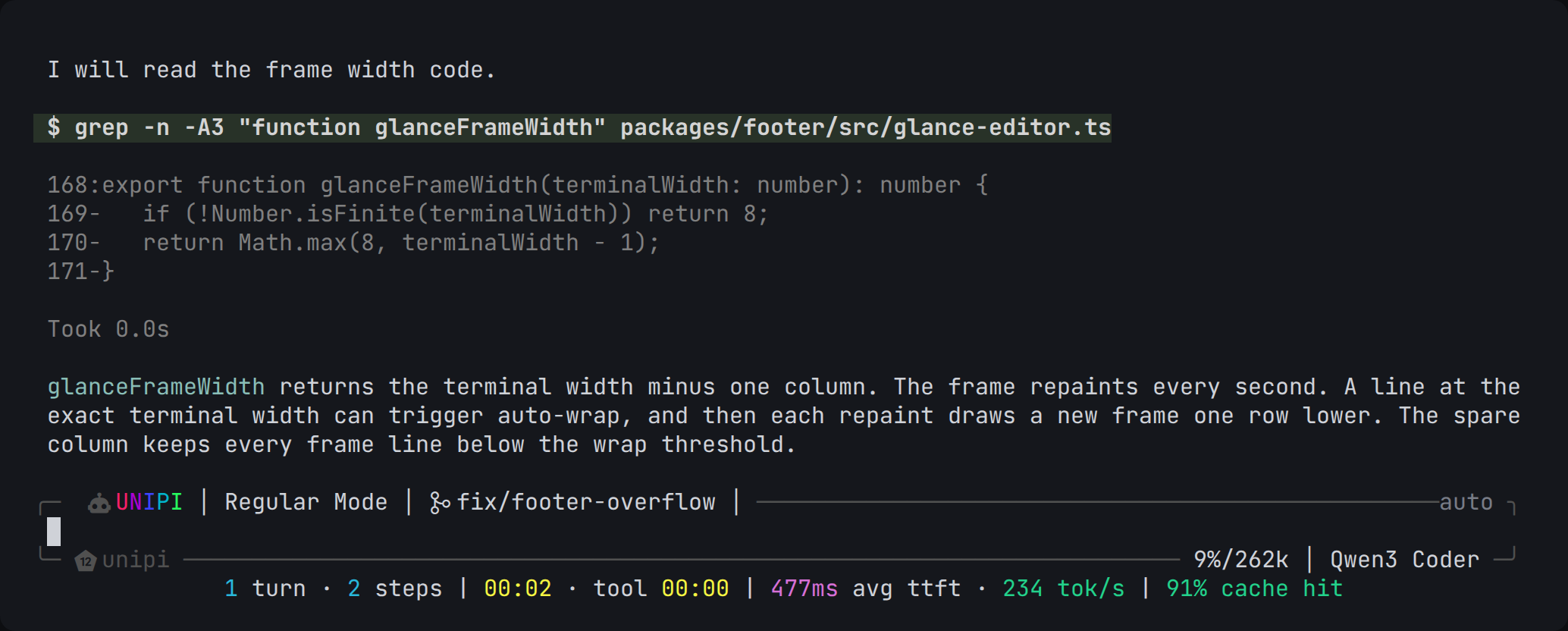
Frames the input box and shows live session stats at the bottom of the terminal.
@pi-unipi/footer · part of UniPi
What it does
- Puts a frame around the input box (the glance frame, always on when the footer is enabled).
- Shows a stats line below the input: input/output tokens, cost, average time to first token (TTFT), tokens per second, turns, steps, model and tool time, cache hit rate, and compactions.
- Shows a line above the input with counts of background tasks: running, stopped, failed and done.
- Adapts to the terminal: parts of the stats line drop by priority when the terminal is narrow, badges leave the frame titles before the branch or model truncate, and on very short terminals the stats and task lines hide.
Quick start
UniPi installs this package:
pi install npm:@pi-unipi/unipi
To install this package alone:
pi install npm:@pi-unipi/footer
The footer starts with the session. Open /unipi:settings → Footer to change it.
Commands
| Command | What it does |
|---|---|
/unipi:footer | Turns the footer on or off. |
/unipi:footer on | Turns the footer on. |
/unipi:footer off | Turns the footer off (plain pi editor). |
The glance frame
The frame has three parts:
- Top border. The UNIPI brand, the long-horizon mode, the git branch, and the plan and permission mode. The brand shows a moving rainbow. The frame also shows the rainbow when the thinking level is
xhighormax(unless Rainbow isbrand-only). - Bottom border. The workspace name, context use and window size, the model and the thinking level. With a Fusion pair, it shows the lead and the sidekick. It also shows Kanboard claims.
- Stats line. The line below the input. A part stays hidden until it has data. For example, compactions show only after the first compaction.
The background-task line reads the Background Tasks registry. It shows nothing when no task exists.
Responsive behavior
- Width. Each stats-line part has a priority. When the line does not fit, the lowest-priority parts drop whole (never mid-part), in this order: compactions, cache, time, turns, speed, cost — tokens always survive. The frame titles degrade the same way: the Kanboard label, the Fusion pair, the plan/permission cluster and the mode label drop (lowest value first) before the branch or model ever truncate.
- Width safety. Nothing ever writes the last terminal column (a full-width line desyncs wrapping terminals).
- Height. Below 20 terminal rows the stats line and the background-task line hide; the frame stays.
Settings
Open /unipi:settings → Footer. The file is ~/.unipi/config/footer/config.json. A project file at .unipi/config/footer/config.json overrides it.
| Key | Default | What it does |
|---|---|---|
enabled | true | Turns the footer on or off. false leaves the plain pi editor. |
iconStyle | nerd | Icon set: nerd (needs a Nerd Font), emoji or text. |
colorMode | auto | auto, truecolor, 256 or none. The legacy value mono loads as none. |
rainbow | always | always animates the brand (and the whole frame at xhigh/max thinking); brand-only never animates the whole frame; off disables the animation. |
processLine | false | Shows an extra line above the input that counts background tasks by status. Background tasks live in the ↓ work tray. |
strip.turns | true | Turn and step counters. |
strip.time | true | Model time and tool time. |
strip.speed | true | Average TTFT and tokens per second. |
strip.tokens | true | Session input and output tokens. |
strip.cost | true | Session cost, or sub when the model runs on a subscription. |
strip.compactions | true | Compaction count, sizes and recency. |
strip.cache | true | Cache hit percentage. |
badges.mode | true | Long-horizon mode label beside the brand. |
badges.planPermission | true | PLAN badge and permission mode in the top border. |
badges.fusion | true | Fusion lead and sidekick in the bottom border. |
badges.kanboard | true | Kanboard claims label in the top border. |
colorMode: auto uses 24-bit color where the terminal supports it, 256 colors in terminals such as Apple Terminal, and no color when the NO_COLOR environment variable exists.
Old v2 keys (preset, separator, zoneSeparator, showFullLabels, groups, glanceMode) in existing config files are ignored.
How it works
The footer listens to UniPi events on the event bus for mode, plan and permission state. Usage data comes from an incremental scan of the session branch: each second only new entries are processed (a compaction or branch change triggers a full rescan), the same pass filling a cached snapshot for the stats line. The TPS tracker is fed live by pi's streaming events and reconciled by the same scan. The footer redraws when something it displays changed — plus once a second while the rainbow animates.