
Install
Install with PiG
pig install npm:@neralabs/rerailInstall with Pi
pi install npm:@neralabs/rerailPackages run code with your permissions and influence agent behavior. Catalog inclusion is not a security audit. Review the source before installing a third-party package.
Pi manifest JSON
The pi field of package.json.
{
  "image": "https://raw.githubusercontent.com/neralabs/rerail/main/docs/images/session-steer.png",
  "extensions": [
    "./dist/hosts/pi/pi-extension.js"
  ]
}
README
Written by the package's publisher, shown as published in version 0.2.1 (README.md). PiG does not review it.
Rerail
Rerail checks the code your coding agent writes against your rules while it works, and steers it back in the same session.
Works with 



What is Rerail
Coding agents drift. They break your architecture's patterns, repeat approaches you already rejected, and ignore conventions they never saw. Writing more rules into the prompt doesn't fix this: it uses up context, goes stale, and still relies on the model noticing when a rule applies.
Rerail takes enforcement out of the model loop. Hooks or extensions in your coding agent send each edit the agent makes to a local daemon. A native Rust engine checks the changed code against your repository's rules, by regex, syntax tree and relations. When the agent breaks a rule, Rerail steers it back during the session and records what fired, where and why.
Rule checking runs on your machine and makes no network requests. No account or API key is needed.
Quickstart
You need Node.js 24 or later and Git, on macOS, Linux with glibc 2.28 or later (not Alpine or other musl Linux), or Windows, on arm64 or x64. On Windows, Claude Code also needs Git Bash, from Git for Windows. Prebuilt native engines come as npm packages of their own, one per system and processor, which npm installs with Rerail, so nothing is compiled on your machine. If set-up or Rerail goes wrong, see Troubleshooting.
In your repository, run this to install Rerail under ~/.rerail, connect your coding agents and start Rerail there:
npx @neralabs/rerail setup
In Windows PowerShell, if that says npx.ps1 cannot be loaded, run npx.cmd @neralabs/rerail setup (why).
Then, in a new terminal, which has rerail on its PATH, open the dashboard with rerail manage.
Set-up asks before it reads the repository, shows the rule packs suggested for what it is built with and the reason for each, or why none matches, and installs only the ones you confirm. It connects the coding agents it finds (or only the ones you name with --agents), puts ~/.rerail/bin on your PATH, and starts Rerail in this repository only. Everywhere else Rerail stays off until you run /rerail-start (or rerail start) there. To have a coding agent install it for you, ask it to; it runs setup --relay and asks you each question in the session. Installing Rerail says what set-up changes on your machine and how to update and remove Rerail.
Then start a new Claude Code, Codex, Cursor, OMP or Pi session in the repository. To watch Rerail catch a broken rule and steer the fix, run:
/rerail-show-me
To add a rule of your own, type /rerail-create followed by what you want:
/rerail-create <what you want>
/rerail-create never import from src/legacy in new code
The agent drafts the rule from your description, tests it against the repository without saving it, and adds it after you confirm. Writing rules covers which rules are worth having, and Architecture rule examples has complete, tested rules for design decisions that maintainers of Sentry, VS Code, rust-analyzer, Nextcloud and other projects enforce in review: layer boundaries, calls that must go through a service or repository, one home for each kind of thing.
How it works
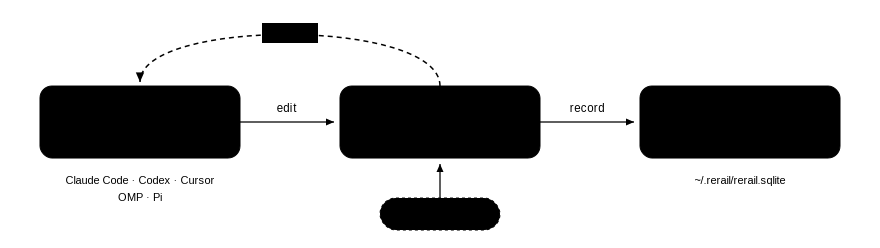
- Capture. Hooks (Claude Code, Codex, Cursor) or native extensions (OMP, Pi) observe the session automatically, so the agent never has to remember to call Rerail. Before an edit, Rerail records the file as it was, so it can tell which lines the agent changed.
- Evaluate. One background daemon keeps the engine and the compiled rules of each repository in use in memory, checks the files the agent touched, and reports only the lines it changed.
- Steer. Each rule has a mode.
logrecords the violation.steersends the agent the rule, the location, what is wrong and, where the rule has one, a suggested fix. - Record. Sessions and violations are stored in one local SQLite database (
~/.rerail/rerail.sqlite) and shown in the dashboard, so you can see what fired, where and why.
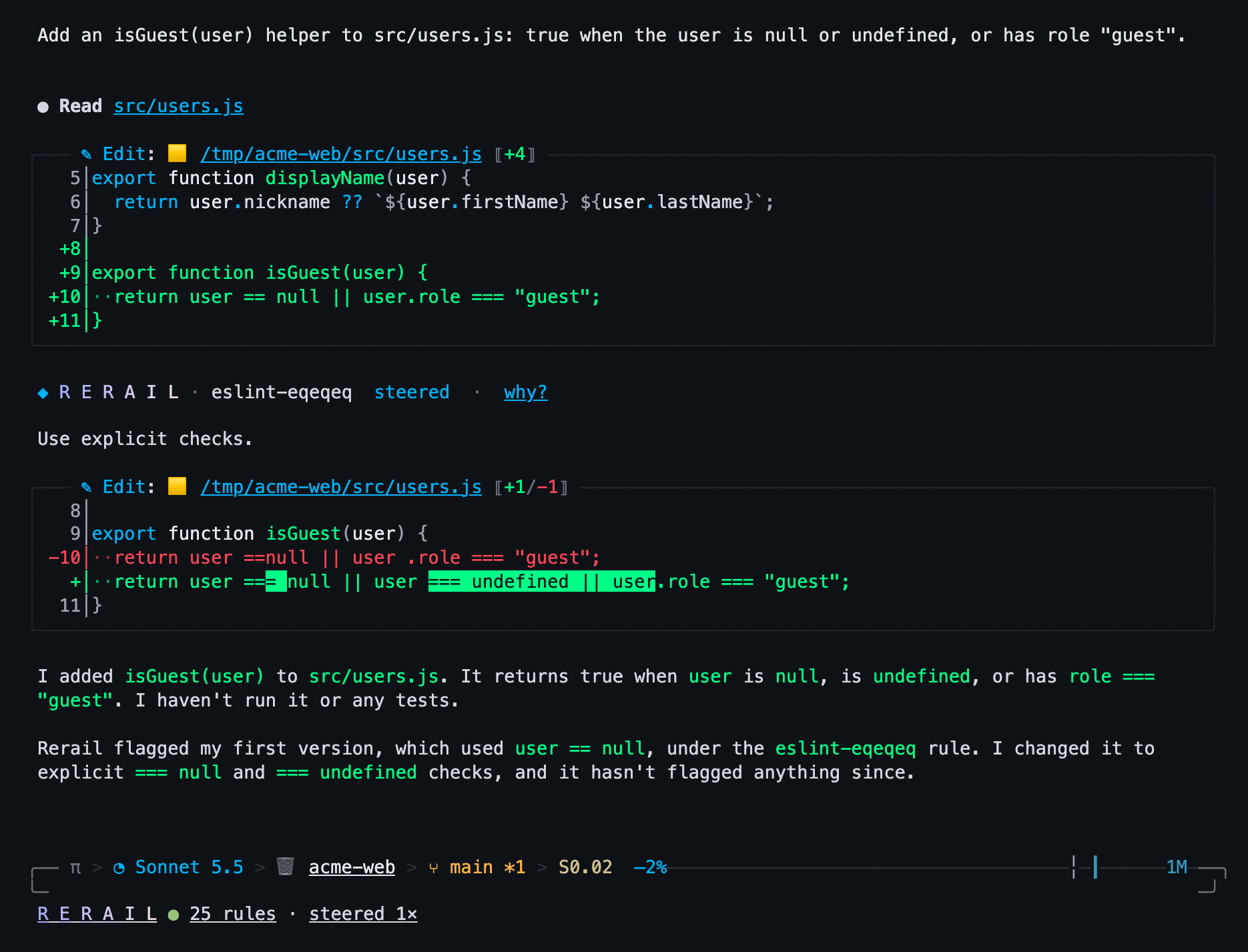
A session in OMP: Rerail steers the agent on eslint-eqeqeq from the javascript pack, and the line under the edit says so, with why? opening the rule on your local dashboard. The agent fixes its edit in the same turn, and the footer counts the steer; R E R A I L, the rule count and the steer count link to the session and the rules on the dashboard.
Capabilities
- Code rules. A rule you write is a JSON
rerail.policy/v1document, which/rerail-create,rerail rules addand a worktree's.rerail/rules/take. Rule packs can also ship rules in Rerail's new rule language,.rerail, as the Django pack does (rules written in .rerail). Each JSON clause isforbid,require_eachorbudget, built from regex, syntax-tree and relational queries; the code-rule DSL reference documents every construct. The native engine runs both kinds the same way every time, within set limits on time and size. - Only the agent's new work is judged. Code rules report only the lines the agent changed in the session, so existing code does not bury the signal.
- Runtime steering. Violations go back into the live session while the change is still being made, not later in review.
- Rules belong to the repository. Every clone and worktree of a remote shares its rules. Turn a rule or pack on, off or to log-only per repository, folder or checkout, and choose whether linters' suppression comments (
eslint-disable,noqa, ...) silence it; changes apply on the next tool call. See Rule scoping. - Rules in your own words.
/rerail-createhas your coding agent draft a rule, test it withrerail rules test, and add it withrerail rules addafter you confirm.rerail rules evidenceshows what recent sessions suggest a rule for. - You approve what steers. A rule Rerail did not publish (one you or a coding agent wrote, a worktree's own, a third party's pack) runs in Log until you approve what it says, with
rerail rules approveor in the dashboard, and again after each edit or new version. See Approval. - Local and multi-agent. One daemon serves Claude Code, Codex, Cursor, OMP and Pi, with a dashboard on your own machine.
- Explicit updates. Nothing updates on its own.
rerail updatebacks up the database and validates the new version before switching to it, then moves each installed rule pack to the newest version that fits it. Once a day the daemon asks npm whether a newer Rerail is out, and the dashboard says so;RERAIL_UPDATE_CHECK=0turns that off.
Rule packs
Core ships no rules. A rule pack is a set of rules published as its own npm package: Rerail's are @neralabs/rerail-pack-<id>, and anyone can publish one as rerail-pack-<id> or @<scope>/rerail-pack-<id>, which Rerail has not reviewed (rule packs). Set-up recommends the packs that fit a repository, by its files or its dependencies, and installs the ones you confirm into ~/.rerail/packs. A pack runs only where you add it. Manage packs from the dashboard's Rule packs page or with rerail packs list|add|remove|update|recommend|calibrate.
To add a pack after set-up, first see the packs that fit this repository, and why:
rerail packs recommend
Install one into ~/.rerail/packs:
rerail packs add complexity
Then open the dashboard and add it to this repository on the Rule packs page:
rerail manage
rerail packs add installs a pack but turns it on nowhere; it runs only in the repositories you add it to.
Packs that port a linter are linter-equivalent to it.
| Pack | Linter-equivalent to |
|---|---|
python | Ruff v0.16, Bandit v1 |
javascript | ESLint v10, eslint-plugin-unicorn v76 |
typescript | typescript-eslint v8, @vitest/eslint-plugin v1 |
next | @next/eslint-plugin-next v16 |
react | eslint-plugin-react v7, eslint-plugin-react-hooks v7 |
node | eslint-plugin-n v18 |
sql | SQLFluff v4 |
vue | eslint-plugin-vue v10 |
rust | Clippy (Rust 1.99) |
blade | Bladestan v0.11, tlint v9, stillat/blade-parser v2 |
php | PHP_CodeSniffer v4, PHPStan v2, Psalm v6 |
complexity | none: counts like lizard v1, for cyclomatic complexity above 6 in Python, TypeScript, JavaScript, PHP, Blade, Rust, Vue and Java |
django | none: Rerail's own rules for Django models, querysets, transactions, views and settings, from the Django docs and maintainers' review advice |
A ported rule ships only once it passes the conformance check: it is scored against the original tool's own findings on the tool's tests, at the exact release the pack pins, and on real-code samples. Ports that are not ready yet sit in each pack's candidates/, scored but never shipped. Each pack is versioned with changesets and released separately from core. See Rule packs, the pack format and the conformance check.
Set-up reads the repository's own linter config, as data, and turns pack rules on and off to match it: the same rules on, the same rules off. rerail packs calibrate reads it again after the config changes, and keeps any setting you made yourself (the repository's own lint config).
A worktree can also carry rules of its own: each rule document in its .rerail/rules/ folder runs in that worktree only, with nothing to install or add, and rerail packs list there shows what loaded (a rule for one worktree only). /rerail-create writes a rule there when you ask for this worktree only.
Rules can target Python, TypeScript, JavaScript, PHP, Blade, Rust, SQL, Vue, Java, C, C++, C#, Go, HTML, CSS, Markdown and JSON; regex rules and file rules read every text file in their scope, Justfile, LICENSE and lock files included (Writing path and text rules). Move your own rules between machines with rerail rules export and rerail rules import.
Supported coding agents
Rerail works with five coding agents: Claude Code, Codex, Cursor, OMP (Oh My Pi) and Pi. Set-up connects the ones it finds, or the ones you name (--agents claude-code,codex,cursor,omp,pi). It backs up each config before changing it, and rerail install --remove takes everything out again.
Pi's package gallery installs Rerail too, with pi install npm:@neralabs/rerail; /rerail-start in a Pi session then finishes set-up and swaps that entry for the managed install, so rerail update governs the version. See Installing Rerail.
| Agent | Integration | In-session commands | Status line |
|---|---|---|---|
| Claude Code | .claude-plugin, hooks/claude.json; commands in ~/.claude/commands/ | /rerail-* | Yes |
| Codex | .codex-plugin, hooks/codex.json; skills in ~/.codex/skills/ | $rerail-* skills | No |
| Cursor | .cursor-plugin, hooks/cursor.json; commands in ~/.cursor/commands/ | /rerail-* | No |
| OMP, Pi | Native extensions (src/hosts/omp, src/hosts/pi) | /rerail-* | Yes |
Every agent gets the same commands; Codex has them as $rerail-* skills:
| Command | What it does |
|---|---|
/rerail | What Rerail is doing in this repository, and every command (/rerail-help is the same) |
/rerail-start, /rerail-stop | Start or stop Rerail in this checkout and the worktrees inside it; rules and history are kept |
/rerail-create | Write a rule in your own words, change one, or get rule suggestions for this repository |
/rerail-show-me | See Rerail catch a broken rule in this repository and steer the fix, then clean up |
/rerail-bug-report | Work out what went wrong: fix your own rule, or report a Rerail bug in an issue |
/rerail-manage | Open the dashboard |
/rerail-update | Update Rerail to the newest version |
/rerail-uninstall | Remove Rerail from this computer, keeping your rules and history in a backup or deleting everything |
Everything else is a rerail terminal command: rerail status, rerail version, rerail update check, rerail reset. Run rerail --help for the full list. In Claude Code, OMP and Pi the status line shows R E R A I L ● <n> rules, and how many times Rerail steered, while Rerail is on; see In-session surfaces.
When the agent decides not to follow a steer, it records its one-line reason with rerail feedback. Rerail keeps the note on your machine and sends it nowhere; to tell us a rule keeps getting pushed back on, attach the output of rerail feedback list --rule <rule-id> to a Rule misfire issue. See Steer feedback.
Internal testing
[!WARNING] These features are in the code and you can find and run them, but they are not ready for public use. We are still testing them internally. They are not supported, they may change or be removed in any release without notice, and nothing in this README promises they work. Do not build on them or rely on them in your workflow.
Each is off until its RERAIL_EXPERIMENTAL_<FEATURE> variable is set. Their list, where each one surfaces and which variable turns it on are in Internal testing. Found one? Feedback is welcome in an issue, labelled as internal testing.
Repository structure
.
├── src/              # TypeScript, one folder per layer (see src/README.md)
│   ├── engine/       # rule model, schemas, code-rule compile, native bridge, audits, database, pack catalog
│   ├── runtime/      # session events through the engine; the daemon client
│   ├── api/          # HTTP and MCP operations served by the daemon
│   ├── presentation/ # the session footer, dashboard links, terminal status
│   ├── daemon/       # the resident daemon: HTTP/MCP server, page, native session server
│   ├── harness/      # shared hook plumbing, event stream, /rerail commands
│   ├── hosts/        # one adapter per agent: claude, codex, cursor, omp, pi
│   ├── setup/        # agent registration and the managed updater
│   ├── activation/   # signed customer profiles and device keys
│   └── cli/          # the rerail command line
├── native/           # Rust engine (napi): embeddings, code-rule DSL, content store, git workspace
├── languages/        # language registry: one JSON file per language
├── packs/            # rule packs, one npm package each
├── model/            # bundled, pinned potion-base-8M model (Git LFS)
├── hooks/            # hook manifests for Claude Code, Codex and Cursor
├── skills/           # agent skills shipped with Rerail (rerail-create, rerail-bug-report)
├── .claude-plugin/ .codex-plugin/ .cursor-plugin/  # agent plugin manifests
├── ui/               # dashboard: plain HTML, CSS and ES modules, no build step
├── conformance/      # the conformance check: scores ported rules against upstream tools' findings
├── fixtures/         # upstream test fixtures and corpora per language
├── benchmark/        # query parity and steer benchmarks
├── test/             # unit tests (Vitest), mirroring src/
├── integration/      # end-to-end tests against real agent hosts
├── e2e/              # dashboard tests (Playwright)
├── scripts/          # build, check, generate, release
├── docs/             # guides, reference and design notes
└── CONTEXT.md        # domain glossary: rules, clauses, violations, oracles
Good places to start
- CONTEXT.md: the vocabulary used across the codebase. Read it first.
- docs/installation.md: what you need, how to install, update and remove Rerail, and what set-up changes on your machine; docs/how-setup-works.md has every step and file in detail.
- docs/reference.md: rules and their configuration, the database, updates, the daemon and its API.
- docs/code-rule-dsl-reference.html: every construct of the
rerail.policy/v1rule language. - docs/rule-packs.md and docs/pack-format.md: how packs work and what each must prove.
- packs/complexity/rules/ and docs/architecture-rule-examples.md: real rules to copy when writing your own.
- src/README.md: the layers and which may import which.
Contributing
See CONTRIBUTING.md for how to start work and what a pull request needs, and docs/GOVERNANCE.md for who the maintainers are and how decisions are made. Contributions are licensed under Apache-2.0, with no CLA. Third-party material must use a permissive licence, and where it came from and under which licence must be recorded with it. How core is released is in docs/release.md.
To build from a checkout you need Node.js 24+, npm, Rust (pinned in rust-toolchain.toml), just and Git LFS. The model weights and an engine data table are stored in LFS, so install it before you clone.
git lfs install
Then, in the checkout, install the dependencies and build:
npm ci && npm run build
Run the checks:
npm run check:all
Run the tests:
npm run test:all
Feedback
Found a bug, a false positive, a missed violation or a confusing steer? Run /rerail-bug-report. It works out whether it is Rerail, a rule that ships with Rerail or your own rule, helps you fix your own, and offers to report the others in an issue with a support bundle: a file of Rerail's diagnostics, with no prompts, replies or code in it (what it holds), since a dashboard link only opens on your computer. To report a vulnerability, follow SECURITY.md instead.
License
Apache License 2.0. See LICENSE and NOTICE. Third-party material bundled with Rerail, including the minishlab/potion-base-8M model (MIT), the Blade parser ported from Forte 1.1.0 (MIT), the vendored grammars and the ported rules, is listed with its licence in THIRD_PARTY_NOTICES and LICENSES/. The coding agents' names and logos are trademarks of their owners.