
Install
Install with PiG
pig install npm:@mrclrchtr/supi-agentInstall with Pi
pi install npm:@mrclrchtr/supi-agentPackages run code with your permissions and influence agent behavior. Catalog inclusion is not a security audit. Review the source before installing a third-party package.
Pi manifest JSON
The pi field of package.json.
{
  "image": "https://raw.githubusercontent.com/mrclrchtr/supi/main/packages/supi-agent/assets/social-preview.png",
  "extensions": [
    "./src/extension.ts"
  ]
}
README
Written by the package's publisher, shown as published in version 16.0.0 (README.md). PiG does not review it.
@mrclrchtr/supi-agent


Profile catalogue, field-level profile settings, and resource policy for background and foreground Agent Runs in Pi.
This package is the policy layer for @mrclrchtr/supi-agent-runtime. It discovers Profile Directory sources from package defaults, ~/.pi/agent/supi/agents/, and trusted project .pi/supi/agents/ directories. It also contributes per-profile Enabled, Model, Thinking, and Instructions rows to /supi-settings.
Built-in profiles:
explore— read, grep, find, ls, git, headless Code Intelligence tools, codemode, and Web tools when available, project instruction files, read-only.general— read, grep, find, ls, bash, edit, write, headless Code Intelligence tools, codemode, and Web tools when available, global/project instruction files, mutation-capable.
Profile sources overlay fields by ID with project → global → package precedence. A partial user manifest can pin only model or thinking; package tools and prompts continue to flow through. An invalid source falls through with a bounded diagnostic. Profiles are context-isolated, not permission- or filesystem-sandboxed.
Prompts and instruction files
The built-in profiles use package-owned system prompts written for a delegated run: the reader is the calling agent, only the final message reaches it, and nobody can answer questions during the run.
Profiles with a package-owned or custom prompt also get a generated <tool_rules> section with the usage rules (promptGuidelines) of their active tools. Profiles with systemPrompt: "native" keep Pi's own rules section.
instructionScopes selects which AGENTS.md or CLAUDE.md files a profile's runs load: [], ["project"], ["global"], or ["global", "project"]. Change it with the profile's Instructions row in /supi-settings, or in its profile.json. For example, keep your global instruction file out of general runs with ~/.pi/agent/supi/agents/general/profile.json:
{ "instructionScopes": ["project"] }
Run /reload after a change. Global instruction files are often written for a conversation with a person, such as a reply language; a run that loads them applies those rules to its report as well.
Git queries
The package-owned git capability runs one Git query per call without a shell, for example { "args": ["diff", "main...HEAD", "--stat"] }. Only diff, log, show, blame, status, rev-parse, and ls-files are admitted. The tool rejects --output, --ext-diff, --textconv (including abbreviations), verbose status, and global options before the subcommand. It always adds --no-pager, --no-optional-locks, core.fsmonitor=false, and, for diff output, --no-ext-diff and --no-textconv. Output follows Pi's standard truncation limits.
git counts as read-only for batch admission, so explore keeps running in parallel and in the background. The allowlist limits what the model chooses; repository configuration such as aliases or hooks is trusted like the user's own Git.
Codemode opt-in
A Profile can opt into Pi codemode by adding codemode to its fixed tools list. The list is replaced as a whole when profile sources overlay, so a partial manifest must retain every capability it still needs:
{
  "tools": ["read", "code_orientation", "code_find", "codemode"]
}
The built-in explore and general profiles include codemode by default. To disable it for a profile, override its tools list without codemode. An opted-in child loads codemode with classifier and image-model APIs enabled and mode: "on"; its permitted direct tools remain available alongside scripts. Script discovery and nested calls are restricted to that Profile's permitted tools. No parent extensions or MCP servers are inherited. Codemode itself is non-mutating for batch classification; bash, edit, and write remain mutation-capable, so any Profile containing them follows the writer rules.
Each top-level batch with opted-in tasks captures one snapshot of the containing session's currently available classifier and image models. The same snapshot is shared by opted-in siblings only; follow-up batches capture a fresh snapshot, and additions during a batch do not expand its authority. An empty catalogue leaves scripting available but authorizes no classifier or image models. Using these APIs may send supplied inputs—including repository evidence—to external providers and may incur provider costs. Availability does not guarantee provider entitlement or a successful request. Codemode and Profile isolation are not filesystem or operating-system sandboxes.
Web tools
Profiles can allow web_fetch_md, web_search, web_docs_search, and web_docs_fetch individually in their tools list. The built-in explore and general profiles allow all four. These are Conditional Capabilities. An Agent Run receives an allowed Web tool only when @mrclrchtr/supi-web is loaded in the containing session and that tool is callable there. supi-agent neither depends on nor bundles supi-web. Unavailable Web tools are silently absent, not a startup failure. Each agent_run call captures availability once for its batch, and each Delegation Follow-Up captures it again.
Children follow the parent's Web behavior. For example, Context7 tools without CONTEXT7_API_KEY remain present and fail when called, and Firecrawl uses the existing Web settings. Web tools count as read-only for batch admission, so read-only profiles can still run in parallel and in the background. Queries and URLs reach external services. Web content is untrusted. Direct calls and codemode scripts see the same Web tools.
Changes to Agent Run tool, Active Agent Run limit, Worktree bootstrap command, and each profile's Model and Thinking settings apply immediately. /agents, agent_list, agent_result, and agent_cancel stay available when new starts through agent_run are off.
Background delegation
In TUI and RPC, agent_run defaults to background execution for read-only profiles such as explore, and for mutation-capable profiles such as general that run in their own linked worktree. It returns a batch handle so the parent can continue independent work. Use mode: "foreground" to wait in the starting call. A mutation-capable task in the parent's worktree or the main worktree defaults to foreground and rejects explicit background requests; see Parallel writers in linked worktrees. Print and JSON modes also default to foreground and reject explicit background requests.
agent_result({ batchId })returns completed task results and pending status. Results are repeatable. When all available results, checkpoints, and Usage are already stored, it showsAlready collected; no new Usage.Pending tasks can still remain. Do not poll.agent_result({ batchId, wait: true })waits for all tasks to finish.agent_cancel({ batchId })requests a stop for the active tasks in one background batch. Collect its terminal results afterward.@mrclrchtr/supi-agent-runtimeregistersagent_resultandagent_cancelonce per Pi runtime and checks every handle. This package formats and renders Delegation Batch results. Other packages that hand Background Run Batches to the runtime share the same two tools.- Each task can produce a completion notice before its siblings finish. The notice reaches a busy parent at the next safe turn boundary, or starts a turn when the parent is idle. It contains identifiers and status, not task output. Notices for successfully collected tasks are omitted from later model requests; the human transcript is unchanged.
- The default limit is four active Agent Runs per session, counting foreground and background together. Set
agent.maxConcurrentRunsin SuPi configuration or use Active Agent Run limit in/supi-settings. The value must be a positive integer. A batch that does not fit is rejected as a whole; there is no queue. Lowering the limit does not stop existing runs. Review limits are separate. - Parent abort stops active background batches and pauses automatic delivery until a later user-originated prompt. Normal parent completion leaves them running. Idle Escape keeps Pi's normal editor behavior; use
/agentsto stop selected runs. - Leaving the conversation branch that contains a batch's launch cancels active tasks. Compaction alone does not cancel them. Reload, session replacement, and shutdown stop owned runs and expire batch handles. Saved conversation checkpoints remain available; active work is not restored.
- Child Usage enters Pi's parent totals when Pi first stores a collection's Usage. A result hook can mark delivery as failed while preserving that Usage; retrying the output does not charge it again. Repeated collection does not count it again.
/agentsmarks uncollected Usage: parent totals remain incomplete if results are never collected. - Runs share the parent's working directory. They do not read a frozen snapshot. Set
new: { profile, cwd }to start a conversation in another worktree of the same Git repository, for example the worktree a task brief names. The child then loads that worktree's instruction files and inherits the parent's project trust; follow-ups keep the directory.
See the background delegation design for the full contract.
Parallel writers in linked worktrees
A task with a mutation-capable profile takes a Worktree Claim on the worktree it works in. Where it works decides how it can run:
| Writer's working directory | Claim | Runs |
|---|---|---|
A linked worktree other than the parent's, set with new: { profile, cwd } | Lease, visible to other Pi sessions and processes | In multi-task batches next to other writers and read-only tasks; background by default in TUI and RPC |
The parent's worktree (no cwd) or the main worktree | Session-local claim | Only as the single task of a foreground batch |
agent_run({
  tasks: [
    { id: "ticket-643", new: { profile: "general", cwd: "/repo/.worktrees/ticket-643" }, instructions: "Implement #643." },
    { id: "ticket-644", new: { profile: "general", cwd: "/repo/.worktrees/ticket-644" }, instructions: "Implement #644." },
  ],
});
- Each writer needs a different worktree. A batch is rejected before any task starts when two writers resolve to one worktree (also through a subdirectory or a symlink), when an active batch of this session already holds it, or when it is locked: by another tool, by another running SuPi session, or by a SuPi owner that has exited. The rejection names the holder. For an orphaned SuPi lock, run
/supi-agent-cleanup; locks are never taken over silently. - The lease is a
git worktree lockwith a SuPi owner marker, sogit worktree listshows which owner and process holds it. It is released after the run has stopped and disposed its resources. Your worktree is unlocked but kept, whatever the outcome, and the task result names its working directory. - A follow-up of a writer conversation claims its saved working directory again under the same rules.
- Read-only tasks take no claim and can run in a leased worktree, for example to inspect an implementer's progress.
agent.maxConcurrentRunscounts writers too.
A lease coordinates SuPi writers; it is not a sandbox. bash can still leave its worktree. Worktrees of one repository also share Git refs (branches and tags), the stash, Git config and hooks, and the machine's ports, temporary directories, global config, and package store. Give parallel tasks separate branches and ports, and avoid the stash.
Let agent_run create the worktree
Set new: { profile, worktree: { base?, branch? } } instead of cwd to have agent_run create an Agent Workspace for the writer:
agent_run({
  tasks: [
    { id: "ticket-643", new: { profile: "general", worktree: {} }, instructions: "Implement #643." },
    { id: "ticket-644", new: { profile: "general", worktree: { base: "main", branch: "fix/644" } }, instructions: "Implement #644." },
  ],
});
- The worktree is a sibling of the main worktree named
<main worktree>.<branch>(with/replaced by-), for example/repo.supi-ticket-643-1a2b3c, on a new branch that starts atbase. baseis any commit-ish, resolved in the parent's working directory; the default is the parent'sHEAD. Uncommitted changes of the parent are not copied, and the result says so when there are any.branchmust not exist yet; the default issupi/<task id>-<6 hex characters>. The branch gets no upstream.- The worktree is locked from creation, so the writer holds a lease and runs like a writer with
new.cwd: in multi-task batches and in the background. Git runs the repository'spost-checkouthooks during creation. - Set
agent.bootstrapCommand, or Worktree bootstrap command in/supi-settings, to run a Dependency Bootstrap such aspnpm installonce in each created worktree before its task starts. Empty runs none. - When the batch is rejected before any task starts, including a failed bootstrap, every worktree and branch it created is removed. Once a task has started, the worktree and branch are kept whatever the outcome, and the result names the working directory, the branch, and the base commit. Follow-ups reuse the worktree. Remove it yourself with
git worktree removeandgit branch -dafter merging./supi-agent-cleanuponly unlocks such a worktree after a crash; it never deletes it. - Only mutation-capable profiles can request
worktree, and not together withcwd.
Plain git worktree worktrees, Worktrunk worktrees, and colocated jj workspaces are linked Git worktrees and work without configuration. GitButler lanes share one checkout, and non-colocated jj workspaces are not Git worktrees; a writer there gets only a session-local claim and the single-task foreground rule.
Choosing handoff context
A fresh Delegation Conversation does not inherit the parent's conversation history. The parent selects what to pass; SuPi does not summarize or forward that history automatically.
| Input | Include | Leave out |
|---|---|---|
Task instructions | Objective and its boundary, required result, known facts as exact paths, symbols, or excerpts, unverified claims marked as such | Unrelated history, unrequested implementation alternatives, and reading lists longer than the task needs |
sharedContext | Background and source-backed findings needed by every task | Sibling-specific work and whole previous reports |
| Delegation Follow-Up | New work, changed facts, and new relevant context | Earlier findings already retained in that conversation |
- The child receives
sharedContextunder the heading "Context shared by every task in this batch" and its owninstructionsunder "Your task". - Check paths and facts before passing them. The child cannot ask, so a wrong path costs it calls.
- Supply findings with accessible source locations or short excerpts, not just a reading itinerary. Separate observations, assumptions, and unresolved questions. Supplied evidence is not a required conclusion: the child should surface contradictions or stale evidence.
- Match evidence access to the selected Agent Profile. For example, fetch an issue in the parent and pass its relevant requirements when the child has no shell or Web tools; do not tell that child to run
gh. Put task-specific evidence ininstructions, not batch-wide context. - Resolve product choices before assigning work that depends on them. A child can report a blocking choice rather than investigate every possible implementation branch.
- Continue a relevant saved conversation rather than restart discovery. Collect completed background work first. Use fresh conversations when independence is intentional; keep independent review requirements and evidence separate from a preferred verdict.
The following investigation and follow-up use illustrative paths and findings.
Fresh investigation with existing evidence:
agent_run({
  tasks: [{
    id: "retry-source",
    new: { profile: "explore" },
    instructions: "Decision: where should a retry-limit change be made? Known: src/config.ts:40–55 reads retryLimit; src/worker.ts:80–95 consumes it. Unknown: whether environment configuration overrides it between those points. Trace that remaining path and return the controlling source locations and any uncertainty; do not remap the whole worker system.",
  }],
});
Follow-up after collecting that conversation:
agent_run({
  tasks: [{
    id: "retry-change",
    continue: { conversationId: "<collected conversation reference>" },
    instructions: "Changed: the proposed default is now five retries. Using the earlier configuration findings, identify which behavior tests would need updating. Report gaps; do not edit files.",
  }],
});
Resumable Agent Conversations
Start a new conversation with new, then use its conversation reference with continue:
agent_run({
  tasks: [{ id: "deployment", new: { profile: "explore" }, instructions: "Inspect deployment." }],
});

agent_run({
  tasks: [{ id: "secrets", continue: { conversationId: "<conversation reference>" }, instructions: "Check production secrets." }],
});
agent_list({ offset, limit })lists saved conversations on the active parent branch. Rows show the reference, original task ID, Profile ID, and availability. It does not return child history.- Each conversation keeps its original Profile ID. Every follow-up checks the current profile, model, tool, trust, and resource rules again.
- A follow-up starts a new Agent Run. It adds only its new instructions and shared context. It does not replay earlier tool calls or interrupted actions. It warns the child to check current files and treat earlier actions as uncertain after a non-success result.
- Pi saves child context in the stored
agent_runresult for foreground runs and the storedagent_resultcollection for background runs. Collect completed background work before you continue that conversation. - Saved context is in parent tool-result details, not model-facing result text. Pi's branch navigation, forks, clones, and retention rules apply. Parent session files and exports can include child context and can become larger.
- Conversation references work only when their saved records are on the active branch. A missing, corrupt, or unsupported checkpoint blocks continuation. It does not start a new conversation silently.
See the approved resumable conversation design for the full data and branch contract.
Provider-reported failures use provider-error. Results and debug events retain a bounded reason, such as provider status 402 quota error, when available. They do not retain raw error responses or credentials. Missing Usage is not a failure signal, and SuPi does not invent token or cost estimates.
Enable or disable profiles
Use a profile's Enabled row in /supi-settings, or set enabled in its profile.json. For example, disable general globally in ~/.pi/agent/supi/agents/general/profile.json:
{ "enabled": false }
enabledis an optional boolean. Omission inherits from the next source; the default istrue.- Project → global → package precedence applies. A trusted project's
enabled: truecan override a globalfalse. - Inherit/Reset removes the scoped field. Other manifest fields remain unchanged.
- Run
/reloadafter a change. Enablement and profile choices stay fixed until the next session start or reload, including after direct file edits. - Disabled profiles remain in settings. They are absent from model choices and cannot start new Agent Runs after the change takes effect.
- The model can select the first 32 sorted, enabled, valid Profile IDs. Disabled profiles do not use these slots.
- With no usable profiles,
agent_runbecomes inactive. Its saved Agent Run tool setting does not change. It becomes active again when a usable profile returns and the tool setting is on. - Validation rules do not change: an invalid source is ignored as a whole, including its
enabledvalue. A lower-precedence source can still enable the profile.
Agent Run row
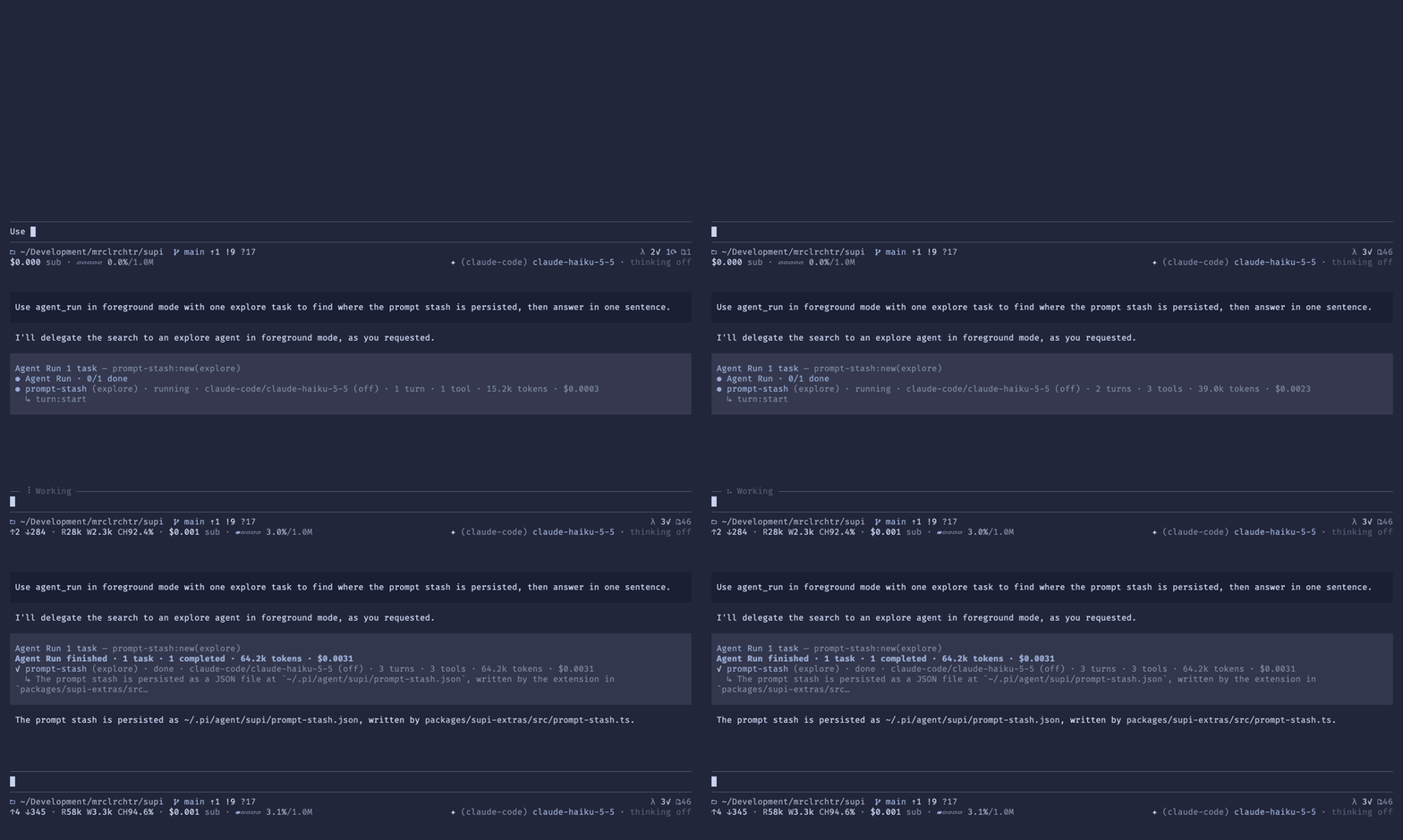
The agent_run transcript row shows the effective model of a Delegation Task as model: provider/model-id. It adds thinking: <level> when the run reports a thinking level. The live progress row, the collapsed result, and the expanded result show these facts first, followed by turns, tool uses, and Usage. A run without model data shows no model segment.
/agents
Use /agents in TUI mode to inspect Agent and Reviewer runs in the current session. When this package is loaded, the viewer also shows effective Agent Profiles and bounded Profile Diagnostics. The viewer keeps the bounded Conversation View separate from the full human-only transcript. It shows status, model, thinking level, turns, tool uses, Usage, safe tool activity, steering, assistant text, and retention notices. Transcript messages stay outside parent tool results.
- Type in the run list to search. Use Up and Down to select a run, Profile, or diagnostic.
- In the run list, use Tab or Shift+Tab to switch between Agent and Reviewer runs. Use Enter to open a run.
- The selected run fills the viewer. The viewer does not use a split pane. Use Esc to return to the run list. Press Esc again to close the viewer.
- In Conversation or Details, use Alt+Left and Alt+Right to cycle through the filtered Agent or Reviewer runs. The viewer keeps the current view. A new Conversation follows the run's latest output.
- In an open run, use Tab to switch between Conversation and Details. Details shows run metadata, role and time headers, system prompts, and technical tool data.
- The viewer follows new transcript output by default (
LIVE). Use Page Up and Page Down to scroll through wrapped lines. Page Up pauses auto-scroll (PAUSED); live updates keep the reading position. The status shows how many lines are below the view, not an unread count. - Use Home to read earlier output. Open Details for task metadata. Use End to resume auto-scroll. Page Down also resumes auto-scroll when it reaches the end.
- Use the configured Pi thinking and tool-detail shortcuts (Ctrl+T and Ctrl+O by default). In Details, click a raw tool block to show or hide its input and output. These keys do not apply while you enter a steering message.
- The bounded Conversation View can omit old entries. The runtime-owned human-only transcript keeps captured messages for Agent and Reviewer runs until the containing session ends. Its retention does not depend on Review audit settings.
- Use
sto steer the selected run when steering is available. A text field opens inside the viewer. Press Enter to send or Esc to cancel. - Use
xto request a stop for a starting or running Agent or Reviewer Run. Press Enter oryto confirm. A startup stop can wait for Pi setup to finish. Stopping one Reviewer Run does not stop its sibling tasks. - Mouse-wheel input scrolls the transcript or selects a run. Closing the viewer does not stop Agent Runs. Parent abort stops active background Delegation Batches; foreground tool cancellation stops that foreground batch.
Transcript files are temporary JSONL files in a private directory for the parent session. They have no application cap or restart recovery. A storage failure marks capture incomplete but does not stop a run. The viewer shows the available transcript and the incomplete status. Session shutdown removes the directory.
Other Pi modes show only an unavailable notice. The overlay does not change global tuiMode or add a text control protocol, durable viewer transcripts, or replay files. Closing the viewer does not stop runs.