
Install
Install with PiG
pig install npm:@leo-alvarenga/pi-zen-frameInstall with Pi
pi install npm:@leo-alvarenga/pi-zen-framePackages run code with your permissions and influence agent behavior. Catalog inclusion is not a security audit. Review the source before installing a third-party package.
Pi manifest JSON
The pi field of package.json.
{
  "extensions": [
    "./extensions/index.ts"
  ]
}
README
Written by the package's publisher, shown as published in version 0.22.0 (README.md). PiG does not review it.
@leo-alvarenga/pi-zen-frame
A pi-coding-agent extension that gives the TUI editor a clean, minimalist layout with customizable status indicators and frames.
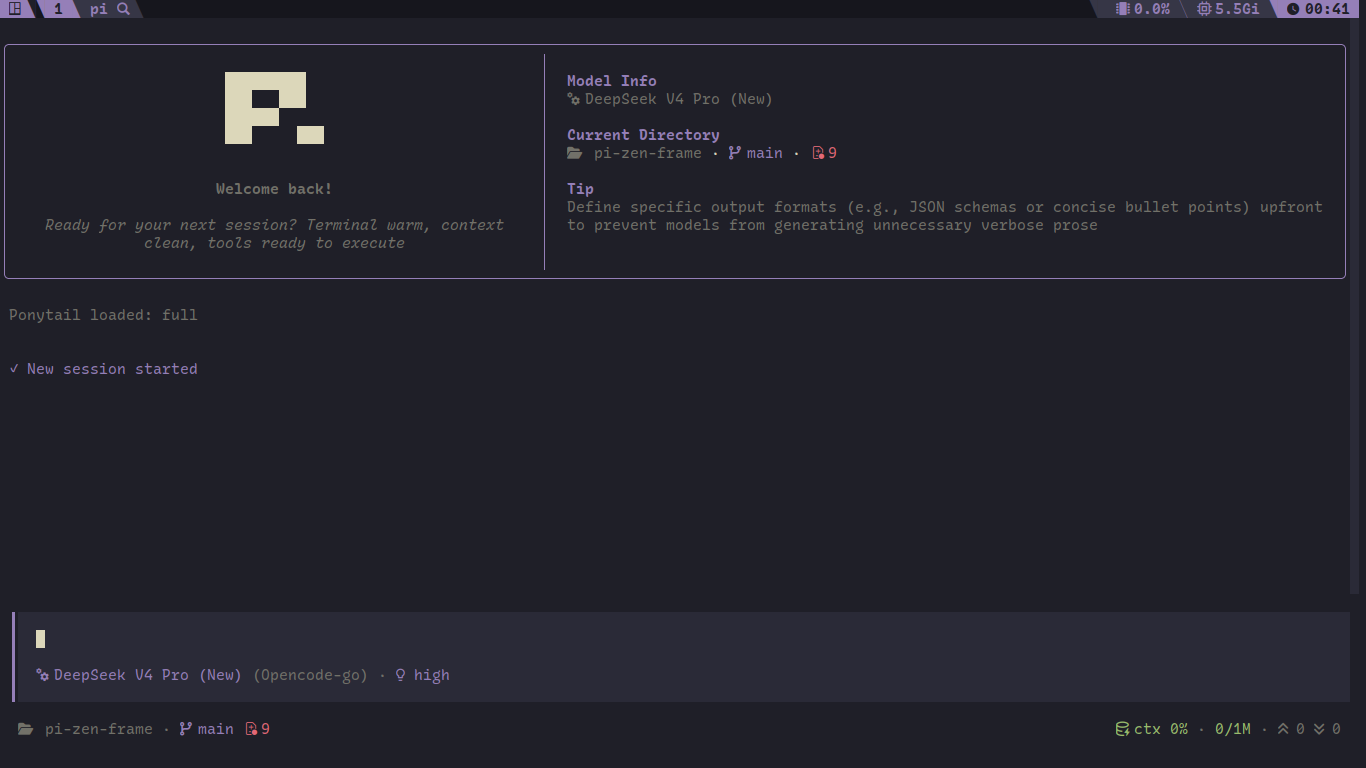
Features
- Clean Frame: Clean editor frame with status segments rendered below the editor
- Header Box: Optional welcome panel with a logo and "Welcome back!" heading, model name, current working directory, Git status, and a random tip
- Working Messages: Randomized loading status messages during response generation, updated on a configurable timer
- Native Theme Support: Uses pi
ThemeColortokens to automatically align with your active theme - Command Palette:
alt+popens a filterable list of built-in and registered slash commands
Installation
Run the following command:
pi install npm:@leo-alvarenga/pi-zen-frame
Or add pi-zen-frame to your pi packages list in ~/.pi/agent/settings.json:
{
  "packages": ["npm:@leo-alvarenga/pi-zen-frame"],
}
Then, restart pi or run /reload in the console.
Configuration
Configuration is loaded from ~/.pi/agent/pi-zen-frame.json. All properties are optional.
{
  // Fallback accent color for frame border and active segments
  "accentColor": "accent",

  // Editor-frame renderer by registered name (built-in: "blocky", "linear", "minimalist")
  "editorFrame": "blocky",

  "header": {
    // Welcome panel is opt-in (default: false)
    "enable": false,
    // Header renderer by registered name (built-in: "basic")
    "type": "basic",
  },

  "frame": {
    "enable": true,

    // Minimum terminal width required to render the border frame
    "minWidth": 20,

    // Toggle individual status segments
    "showCwd": true,
    "showModel": true,
    "showContext": true,
    "showThinking": true,
    "showSpinner": false,
    "showAgentMode": true,
  },

  // Randomized status messages shown while streaming responses
  "workingMessage": {
    "enable": true,
    "intervalMs": 3000,
    // Omit to use the built-in message pool
    "messages": [
      "Exploring the seas",
      "Tinkering with strange objects",
      "Analyzing patterns",
    ],
  },
}
Structure & Status Segments
The editor frame shows status indicators in two rows below the editor:
| Location | Segment | Description |
|---|---|---|
| Top | agent mode | Active agent indicator pill from pi-agent-manager |
| model | Active model name and provider | |
| reasoning | Current reasoning effort level, tinted with pi thinking tokens | |
| spinner | Active phase indicator (thinking, outputting, toolcall, exec); replaces the row while streaming when showSpinner is enabled (default off) | |
| Footer (left) | cwd | Shortened path, active Git branch, and uncommitted file counts |
| Footer (right) | ctx | Context usage percentage and token counts with color alerts |
Commands & Keybindings
- Command Palette:
alt+p— filter and insert built-in or registered slash commands. - Palette Keys:
↑/↓navigate,Enterinserts the command,Esccloses.
To rebind or disable the hotkey, update ~/.pi/agent/keybindings.json:
{
  "piZenFrame.palette": "alt+p", // Set to [] to disable the shortcut
}
Run /reload after modifying your keybindings.
Directory Layout
extensions/
├── index.ts            # Extension entry point: config initialization and events
├── config/             # Types, defaults, and settings normalization
├── components/         # Status segments, header, and frame layout helpers
├── editor/             # Editor-frame renderers (blocky / minimalist) + palette
├── renderers/          # Renderer registry + swap-in API (blocky / basic)
└── utils/              # Helpers for Git status, paths, agent modes, and token usage