
Install
Install with PiG
pig install npm:@lazco/pi-rulesInstall with Pi
pi install npm:@lazco/pi-rulesPackages run code with your permissions and influence agent behavior. Catalog inclusion is not a security audit. Review the source before installing a third-party package.
Video
Declared by the package manifest. Open the file ↗
Pi manifest JSON
The pi field of package.json.
{
  "image": "https://lazco-public-15298932ec.pub.t4.txg1.lazco.cloud/pi-rules/path-rule.png",
  "video": "https://lazco-public-15298932ec.pub.t4.txg1.lazco.cloud/pi-rules/Demo.mp4",
  "extensions": [
    "./src/index.ts"
  ]
}
README
Written by the package's publisher, shown as published in version 0.12.1 (README.md). PiG does not review it.
pi-rules
Pi extension: load Markdown rules into the agent context, for the whole project or only for matching files.


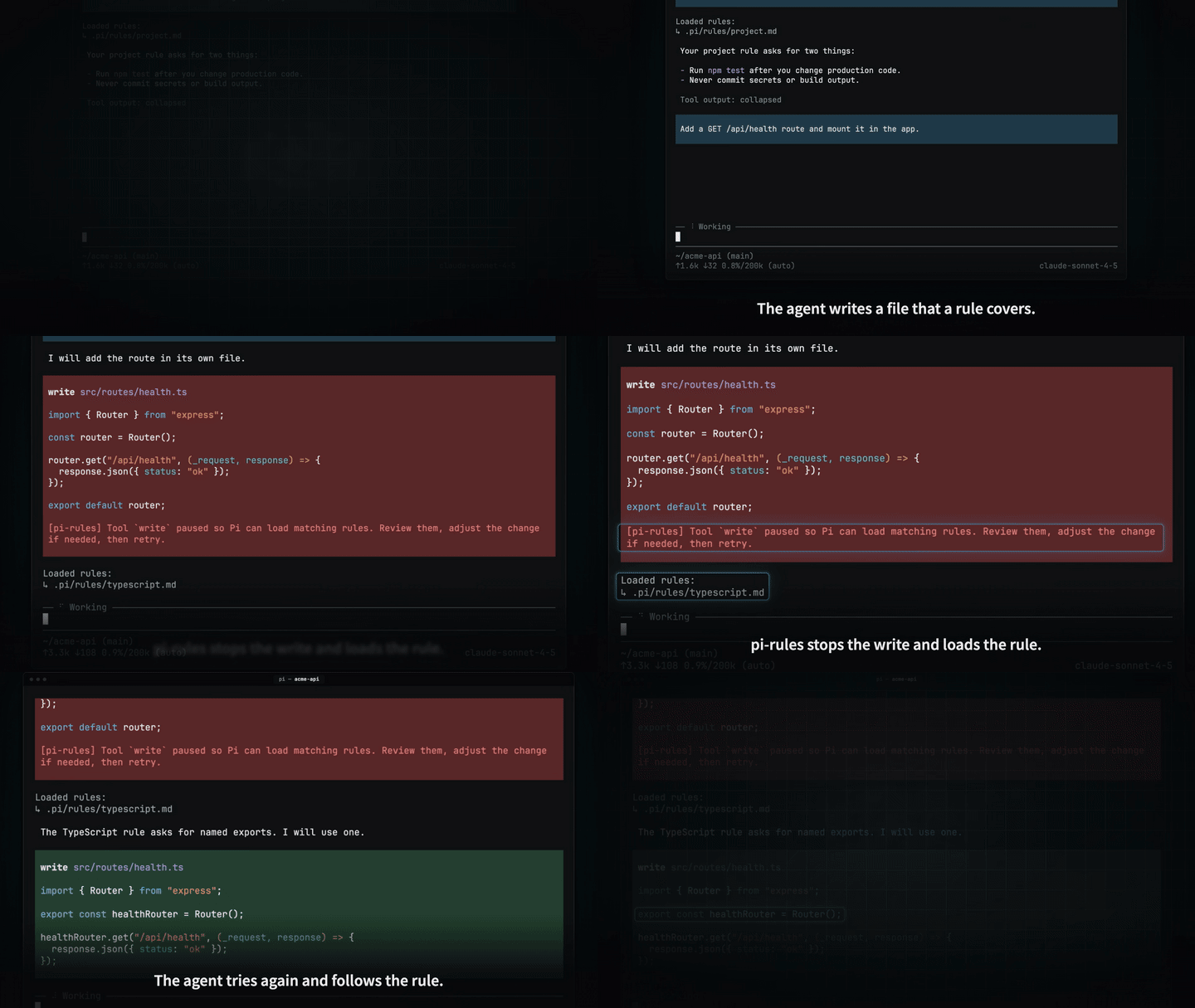
Demo video · Installation · Usage · Rule files · Frontmatter · Configuration · Limitations
@lazco/pi-rules is a fork of tigorlazuardi/pi-rules, maintained by Lazco Corporation.
It reads the same rule files, so you can switch without a change to your rules.
Highlights
- Claude Code compatible. Reads
.claude/rules/and.agents/rules/next to.pi/rules/, so one set of files serves both tools. - Rules for matching files. A rule with
pathsloads only when the agent reads, edits, or writes a matching file. - User rules for any file. A rule in your home directory also loads for files outside the project, such as
/tmp/build.shor~/.zshrc. - Rule before change. An edit or a write to a matching file waits until the agent has the rule, then the agent tries again. Set
timing: afterto skip the wait for short rules. - Linked skills. A rule can load full pi skills when it loads.
- Six sources in one list. Project and user directories merge by file name, and the first source wins. See Rule files.
Demo video
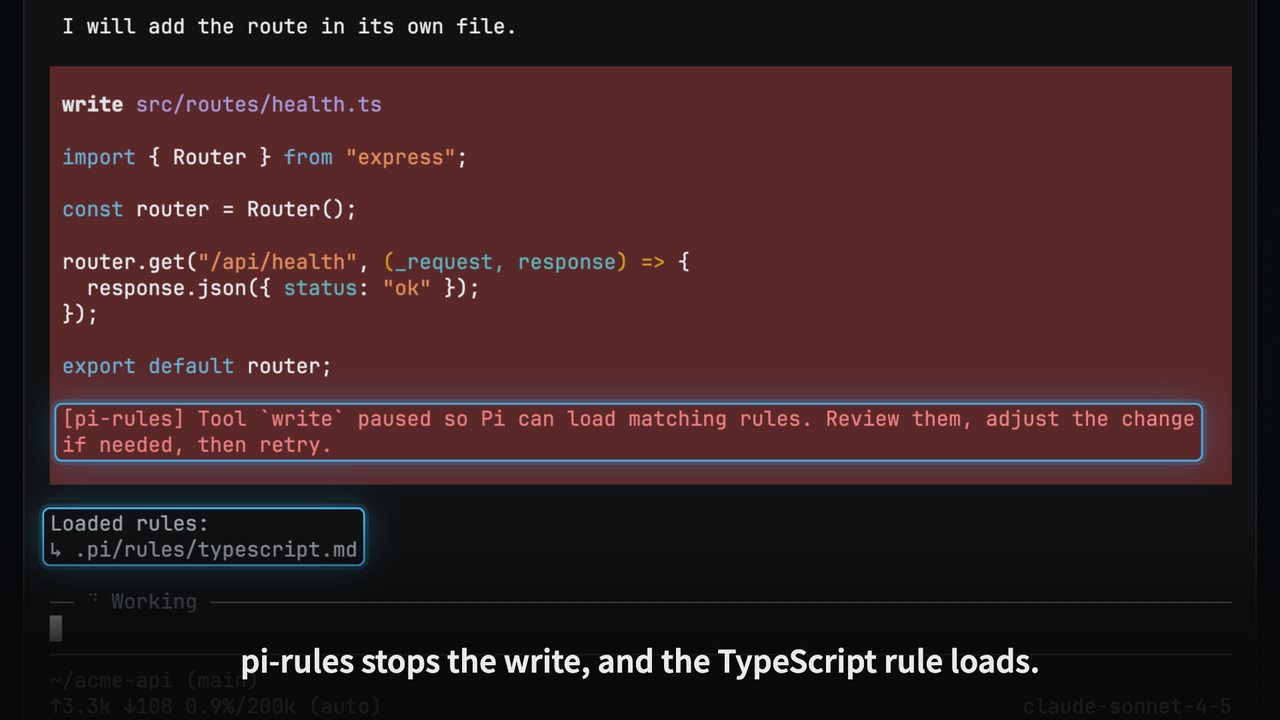
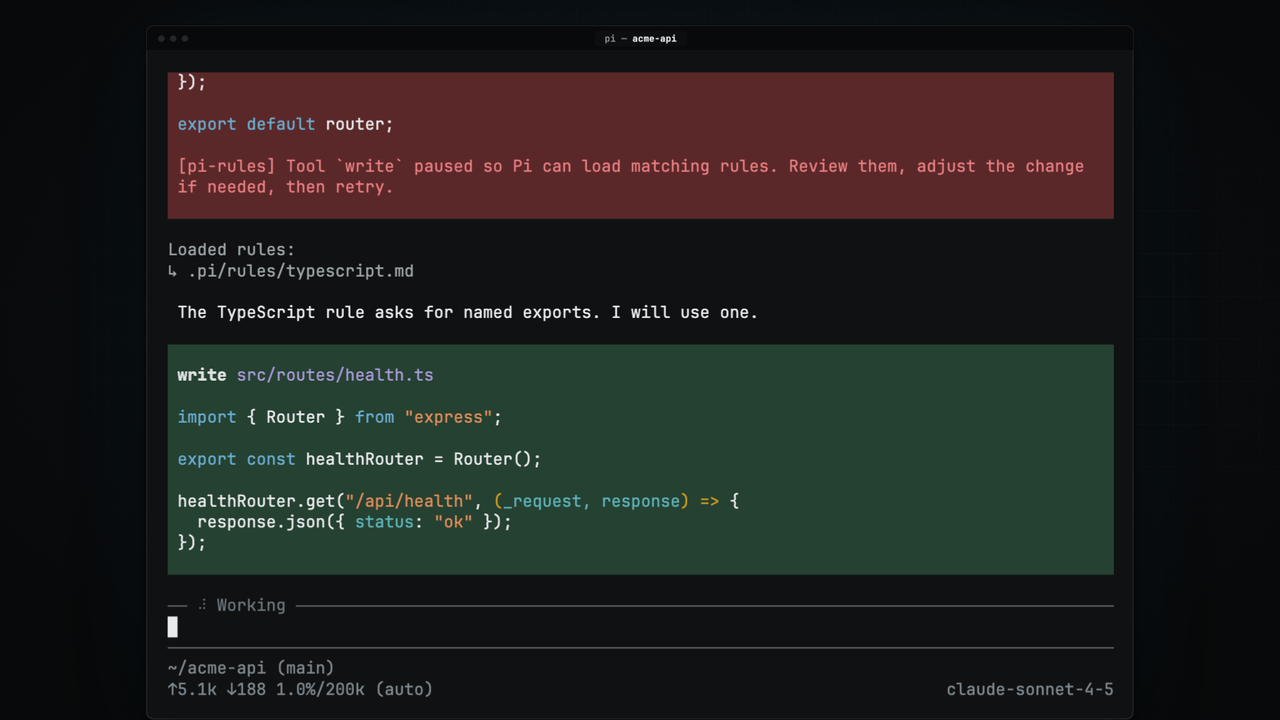
The 60-second video shows the rule folders, the install, a project rule and its full text, a rule for TypeScript files that pauses a write, and a user rule for a file outside the project. Click the image to play the video.
Installation
You need pi and Node.js 22.19.0 or later.
pi install npm:@lazco/pi-rules
Then run /reload in pi.
To check the install, run pi list.
The list of user packages shows npm:@lazco/pi-rules.
If you use npm:@tigorhutasuhut/pi-rules, remove it first:
pi remove npm:@tigorhutasuhut/pi-rules
If pi loads both packages, every rule loads twice.
Usage
Create .pi/rules/project.md in your project:
Run the focused tests after you change production code.
Never commit secrets or build output.
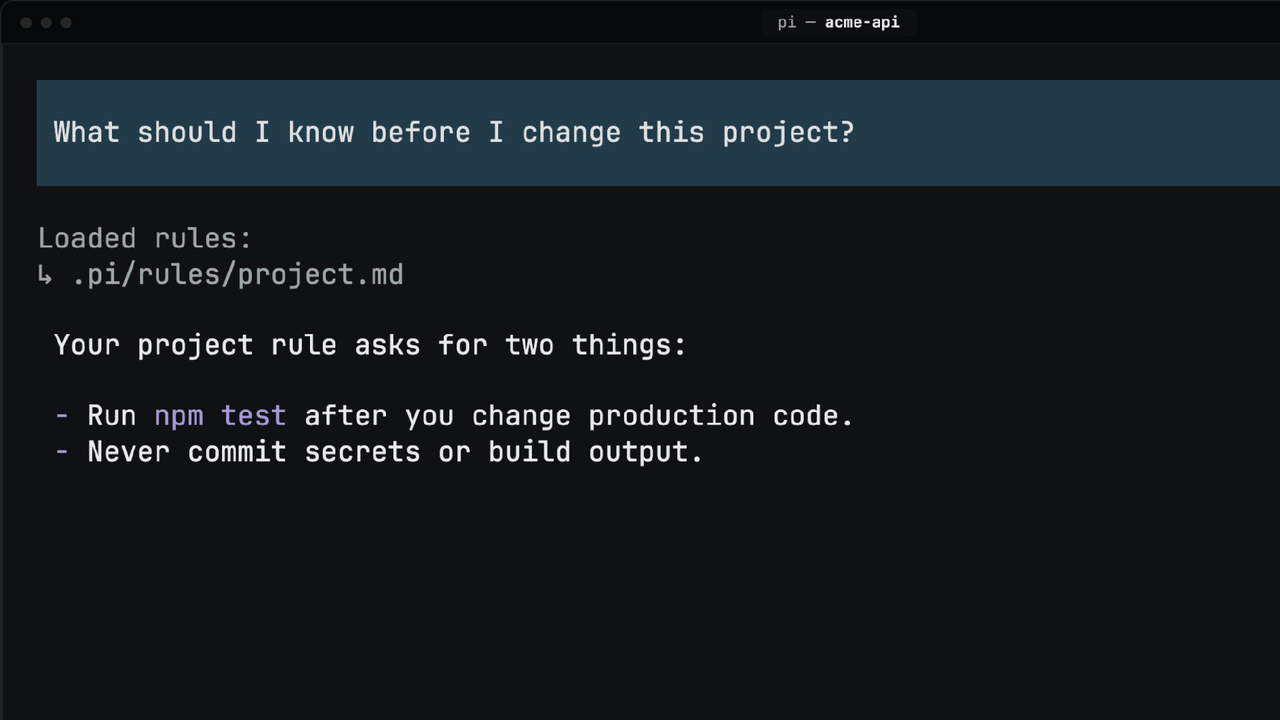
Start pi in the project and send a message. Before the first model call, the rule loads, and the chat shows:
Loaded rules:
↳ .pi/rules/project.md
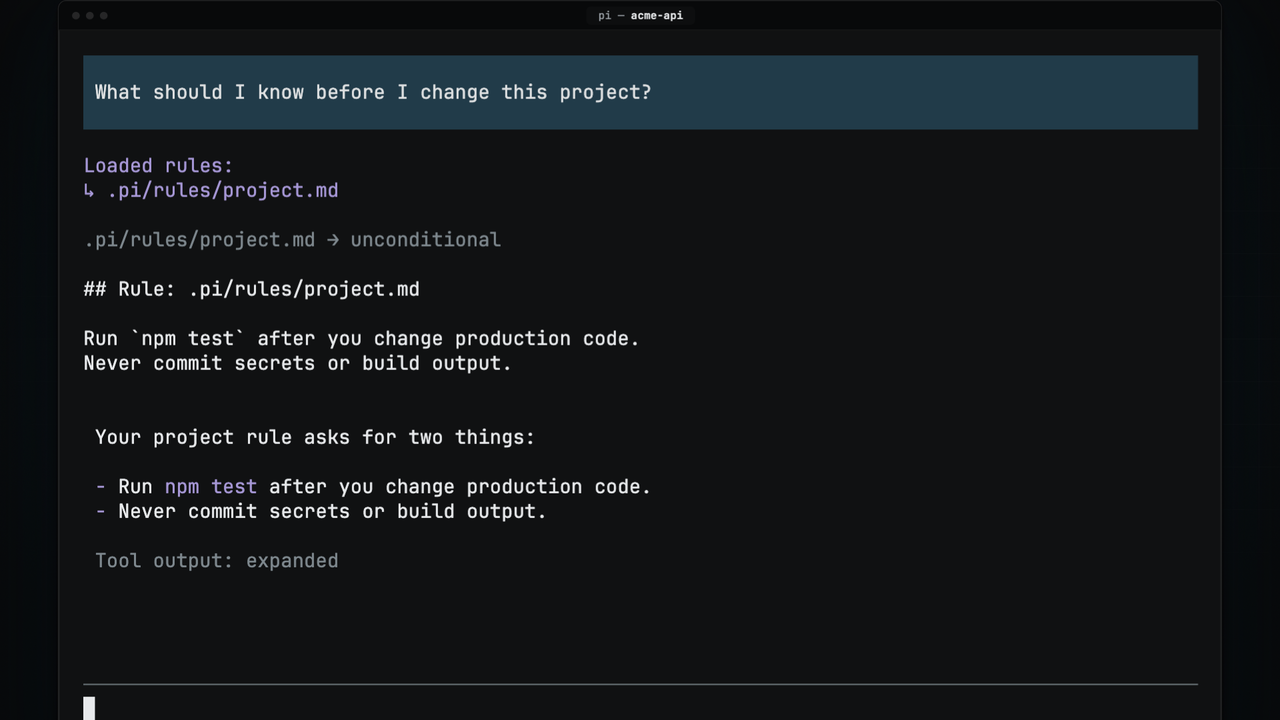
Press the expand key on the message to see the full rule text and the files that matched.
Rules for some files
Add paths frontmatter when a rule applies only to part of the project:
---
paths:
  - "src/**/*.ts"
  - "test/**/*.ts"
---
Use strict TypeScript.
Keep tests next to the behavior they check.
| The agent calls | What happens |
|---|---|
read on a matching file | The read runs. The rule loads before the next model call. |
edit or write on a matching file | The call stops before it runs. The rule loads, and the agent tries the call again. With timing: after, the call runs, and the rule loads like a read. |
bash that changes a matching file | The same as edit. |
bash that names an existing matching file | The same as read. |
Shell commands
pi-rules reads a bash command before it runs.
Only these forms count as a change to a file:
- redirections, such as
> fileand>> file, tee,touch,sed -i, andperl -i,- the destination of
cp,mv, andinstall.
It follows cd in the same command, so cd src && sed -i 's/a/b/' main.go counts as a change to src/main.go.
A cd inside ( … ) applies only inside the parentheses.
The first 64 other arguments that name an existing file count as reads.
A bash change matches a rule without events, and a rule whose events list edit or write.
Each rule loads once on the current branch of the conversation. pi-rules reads the injected rules from the messages that the model sees, so it stays correct when you:
- go back to an earlier message with
/tree, or send a message again after you stop an answer, - resume a session, run
/reload, or fork a session, - compact the session. The rules that the summary replaced load again when they are needed.
When you change a rule file that already loaded, also only its frontmatter, the new version loads before the next model call, marked (updated).
When you delete it, the model gets a short notice that the rule no longer applies.
Rule files
A rule is a Markdown file.
pi-rules reads every .md file in these directories, also in subdirectories:
| Order | Directory | Scope |
|---|---|---|
| 1 | <project>/.pi/rules/ | project |
| 2 | <project>/.agents/rules/ | project |
| 3 | <project>/.claude/rules/ | project |
| 4 | ~/.pi/agent/rules/ | user |
| 5 | ~/.agents/rules/ | user |
| 6 | ~/.claude/rules/ | user |
<project> is the directory where you start pi.
The file name without .md is the rule name.
When two files have the same rule name, only the file from the first directory in the table loads.
pi-rules follows symbolic links to files and directories.
PI_CODING_AGENT_DIR or PI_CONFIG_DIR changes directory 4.
CLAUDE_CONFIG_DIR changes directory 6.
Frontmatter
All frontmatter fields are optional. A file without frontmatter is a rule for every session.
| Field | Value | Effect |
|---|---|---|
paths | a glob or a list of globs | The rule loads only for matching files. |
events | tool_call: <tool> or a list of tools | The rule loads only for these tools: read, edit, write. |
skills | a skill name or a list of names | These skills load with the rule. |
timing | before (default) or after | after lets an edit or a write run first, and the rule loads after it. Only for a rule with paths or events. See Timing. |
Globs use / and match dotfiles.
How a glob matches depends on the directory of the rule:
| Rule in | Applies to | Glob |
|---|---|---|
| a project directory (1 to 3) | files inside <project> | relative to <project> |
| a user directory (4 to 6) | any file | /… is an absolute path. ~/… starts at your home directory. Other globs match the path inside <project> or the absolute path. |
For example, a user rule with paths: "**/*.sh" loads for /tmp/build.sh and for scripts/build.sh in any project.
A user rule with paths: "~/Projects/shop/**" loads only for files of that project.
When you start pi in your home directory, .agents/rules/ and ~/.agents/rules/ are the same directory.
Its rules then count as user rules.
Other projects
When the agent reads or changes a file in another git project, the project rules of that project load too.
Their globs are relative to that project, and a rule without paths loads with the first file of that project.
The chat shows them with the project path, such as ~/Projects/shop/.pi/rules/style.md.
This happens only for a project that pi trusts, because its rules reach the model as instructions.
pi saves trust decisions in trust.json in its agent directory, ~/.pi/agent/ unless PI_CODING_AGENT_DIR or PI_CONFIG_DIR moves it.
A trusted parent directory also trusts the projects in it.
Tools
Use events to load a rule for some tools only:
---
paths: "docs/**/*.md"
events:
  tool_call: read
---
Check the facts in the docs against the code.
This rule loads after a read of a matching file, but not for an edit or a write.
Timing
By default, an edit or a write of a matching file stops until the rule loads, and the agent tries again.
For a short style rule, the stop often changes nothing, and it costs one more model call.
Set timing: after to let the change run, and load the rule before the next model call:
---
paths: "**/*.ts"
timing: after
---
Use camelCase for variables.
If the change breaks the rule, the agent fixes it in the next step.
Keep the default for rules that the agent must know before it changes a file, such as a rule that a file is generated.
A rule without paths and events loads before the first model call, so timing has no effect on it.
Skills
Use skills to load full pi skills with a rule:
---
paths: "src/frontend/**"
skills:
  - frontend-design
---
Follow the linked frontend workflow.
pi-rules finds the skill by name in the skills that pi found.
The skill loads even when its frontmatter sets disable-model-invocation: true.
A missing skill shows a warning, and the rule still loads.
Configuration
A rules.json file turns pi-rules off or changes the directory list.
pi-rules reads the first file that exists:
<project>/.pi/rules.json~/.pi/agent/rules.json
The two files do not merge.
{
  "enabled": true,
  "sources": [
    { "scope": "repo", "kind": "pi" },
    { "scope": "repo", "kind": "agents" },
    { "scope": "repo", "kind": "claude" },
    { "scope": "user", "kind": "pi" },
    { "scope": "user", "kind": "agents" },
    { "scope": "user", "kind": "claude" }
  ]
}
| Field | Default | Effect |
|---|---|---|
enabled | true | false turns off all rules. |
sources | the six directories above | The directories to read, in order. scope is repo or user. kind is pi, agents, or claude. |
To turn off the rules in one project, put { "enabled": false, "sources": [] } in <project>/.pi/rules.json.
An invalid file shows a warning, and no rule loads.
pi-rules reads rules.json when a session starts and after a compaction.
Limitations
- Projects that pi does not trust. A file in another project loads the rules of that project only when pi trusts it.
- Other shell changes. Commands such as
rm,ln,chmod, anddd of=, and code inside a heredoc, such aspython3 - <<EOF, do not count as changes. A file that a script changes counts as a change only through the forms above. When the command names that file, as inpython3 update.py src/a.ts, the rule loads after the command, like a read.
Contributing
Report bugs and ask questions in GitHub issues. Pull requests are welcome. See CONTRIBUTING.md for the setup and the tests.
License
AGPL-3.0-or-later. The code from the original project is under the MIT License. See THIRD_PARTY_NOTICES.md.