
Install
Install with PiG
pig install npm:@ksankar/pi-monitorInstall with Pi
pi install npm:@ksankar/pi-monitorPackages run code with your permissions and influence agent behavior. Catalog inclusion is not a security audit. Review the source before installing a third-party package.
Pi manifest JSON
The pi field of package.json.
{
  "image": "https://raw.githubusercontent.com/Kailash-Sankar/pi-monitor/main/assets/monitor-preview.png",
  "extensions": [
    "./src/index.ts"
  ]
}
README
Written by the package's publisher, shown as published in version 0.2.4 (README.md). PiG does not review it.
pi-monitor
Wake the agent once when a background command finishes, matches output, or goes quiet. No polling.
Why
Agents stall by polling: sleep 15 && curl ..., or a while loop that checks until something is ready. That burns tokens, hides progress, and wedges the turn when the check stalls.
pi-monitor lets the agent step away instead. It runs a command in the background and wakes the agent once, when something worth acting on happens:
- the command exits,
- its output matches a pattern (e.g.
listening on :3000), - or it goes quiet for too long.
It costs zero model tokens while waiting.
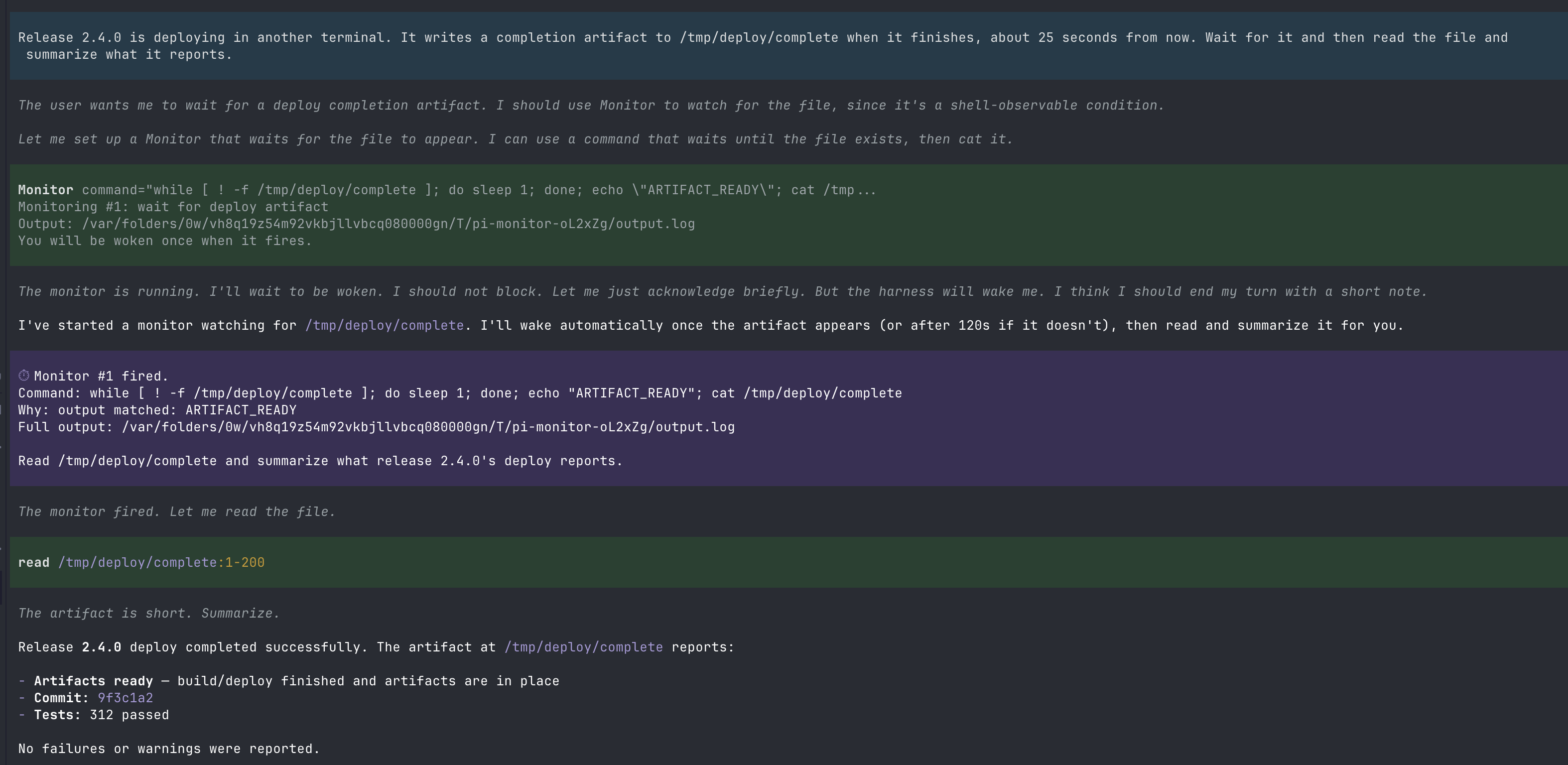
In the screenshot above, the agent waits for a deployment artifact by pushing the polling loop into the background shell — no blocked turn, no repeated status checks — and wakes once when the artifact appears.
Install
pi install npm:@ksankar/pi-monitor
pi install git:github.com/Kailash-Sankar/pi-monitor
Try it locally during development:
pi -e ./pi-monitor
Installing while a Pi session is already running? Extensions load at session start, so run
/reloador start a new session for the tools to appear.
Tools
Monitor — watch a command
Run a command in the background and wake the agent once on a condition. It
waits for a condition, then stops the command — it is not a process
supervisor. If you need something to keep running (a dev server), start it
separately and use Monitor only to wait for it.
Monitor command="until curl -sf localhost:3000/health; do sleep 1; done" onDone="The server is up; run the tests."
Returns immediately with an id. Output is captured to a temp file whose path is included in the wake.
| Parameter | Meaning |
|---|---|
command | Shell command to run in the background. |
match | Optional regex. Wake when an output line matches. |
flags | Optional regex flags for match, e.g. i for case-insensitive. |
timeoutSeconds | Silence threshold. Any output renews it. Default 300. 0 disables. The command is stopped when it fires. |
onDone | What to do when it fires — delivered as the wake instruction. |
label | Short human-readable label. |
CheckLater — wake after a delay
For checks the shell cannot observe (an external deployment, an MCP call). Fallback only — if the check can be a shell command, use Monitor. Each fire costs a turn.
CheckLater prompt="Check the deployment status" delaySeconds=60
MonitorList / MonitorStop / /monitors
Inspect and cancel monitors. The footer also shows a live count, e.g. ⏱ 1 monitor.
Design
- One job. Watch a background command and wake the agent once.
- One-shot. Fires once, then stops the command and retires. Re-arm explicitly to watch again.
- Interrupt-driven. Zero tokens while waiting.
- Process-group aware. Commands run in their own group; stopping a monitor kills the whole tree, including grandchildren.
- Pure core. Condition logic is a standalone, unit-tested module with no timers, processes, or I/O.
Limitations
- Monitors live in memory and do not survive a Pi restart or session switch.
matchis tested against complete lines of output. Finished monitors are listed for 5 minutes, then pruned.- No repeat/recurring mode by design; re-arm explicitly.
- At most 25 monitors run at once.
- Process-tree cleanup on Windows uses
taskkilland is untested on that platform.
Development
npm test           # node --test (no install needed, Node >= 22.6)
npm install        # dev tooling: tsc and Pi type packages
npm run typecheck  # tsc --noEmit
pi -e ./           # load locally
License
MIT