
Install
Install with PiG
pig install npm:@krtclcdy/tersioInstall with Pi
pi install npm:@krtclcdy/tersioPackages run code with your permissions and influence agent behavior. Catalog inclusion is not a security audit. Review the source before installing a third-party package.
Pi manifest JSON
The pi field of package.json.
{
  "skills": [
    "./extensions/ponytail/skills"
  ],
  "extensions": [
    "./extensions/caveman/caveman.ts",
    "./extensions/pstack/pstack.ts",
    "./extensions/headroom/headroom.ts",
    "./extensions/rtk/session.ts",
    "./extensions/rtk/filter.ts",
    "./extensions/timing/timing.ts",
    "./extensions/combo/combo.ts",
    "./extensions/commands/commands.ts"
  ]
}
README
Written by the package's publisher, shown as published in version 2.25.22 (README.md). PiG does not review it.

✂️ Tersio — Token Saver & Usage Tracker





Token saver & usage tracker for coding agents: terse caveman replies, compact RTK shell output, lean Ponytail code, Headroom compression, pstack rigor, and a gain dashboard — one-command combos over one shared extension tree.
🎯 What this is, and why you would use it
Coding agents bill you per token. Three of the costs you never asked for:
- Replies carry filler. The same three sentences, plus a greeting, a hedge, a recap, and a "hope this helps".
- Shell output is noise. A failing test prints hundreds of lines to reach the four that matter.
- The rules repeat every turn. Your agent re-reads its instructions on every single turn.
Tersio installs into Oh My Pi, Pi, Pi-in-go, OpenCode, DeepSeek Harness, Codex, and Claude Code, and cuts those costs:
| Mode | What it does for you |
|---|---|
| 🪨 Caveman | Shorter replies. Answer first, filler gone, and code, commands, paths, and errors stay exact. |
| 🗜️ RTK | Condensed shell output, every signal kept. A failing test still names the test, the assertion, and the line. |
| 🧠 Ponytail | Leaner code. YAGNI: no feature, option, or abstraction nobody asked for, and the shortest diff that still works. |
| 🥔 pstack | Rigor mode. It applies a design principle when the moment fits, and owns the approach, the check, and the design. Opt-in, on its own switch. |
| 🍃 Headroom | Headroom shrinks tool output, file reads, and history. Opt-in; Tersio reads its savings and never turns it on for you. |
| 🧩 Combo | One command sets Caveman, RTK, and Ponytail, at three strengths. |
| 📊 Dashboard | What you spent, per model and per day. |
⚡ Getting Started
All install paths in one table, with update and remove commands: INSTALL.md.
Default (macOS/Linux) — one line. Installs the CLI via npm, then runs the main installer (scope + Combo preset menus) in the same pass:
curl -fsSL https://github.com/KurutoDenzeru/tersio/releases/latest/download/install.sh | sh
Windows — one line, the same pass through PowerShell:
irm https://github.com/KurutoDenzeru/tersio/releases/latest/download/install.ps1 | iex
Then run the CLI. Bare tersio opens a menu and asks which host to install into. Install one host directly, or let the host install the package itself:
| Host | Tersio install | Host-native install |
|---|---|---|
| Codex | tersio install --host codex | codex plugin marketplace add KurutoDenzeru/tersioor codex plugin add tersio@tersio |
| Claude Code | tersio install --host claude | /plugin marketplace add KurutoDenzeru/tersiothen /plugin install tersio@tersio |
| OpenCode | tersio install --host opencode | opencode plugin add @krtclcdy/tersio |
| Oh My Pi | tersio install --host omp | omp plugin install @krtclcdy/tersio |
| pi | tersio install --host pi | pi install npm:@krtclcdy/tersio |
| DeepSeek Harness | tersio install --host dsh | dsh plugin --profile web add npm:@krtclcdy/tersio |
| Pi-in-Go (PiG) | tersio install --host pig | pig install npm:@krtclcdy/tersio |
One-off use without installing:
npm exec --yes --prefer-online --package=@krtclcdy/tersio@latest -- tersio install
Requirements
| Need | Detail |
|---|---|
| Host | OMP, pi, OpenCode, PiG, DeepSeek Harness, Codex, or Claude Code — tersio install --host <omp|pi|opencode|pig|dsh|codex|claude> |
| Node.js | 20.12+ with npm. The CLI runs under Node |
| Bun | Optional. Preferred when on PATH, npm otherwise; also supplies SQLite in process |
| SQLite | Bun, Node 22.5+ node:sqlite, or the sqlite3 binary on PATH |
| OS | macOS, Linux, or Windows, native (install.ps1). WSL works too, installed from inside it |
📊 Dashboard
tersio dashboard opens a local page (defaults to port 3456, or $TERSIO_DASHBOARD_PORT) for usage, cost, tools, traces, and savings. Other pages cover Models, Providers, Costs, Carbon, Requests, Errors, Tools, and Projects.
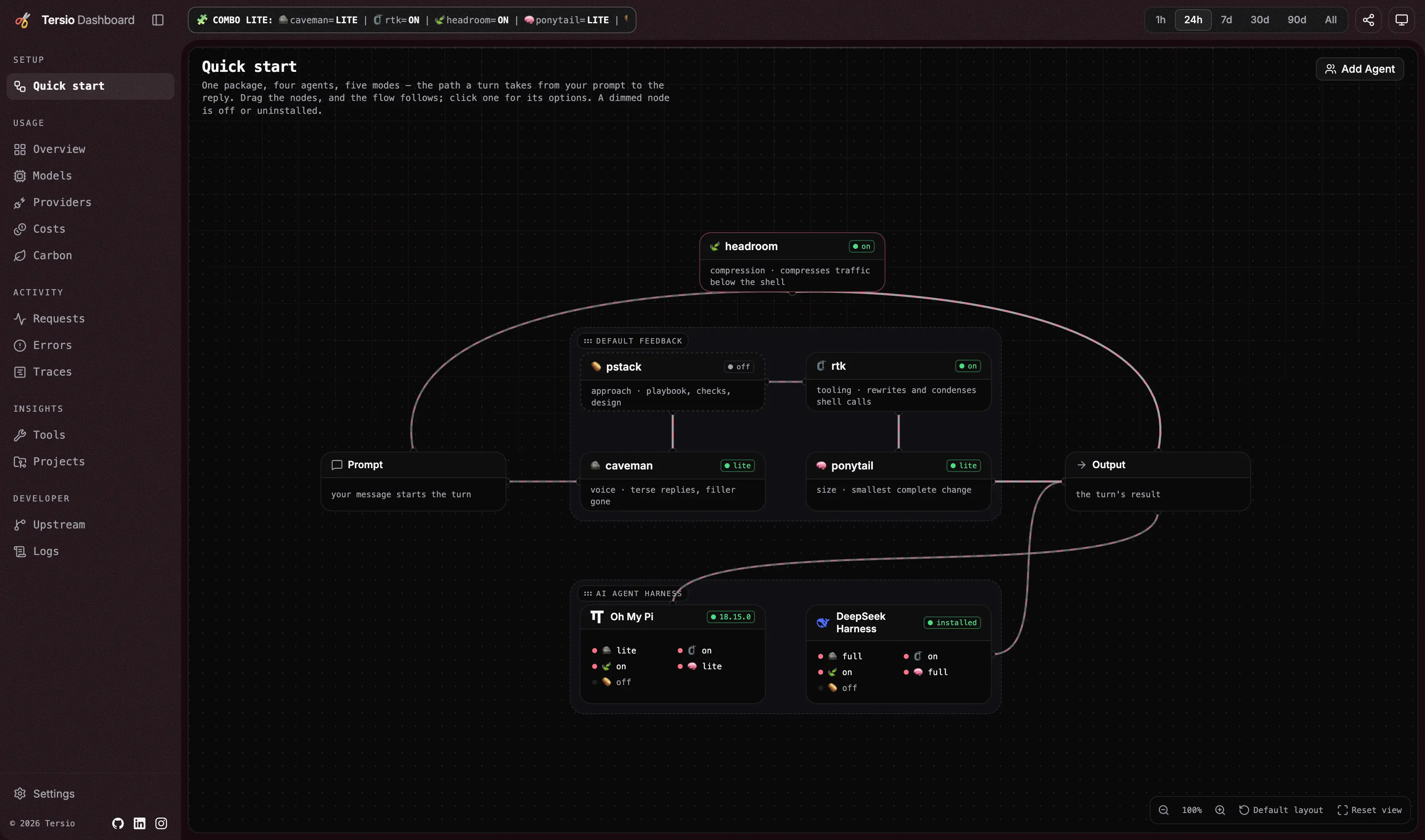
Quick start (Recommended) is the place to see the whole setup workflow: the modes, the agents, and how one turn moves from prompt to output.
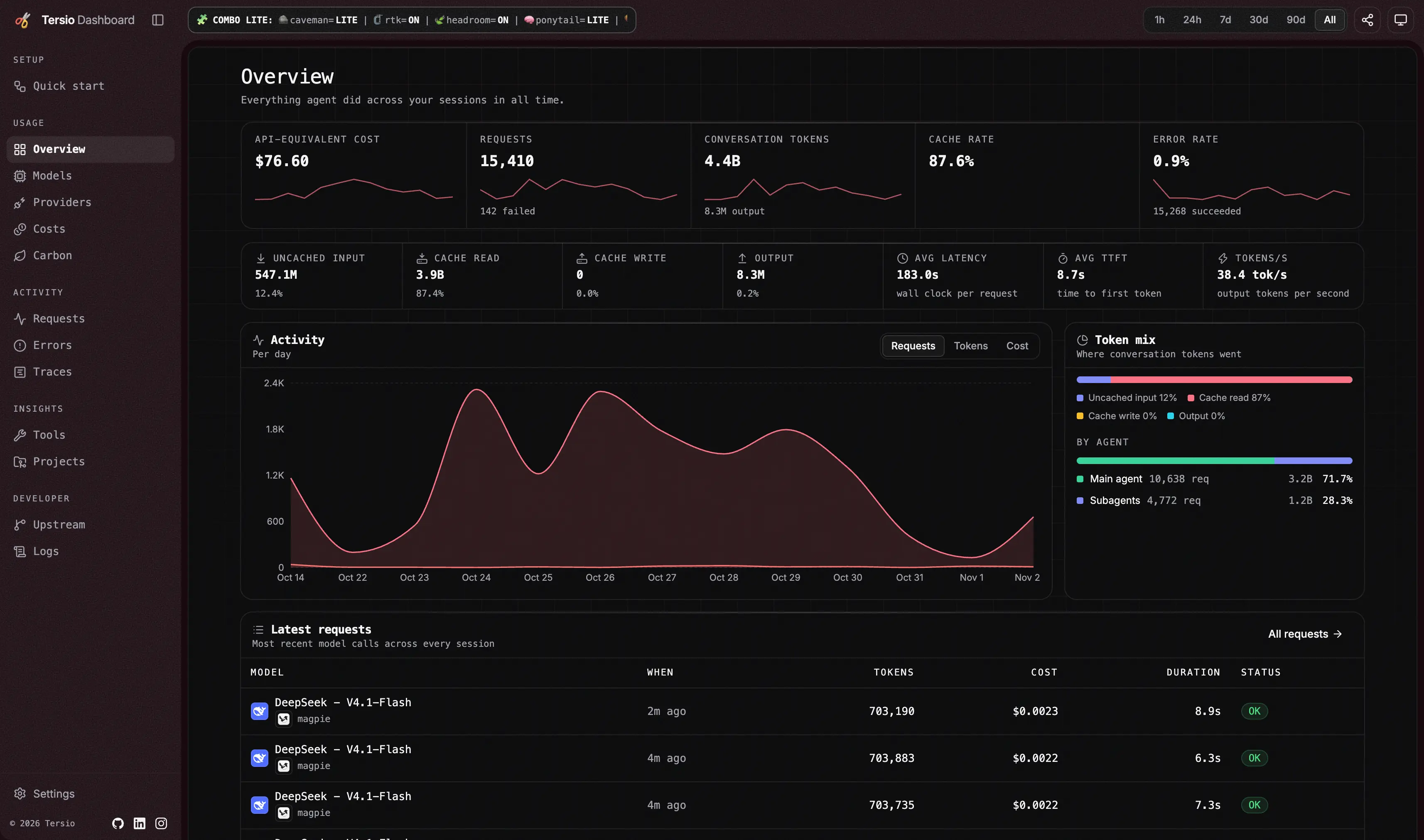
Overview shows spend, requests, tokens, cache rate, and the latest calls.
🧪 Benchmarks
One model, GLM-5.3-Flash, five runs per prompt. Method: docs/BENCHMARK.md.
| Case | Reply Δ% | Δ Net | Quality | Agentic Δ% | Wall Δ |
|---|---|---|---|---|---|
| Base | 0 | 0 | 11/15 | 0 | 0 |
Caveman lite | -10.9% | +1,044 | 8/15 | — | — |
Caveman full | -8.4% | +1,182 | 8/15 | — | — |
Caveman ultra | -15.1% | +612 | 12/15 | — | — |
Caveman megacave-lite | +8.4% | +817 | 2/15 | — | — |
Caveman megacave-full | +58.0% | +844 | 0/15 | — | — |
Caveman megacave-ultra | +46.2% | +789 | 4/15 | — | — |
Ponytail lite | +20.6% | -70 | 13/15 | — | — |
Ponytail full | +11.2% | +188 | 12/15 | — | — |
Ponytail ultra | +28.4% | +302 | 12/15 | — | — |
pstack on | — | — | 5/5 | +17.9% | -4.3s |
RTK on | -79.5% find, -10.5% grep | — | 3/3 | +152.3% | +108.5s |
Headroom on | -94.9% payload | — | sentinel | — | — |
Combo lite | -16.0% | +1,743 | 5/15 | -27.8% | -18.8s |
Combo balanced | -0.8% | +1,882 | 10/15 | -3.1% | +46.1s |
Combo max | +6.7% | +1,343 | 8/15 | -31.5% | -19.2s |
Combo + Headroom lite | -13.4% | +1,744 | 9/15 | +10.6% | +103.7s |
Combo + Headroom balanced | -7.6% | +1,874 | 9/15 | -27.6% | -12.2s |
Combo + Headroom max | +0.8% | +1,333 | 12/15 | -20.0% | -20.9s |
Combo + pstack lite | -0.8% | +5,337 | 9/15 | +1.9% | -27.2s |
Combo + pstack balanced | -7.6% | +5,452 | 6/15 | +45.1% | +6.7s |
Combo + pstack max | +0.8% | +4,909 | 9/15 | +15.2% | -22.0s |
Combo + all lite | -3.4% | +5,334 | 9/15 | +20.3% | -13.9s |
Combo + all balanced | -13.4% | +5,445 | 8/15 | +5.7% | +2.9s |
Combo + all max | -12.6% | +4,896 | 10/15 | -16.6% | -25.1s |
Base: 119 reply tokens, 1,616 total, 11 of 15. Agentic base: 40,176 tokens at 135.5s (pstack, RTK) and 70,784 at 150.3s (combo stacks). Agentic rows rest on 1 to 5 runs, so read them as smoke tests; no bill savings are claimed. Per-mode files: Caveman, Ponytail, pstack, RTK, Headroom, Combo, Combo + Headroom, Combo + pstack, Combo + all.
🔌 MCP
tersio mcp speaks the Model Context Protocol, so any MCP-capable client can read Tersio's data and set its modes mid-session. Nothing to run: the client starts Tersio when it needs it and stops it when done.
Add this entry under mcpServers in the client's MCP settings:
{
  "mcpServers": {
    "tersio": {
      "command": "tersio",
      "args": ["mcp"]
    }
  }
}
That is all of it, with no port or token to set up. tersio install adds the same entry for OMP, Pi, PiG, and OpenCode, and asks before it touches anything. DeepSeek Harness already carries the entry in its bundle.
Your agent then gets six tools:
| Tool | What it answers |
|---|---|
tersio_stats | Requests, errors, tokens, and cost for a period. |
tersio_activity | What Tersio changed, newest first. |
tersio_hosts | Each agent, its version, and whether it reaches Tersio. |
tersio_sessions | Recent sessions with model, tokens, and cost. |
tersio_modes | The starting modes, shown or changed, for every agent or one. |
tersio_headroom | Savings, live status, stored originals, and its own commands. |
Two resources answer without using a tool: tersio://settings and tersio://hosts.
🖥️ CLI
| Command | Purpose |
|---|---|
tersio install | Install (user scope: all OMP sessions) |
tersio update | Update the Tersio CLI. --host <agent> also refreshes that agent's extensions and add-ons (Caveman rule, Headroom, Ponytail) and reports a newer rtk release; no prompt is asked |
tersio doctor (Defaults row) | tersio doctor prints the shared defaults and each agent's overrides, so a value's source is visible without reading the store |
tersio doctor | Check each host, extension/plugin wiring, Ponytail, RTK, and OpenCode service health (--fix repairs, --fix=<scope> one scope, --dry-run previews) |
tersio dashboard | Open the Dashboard (--open, --export <file>, --port <n> (defaults to 3456 or $TERSIO_DASHBOARD_PORT), --currency <code>; serves localhost only) |
tersio mcp | Start the Tersio MCP server on stdio (see MCP) |
tersio modes | Read or set session defaults without a slash command; --host <agent> scopes the write |
tersio uninstall | Remove extensions, registrations, the Ponytail plugin, and the rtk.ts OMP wiring (--keep-ponytail keeps Ponytail; --remove-rtk also removes that wiring, never the binary) |
tersio version | Print version |
Flags: --dry-run, --yes/-y, --verbose, --combo-default/--caveman-default/--rtk-default/--ponytail-default/--pstack-default/--headroom-default, --currency <code> (usage/dashboard display currency; flag wins, then the dashboard's own default, then USD). Legacy --doctor / --uninstall forms still work.
⌨️ Commands reference
Mode switches live on their own commands; bare /tersio prints status. A switch also saves the default for the next session, while reopening a session restores the entries that session already carries. Every mode command, and every session start, prints the status line:
🧩 COMBO MAX: 🪨 caveman=ULTRA | 🗜️ rtk=ON | 🍃 headroom=ON | 🧠 ponytail=ULTRA | 🥔 pstack=ON
It is display-only — it never enters the model context, so it costs the session nothing.
| Command | Purpose |
|---|---|
/combo off|lite|balanced|max|status | One preset for caveman, RTK, and Ponytail. pstack and headroom stay separate. |
/caveman lite|full|ultra|megacave-lite|megacave-full|megacave-ultra|off|status | Caveman reply levels. Legacy wenyan names still work. |
/rtk on|off|status | RTK shell output. Exact bytes skip it. |
/ponytail off|lite|full|ultra|status | Ponytail code levels. |
/pstack on|off|status | pstack rigor mode. Opt-in; normal mode clears it. |
/headroom on|off|status | Headroom compression. Opt-in; Tersio reads its savings and never installs it silently. |
/tersio status [on|off|toggle] | Active modes and combo level. on, off, or toggle shows or hides the footer status line and saves the choice for this agent. |
/tersio update <ponytail|rtk|caveman|all> [--dry-run] | Update add-ons. |
/tersio dashboard | Open the dashboard. |
/tersio help | This table. |
🗂️ Files and backups
Shared, and identical for every host:
| What | Path |
|---|---|
| Session defaults | ~/.tersio/settings.json — combo, caveman, rtk, ponytail, pstack, headroom, status line (statusVisible), and currency. hosts.<agent> overrides one agent; inherit restores the shared value |
| RTK binary | Not Tersio's: whatever rtk resolves to on PATH (or ~/.bun/bin). rtk installs and updates it |
| Ledger and caches | ~/.tersio/usage.db — usage rows, prices, scorecard, state, Headroom records, and layout. Local only |
| Activity log | ~/.tersio/activity.jsonl — one line per change, as the Logs page reads it |
| Host scope | The same usage.db mirrors omp, pi, PiG, OpenCode, DeepSeek Harness, Codex, and Claude Code sessions, split by host and agent kind |
| Snapshots | ~/.tersio/backups/ — one hashed .snap each, fourteen kept, carrying usage.db whole |
The installer writes <file>.bak before it replaces a source. tersio doctor --fix extensions restores a damaged tree, and doctor --fix registrations drops retired or duplicate config.yml entries.
Settings → Data holds snapshots, the backup schedule, retention (7 days to Forever; older usage rows drop on the next sync; transcripts stay), and Reset behind Advanced. Restore saves the current state first, then copies the snapshot over the live files; delete never touches live data. Both ask first, name what they change, and leave files outside the snapshot untouched. Reset confirms, clears the ledger and its RTK rows, hides the summary, and keeps transcripts, rtk history, and prices.
Active modes reassert after Ponytail's prompt block on every top-level turn, including after history compaction.
🛠️ Troubleshooting
Ponytail or Combo command missing on OMP: confirm ~/.omp/plugins/package.json lists @krtclcdy/tersio, then run tersio install, restart OMP, and check tersio doctor. A damaged tree is repaired by tersio doctor --fix extensions.
RTK missing: rtk is part of Tersio, so tersio install runs rtk's own quick install for you — curl -fsSL https://raw.githubusercontent.com/rtk-ai/rtk/master/install.sh | sh on macOS/Linux, winget install rtk-ai.rtk on Windows — then binds it, reading ~/.local/bin even before your shell picks it up. If that install cannot run, it prints rtk's install page — rtk-ai.app/docs/getting-started/installation — and finishes everything else.
Headroom installed somewhere unusual: point Tersio at the binary with TERSIO_HEADROOM_BIN=/path/to/headroom; the install and the routing both read it.
RTK savings and adoption: the Gain numbers read rtk's own history.db (%LOCALAPPDATA%\rtk on Windows), so pi and OpenCode runs are already in them. The adoption row counts executed Bash calls from the omp and pi transcripts and OpenCode's v2 sqlite or pre-v2 JSON tree. The eligible list comes from rtk rewrite, cached per binary version. Native tool calls (read/edit/eval) and exact bytes bypass RTK.
RTK update available: tersio update, tersio doctor, and the dashboard report the version rtk upstream ships. Tersio never installs it; update rtk with its own installer.
🤝🏻 Contributing
Contributions are always welcome, whether you're fixing bugs, improving docs, or shipping new features that make the project better for everyone.
Check out CONTRIBUTING.md to learn how to get started and follow the recommended workflow.
⚖️ License
This project is released under the MIT License, giving you the freedom to use, modify, and distribute the code with minimal restrictions.
For the full legal text, see the LICENSE file.